
Use Python's logging instead of print to quickly output program information to the screen and log files, distinguish information levels by color, and include the ability to calculate program runtime.

Project description
MyLogger
Use Python's logging instead of print to quickly output program information to the screen and log files, distinguish information levels by color, and include the ability to calculate program runtime.
具备功能:
- 支持不同日志等级以不同颜色输出。
- 支持同时输出到屏幕及日志文件内。
- 支持常用的日志设置。
- 支持计算程序运行时间。
- 支持原生print函数,附带文件名和行号。
快速使用
安装:
pip install yan-logger
from yan-logger import MyLogger  # 导入

mg = MyLogger()
mg.debug('debug')
mg.info('info')
mg.warning('warning')
mg.error('error')
mg.critical('critical')
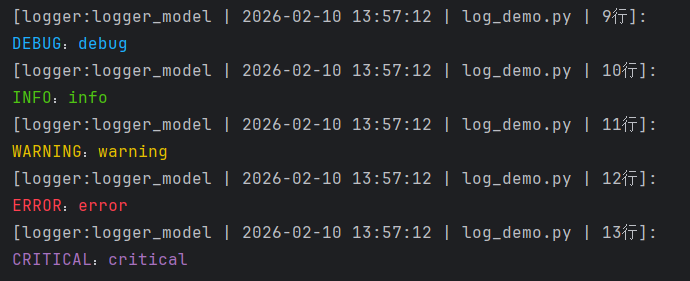
运行结果:
包含 日志器名称、运行时间点、运行文件名、输出所在行号。不同日志等级以不同颜色输出,见下图:
进阶使用
可自定义输出到屏幕和保存到日志文件两种handler,分别独立设置级别。 启用保存到文件时,还可设置按日期循环及文件大小循环两种模式对文件进行切割。 具体参数设置见源码,也可参考RotatingFileHandler及TimedRotatingFileHandler的参数。
from yan-logger import MyLogger

mg = MyLogger("new_logger", file_path='log_demo.log')   # 自定义日志器名称,输出到屏幕且保存到log_demo.log文件中。  具体参数设置见源码。
mg.stream_logger_level= "warning"                       # 设置输出到屏幕的日志级别为"warning"
mg.file_logger_level = 20                               # 设置保存到日志文件的级别为 “info”, 级别设置用数字和单词均可。
mg.debug('debug')
mg.info('info')
mg.warning('warning')
mg.error('error')
mg.critical('critical')
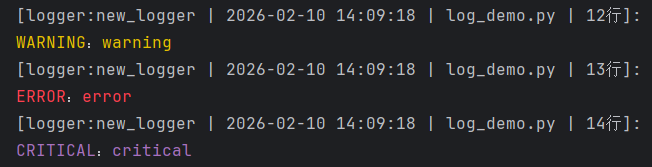
运行结果:
在屏幕上只输出"warning" 级别以上的内容,在日志文件中是输出info级别内容。
计算程序运行时间
from yan-logger import MyLogger

mg = MyLogger("new_logger")

# 方法一,用with mg.with_run_time()包裹需要计算的代码即可
with mg.with_run_time():
    for _ in range(3):
        mg.debug(_)
        mg.time.sleep(1)

# 方法二,使用装饰器mg.run_time(),默认参数1 只运行一遍函数。
@mg.run_time()
def fun():
    for _ in range(3):
        mg.debug(_)
        mg.time.sleep(1)

fun()
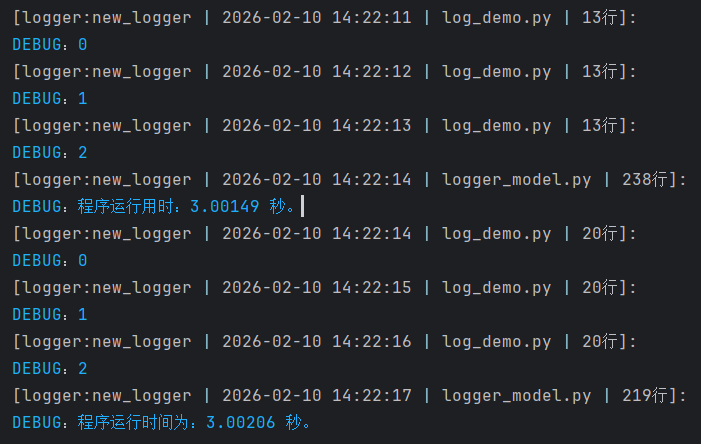
运行结果如下:
自动输出程序运行时间
集成小功能
- 集成实例静态print函数,增加显示文件名及行号。
- 类方法集成了sleep模块,不用多次导入。
with ml.with_run_time():
    MyLogger.print("开始计时……")         # 集成实例静态print函数,增加显示文件名及行号。
    MyLogger.time.sleep(3)              # 类方法集成了sleep模块,不用多次导入。
    MyLogger.print("with 模块运行结束。")
运行结果



Download files
Download the file for your platform. If you're not sure which to choose, learn more about installing packages.
Source Distribution
Built Distribution
Filter files by name, interpreter, ABI, and platform.
If you're not sure about the file name format, learn more about wheel file names.
Copy a direct link to the current filters
File details
Details for the file yan_logger-0.1.2.tar.gz.
File metadata
- Download URL: yan_logger-0.1.2.tar.gz
- Upload date:
- Size: 7.7 kB
- Tags: Source
- Uploaded using Trusted Publishing? No
- Uploaded via: twine/6.2.0 CPython/3.12.10
File hashes
| Algorithm | Hash digest | |
|---|---|---|
| SHA256 |
d728febfdce08a111b87d0317063dda73e8d4f6d60c9365bc2aca5986233f886
|
|
| MD5 |
94efe08b95c0d9b202598cc1ff068ac4
|
|
| BLAKE2b-256 |
71541424879b0a5b0a602d8fb9da4adf875e0f087bf8a762e72ff4f41ee017a2
|
File details
Details for the file yan_logger-0.1.2-py3-none-any.whl.
File metadata
- Download URL: yan_logger-0.1.2-py3-none-any.whl
- Upload date:
- Size: 8.0 kB
- Tags: Python 3
- Uploaded using Trusted Publishing? No
- Uploaded via: twine/6.2.0 CPython/3.12.10
File hashes
| Algorithm | Hash digest | |
|---|---|---|
| SHA256 |
a39d818beb6939d47dcdf175074e1b2efe8a8aad6926aa469ccea0dd84af6a55
|
|
| MD5 |
a44a182bf7b6539e6640fba7d8151816
|
|
| BLAKE2b-256 |
10f66588b4309fed0bb0a058696276d9cdb1db4f15028ac8d8e08a99910ce201
|






