
Build flashcard decks from text files containing YouTube URLs
Yanki makes it easy to build and maintain video flashcard decks. It can export decks to Anki, or it can display flashcards in a simple web UI that can be hosted on any web server.
Flashcards can use media from local video or image files, YouTube, or any other source yt-dlp supports.
Installation
There are a few prerequisites needed to use Yanki:
python: This may be built into your system, but I recommend usinguvxrun Yanki.uvxis part of uv, which can be installed a number of ways, but it’s probably simplest to installuvthrough your package manager, e.g.brew install uvon macOS.ffmpeg: On macOS, install it withbrew install ffmpegor from ffmpeg.org. On Linux or Windows, try installing it from a package manager or yt-dlp’s ffmpeg.deno(only needed for YouTube downloads): On macOS, install it withbrew install denoor from deno.com. On Linux or Windows, try installing it from a package manager or deno.com.
Quick start
Create a simple deck file, e.g. basic.deck, to define your flashcards:
title: Basic ASL phrases
more: md:From [Lifeprint](https://www.lifeprint.com/)
audio: strip

https://www.youtube.com/watch?v=FHPszRvL9pg What is your name?
https://www.youtube.com/watch?v=zW8cpOVeKZ4 Are you deaf?
https://www.youtube.com/watch?v=xqKENRGkOUQ Are you a student?
Web flashcard UI
You can try a demo of the web UI at http://demon.horse/portfolio/yanki/ui/.
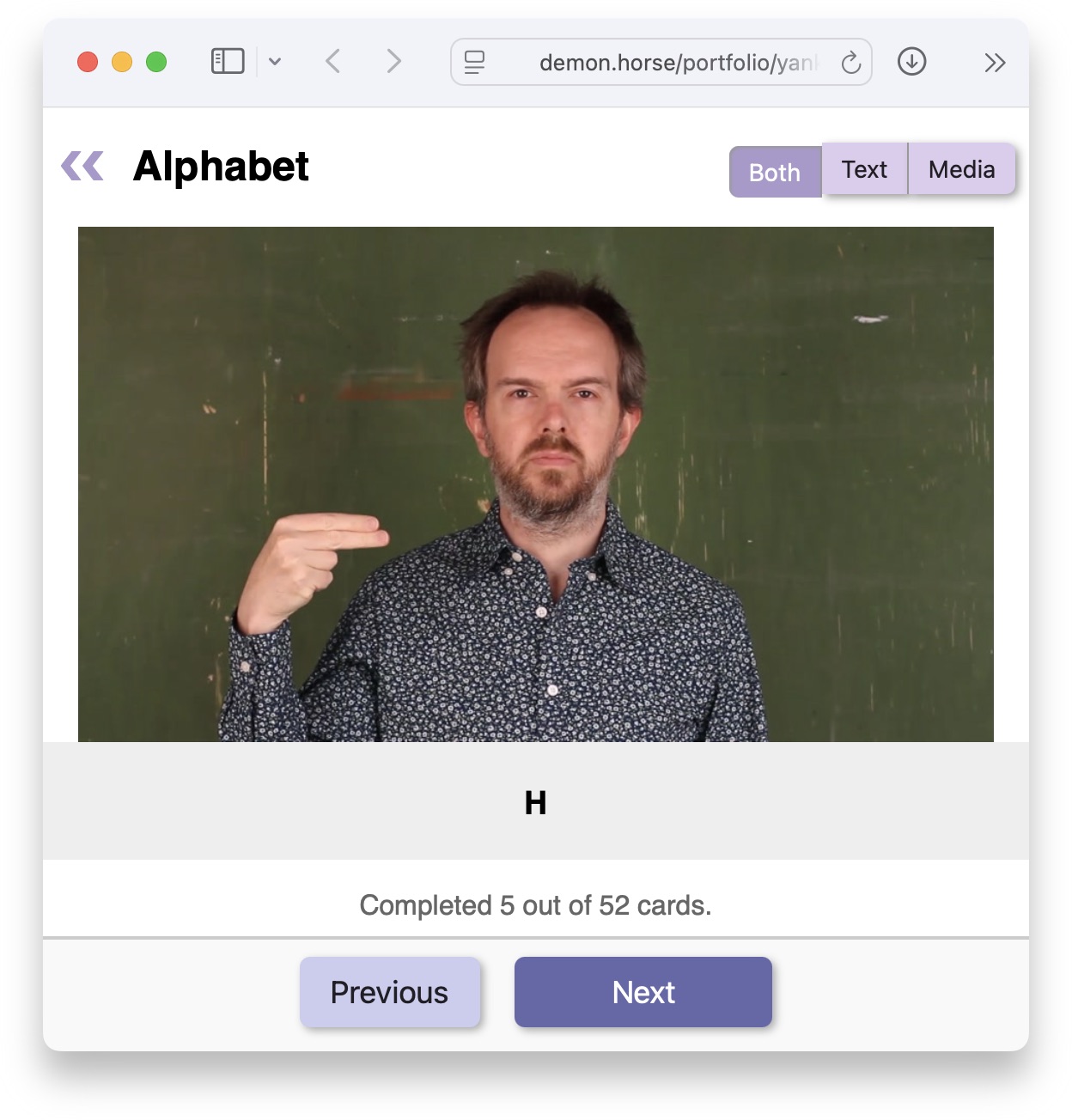
To open your flashcard decks in the web UI:
uvx yanki serve-flashcards --open *.deck
The --open flag will open your web browser to the correct URL on macOS and
some Linux distributions (requires xdg-utils). If that doesn’t work, you can
just open http://localhost:8000/ in your web browser.
You can also save the web UI into a directory and serve it from any web browser:
uvx yanki save-flashcards my-export-dir *.deck
Anki export
On macOS and some Linux distributions, you can make yanki open Anki and start
the import of the new deck:
uvx yanki -v update basic.deck
Otherwise, you can make it build an .apkg and then import that into Anki:
uvx yanki -v build -o basic.apkg basic.deck
Deck file format
There is a reference for the deck file format in REFERENCE.adoc.
Examples
The asl/ directory contains example .deck files that can be used to
build a deck for the vocabulary and phrases in each Lifeprint.com ASLU
lesson. Its README.md briefly explains how the signs were chosen.
💡 Tip
If you are interested in learning American Sign Language, please see Dr. Bill Vicar’s Lifeprint.com ASLU. These decks can help you, but they cannot replace the Lifeprint lessons and vocabulary pages.
Plus, Lifeprint is full of Dr. Bill’s humor.
Command usage
This is a Python package that can be run with uvx. The most common usage is
probably just to build your decks and import them to Anki. That’s as simple as:
uvx yanki update *.deck
You can see all the commands and options with --help:
❯ uvx yanki --help
Usage: yanki [OPTIONS] COMMAND [ARGS]...

  Build flashcard decks from text files containing YouTube URLs.

  There are two ways to use flashcards built with Yanki:

      1. With Anki <https://apps.ankiweb.net>. Use either `yanki update` to
      export decks directly to Anki, or `yanki build` to build an .apkg
      file that can be imported into Anki.

      2. Through a web UI. Use `yanki serve-flashcards` to start a web server
      you can visit at <http://localhost:8000/>, or save HTML into a
      directory with `yanki save-flashcards`.

Options:
  -v, --verbose                 Be more verbose. May be passed up to 3 times.
  --cache DIRECTORY             Path to cache for downloads and media files.
                                [default: $YANKI_CACHE or ~/.cache/yanki]
  --reprocess / --no-reprocess  Force reprocessing videos.
  -j, --concurrency INTEGER     Number of ffmpeg process to run at once.
                                [default: $YANKI_CONCURRENCY or 4]
  --version                     Show the version and exit.
  --help                        Show this message and exit.

Commands:
  build             Build an Anki package from deck files.
  list-notes        List notes in deck files.
  open-videos       Download, process, and open video URLs.
  save-flashcards   Save HTML flashcard UI to a directory.
  save-summary      Save HTML summary of decks to a directory.
  serve-flashcards  Serve HTML flashcards localhost:8000.
  serve-summary     Serve HTML summary of deck on localhost:8000.
  to-json           Generate JSON version of decks.
  update            Update Anki from deck files.
License
Unless otherwise noted, this is dual-licensed under the Apache 2 and MIT licenses. You may choose to use either.
1 maintainer

Metadata
1 maintainer
Release files for yanki 0.6.2
For a detailed explanation of source distributions (sdists) and built distributions (wheels), please see the package formats documentation.
Source distribution (sdist)
| File | Size | Uploaded | |
|---|---|---|---|
| yanki-0.6.2.tar.gz | 962.1 kB | Details |
Built distribution (wheel)
| File | Interpreter | ABI | Platform | Reset |
|---|---|---|---|---|
| yanki-0.6.2-py3-none-any.whl | Python 3 | none | any | Details |
Total release size: 1.0 MB
Release files / yanki-0.6.2.tar.gz
| Download URL | yanki-0.6.2.tar.gz |
|---|---|
| Size | 962.1 kB |
| Tags | Source |
|
SHA-256 checksum How to use checksums |
c1ea9abd2fa6412c8b6c153af907c29ba8326ab5b18bef627aed3f4f143a6513
|
|
BLAKE2b-256 checksum How to use checksums |
ec1de398c4cea00335fb2c53c7d0220126240eebb7ce9d175a090a8599473aee
|
| Upload date | |
|
Uploaded using Trusted Publishing? What is trusted publishing? |
No |
| Uploaded via |
Hatch/1.16.5 cpython/3.13.5 HTTPX/0.28.1
|
Release files / yanki-0.6.2-py3-none-any.whl
| Download URL | yanki-0.6.2-py3-none-any.whl |
|---|---|
| Size | 51.6 kB |
| Tags | Python 3 |
|
SHA-256 checksum How to use checksums |
3c72fa3171e4387637c9eee1d4cef82fc9b7650d685bc6791b0ad85baed4cba0
|
|
BLAKE2b-256 checksum How to use checksums |
5c55a24a96af2239e4b4eb3e7ef70f24e2f9e0d3ed9c3a1ac4005abbde437c3a
|
| Upload date | |
|
Uploaded using Trusted Publishing? What is trusted publishing? |
No |
| Uploaded via |
Hatch/1.16.5 cpython/3.13.5 HTTPX/0.28.1
|














