
Talk is cheap. Voice dictation for the terminal.

Project description

Speak → Whisper transcribes → text appears.
Linux · macOS · Windows
Install
uv pip install yap-dictation
Or from source:
git clone https://github.com/xuefei-wang/yap.git
cd yap
uv pip install .
pip install also works if you don't use uv.
Windows users: uv pip install yap-dictation[windows]
You also need ffmpeg installed (apt install ffmpeg / brew install ffmpeg / winget install ffmpeg).
Usage
yap           # Record -> transcribe -> type into active window
yap -c        # Copy to clipboard instead
yap --llm     # Also correct with an LLM
Speak, press Enter to stop. Text is typed into the active window.
If no typing tool is found, yap copies to clipboard as a fallback.
Options
| Flag / Env Var | Description |
|---|---|
-c, --clipboard |
Copy to clipboard instead of typing |
-l, --llm |
Correct transcription with an LLM |
--model MODEL |
Whisper model (default: small.en, env: WHISPER_MODEL) |
--lang LANG |
Language code e.g. en, zh, ja (env: YAP_LANG) |
-s, --serve |
Start the web UI server |
--port PORT |
Port for web UI server (default: 8765) |
Web UI
For a graphical interface, start the web server:
uv pip install yap-dictation[web]   # one-time setup
yap --serve
Opens a browser page with a record button, transcription display, and settings.
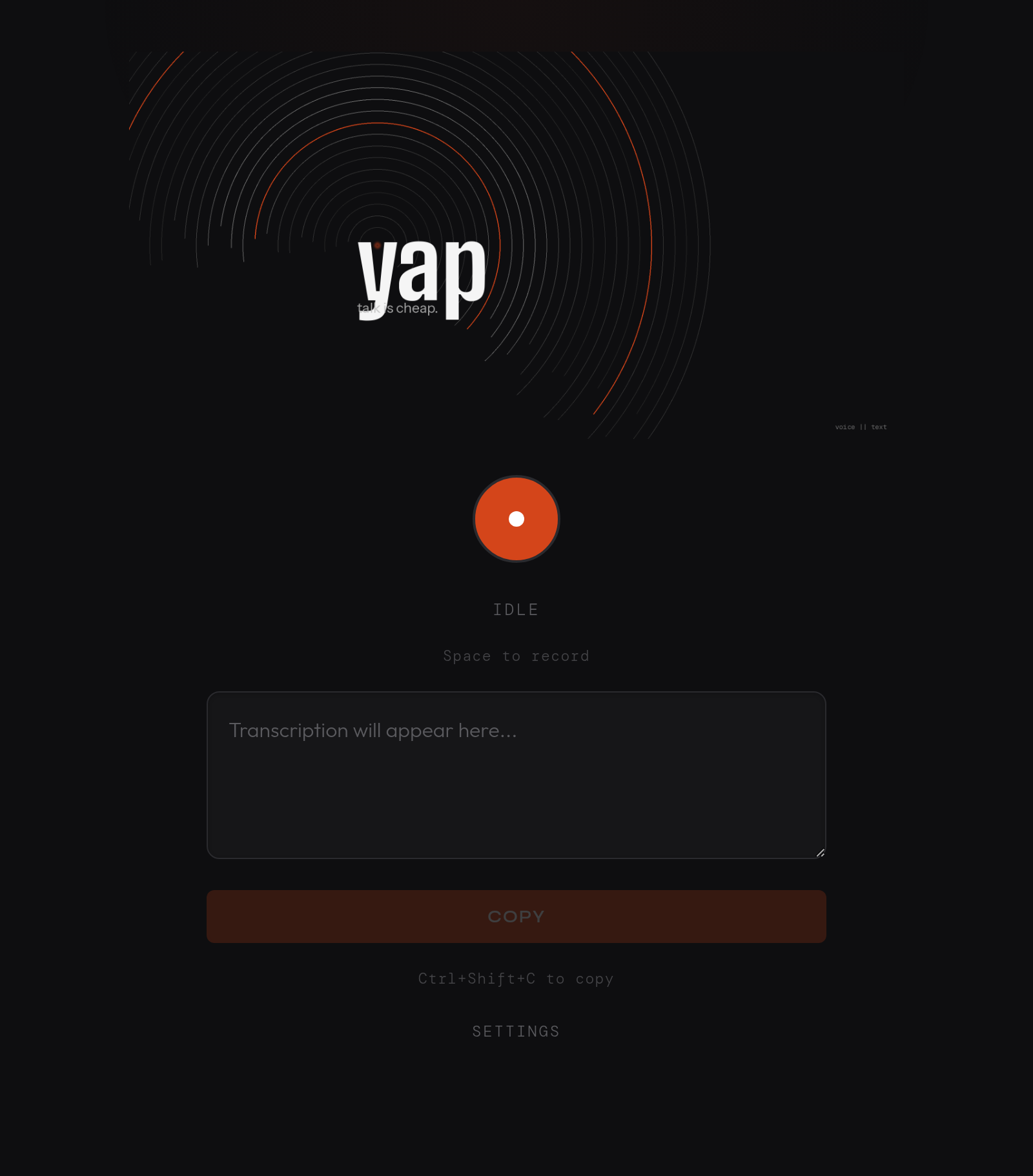
Keyboard shortcuts: Space to toggle recording, Ctrl+Shift+C to copy transcription.
Two transcription modes available in the web UI:
- Browser Speech — free, uses your browser's built-in speech recognition (Chrome, Edge, Safari)
- Local Whisper — private, uses the same local Whisper model as the CLI
Note: Browser Speech sends audio to your browser vendor's servers for processing.
LLM correction (optional)
Use --llm to send transcription through an LLM for grammar, punctuation, and misheard word fixes.
Setup
Run yap config to choose your provider:
yap config
Available providers:
| Provider | Requires |
|---|---|
claude-code |
Claude Code CLI installed |
claude |
ANTHROPIC_API_KEY env var |
openai |
OPENAI_API_KEY env var |
gemini |
GEMINI_API_KEY env var |
yap config also lets you choose which model to use per provider. Defaults: Claude Haiku 4.5, GPT-4o Mini, Gemini 2.0 Flash.
Configuration is saved to ~/.config/yap/config.json.
Whisper models
| Model | Speed | Accuracy |
|---|---|---|
tiny.en |
~1s | Good |
base.en |
~2s | Better |
small.en |
~4s | Great (default) |
medium.en |
~8s | Best |
For non-English languages, use models without .en suffix (e.g. small, medium):
yap --model small --lang zh
Requirements
- Python 3.10+
- ffmpeg — audio recording (
apt install ffmpeg/brew install ffmpeg/winget install ffmpeg) - faster-whisper — installed automatically
- Linux: PulseAudio or PipeWire (with pipewire-pulse) for audio capture
- Linux: xdotool or wtype (typing), xclip or wl-copy (clipboard)
- macOS: works out of the box (uses osascript + pbcopy)
- Windows: ffmpeg (
winget install ffmpegorchoco install ffmpeg), install extras withuv pip install yap-dictation[windows]
License
GPL-3.0
Release history Release notifications | RSS feed


Download files
Download the file for your platform. If you're not sure which to choose, learn more about installing packages.
Source Distribution
Built Distribution
Filter files by name, interpreter, ABI, and platform.
If you're not sure about the file name format, learn more about wheel file names.
Copy a direct link to the current filters
File details
Details for the file yap_dictation-0.1.4.tar.gz.
File metadata
- Download URL: yap_dictation-0.1.4.tar.gz
- Upload date:
- Size: 483.4 kB
- Tags: Source
- Uploaded using Trusted Publishing? No
- Uploaded via: uv/0.10.9 {"installer":{"name":"uv","version":"0.10.9","subcommand":["publish"]},"python":null,"implementation":{"name":null,"version":null},"distro":{"name":"Ubuntu","version":"22.04","id":"jammy","libc":null},"system":{"name":null,"release":null},"cpu":null,"openssl_version":null,"setuptools_version":null,"rustc_version":null,"ci":null}
File hashes
| Algorithm | Hash digest | |
|---|---|---|
| SHA256 |
3d93efed5114ccb916ff0201ab38f16bed3b360cc73840ee5194e0d1f2e6d372
|
|
| MD5 |
699a5c2aaba149d8e32d93659a54268d
|
|
| BLAKE2b-256 |
e03cbea448d74d5b728471eb782e3a16f84d6c51a7710341c1f78e58ab592326
|
File details
Details for the file yap_dictation-0.1.4-py3-none-any.whl.
File metadata
- Download URL: yap_dictation-0.1.4-py3-none-any.whl
- Upload date:
- Size: 122.6 kB
- Tags: Python 3
- Uploaded using Trusted Publishing? No
- Uploaded via: uv/0.10.9 {"installer":{"name":"uv","version":"0.10.9","subcommand":["publish"]},"python":null,"implementation":{"name":null,"version":null},"distro":{"name":"Ubuntu","version":"22.04","id":"jammy","libc":null},"system":{"name":null,"release":null},"cpu":null,"openssl_version":null,"setuptools_version":null,"rustc_version":null,"ci":null}
File hashes
| Algorithm | Hash digest | |
|---|---|---|
| SHA256 |
5fd50d6c167908c903e499ea3248f61bd9b773893c2dbc74ab760aad6118847d
|
|
| MD5 |
05b4fde1bf6778df0091cc144ffe91b9
|
|
| BLAKE2b-256 |
affe1b670689c20fedc1713df5f49b9410ce555ea8921cd64b1f9dd0344e71bb
|






