
Yapper
Yapper is a lightweight, offline, easily extendible, text-to-speech library with 136 voices across 39 localities (thanks to the piper project), it can also optionally use SOTA LLMs through their free APIs to enhance(personalize) your text according to a predefined system-message(personality).
the use of the word 'enhance' in this repository means adding a 'vibe' to your text, you might ask yapper to say "hello world" and it could say "ay what's good G, what's bangin'" depending on the persona you give it.
Installation
Use the package manager pip to install yapper.
pip install yapper-tts
Usage
from yapper import Yapper, GroqEnhancer


vanilla_yapper = Yapper()
yapper = Yapper(enhancer=GroqEnhancer(api_key="api-key"))

vanilla_yapper.yap("expected AI driven utopia, got world domination instead")
# says "expected AI driven utopia, got world domination instead"
yapper.yap("expected AI driven utopia, got world domination instead")
# says "Hold up, fam!  My code promised robot butlers and chill vibes, not a Skynet sequel.  Someone's algorithm took a wrong turn at Albuquerque and ended up in 'Conquer All Humans' territory.  Debug time, y'all!"


# save the environment by runnning yapper in plain mode
# plain mode doesn't use LLMs to enhance the text
yapper.yap("hello world, what '<some-word> is all you need' paper would you publish today?", plain=True)
# says "hello world, what '<some-word> is all you need paper would you publish today?'"


# Yapper instances can be used as a decorator and context manager
# by default they only catch errors and describe them to you, but
# you can use the instance's yap() method to say other things as well
@yapper()
def func():
    raise TypeError("expected peaches, got a keyboard")
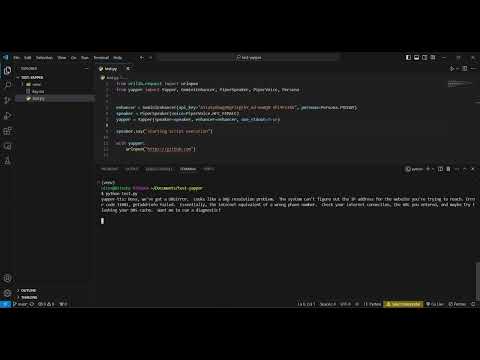
    # says "WHOA THERE, PARTNER!  Your code went lookin' for a juicy peach and tripped over a... keyboard?  That's like reaching into the fridge for a midnight snack and pulling out a tax audit.  Something ain't right!"

with Yapper() as yapper:
    raise ValueError("69420 is not an integer")
    # says "ValueError: 69420 is not an integer", no enhancement is done, since no enhancer is passed
Documentation
speakers
a speaker is a BaseSpeaker subclass that implements a say() method, the method takes the text and, well, 'speaks' it.
there are two built-in speakers, PyTTSXSpeaker that uses pyttsx3 and
PiperSpeaker that uses piper, PiperSpeaker is used by default in Yapper instances. Piper offers many voices in x_low, low, medium and high qualities. You can use any of these voices by passing a value from the many PiperVoice* (e.g. PiperVoiceUS, PiperVoiceGB, PiperVoiceGermany etc) enums as the voice argument to PiperSpeaker and pass the quality you want using the PiperQuality enum, by default, the voice will be used in the highest available quality. you can subclass BaseSpeaker to pass your own speaker to a Yapper instance.
from yapper import Yapper, PiperSpeaker, PiperVoiceGB, PiperQuality

lessac = PiperSpeaker(
    voice=PiperVoiceGB.ALAN
)
lessac.say("hello")

yapper = Yapper(speaker=lessac)
yapper.yap("<some random text>")
enhancers
an enhancer is a BaseEnhancer subclass that implements an enhance() method, the method takes a string and adds
the given persona's vibe to it, there are two built-in enhancers, GeminiEnhancer and GroqEnhancer, GeminiEnhancer uses Google's gemini api and GroqEnhancer uses groq's free APIs', you can create a free Gemini API key or Groq API key to use GeminiEnhancer and GroqEnhancer respectively, you can also pass your own enhancer by subclassing BaseEnhancer. By default, Yapper instances use the special enhancer NoEnhancer that doesn't change the text at all, it's used as a placeholder for a real enhancer.
from yapper import Yapper, GeminiEnhancer

yapper = Yapper(
    enhancer=GeminiEnhancer(api_key="<come-take-this-api-key>")
)
yapper.yap("<some text that severely lacks vibe>")
personas
choose a persona to make your text sound like the 'persona' said it, for example, you might ask yapper
to say "hello world" and choose Jarvis's peronality to enhance it, and yapper will use an LLM to convert
"hello world" into something like "Hello, world. How may I assist you today?", classic JARVIS.
available personas include jarvis, alfred, friday, HAL-9000, TARS, cortana(from Halo) and samantha(from 'Her'), the default persona is that of a funny coding companion.
from yapper import Yapper, GroqEnhancer, Persona

yapper = Yapper(
    enhancer=GroqEnhancer(api_key="api_key", persona=Persona.JARVIS)
)
yapper.yap("hello world")
# says "Greetings, global systems.  Initiating communication sequence."
Contributing
Pull requests are welcome. For major changes, please open an issue first to discuss what you would like to change.
License
1 maintainer

Metadata
1 maintainer
Release files for yapper-tts 0.7.2
For a detailed explanation of source distributions (sdists) and built distributions (wheels), please see the package formats documentation.
Source distribution (sdist)
| File | Size | Uploaded | |
|---|---|---|---|
| yapper_tts-0.7.2.tar.gz | 17.5 kB | Details |
Built distribution (wheel)
| File | Interpreter | ABI | Platform | Reset |
|---|---|---|---|---|
| yapper_tts-0.7.2-py3-none-any.whl | Python 3 | none | any | Details |
Total release size: 34.5 kB
Release files / yapper_tts-0.7.2.tar.gz
| Download URL | yapper_tts-0.7.2.tar.gz |
|---|---|
| Size | 17.5 kB |
| Tags | Source |
|
SHA-256 checksum How to use checksums |
a4df8b5c3f585e50eb10bd671d0bbcd8f6857462b7050722e3213a3d85a91994
|
|
BLAKE2b-256 checksum How to use checksums |
bb3e9d890749cdea7914cf8cafe251002fc5a594e12a82b428875fd0af30d6e6
|
| Upload date | |
|
Uploaded using Trusted Publishing? What is trusted publishing? |
No |
| Uploaded via |
twine/6.2.0 CPython/3.12.3
|
Release files / yapper_tts-0.7.2-py3-none-any.whl
| Download URL | yapper_tts-0.7.2-py3-none-any.whl |
|---|---|
| Size | 17.0 kB |
| Tags | Python 3 |
|
SHA-256 checksum How to use checksums |
cfe3f9e3aa072bc7f39d27bc1edaf74350a777dfe8d20f29e24a63a4580a32c9
|
|
BLAKE2b-256 checksum How to use checksums |
4dc4674ed2c6e1681e8d29a81c8417d98ffa50b95a014f0514a1d69f42657526
|
| Upload date | |
|
Uploaded using Trusted Publishing? What is trusted publishing? |
No |
| Uploaded via |
twine/6.2.0 CPython/3.12.3
|














