
Yardi SDK for Python

Project description
Yardi SDK for Python



About
This package provides an unofficial SDK for using Yardi APIs, making it extremely simple to call Yardi API endpoints. Yardi uses SOAP APIs requiring XML envelopes and documents, which may be unfamiliar for many developers. This package exposes a Client object as well as endpoint classes to allow for easy calling of Yardi APIs, complete with IntelliSense and tab completion.
Yardi vendors and third-party integrators, please read the Vendors section below.
Installation
$ pip install yardi-sdk
Usage
Run env.sh to create an .env file and then fill in your Yardi credentials.
$ chmod +x env.sh
$ ./env.sh
Your WSDL_URL might look something like https://www.yardiasp13.com/<CLIENT_URL>/webservices/ItfResidentTransactions20.asmx?WSDL. Ask your Yardi representative about your <CLIENT_URL> or check in Voyager under Administration > About > URL. The ItfResidentTransactions20 part will be different for each interface; this one is for Billing and Payments.
import yardi_sdk


# Initialise client instance using .env variables by default
client = yardi_sdk.Client()

# Create endpoint object using .env variables for credential parameters and manually passing in other parameters
endpoint = yardi_sdk.endpoints.GetResidentTransactions_ByChargeDate_Login(
    YardiPropertyId="123",
    FromDate="2024-12-01",
    ToDate="2024-12-31"
)

# Call endpoint using client
response = client.call(endpoint)

# Pretty-print response to terminal or file
response.dump("file.xml")

# Inspect response structure in terminal or file
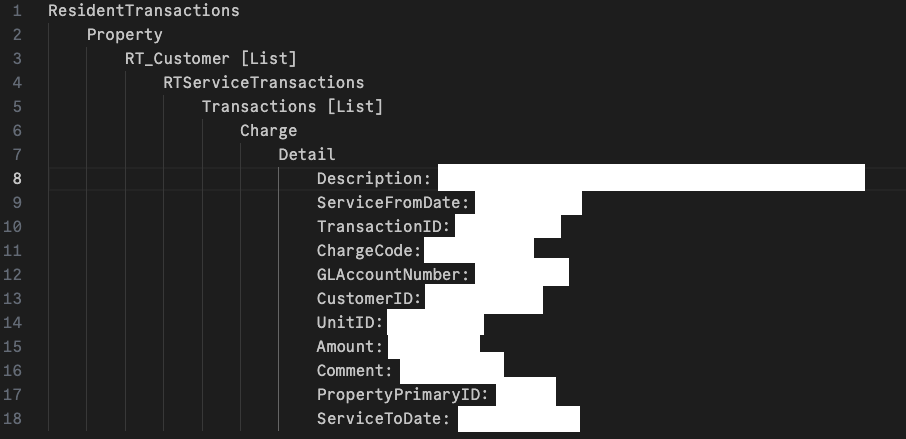
response.inspect("structure.txt")
Endpoints
The SDK provides classes for all endpoints listed under the Billing & Payments, Vendor Invoicing, Service Requests, and Common Data Yardi interfaces. Each class has type-hinted instance variables matching the endpoint's parameters, allowing for rapid development using IntelliSense and tab completion. Yardi endpoints require credentials as part of the request, and then some endpoint-specific parameters which may be required or optional.

WSDL and interfaces
Yardi's API systems are defined using WSDL (Web Services Description Language), which functions as the "documentation" for the endpoints. Each interface (such as Billing and Payments or Common Data) has its own WSDL URL, and when accessed you will find an XML document with all the endpoints available. The endpoints in the SDK are auto-generated from these WSDLs, and the Client object connects to a WSDL in order to actually call the endpoint. Under the hood, the zeep package is used to handle connections to the SOAP interface.
This means that you need a different client instance for each interface with which you want to interact. If you are working with multiple interfaces, then you will need multiple WSDL variables, so you can extend the .env file and load those variables into the respective clients.
Interface entities and interface licenses are passed into each endpoint, so if you are working with multiple interfaces, you will also want to extend the .env file and load these variables into the respective endpoint objects.
API
Client
The Client class handles the SOAP connection to Yardi, using your WSDL URL, Yardi interface username, and Yardi interface password.
Client.call(self, endpoint, raw_output=False)
Calls an endpoint using a given endpoint object and returns a Response object. By default, the response is cleaned from namespaces to make navigation easier, but this can be turned off using raw_output=True.
Response
The Response class has convenient methods for using the XML reponse from the endpoint. Of course, you can use the xml or lxml packages to deal with the response as you see fit.
Response.dump(self, path=None)
Pretty-prints the XML response to the terminal or a file.
Response.inspect(self, path=None)
Prints a high-level tree structure of the XML response to the terminal or a file, so that you can understand the elements and hierarchies. Elements that are returned in lists, such as Charges or Transactions, are truncated to just show one element with a [List] marker. A sample value from the actual response will be shown in the structure so that you know what type of values are returned (redacted below).
endpoints
You can import all endpoint classes from yardi_sdk.endpoints and view parameter names and types in order to use them. An endpoint instance is passed to Client.call().
Vendors
If you are a Yardi interface vendor, you are likely calling APIs across several Yardi accounts, since you have many Yardi customers. Thus, a single .env file with one Yardi username and password would not be sufficient. In your case, it is recommended to retrieve Yardi credentials of your customers (from wherever you keep them) and pass them into respective Client instances, one client for each customer. This is no worse than having to use a different requests.HTTPBasicAuth instance for each customer if you were to build the XML request documents manually (i.e., without an SDK).
Further documentation
Consult with your Yardi representative to get further documentation on the interface endpoints, as the WSDLs do not give endpoint descriptions and detailed explanations for each parameter.
Release history Release notifications | RSS feed


Download files
Download the file for your platform. If you're not sure which to choose, learn more about installing packages.
Source Distribution
Built Distribution
Filter files by name, interpreter, ABI, and platform.
If you're not sure about the file name format, learn more about wheel file names.
Copy a direct link to the current filters
File details
Details for the file yardi_sdk-0.1.15.tar.gz.
File metadata
- Download URL: yardi_sdk-0.1.15.tar.gz
- Upload date:
- Size: 307.1 kB
- Tags: Source
- Uploaded using Trusted Publishing? No
- Uploaded via: uv/0.5.4
File hashes
| Algorithm | Hash digest | |
|---|---|---|
| SHA256 |
82d21a344def5fc1fc6fca9f87efd3a36e994cf0564322cfe81dd75b7b6b1197
|
|
| MD5 |
49f5900844aa0edd45c5774f89600722
|
|
| BLAKE2b-256 |
b538642fa2b91bd211b311c80b7c98f482c6f71237c1a8d56655594b29904ce0
|
File details
Details for the file yardi_sdk-0.1.15-py3-none-any.whl.
File metadata
- Download URL: yardi_sdk-0.1.15-py3-none-any.whl
- Upload date:
- Size: 14.2 kB
- Tags: Python 3
- Uploaded using Trusted Publishing? No
- Uploaded via: uv/0.5.4
File hashes
| Algorithm | Hash digest | |
|---|---|---|
| SHA256 |
1ba54ae26883ae78545e1430d31981cb9751d68349c73de4088e3a18174efd4f
|
|
| MD5 |
6bddb6d5c245c3f8636c2744285b49a5
|
|
| BLAKE2b-256 |
2c104d8ccfe17b90dc4a926d9a01ad76d4f61eb922a7c35c6a21f55cd585e6ee
|






