
This release is a pre-release and may not be stable for production use.
YARTSU
yartsu, another rich terminal screenshot utility


NOTE: this is a currently in a beta release and the API is subject to change (feedback welcome)
Inspired by recent commits in the wonderful library rich I decided to write yartsu.
I needed to programmatically generate screenshots for documentation purposes. The new export_svg methods in rich were a godsend.
So I wanted to try to make this feature a little more generalizable to program output outside of rich/python.
Hopefully, you find it useful.
If you come across anything unexpected please submit an issue.
Install
pip install yartsu
There is a standalone binary available for linux in the releases.
Optionally install with eget:
eget daylinmorgan/yartsu
Otherwise you can download an extract manually to somewhere on your path.
Usage
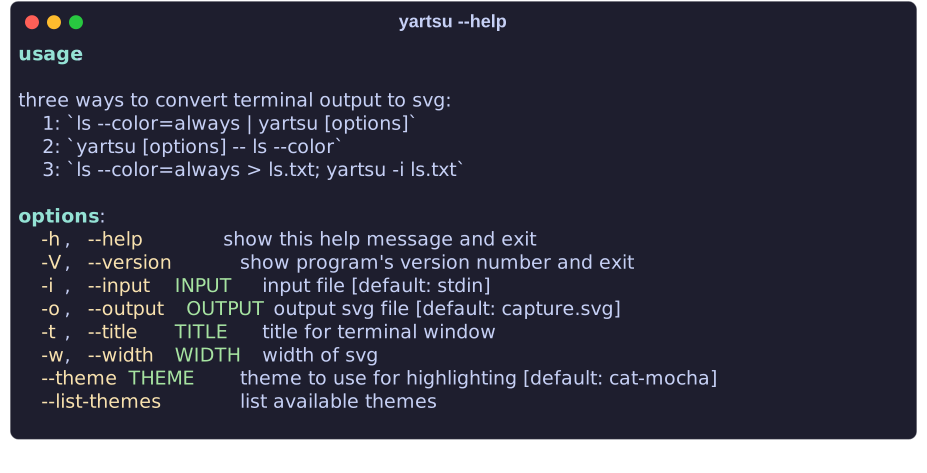
Getting a properly formatted output from a terminal screenshot is challenging.
There are three options for generating a screenshot.
If one of the below option causes you any headaches consider first trying a different option.
Option 1: Pipes
Many tools that color output (i.e. grep or ls) additionally allow
you to force ANSI color codes to be included even when piping output.
In these cases you can simply pipe the output directly into yartsu
ls --color=always | yartsu -w 50 -o assets/ls_color.svg
Option 2: Subprocess/Pty
With this option yartsu will deploy a subprocess and pty
to run your command for you in an attempt to preserve ANSI.
Note with this option you need to separate
the command you want to run with yartsu args using --.
yartsu -w 50 -o assets/ls_color.svg -- ls --color /
Option 3: Text File
Finally, if you neither of the above options work and you can
manage to preserve the codes in a plain text file you can pass this as input to yartsu.
ls --color > ls.txt
yartsu -w 50 -i ls.txt -o assets/ls_color.svg
By default svgs will be saved at ./capture.svg.
Additionally, for options 1 and 3 you may want to define your own title with -t/--title.
For option 2 the title will by default be the cmd ran by yartsu.
Themes:
There are a number of themes you can use to style output.
Use yartsu --list-themes to see the available options.
Then you can specify the theme you want with --theme, i.e. yartsu --theme rich_default.
You may also use the environment variable YARTSU_THEME.
See here a preview of the available themes
Supported Characters
Currently yartsu loads the nerd font patched FiraCode font.
This should result in general support for emoji's and nerd font icons.

Note: github won't load the font's when displaying on the README. Click on the svg to see the nerd font icons.
Differences from Rich
For both practical and stylistic reasons the underlying code used to generate the SVG is slightly different than rich's default save_svg method. See here for the current deviation between the latest releases of each respective release.
TODO (for stable release)
- add support for nerd-fonts
- add
optionalshadow - add unit tests
- setup CI for release/testing
1 maintainer

Release files for yartsu 23.5.1b1
For a detailed explanation of source distributions (sdists) and built distributions (wheels), please see the package formats documentation.
Source distribution (sdist)
| File | Size | Uploaded | |
|---|---|---|---|
| yartsu-23.5.1b1.tar.gz | 14.6 kB | Details |
Built distribution (wheel)
| File | Interpreter | ABI | Platform | Reset |
|---|---|---|---|---|
| yartsu-23.5.1b1-py3-none-any.whl | Python 3 | none | any | Details |
Total release size: 29.4 kB
Release files / yartsu-23.5.1b1.tar.gz
| Download URL | yartsu-23.5.1b1.tar.gz |
|---|---|
| Size | 14.6 kB |
| Tags | Source |
|
SHA-256 checksum How to use checksums |
d5a28f10093204fa3d78424c090a6c1a5966d70e95acff47fcc6334e30ae136a
|
|
BLAKE2b-256 checksum How to use checksums |
5d936708492f230b7d0d9ca8d7e986dde205d6a6f9de35d56596fd501744a61e
|
| Upload date | |
|
Uploaded using Trusted Publishing? What is trusted publishing? |
No |
| Uploaded via |
twine/4.0.2 CPython/3.11.3
|
Release files / yartsu-23.5.1b1-py3-none-any.whl
| Download URL | yartsu-23.5.1b1-py3-none-any.whl |
|---|---|
| Size | 14.8 kB |
| Tags | Python 3 |
|
SHA-256 checksum How to use checksums |
f4ec3e80f5165ba7d8684ac0efff27b5f1df27fe78ee254175c3b240ede0ba4e
|
|
BLAKE2b-256 checksum How to use checksums |
12002083f7070293257e5297db609a5ab126180bee150cc13c3c95be743c175d
|
| Upload date | |
|
Uploaded using Trusted Publishing? What is trusted publishing? |
No |
| Uploaded via |
twine/4.0.2 CPython/3.11.3
|














