
"Even a pair of scissors deserves to be smart. Welcome to cybernetic boundary shearing."







If you like this project, a star ⭐️ would mean a lot :)
📑 Table of Contents (Click me!)
 Manifesto
Yet Another Sentence Boundary Detector is a pair of smart scissors for text. Pointer-based, from-scratch SBD for production NLP pipelines. Features a drop-in adapter for pysbd to fix edge cases without heavy refactoring.
It was born out of chunklet-py, an all-in-one chunker for sentences, documents, and code.
✂ Why do I need a pair of "smart scissors" for text?
Running re.split(r'(?<=[.!?])(?=\s+[A-Z])') and praying. This blunt tool instantly shears titles like Mr. Smith or French corporate markers like Sté. Générale in half, scattering semantic fragments across the pipeline.
Punctuation is the most overloaded glyph set in text. A period alone does six jobs and only one is "sentence end." Generic split-on-punctuation fails on:
Dr.Inc.U.S.A.(abbreviation markers, not boundaries. ~47% of periods in news text are these)3.5M3.14(decimal points, not sentence ends)D. H. Lawrence(initials. Two periods, zero boundaries)...(ellipsis. Trailing off or sentence end? ambiguous)1.a.at line start (inline list markers impersonating sentence ends)?!inside quotes (punctuation nesting across boundaries)
And multilingual quirks a naive splitter never saw coming.
 Are these shears just a rusty regex loop spray-painted in carbon fiber?
Nope!! It is a two-pass pipeline:
Pass 1 Candidate boundary finder. Finds every position that could plausibly end a sentence: periods, question marks, exclamation points followed by whitespace, uppercase, or a newline. Deliberately over-inclusive. Better to catch a false positive than miss a real boundary.
Pass 2 Cross-references 9+ mid-sentence patterns to surgically excise false positives:
- Newline inside sentence
- Title/initialism protection
- Abbreviation lists
- Geopolitical + case markers
- Quote/parenthesis span filtering
- TOC leader suppression
- List marker re-alignment
- Contiguous terminator collapsing
- Language-specific final fixups
💡 Use Cases
Yasbd shines in real-world text processing scenarios where robust sentence boundaries matter, such as:
- 📰 News & Article Processing: Split articles without mangling titles (
Dr.,Inc.), decimals (3.5M,$199.99), or citations (Smith et al. (2021)). - 🤖 NLP Pipelines & Text Analytics: A fast preprocessor for tokenizers, NER, and sentiment analysis across 39 languages.
- 📚 Document Chunking & RAG: Clean sentence boundaries for vector database ingestion and retrieval-augmented generation.
- 💬 Chat & Social Media Analysis: Handles informal punctuation (
!!!,...) and emoji without fragmenting conversational intent. - 🧹 OCR & Noisy Text Cleanup: Combine with
StreamCleanerto fix artifacts and mojibake before segmentation. - 📦 CLI Text Processing: Pipe documents into the command line for one-off batch segmentation.
🌐 Supported Languages (API)
39 languages supported.
Click to see all supported languages
| Code | Language | |
|---|---|---|
| 🇿🇦 | af | Afrikaans |
| 🇪🇹 | am | Amharic |
| 🇸🇦 | ar | Arabic |
| 🇧🇩 | bn | Bengali |
| 🇧🇬 | bg | Bulgarian |
| 🇨🇿 | cs | Czech |
| 🇩🇰 | da | Danish |
| 🇩🇪 | de | German |
| 🇬🇷 | el | Greek |
| 🇬🇧 | en | English |
| 🇪🇸 | es | Spanish |
| 🇮🇷 | fa | Persian |
| 🇫🇷 | fr | French |
| 🇮🇳 | hi | Hindi |
| 🇭🇹 | ht | Haitian Creole |
| 🇦🇲 | hy | Armenian |
| 🇮🇩 | id | Indonesian |
| 🇮🇹 | it | Italian |
| 🇯🇵 | ja | Japanese |
| 🇰🇿 | kk | Kazakh |
| 🇰🇷 | ko | Korean |
| 🇱🇹 | lt | Lithuanian |
| 🇮🇳 | ml | Malayalam |
| 🇮🇳 | mr | Marathi |
| 🇲🇲 | my | Burmese |
| 🇳🇱 | nl | Dutch |
| 🇵🇱 | pl | Polish |
| 🇵🇹 | pt | Portuguese |
| 🇷🇴 | ro | Romanian |
| 🇷🇺 | ru | Russian |
| 🇸🇰 | sk | Slovak |
| 🇸🇪 | sv | Swedish |
| 🇹🇿 | sw | Swahili |
| 🇹🇭 | th | Thai |
| 🇹🇷 | tr | Turkish |
| 🇺🇦 | uk | Ukrainian |
| 🇵🇰 | ur | Urdu |
| 🇻🇳 | vi | Vietnamese |
| 🇨🇳 | zh | Chinese |
You can also get a list from yasbd.get_supported_langs.
How Language Profiles Are Built
Each language profile (IdRules, ViRules, etc.) is assembled from multiple sources: real text corpora, web research (Wikipedia, style guides), exception lists from spaCy's sentencizer, abbreviation lists from pysbd and other SBD libraries, and AI/LLM assistance as a supplementary tool. No profile is built from guessing.
Candidate abbreviations are collected from all sources, classified by type (TITLE_ABBRVS, REFERENCE_ABBRVS, etc.), deduplicated against the base Rules class, validated with test sentences, and checked against the full test suite to prevent regressions.
 Benchmarks
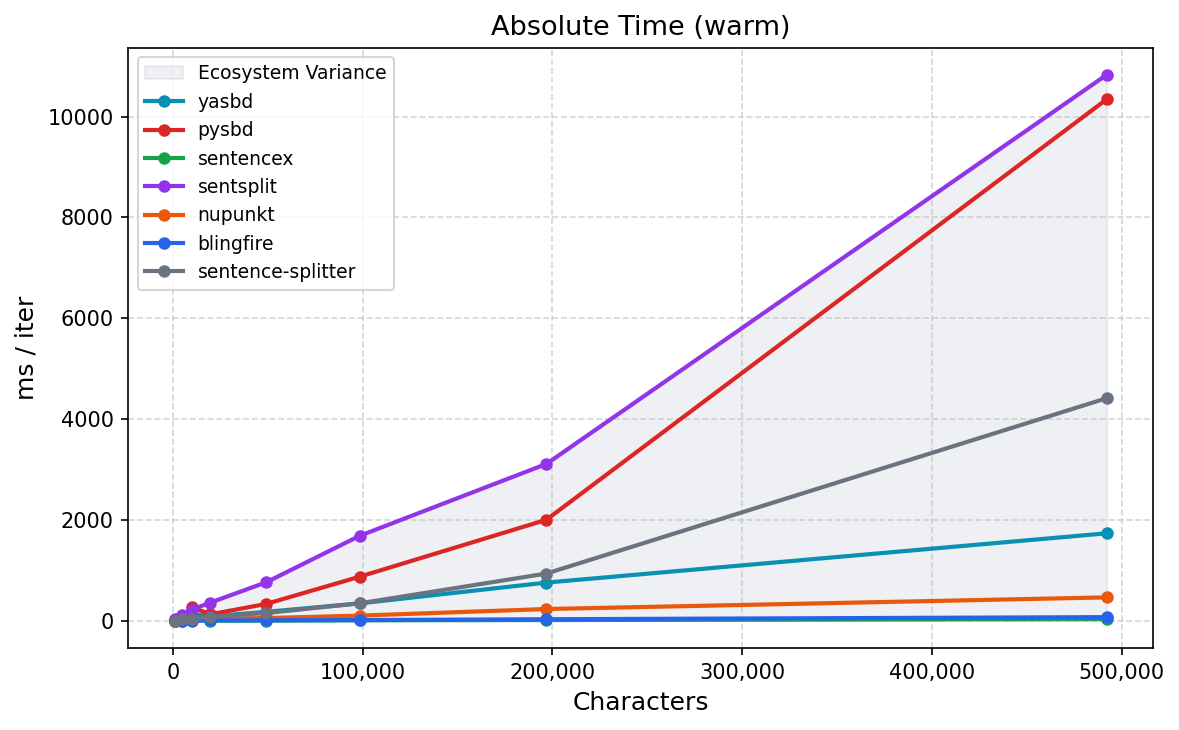
Tested against 7 competitors (pysbd, sentencex, sentsplit, nupunkt, blingfire, sentence-splitter, spaCy-sentencizer) across multiple languages and 7 edge cases: compound abbreviations, CJK quotes, newline wrapping, chat logs, URLs, decimals, and nested punctuation.
TL;DR: yasbd ranked #1 in accuracy across almost every test, while staying competitive on speed as pure Python. blingfire is faster but brittle. pysbd and sentencex shred French abbreviations.
On our golden benchmark (92 English edge cases — expanded from pysbd's original 48 with fixes and additions): yasbd scores 98.9%, pysbd 83.7%, spaCy-sentencizer 55.4%, etc. Against same boundary-level metrics, yasbd leads in Precision 100.0% / Recall 99.3% / F1 99.7%, with pysbd next at F1 93.8%.
Full results, terminal output, boundary-level (Precision/Recall/F1) metrics, and a performance graph can be found in benchmarks/
SPOILER: Yasbd aced 'em all in accuracy while offering balanced speed. On Adventures of Sherlock Holmes (594k chars), yasbd is ~9.5× faster than pysbd (1.8s vs 16.6s warm) with far fewer false splits.
📥 Installation
Ready to do some cybernetic boundary shearing? Let's get you set up quickly and painlessly.
The Quick & Easy Way
The simplest way to get started is with pip:
pip install yasbd-lib -U
That's it! Blade is armed.
The From-Source Way
Prefer building from source? Clone and install manually for full control:
git clone [https://github.com/speedyk-005/yasbd-lib.git](https://github.com/speedyk-005/yasbd-lib.git)
cd yasbd-lib
pip install .
(But honestly, the pip way is way easier.)
Want to Help Make yasbd Even Better?
That's awesome. See Contributing Guide.
 Usage (API)
Initialization
from yasbd.boundary_detector import BoundaryDetector
# Or from yasbd import BoundaryDetector

# Basic setup
detector = BoundaryDetector(lang="en")

# With all options (so far.)
# fmt: off
detector = BoundaryDetector(
    # ISO 639 code (e.g., en, fr, es, ...). Required.
    # Use "auto" for automatic detection.
    # [https://en.wikipedia.org/wiki/List_of_ISO_639_language_codes](https://en.wikipedia.org/wiki/List_of_ISO_639_language_codes)
    lang="fr",

    # Optional external language pack modules to load. Defaults to `None`.
    # Each pack is validated and stored in a private registry for this detector only.
    # Check #-lang-packs for more.
    external_lang_packs=["yasbd_auxlang"],

    # Don't split inside them. (It won't protect block quotes) Defaults to `True`.
    # [https://en.wikipedia.org/wiki/Block_quotation](https://en.wikipedia.org/wiki/Block_quotation)
    preserve_quote_and_paren=True,

    # Enable verbose logging. Defaults to `False`.
    verbose=True,
)
If you want to know more about Lang Packs check the Lang packs section.
Switching languages at runtime is a property set:
detector.lang = "es"
FUN FACT: Each language rule initialized once globally. Once loaded, a language stays cached. Switching back or creating a new instance is instant.
Core Methods
The two primary APIs are detect() and segment().
Both methods accept plain strings, open text streams (TextIOBase), or a StreamCleaner instance. Inputs are processed lazily as a stream of paragraphs, allowing large documents to be handled without loading everything into memory at once.
detect()yields sentence boundary offsets.segment()yields sentence strings.
Boundary detection
detect() tells you where each sentence stops. Integer offsets into the original input stream.
Two detection modes:
- absolute: (default) offsets count from the start of the entire input stream.
- relative: offsets reset at each paragraph boundary. A
ParagraphEOFsentinel signals the gap between paragraphs.
# absolute mode (default)
res = list(
    detector.detect('She turned to him, "This is great." She held the book out to show him.')
)
print(res)
# [35, 70]

# relative mode with paragraph break
detector.lang = "es"
res = list(
    detector.detect(
        "El Sr. García llegó ayer. La Sra. López también.\n\nVéase la pág. 55 del libro.",
        relative=True,
    )
)
print(res)
# [25, 48, ParagraphEOF, 27]
Segmentation
If you do not want to manage boundary offsets yourself (and who would?), segment() slices text for you.
detector.lang = "en"

# Basic sentence splitting
res = list(detector.segment("Hello world. How are you? I am fine."))
print(res)
# ['Hello world.', 'How are you?', 'I am fine.']

# Multi-paragraph with whitespace preserved
res = list(
    detector.segment(
        "First para.\nStill first.\n\nSecond para.\nFinished.",
        preserve_whitespace=True,
    )
)
print(res)
# ['First para.', '\nStill first.', '\n\n', 'Second para.', '\nFinished.']
Cleaner (API)
OCR'd a PDF, parsed a DOCX, or scraped noisy HTML? "StreamCleaner" normalizes text before it reaches the language detector or sentence segmenter. StreamCleaner accepts either a string or an open text stream and yields cleaned paragraphs lazily. You can pass a "StreamCleaner" instance directly to "detect()" or "segment()" to clean text as it is processed.
from yasbd.utils.cleaner import StreamCleaner
# Or from yasbd.cleaner import StreamCleaner

cleaner = StreamCleaner(
    "Hello  world.   This is  messy.",
    verbose=True,  # Default to False
)
list(cleaner)
# ['Hello world. This is messy.']
"StreamCleaner" implements the iterator protocol and yields cleaned paragraphs one at a time. It can consume plain strings, open text files, and other text streams.
with open("document.txt", encoding="utf-8") as f:
    for paragraph in StreamCleaner(f):
        print(paragraph)
Common cleanup operations include:
- Normalizing line endings (
\r\nand\rto\n) - Fixing mojibake and OCR artifacts
- Removing HTML markup (lightweight preprocessor, not a full HTML parser)
- Normalizing whitespace
- Rejoining hyphenated words split across lines
- Preserving word boundaries across single line breaks
Skip built-in steps you don't want:
cleaner = StreamCleaner(
    text,
    steps_to_skip=[
        "fix_ocr_text",
        "normalize_spaces",
    ],
)
Add custom cleaning steps:
cleaner = StreamCleaner(
    text,
    extra_steps=[
        lambda t: t.replace("TM", ""),
        lambda t: t.upper(),
    ],
)
Each extra step must accept and return a str. If a step raises or returns a non-string, a CleanStepError is raised with the original exception chained.
Available built-in steps:
| Step | What it does |
|---|---|
normalize_newlines |
Normalizes Windows (\r\n) and Mac (\r) line endings to Unix (\n) |
fix_mojibake |
Fixes common UTF-8 mojibake (cp1252/latin-1 misreads) and unescapes HTML entities |
fix_ocr_text |
Repairs OCR artifacts, rejoins hyphenated words, removes page markers |
unwrap_htmls |
Removes most HTML markup while preserving visible text. <b>, <i>, and <u> tags are preserved |
normalize_spaces |
Collapses multiple spaces into one |
CLI (API)
Do you just want to split text into sentences without writing Python?
The yasbd command works right from your terminal. Install once, pipe
anything into it, get sentences back.
# List supported language codes
yasbd langs
# auto, af, am, ar, de, el, en, es, ...

# Split text into sentences
yasbd segment "Dr. Smith works here. Is he there?"
# [1] 'Dr. Smith works here.'
# [2] 'Is he there?'

# Detect boundary offsets
yasbd detect "Hello world. How are you?"
# [1] 12
# [2] 24

# Read from file
yasbd segment --file document.txt
yasbd segment --file input.txt --destination output.txt  # JSONL output

# Pipe support - auto-detects, skips [N] enumeration
echo "Hello. World." | yasbd segment | cat
# Hello.
# World.

# Load external language pack and segment a mono-profile pack
pip install yasbd-union
yasbd segment --from-pack yasbd_union --lang xx "Hello. World."
# [1] 'Hello.'
# [2] 'World.'

# Multi-profile pack with explicit --lang
pip install yasbd-auxlang
yasbd segment --from-pack yasbd_auxlang --lang eo "Saluton. Kiel vi fartas?"
# [1] 'Saluton.'
# [2] 'Kiel vi fartas?'

# Clean noisy text (HTML, mojibake, OCR artifacts)
yasbd clean "<script>x</script>Hello <b>world</b>."
# [1] 'Hello <b>world</b>.'

# Clean with extra shell command step (e.g., transliterate via external tool)
yasbd clean "naïve café" --extra-step "sed 's/é/e/g; s/ï/i/g'"
# [1] 'naive cafe'

# Repeatable --extra-step for multiple shell commands
yasbd clean "HELLO." -e "tr 'A-Z' 'a-z'" -e "sed 's/\./!/g'"
# [1] 'hello!'

# Chaining: Skip HTML unwrap then segment in Spanish with verbosity
yasbd clean --file dirty.html --skip unwrap_htmls | yasbd segment --lang es -v

# Version
yasbd --version

# Full help
yasbd --help         # top-level commands
yasbd segment --help # per-command options
yasbd detect --help
yasbd clean --help
About JSONL
When writing to a file with --destination, output is JSONL (one JSON object per line):
- segment / clean:
{"no": 1, "text": "Hello."} - detect:
{"no": 1, "offset": 6}or{"no": 2, "offset": 13} - detect --relative:
{"no": 3, "eof": true}on paragraph boundaries
Adapter (API)
Migrating from pysbd? Swap the import and keep your pipeline:
# Before: from pysbd import Segmenter
from yasbd.utils.pysbd_adapter import Segmenter
# Or from yasbd.Pysbd_adapter import Segmenter

seg = Segmenter(language="ja")
res = seg.segment(
    "田中さんは「準備は完了しました」そう言って部屋を出た。U.S.A.の経済政策は非常に複雑です。"
)
print(res)
# ['田中さんは「準備は完了しました」そう言って部屋を出た。', 'U.S.A.の経済政策は非常に複雑です。']
Same API surface. Same Segmenter class. Same segment() method signature. Even the lovely TextSpan with .sent, .start, .end is included.
spaCy component (API)
Even your spaCy pipeline deserves smart scissors. Call register_spacy_component() once, then add yasbd to any pipeline:
import spacy
from yasbd import register_spacy_component

register_spacy_component()  # requires spaCy v3+
nlp = spacy.blank("en")
nlp.add_pipe("yasbd", first=True, config={"lang": "en"})

doc = nlp("Dr. Smith arrived. He was late.")
for sent in doc.sents:
    print(sent.text)
# Dr. Smith arrived.
# He was late.
When lang is omitted from the config, it inherits the pipeline's language:
nlp.add_pipe("yasbd", first=True) # lang defaults to nlp.lang
Automatic language detection also works:
nlp.add_pipe("yasbd", first=True, config={"lang": "auto"})
Tweak the detector at runtime:
pipe = nlp.get_pipe("yasbd")
pipe.detector.lang = "fr"
pipe.detector.verbose = True
pipe.preserve_quote_and_paren = False
📦 Lang Packs (API)
Need support for a language that isn't built in? Plug in your own lang pack. A lang pack is simply a Python module that exposes a PROFILES list of Rules subclasses.
from yasbd import BoundaryDetector

detector = BoundaryDetector(lang="eo", external_lang_packs=["yasbd_auxlang"])
detector.segment("Saluton. Kiel vi fartas?")
Want to build a lang pack? Start with the language template.
Official Lang Packs
| Package | Languages | Description |
|---|---|---|
yasbd-auxlang |
eo, ia, ie, io |
Esperanto, Interlingua, Interlingue, Ido — constructed auxiliary languages |
yasbd-union |
xx |
Experimental multi-language profile for mixed-text segmentation without language constraints |
 Integrations & Ecosystem
- 🔵 spaCy Component: Plug
yasbdstraight into any spaCy v3+ pipeline as a fast sentence segmenter. - 📦 Lang Packs: Plug in modular rule sets (like
yasbd-auxlang) for extended language support. - 🧩 chunklet-py: Powers polyglot RAG document chunking as the core SBD workhorse.
- 🏥 OpenMed: Integrates
yasbdas a specialized backend for medical text segmentation. - 🎙 LiveTranslate: Real-time audio translation for Windows using yasbd-lib for incremental ASR sentence segmentation.
- 🏠 wyoming_openai: OpenAI-compatible Wyoming proxy that uses yasbd for incremental TTS streaming via sentence boundary chunking.
- 🇭🇹 kreyolib: A software library for Haitian Creole (Kreyòl Ayisyen) natural language processing, text normalization, and localization. Currently in alpha. Uses yasbd for sentence boundary detection as part of its NLP tooling.
 Contributors
See CONTRIBUTORS.md for the full list.
Interested in contributing? See the Contributing Guide to get started!
 Last note
yasbd is maintained by speedyk-005. Licensed under Mozilla Public License 2.0.
If you find this project helpful, please consider giving it a ⭐!
1 maintainer

Release files for yasbd-lib 1.0.1
For a detailed explanation of source distributions (sdists) and built distributions (wheels), please see the package formats documentation.
Source distribution (sdist)
| File | Size | Uploaded | |
|---|---|---|---|
| yasbd_lib-1.0.1.tar.gz | 98.2 kB | Details |
Built distribution (wheel)
| File | Interpreter | ABI | Platform | Reset |
|---|---|---|---|---|
| yasbd_lib-1.0.1-py3-none-any.whl | Python 3 | none | any | Details |
Total release size: 198.4 kB
Release files / yasbd_lib-1.0.1.tar.gz
| Download URL | yasbd_lib-1.0.1.tar.gz |
|---|---|
| Size | 98.2 kB |
| Tags | Source |
|
SHA-256 checksum How to use checksums |
cff54941d69792032deceea646f75d611e7480cc4b8289b6e7288f8daf5755c9
|
|
BLAKE2b-256 checksum How to use checksums |
e38dd1177c35e416ad30a3820609d62ada78a5f0e6db0dfec8532414683a26e8
|
| Upload date | |
|
Uploaded using Trusted Publishing? What is trusted publishing? |
Yes |
| Uploaded via |
twine/7.0.0 CPython/3.13.14
|
Provenance
Provenance describes where a file came from. On PyPI, provenance is shared via attestations, which provide a verifiable record of the build or publishing details. View details, limitations and caveats.


PyPI Publish Attestation
PyPI verified that this artifact, at this checksum, originated from the publisher listed below.
Signed by GitHub Actions, verified by PyPI on Sep 26, 2026.
Transparency logRelease files / yasbd_lib-1.0.1-py3-none-any.whl
| Download URL | yasbd_lib-1.0.1-py3-none-any.whl |
|---|---|
| Size | 100.2 kB |
| Tags | Python 3 |
|
SHA-256 checksum How to use checksums |
221c7fbb4e5355ea74d0e27bb3e1d135bd6b8b1cf758f35cadef77edf2c43d82
|
|
BLAKE2b-256 checksum How to use checksums |
0dccecb03783cb031255717294ca23df02661c6b23892b9ac2d5f376bd712b05
|
| Upload date | |
|
Uploaded using Trusted Publishing? What is trusted publishing? |
Yes |
| Uploaded via |
twine/7.0.0 CPython/3.13.14
|
Provenance
Provenance describes where a file came from. On PyPI, provenance is shared via attestations, which provide a verifiable record of the build or publishing details. View details, limitations and caveats.
PyPI Publish Attestation
PyPI verified that this artifact, at this checksum, originated from the publisher listed below.
Signed by GitHub Actions, verified by PyPI on Sep 26, 2026.
Transparency log













