
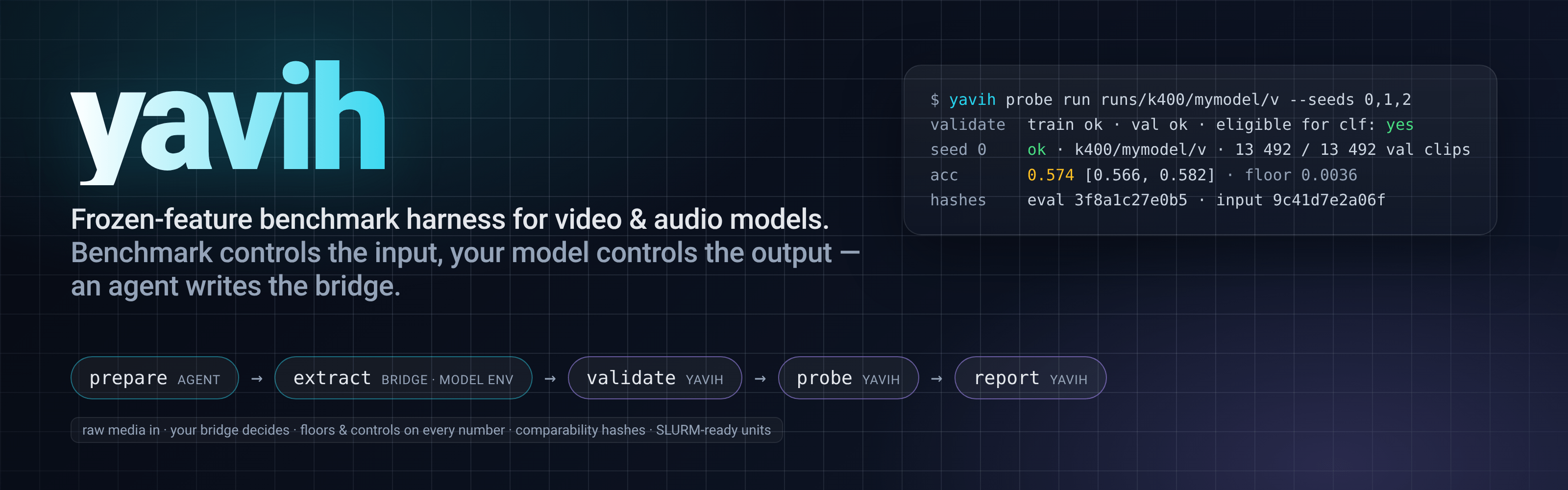




A growing library of video, audio and audio-visual benchmarks.
One harness, one protocol — and your coding agent does the wiring.
yavih (Yet Another Video Harness) evaluates frozen video, audio and audio-visual encoders. You bring a model; yavih brings the benchmarks, the data recipes, the probes and the guarantees that your numbers mean the same thing as everyone else's.
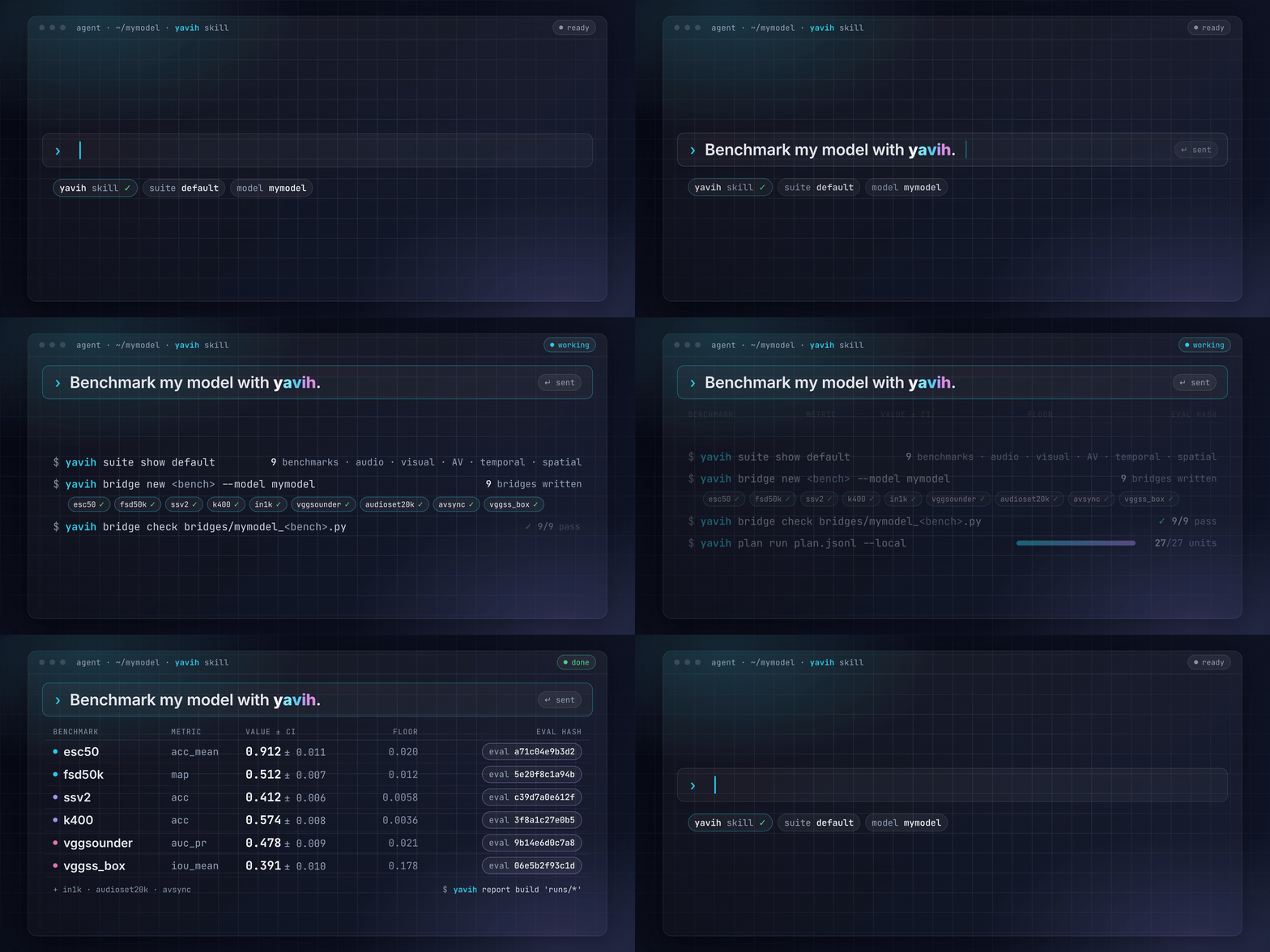
Get started in one sentence
pip install yavih          # into the Python environment that runs your model
yavih skill install        # teaches your coding agent (Claude Code, Codex, Cursor, …) how to use yavih
Then tell your agent:
Benchmark my model with yavih.
That's it. The agent picks the default suite, prepares each benchmark's data, writes the small adapter that feeds your model, checks it, extracts features, trains the standard probes and hands you a report. What it cannot do on its own — a licence you have to accept, a download only a person can make — it lists for you at the end, while the rest runs.
Why yavih
A growing library
You rarely choose benchmarks one by one. A suite is a named set: default is what "benchmark my model" runs,
minimal is a quick smoke pass, and yavih suite new makes your own.
yavih suite list               # default, minimal, and any suite you define
yavih bench list               # every benchmark: task, size, how to get the data, what's ready on your machine

| capability | benchmarks | examples |
|---|---|---|
audio |
2 | esc50, fsd50k |
visual |
4 | in1k, k400, nyuv2_depth, ssv2 |
audio-visual |
5 | audioset20k, ave, avsync, vggsounder + 1 more |
temporal |
2 | ave, avsync |
spatial |
2 | nyuv2_depth, vggss_box |
Each benchmark is one self-contained folder with its own page: the paper, how to get the data, and exactly how yavih runs it.
Numbers you can trust
A benchmark result is only useful if someone else can get the same number the same way. yavih freezes everything that decides what a number means and leaves everything else to you:
- Frozen by yavih: which clips, which labels, which raw files your model receives, which probe is trained on top, how it is trained, and which metric is reported — with a floor (what a model that ignores its input would score) next to every result.
- Yours to choose: the model, how it reads the media (frames, crops, audio front end), its precision and batch size. All of it is recorded with every number, none of it changes what the number is compared against.
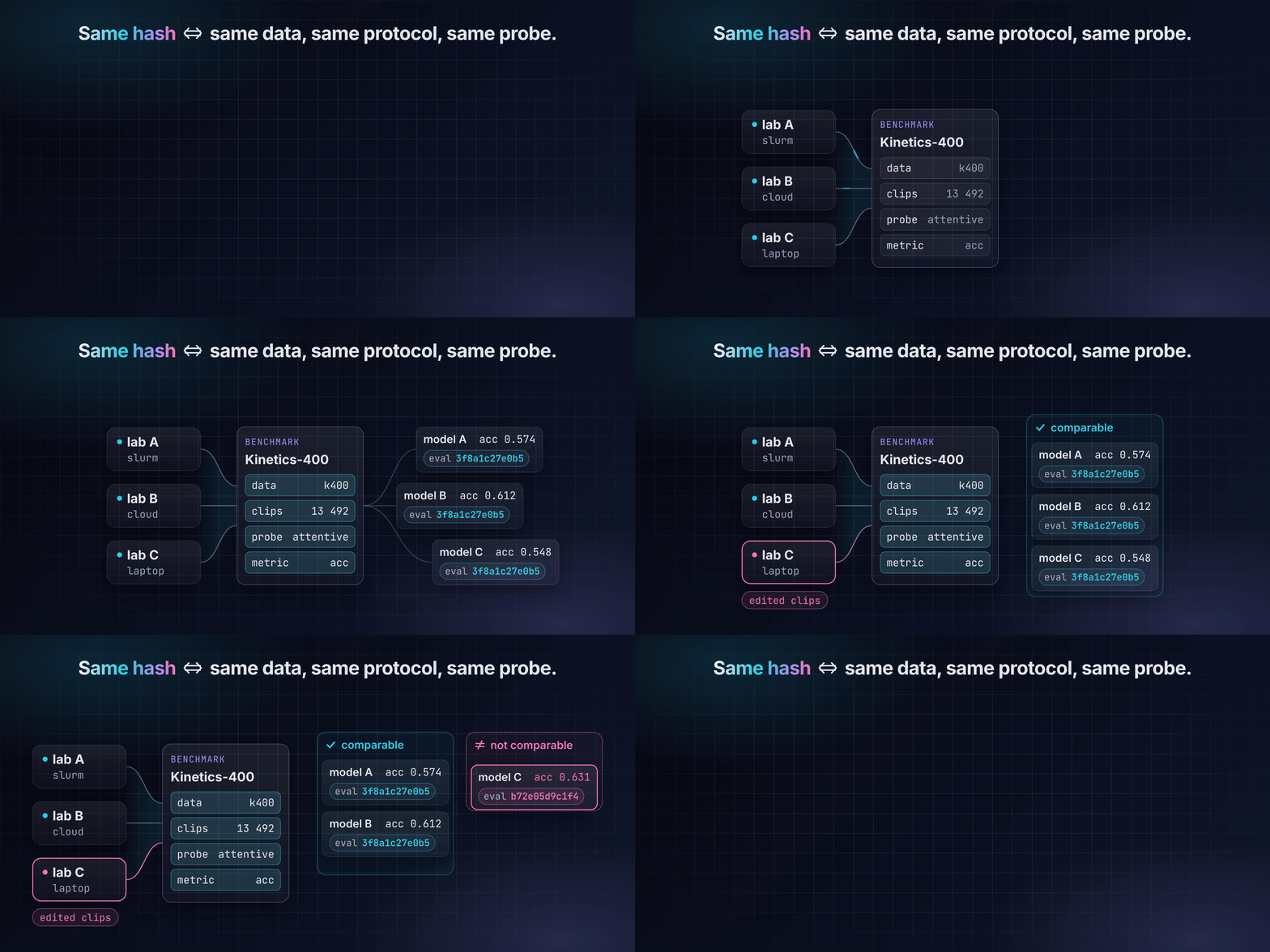
That frozen protocol is summarised in one short hash, the eval_hash. Same hash ⇔ same data, same protocol, same
probe. The report only ever puts numbers with the same hash in one column; change a clip or a metric and you get a
new hash, never a quietly different number.
Add your benchmark
Tell your agent:
Add Diving48 to yavih.
It follows contributing a benchmark step by step — scaffold the folder, freeze the manifest from the public release, write the data recipe and the tests, render the header — then runs a synthetic trial and a fresh-agent trial run before opening the pull request.

How it works
prepare ──► extract ──► validate ──► probe ──► report
 data         your model   yavih checks   standard     comparable
 recipe       (a bridge)   the features   probe        tables
Your model connects through a bridge: a small Python file, written by your agent from a template, that turns a benchmark's raw files into features. It runs in your model's own environment — yavih installs without touching your torch. yavih checks the features, trains the same probe every model gets, and reports with floors and confidence intervals. Everything runs on a laptop, a workstation or as job arrays on any cluster.
Learn more
- Quickstart by hand — every step without an agent, with a complete bridge.
- Design — why yavih works the way it does.
- The bridge contract, validation, readouts, hashing, the CLI — the reference.
- The agent skill — what your agent reads.
- Developing yavih and the releases.
License
yavih is released under the MIT License. Benchmark datasets are not part of yavih and keep their own licences and terms of use (each benchmark's page says where they come from).
1 maintainer

Metadata
1 maintainer
Release files for yavih 1.0.0
For a detailed explanation of source distributions (sdists) and built distributions (wheels), please see the package formats documentation.
Source distribution (sdist)
| File | Size | Uploaded | Provenance | Actions |
|---|---|---|---|---|
| yavih-1.0.0.tar.gz | 49.9 MB | With provenance | Details for yavih-1.0.0.tar.gz |
Built distribution (wheel)
| File | Interpreter | ABI | Platform | Actions Reset |
|---|---|---|---|---|
| yavih-1.0.0-py3-none-any.whl | Python 3 | none | any | Details for yavih-1.0.0-py3-none-any.whl |
Total release size: 57.7 MB
Release files / yavih-1.0.0.tar.gz
| Download URL | yavih-1.0.0.tar.gz |
|---|---|
| Size | 49.9 MB |
| Tags | Source |
|
SHA-256 checksum How to use checksums |
f6c29f7f56a12c7a4b45a97036c541a3a231827dedeca3e88169366220bf3c85
|
|
BLAKE2b-256 checksum How to use checksums |
bcfeb3f5b3bfa737e5348b2a8f8e16a37389055d1016f000d96b2973dcc79f9c
|
| Upload date | |
|
Uploaded using Trusted Publishing? What is trusted publishing? |
Yes |
| Uploaded via |
twine/7.0.0 CPython/3.13.16
|
Provenance
Provenance describes where a file came from. On PyPI, provenance is shared via attestations, which provide a verifiable record of the build or publishing details. View details, limitations and caveats.


PyPI Publish Attestation
PyPI verified that this artifact, at this checksum, originated from the publisher listed below.
Signed by GitHub Actions, verified by PyPI on Oct 26, 2026.
Transparency logRelease files / yavih-1.0.0-py3-none-any.whl
| Download URL | yavih-1.0.0-py3-none-any.whl |
|---|---|
| Size | 7.8 MB |
| Tags | Python 3 |
|
SHA-256 checksum How to use checksums |
cbe48fbc1ae35b91728beceb493390f02d90644662005a4bab100d39884d624d
|
|
BLAKE2b-256 checksum How to use checksums |
d31169236cce5e8b158fbb93a89bdfa516229e28d7cab39ec9835485159b0e35
|
| Upload date | |
|
Uploaded using Trusted Publishing? What is trusted publishing? |
Yes |
| Uploaded via |
twine/7.0.0 CPython/3.13.16
|
Provenance
Provenance describes where a file came from. On PyPI, provenance is shared via attestations, which provide a verifiable record of the build or publishing details. View details, limitations and caveats.
PyPI Publish Attestation
PyPI verified that this artifact, at this checksum, originated from the publisher listed below.
Signed by GitHub Actions, verified by PyPI on Oct 26, 2026.
Transparency logSecurity for yavih 1.0.0
Provenance
Provenance describes where a file came from. On PyPI, provenance is shared via attestations, which provide a verifiable record of the build or publishing details. View details, limitations and caveats.
Full provenance
All 2 files in this release have been uploaded with provenance metadata.
Attestation for yavih-1.0.0.tar.gz
PyPI Publish Attestation
PyPI verified that this artifact, at this checksum, originated from the publisher listed below.
Signed by GitHub Actions, verified by PyPI on Oct 26, 2026.
Transparency logA note on package security
PyPI is a repository for distributing packages, not a service for auditing them. While third-party security researchers and our staff do their best to detect and remove malicious packages, PyPI cannot guarantee the quality, security or suitability of any given package.
To learn more about protecting yourself from malicious actors, visit our package security documentation.













