
Simple Enigma machine emulator

Project description
Enigma
| Author: | Yurii Bliusiuk |
| Email: | ura.blusuk@gmail.com |
| License: | MIT |
Description
Emulate (replicate) functionality of the physical Enigma machine.
Installation
pip install yb-enigma
Usage (CLI)
enigma-cli [ARGS]...
Input
| -s, --string | String to encode |
| -i, --input-file | Path to source file |
| -cnfg, --configuration | Configuration string (see Configuration string format) |
| -k, --key-file | Path to file with key (Configuration string) |
Output
| - | Default: print key and encoded string to console |
| -o, --output-file | Path to destination file |
| -sk, --save-key | Save key to file. Key will be saved to /path/to/destination_file_name.key Can only be used in FILE mode |
Args
| -d, --debug | Enable debug output |
| -rcnfg --random-configuration | Set random rotors, reflector and plugboard configuration |
| -ks, --keep-spaces | Keep spaces in input string |
| -kx, --keep-special | Keep all special characters in input string. |
| -kn, --keep-new-line | Keep new line charecters in input string. |
| -g, --groups | Divide output string to groups Example: "ENIGMA IS COOL" => "ENIGM AISCO OL" Can`t be used with '--keep-spaces', '--keep-special' or '--keep-new-line' |
Configuration string
Example:
A II:10-I:3-III:20 AB:CD
- A - reflector
- II:10-I:3-III:20 - rotors
- II:10 - set first rotor to II at position 10
- I:3 - set second rotor to I at position 3
- III:20 - set third rotor to III at position 20
- AB:CD - plugboard
- AB - Plug pair A to B
- CD - Plpug pair C to D
Examples
Encode string "Hello, World!" using random configuration:
NOTE: special characters must be escaped by "\"
$ enigma-cli -s "Hello, World\!" -rcnfg
Encode string "Hello, World!" using random configuration, keeping spaces and special characters:
$ enigma-cli -s "Hello, World\!" -rcnfg -ks -kx
Encode string "Hello, World!" using random configuration, keeping spaces and special characters, output to file ./encoded.txt, key will be saved to ./encoded.key:
$ enigma-cli -s "Hello, World\!" -rcnfg -o ./encoded.txt -sk -ks -kx
Encode text from ./text.txt using "A II:10-I:3-III:20 AB:CD" configuration:
$ enigma-cli -f ./text.txt -cnfg "A II:10-I:3-III:20 AB:CD"
Encode text from ./text.txt using random configuration, output to file ./encoded.txt:
$ enigma-cli -f ./text.txt -rcnfg -o ./encoded.txt
Encode text from ./text.txt using random configuration, keeping spaces, special characters and new-line charecters, output to file ./encoded.txt, key will be saved to ./encoded.key:
$ enigma-cli -f ./text.txt -rcnfg -o ./encoded.txt -sk -ks -kx -kn
Usage (as module)
Import:
from yb_enigma import Enigma, Rotor, Reflector, Plugboard, parse_configuration
Encode string:
enigma = Enigma(random_cnfg=True)                   # Create enigma instance

encoded_string = enigma.encode('Hello, World!')     # Encode "Hello, World!"
Encode text from file:
enigma = Enigma(random_cnfg=True)                   # Create enigma instance

encoded_string = ''
with open('./text.txt', 'r') as file:               # Open file to read
    char = file.read(1)                             # Read first byte
    while char:
        if char.isalpha():                          # If char is [a-zA-Z]
            encoded_string += enigma.encode(char)   # Encode char and add to encoded_string
            char = file.read(1)                     # Read next byte
Custom configuration (manually):
reflector = Reflector.A()                           # Reflector
rotors_list = [                                     # List of rotors
    Rotor.I(pos=2),
    Rotor.II(pos=10),
    Rotor.III(pos=0),
]
plugboard = Plugboard(pairs=[                       # Plugboard
    {'a', 'b'},
    {'c', 'd'},
])

enigma = Enigma(                                    # Create enigma instance with
    reflector   = reflector,                        # predefined configuration
    rotors_list = rotors_list,
    plugboard   = plugboard,
)
Custom configuration (from Configuration string):
reflector, rotors_list, plugboard = parse_configuration("A I:2-II:10-III:0 AB:CD")

enigma = Enigma(                                    # Create enigma instance with
    reflector   = reflector,                        # predefined configuration
    rotors_list = rotors_list,
    plugboard   = plugboard,
)
Get/set configuration using Configuration string:
enigma = Enigma(random_cnfg=True)                   # Create enigma instance

configuration_string = enigma.get_configuration()   # Get configuration string
enigma.set_configuration(configuration_string)      # Set configuration
How it works
Main parts are:
Rotor
In real Enigma machine, rotors are discs with 26 brass, spring-loaded, electrical contact pins arranged in a circle on one face, with the other face housing 26 corresponding electrical contacts in the form of circular plates.
Inside the body of the rotor, 26 wires connect each pin on one side to a contact on the other in a complex pattern.
This way, we have very simple encryption algorithm (basically substitution cipher). For example, the pin corresponding to the letter E might be wired to the contact for letter T on the opposite face, and so on.
Enigma's security comes from using several rotors in series (usually three or four) and the regular stepping movement of the rotors, thus implementing a polyalphabetic substitution cipher.
In program this is made by each Rotor knowing it's "key": string, containing all english letter (basically it's permutation of alphabet).
To find corresponding letter, you get letter's position in alphabet and then get letter in "key" at this position. For example, we need to find corresponding letter for "c" having key "ekmflgdqvzntowyhxuspaibrcj": position in alphabet is 3, third letter in "key" is "m". So, we have C => M.
However, rotors are shifting, so N'th letter in alphabet corresponds to (N+Rotor.position)'th letter in "key"
Also, important part of Enigma's encoding algorithm is the fact, that for each pressed letter (in our case encoded letter), first rotor shifts (rotates) by 1. Moreover, rotors are connected such a way, that when first rotor makes full rotation, it shifts second rotor by 1. The same thing second rotor does with third and so on.
Example:
For simplicity, lets consider we have only 5 letters in alphabet. Our Enigma has 3 rotors with following keys:
- "cbdae"
- "decba"
- "acdeb"
All rotors are at starting position (let's say posiiton 0). We want to encode string "cad". The steps are going to be:
- press (encode) "c":
- first rotor shifts, so it's position is 1 now
- position of "c" in alphabet is 3
- (3+1)'th letter in first rotor "key" is "a"
- position of "a" in alphabet is 1, second rotor's position is 0
- (1+0)'th letter in second rotor "key" is "d"
- position of "d" in alphabet is 4, third rotor's position is 0
- (4+0)'th letter in third rotor "key" is "e"
- "e" is the result
- press (encode) "a":
- first rotor shifts, so it's position is 2 now
- position of "a" in alphabet is 1
- (1+2)'th letter in first rotor "key" is "d"
- position of "d" in alphabet is 4, second rotor's position is 0
- (4+0)'th letter in second rotor "key" is "b"
- position of "b" in alphabet is 2, third rotor's position is 0
- (2+0)'th letter in third rotor "key" is "c"
- "c" is the result
- press (encode) "d":
- first rotor shifts, so it's position is 3 now
- position of "d" in alphabet is 4
- (4+3)'th letter in first rotor "key" is "b" NOTE: actually, there is no 7'th letter, so it's (7 % 5)'th letter
- position of "b" in alphabet is 2, second rotor's position is 0
- (2+0)'th letter in second rotor "key" is "e"
- position of "e" in alphabet is 5, third rotor's position is 0
- (5+0)'th letter in third rotor "key" is "b"
- "b" is the result
Result: "cad" => "ecb"
Reflector
Previously, we have encoded string "cad" such a way, that each letter "went" from the first rotor to the second one, from the second to third and so on. However, what should actually happen, is that each letter is "going" through all rotors from the first to the last, then through the reflector, and back through all rotors, but now from the last to the first.
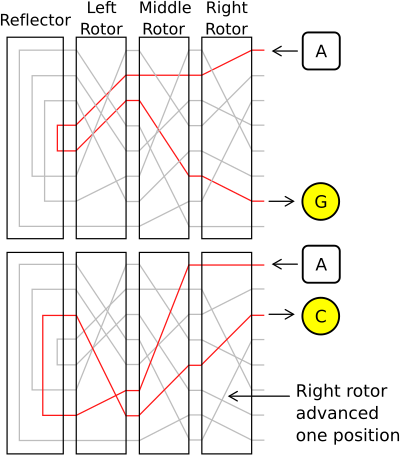
So, reflector is basically doing the same job as the rotor does, but it "encodes" and then redirects letter (electrical signal in real Enigma) back to the last rotor and it's not moving during work.
IMPORTANT: in reflector's "key", letters are pointing on each other in pairs, e.g. if "a" is pointing to "c", "c" must be pointing to "a"
Plugboard
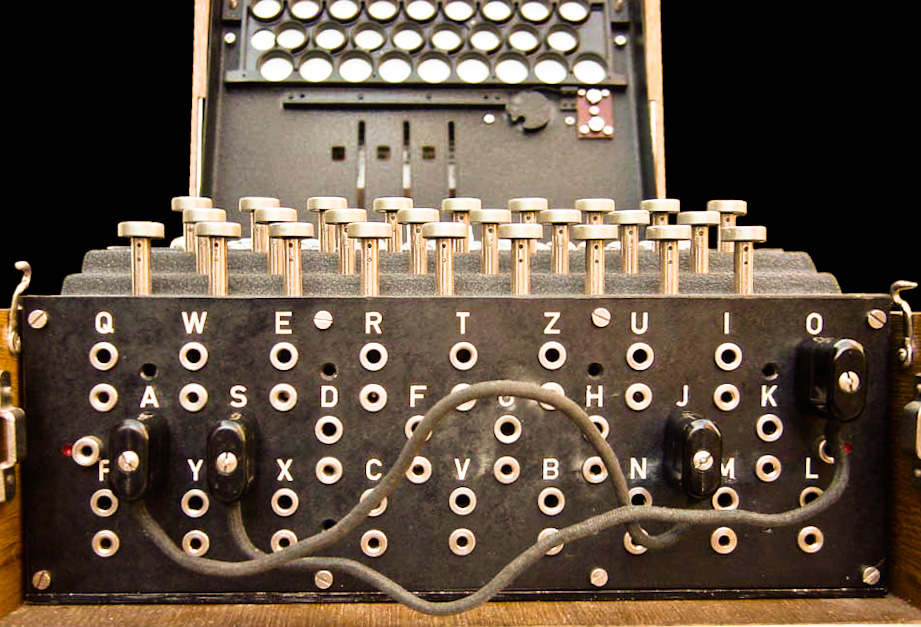
The plugboard permitted variable wiring that could be reconfigured by the operator.
A cable placed onto the plugboard connected letters in pairs; for example, E and Q might be the pair. The effect was to swap those letters before and after the main rotor unit. For example, when an operator pressed E, the signal was diverted to Q before entering the rotors.
Implementation
All the steps are well described in the comments. Small summary:
Rotor
To implement rotors rotation system (each rotor rotates the next one after it's full rotation, more in "How it works -> Rotor"), rotors are organised using Doubly linked list.
Also, to optimise encoding, I am creating coding_list - list of each key letter's num in alphabet (e.g. "ecabd" => [4, 2, 0, 1, 3]).
Each rotor has it's number: I, II, ..., VIII and position (rotation step).
Reflector
As previously said in "How it works -> Reflector", reflector is doing pretty much the same work as Rotor do, but
- it is not moving during encoding, so it doesn't have position.
- it doesn't have reverse mode while getting corresponding letter.
Plugboard
Plugpairs are stored using set data type (it just feels more ideologically correct for me, however in terms of speed, it is just the same as list or tuple, because of small amount of data stored (it's always only two strings of length 1)).
Pairs are stored in list.
During encoding, it returns corresponding char or char itself, if it's not in plugged pairs
Enigma
Finally an Enigma class.
Can be initialised using random or default configuration.
Takes care of creating doubly linked list of rotors.
While encoding, shift the first rotor and passes letter through the whole chain (plugboard -> rotors -> reflector -> rotors (desc) -> plugboard).
CLI
The CLI script is pretty simple script, which parses passed arguments, and works based on those argument.
There are basically 2 modes: string and file. In the string mode, input is passed as string using (-s <STRING>, --string <STRING>) argument. In the file mode, input is passed using file, path is set by (-i <PATH>, --input-file <PATH>).
Release history Release notifications | RSS feed

Download files
Download the file for your platform. If you're not sure which to choose, learn more about installing packages.
Source Distribution
Built Distribution
Filter files by name, interpreter, ABI, and platform.
If you're not sure about the file name format, learn more about wheel file names.
Copy a direct link to the current filters
File details
Details for the file yb-enigma-1.0.1.tar.gz.
File metadata
- Download URL: yb-enigma-1.0.1.tar.gz
- Upload date:
- Size: 17.7 kB
- Tags: Source
- Uploaded using Trusted Publishing? No
- Uploaded via: twine/3.3.0 pkginfo/1.6.1 requests/2.24.0 setuptools/51.1.2 requests-toolbelt/0.9.1 tqdm/4.56.0 CPython/3.9.0
File hashes
| Algorithm | Hash digest | |
|---|---|---|
| SHA256 |
771de46d48a50f0df0224b762303751f3186b0f0eaa04aa0d33c66b230fdfd3d
|
|
| MD5 |
e64313a4579c8e80b341d871b3f131f8
|
|
| BLAKE2b-256 |
de82fcb2dbc772464b258f2800f109c6c08d34c76fbf4c13b1eec08cb8ae35ef
|
File details
Details for the file yb_enigma-1.0.1-py3-none-any.whl.
File metadata
- Download URL: yb_enigma-1.0.1-py3-none-any.whl
- Upload date:
- Size: 16.5 kB
- Tags: Python 3
- Uploaded using Trusted Publishing? No
- Uploaded via: twine/3.3.0 pkginfo/1.6.1 requests/2.24.0 setuptools/51.1.2 requests-toolbelt/0.9.1 tqdm/4.56.0 CPython/3.9.0
File hashes
| Algorithm | Hash digest | |
|---|---|---|
| SHA256 |
cc9dcfc38effb7decaf071d0b7e9276328a035588e136f9cd54e5257469d694e
|
|
| MD5 |
d0a417beabd2b416874896b2589a57ad
|
|
| BLAKE2b-256 |
35946238724003821533d35876d42d184032cafaa3f056ebb561e9a311ce736a
|






