
View colored, incremental diff in a workspace or from stdin, in side-by-side or unified moded, and auto paged.

Project description
Ydiff

Ydiff is a terminal-based tool to view colored, incremental diffs in a version-controlled workspace or from stdin, in side-by-side (similar to diff -y) or unified mode, and auto-paged. It only requires Python >= 3.3 without external dependencies and less as a pager.
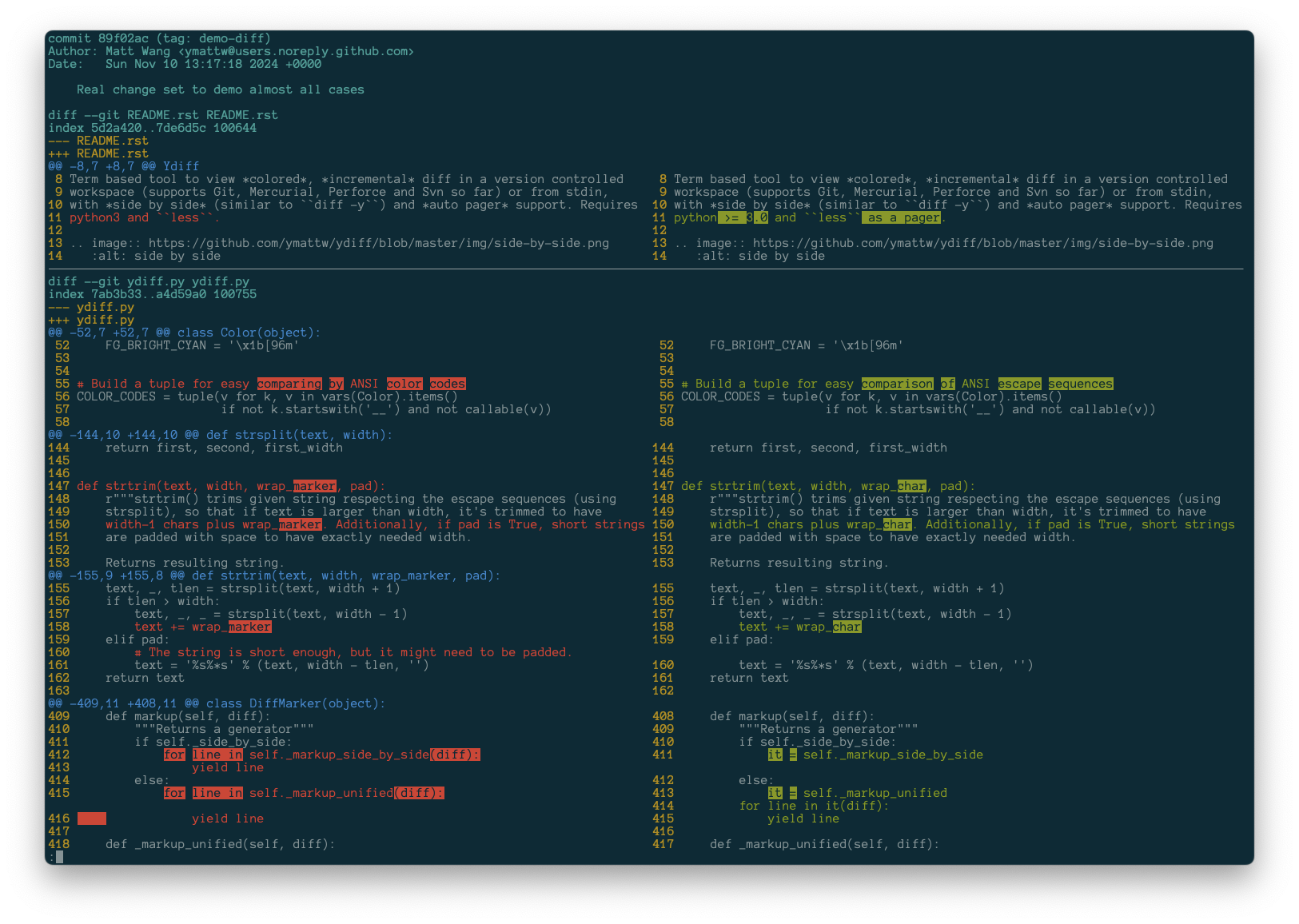
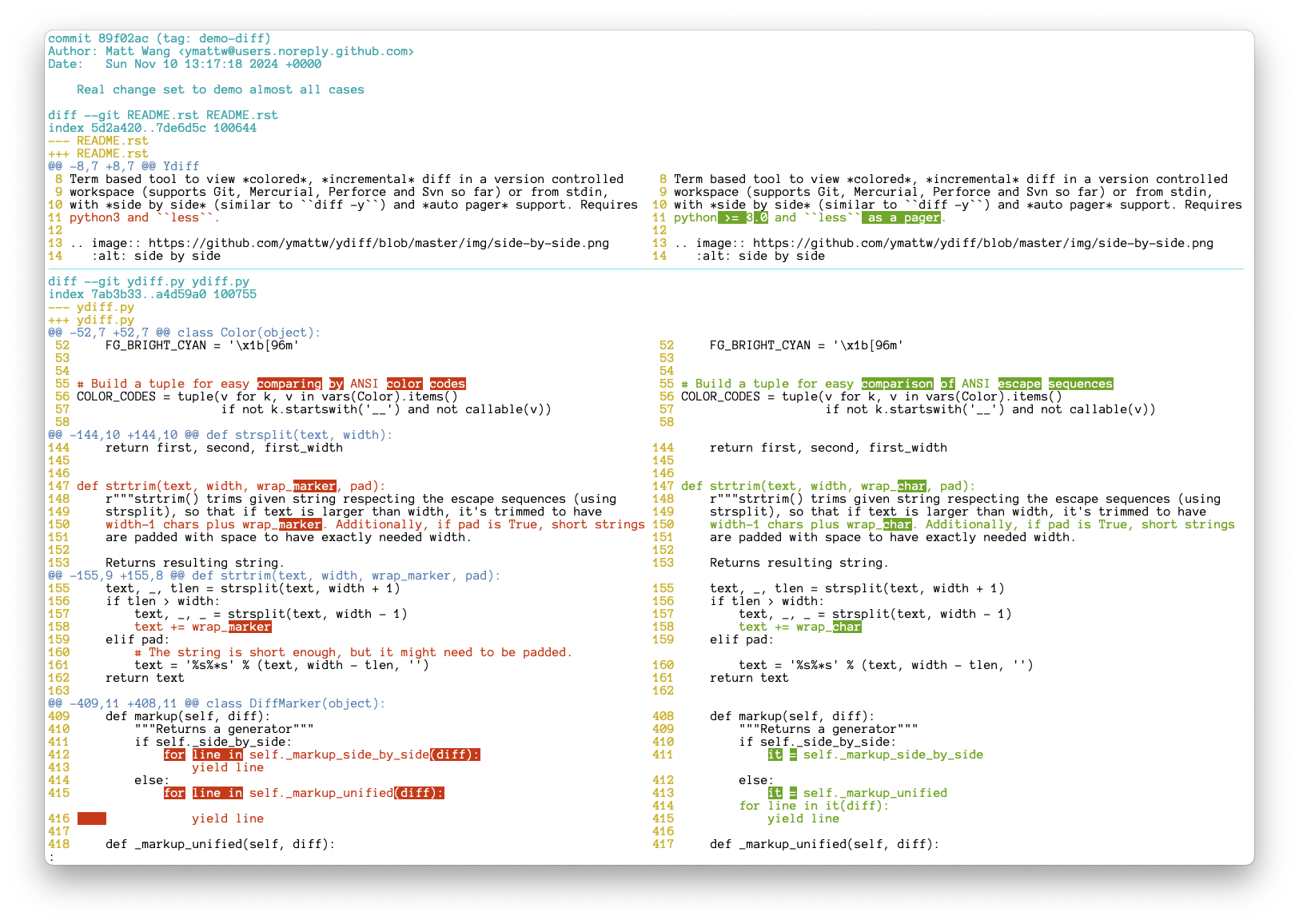
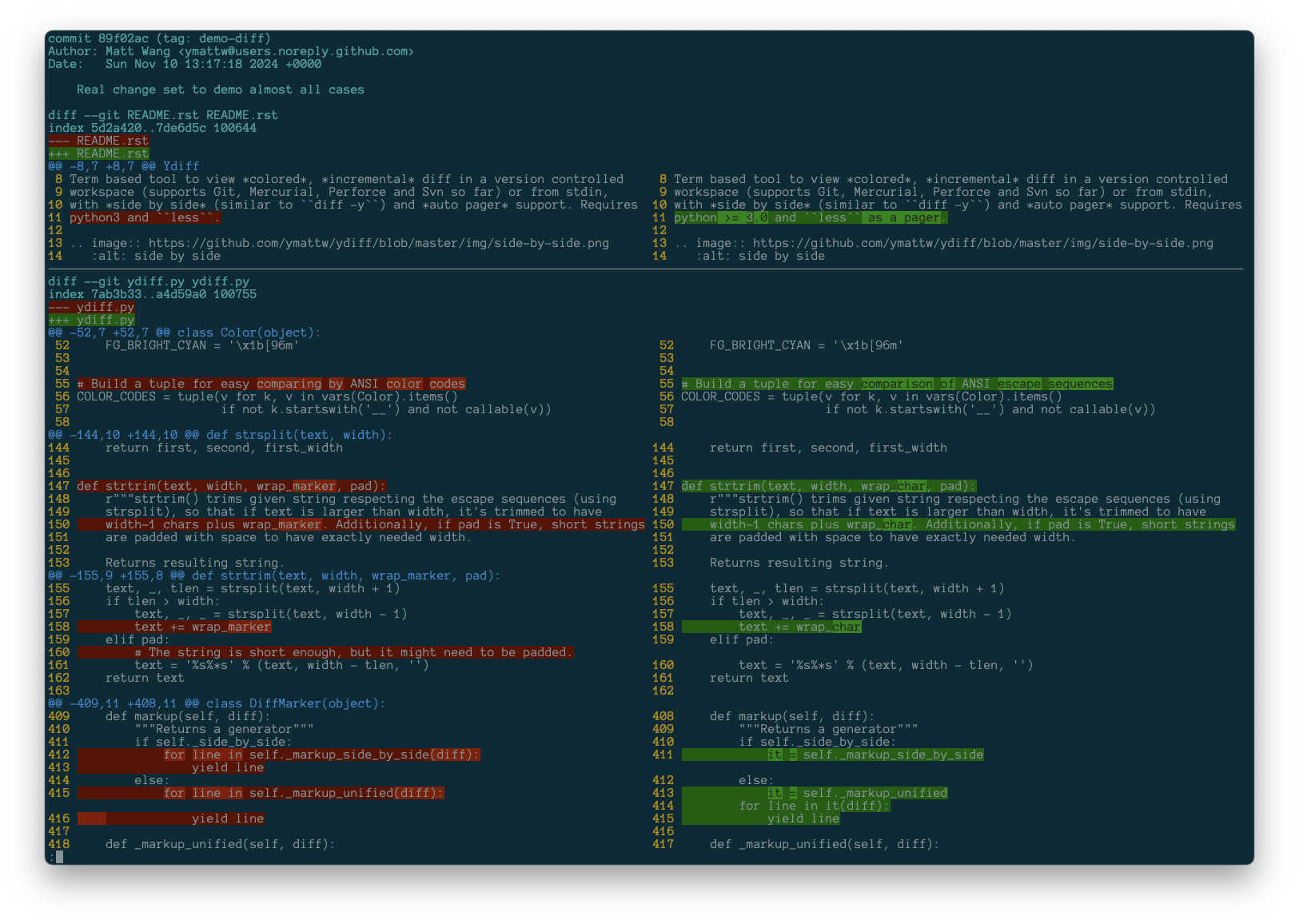
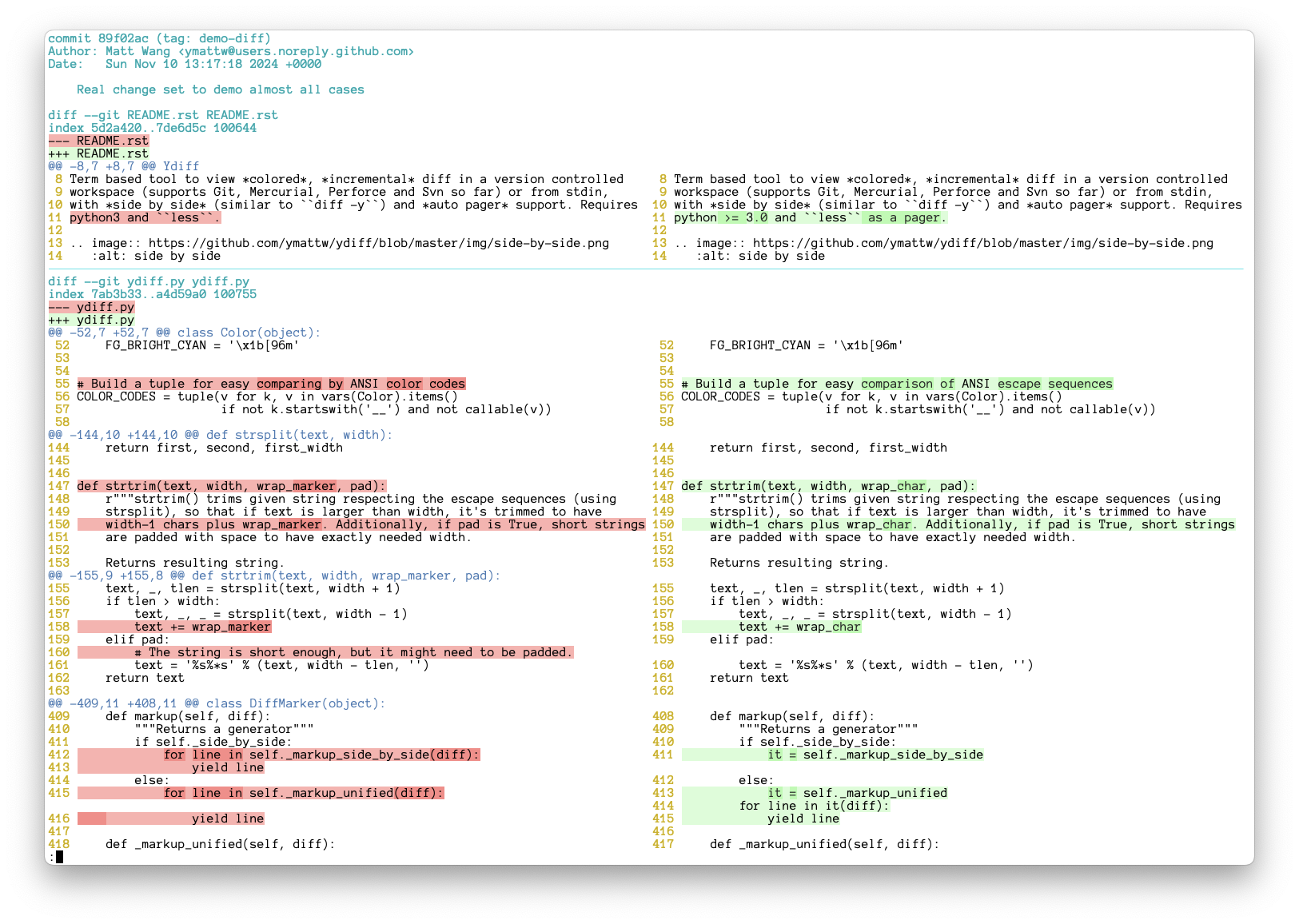
The diffs in side-by-side mode appear below. See also the screenshots of the unified mode.
Theme “default” on a dark terminal background:
Theme “default” on a light terminal background:
Theme “dark” on a dark terminal background:
Theme “light” on a light terminal background:
Installation
Ydiff only depends on Python built-in libraries, so you can just download the source and run without worrying about any installation. Git tagged revisions will be packaged and uploaded to PyPI timely, however, packages hosted elsewhere are not (please note they are not managed by the author @ymattw).
To run from source directly, just save ydiff.py as ydiff to whatever directory which is in your $PATH, for example, $HOME/bin:
curl -L https://raw.github.com/ymattw/ydiff/master/ydiff.py > ~/bin/ydiff
chmod +x ~/bin/ydiff
To install from PyPI:
pip install --upgrade ydiffTo install with Homebrew (Formula) on macOS:
brew install ydiffTo install on Fedora:
dnf install ydiffTo install on FreeBSD:
pkg install ydiffUsage
Type ydiff -h to show usage:
$ ydiff -h
Usage: ydiff [options] [file|dir ...]

View colored, incremental diff in a workspace or from stdin, with side by side
and auto pager support.

Options:
  --version             show program's version number and exit
  -h, --help            show this help message and exit
  -s, --side-by-side    enable side-by-side mode (default True; DEPRECATED)
  -u, --unified         show diff in unified mode (disables side-by-side mode)
  -w N, --width=N       set text width for side-by-side mode, 0 (default) for
                        auto detection and fallback to 80 when not possible
  -l, --log             show log with changes from revision control
  -c WHEN, --color=WHEN
                        colorize mode 'auto' (default), 'always', or 'never'
  -t N, --tab-width=N   convert tab chars to this many spaces (default: 8)
  --wrap                wrap long lines in side-by-side mode (default True;
                        DEPRECATED)
  --nowrap, --no-wrap   do not wrap long lines in side-by-side mode
  -p PAGER, --pager=PAGER
                        pager application to feed output to, default is 'less'
  -o OPT, --pager-options=OPT
                        options to supply to pager application
  --theme=THEME         option to pick a color theme (one of dark, default,
                        light)

  Note:
    Option parser will stop on first unknown option and pass them down to
    underneath revision control. Environment variable YDIFF_OPTIONS may be
    used to specify default options that will be placed at the beginning
    of the argument list.
Read diff from local modification in a Git/Mercurial/Perforce/Svn workspace (output from e.g. git diff, svn diff):
cd proj-workspace
ydiff                       # view colored side by side diff, auto set text
                            # width based on terminal size
ydiff -u                    # view colored incremental diff in unified mode
ydiff -w 90                 # use text width 90, wrap long lines
ydiff --no-wrap             # auto set text width but do not wrap long lines
ydiff file1 dir2            # view modification of given files/dirs only
ydiff -w90 -U10             # pass '-U10' to underneath revision diff tool
ydiff --cached              # show git staged diff (git diff --cached)
ydiff -r1234                # show svn diff to revision 1234
Read log with changes in a Git/Mercurial/Svn workspace (output from e.g. git log -p, svn log --diff), note –diff option is new in svn 1.7.0:
cd proj-workspace
ydiff -l                    # read log along with changes, side by side
ydiff -lu                   # equivalent to ydiff -l -u, unified mode
ydiff -l -w90 --no-wrap     # set text width 90 and disable wrapping
ydiff -l file1 dir2         # see log with changes of given files/dirs only
Utilize a specific pager application:
ydiff -p more                   # use "more" as a pager
ydiff -p cat                    # when neither less nor more is avilable
ydiff -o "-FRSX --shift 2"      # customized option (pager defaults to less)
Pipe in a diff:
git log -p -2 | ydiff       # view git log with changes of last 2 commits
git show 15bfa | ydiff      # view a given git commit, side by side
svn diff -r1234 | ydiff     # view svn diff comparing to given revision
diff -u file1 file2 | ydiff # view diff between two files (note the '-u')
diff -ur dir1 dir2 | ydiff  # view diff between two dirs

# View diff in a GitHub pull request, side by side
curl https://github.com/ymattw/ydiff/pull/11.diff | ydiff

# View a patch file in colored unified format.
ydiff -u < foo.patch
Redirect output to another patch file is safe even without -u:
svn diff -r PREV | ydiff > my.patchCustomized themes
You can define your own themes in ~/.config/ydiff/themes.ini. Check out the built-in themes for examples.
The section names are theme names. Undeclared theme keys will inherit values from the same-named built-in theme or from the “default” theme otherwise.
Notes
Ydiff only supports diffs in Unified Format. Diffs in other format may be converted to Unified Format via tool filterdiff (usually offered by package patchutils.)
Environment variable YDIFF_OPTIONS may be used to specify default options that will be placed at the beginning of the argument list, for example:
export YDIFF_OPTIONS='-w100'
ydiff foo  # equivalent to "ydiff -w100 foo"
If you feel more comfortable with a command such as git d to trigger the ydiff command, you may symlink the executable to one named git-d, or configure an alias:
# Create a symlink git-d -> ydiff
D=$(dirname $(which ydiff)); ln -s ydiff $D/git-d

# Or configure an alias
git config --global alias.d '!ydiff'
Known issues
Wide characters may cause alignment problem in side-by-side mode.
Terminal might be in a mess on exception (type reset can fix it).
Change log
Version 1.5 (2025-12-06)
Support customized themes in INI format
Only read stdin when redirected from a regular file or pipe
Apply –color=never option to git diff and git log
Release both source and wheel packages
Version 1.4.2 (2024-11-18)
Compatibility Fix: Ensure ydiff works properly with Python 3.3 and later.
Version 1.4.1 (2024-11-13)
Fix setup() dependency: MANIFEST.in is still required for Python < 3.8 to pack data files
Version 1.4 (2024-11-13) Revoked due to #123
Fine-grained, word-level diff for change blocks
New --theme option for selecting different themes
Options --side-by-side, --width 0, and --wrap become default (use --unified/--nowrap for legacy behavior)
Python 2, 3.1, 3.2 support is officially dropped
Version 1.3 (2024-04-02)
Dropped context diff support
Handle East Asian wide characters (thanks to @roy2220)
Fix SIGPIPE issue on Windows (unofficial support, thanks to @kingsamchen)
Bump Python requirement to >=2.6 (Python 2 support is no longer tested)
Version 1.2 (2020-08-08)
Support perforce workspaces
Support pager customization via –pager and –pager_options
Support running on Windows (requires less which is offered by git-bash)
Fix a bug where reading stdin does not work outside a CVS workspace
Fix tab expansion, expands to the next stop modulo tab width
Performance improvement
Version 1.1 (2018-06-05)
Rename from cdiff to ydiff to avoid binary name conflict on major distributions, CDIFF_OPTIONS still works but will be deprepated soon
New option --wrap to wrap long lines in side-by-side view
Version 1.0 (2016-12-31)
Use environment variable CDIFF_OPTIONS to hold default options
Version 0.9.8 (2016-01-16)
More robust parser to tolerate evil unified diff
Version 0.9.7 (2015-04-24)
Fix unexpected side-by-side output for diff of diff
Better color to work with solarized color scheme
Version 0.9.6 (2014-06-20)
Fix TypeError exception in auto width logic
Version 0.9.5 (2014-06-19)
Option --width 0 now fits terminal size automatically
Enable smooth horizontal scrolling with less option --shift 1
Version 0.9.4 (2014-06-04)
Respect the LESS environment variable
Support python 3.4
Fix curl options in document
Version 0.9.3 (2013-09-28)
Moved screenshots to ‘gh-pages’ branch
Handle all keyboard interrupts more completely
Explicitly set default encoding to utf-8
Fixed broken output diff when I/O with filterdiff in nonblocking mode
Version 0.9.2 (2013-06-21)
Enahanced option parser now pass unknown option to underneath revision control, user can use cdiff --cached, cdiff -U5 directly
Version 0.9.1 (2013-05-20)
Use --no-ext-diff to disable GIT_EXTERNAL_DIFF and diff.external which might break cdiff output
Version 0.9 (2013-03-23)
Supports reading context diff via filterdiff (patchutils)
Fixed a diff parser bug which misread git commit message as common line
Lots of code refactor
Version 0.8 (2013-03-13)
Parser is now robust enough to handle dangling headers and short patch
PEP8 (with minor own flavors) and other code lint
Change ‘Development Status’ to stable
Version 0.7.1 (2013-02-25)
Handle ‘Binary files … differ’
Document update for known issues
Version 0.7 (2013-02-23)
Support reading diff or log for given files/dirs in workspace
Support diff generated from diff -ru dir1 dir2
Usage change: reading a patch and comparing two files need stdin redirect
Version 0.6 (2013-02-20)
A few performance tuning and code clean up
Add unit test cases with coverage 70%
Show merge history in svn log
Version 0.5.1 (2013-02-19)
Fixed incorrect yield on diff missing eof
Fixed a bug in diff format probe
Handle keyboard interrupt and large diffs in non-color mode
Code clean up
Version 0.5 (2013-02-18)
Support read output from svn diff --log and hg log -p
Streamline reading large patch set
New --log (-l) option to read revision control diff log (thanks to Steven Myint)
Version 0.4 (2013-02-16)
New option -c WHEN (–color WHEN) to support auto test
Auto regression test now on Travis
Version 0.3 (2013-02-07)
Support compare two files (wrapper of diff)
Version 0.2 (2013-02-06)
Move cdiff.py to top dir for better meta info management
Version 0.1 (2013-02-05)
New –version option
setup.py now read version from source code
Version 0.0.4 (2013-02-04)
Add CHANGES for history track and better versioning
Version 0.0.3 (2013-02-04)
Publish on PyPI, supports read patch from file, pipe and diff output from revision tools (thanks to Steven Myint)


Download files
Download the file for your platform. If you're not sure which to choose, learn more about installing packages.
Source Distribution
Built Distribution
Filter files by name, interpreter, ABI, and platform.
If you're not sure about the file name format, learn more about wheel file names.
Copy a direct link to the current filters
File details
Details for the file ydiff-1.5.tar.gz.
File metadata
- Download URL: ydiff-1.5.tar.gz
- Upload date:
- Size: 78.3 kB
- Tags: Source
- Uploaded using Trusted Publishing? No
- Uploaded via: twine/6.2.0 CPython/3.11.2
File hashes
| Algorithm | Hash digest | |
|---|---|---|
| SHA256 |
dd5272afd7409902678c1ac6d1945d73cf85104ac6cda1e67684a67617918a20
|
|
| MD5 |
d938f293b9b0f02b9b22cb08c015e3d9
|
|
| BLAKE2b-256 |
250893b7e744645d94ae2f5dcddbbd2cfd5ec1420768994987a21a10b226be86
|
File details
Details for the file ydiff-1.5-py3-none-any.whl.
File metadata
- Download URL: ydiff-1.5-py3-none-any.whl
- Upload date:
- Size: 16.4 kB
- Tags: Python 3
- Uploaded using Trusted Publishing? No
- Uploaded via: twine/6.2.0 CPython/3.11.2
File hashes
| Algorithm | Hash digest | |
|---|---|---|
| SHA256 |
ec3bee0f358c858a57473ad2605336171a537ba2fc0c3a51b28211700951f77d
|
|
| MD5 |
d42c64aacf14cf3eef1a087d5b61987c
|
|
| BLAKE2b-256 |
0124ff5fc8a95a05fbd46881439b78236f950f5b321b91f59a9167c4bf80db2a
|






