
Create an html file that shows the directory listing structure of an s3 bucket.

Project description
ye3sld
Créer un fichier HTML qui affiche la structure de la liste des dossiers d'un bucket S3.
Create an html file that show the directory listing structure of an s3 bucket.
Features
- Works with all S3 compatible storage API implementations (Amazon, Garage, MinIO, etc.)
- GUI (Graphical User Interface) mode and CLI (Command Line Interface) mode
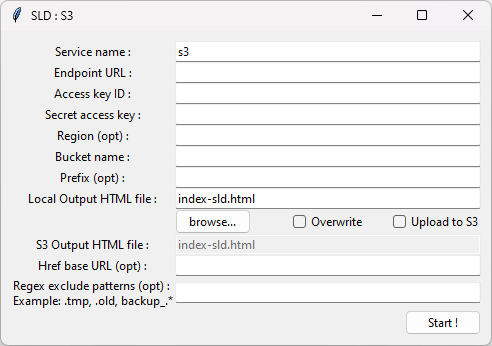
- Enter the Endpoint URL, Access key ID, Secret access key, Region, Bucket name
- Filter on a specific folder in S3 bucket (Prefix)
- Filter with regex to exclude certain patterns (eg: .tmp, .old, backup_.*)
- Can list all files, even if there are more than 1000 files in the bucket (S3 pagination)
- Select the output HTML file location: in local and S3 bucket (optional)
- Output HTML : Nice tree structure with a smooth effect when moving the mouse over the list items
- Output HTML : List items are clickable, with customizable href base url
The main goal is to display the entire folder structure on a single page. Really light and simple, without any action button or entry box on the output html page.
Prerequisite
Python and boto3
tkinter if you want a Graphical User Interface
Simple usage
1) Install
Open the command prompt and type :
pip install ye3sld
2) Run
From the command prompt,
For GUI mode, type :
ye3sld
Fill in the fields in the GUI
For CLI mode, type :
ye3sld --cli --endpoint_url="http://MYWEBSITE" --aws_access_key_id="MYID" --aws_secret_access_key="MYSECRET" --bucket_name="MYBUCKET" --upload --overwrite --exclude=".tmp, .old"
To show all CLI options : ye3sld --help
3) Verify
Open the HTML output file in your local folder or in your s3 bucket
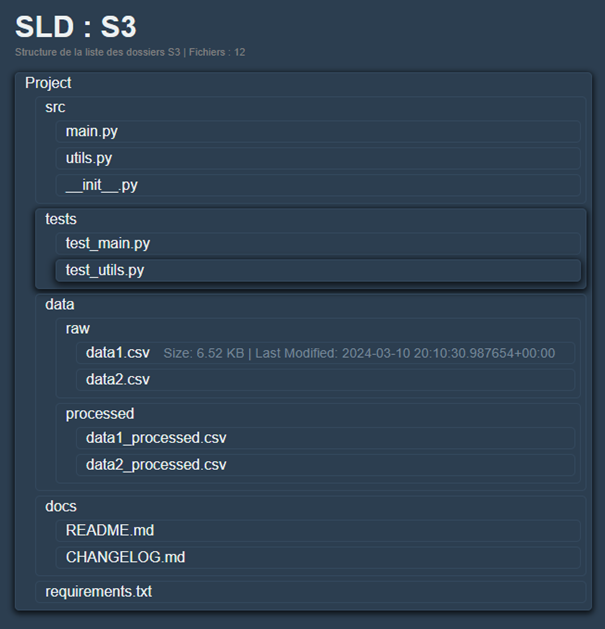
To view the HTML code Click here
Version
| name | version |
|---|---|
| ye3sld | 1.0.2 |
Changelog
[1.0.2] - 2025-01-06
Changed
- Success and error message
- Help message in cli mode
- Missing tkinter message displayed in main()
Added
- New function "check_s3_file_exists" to detect if s3 output file already exists
- New function "get_full_path" to get fullpath of the local output file
- Hint in cli mode
[1.0.1] - 2025-01-02
Fixed
- messagebox was not showing because tkinter was not imported in the generate_html function. Now, tkinter is imported at the top of the script, inside a try except.
[1.0.0] - 2024-12-30
Added
- première : first release
ToDo
Feel free to contribute or share your ideas for new features, you can contact me here on github or by email. I speak French, you can write to me in other languages I will find ways to translate.
License
MIT
author: palw3ey
maintainer: palw3ey
email: palw3ey@gmail.com
website: https://github.com/palw3ey/ye3sld


Download files
Download the file for your platform. If you're not sure which to choose, learn more about installing packages.
Source Distribution
Built Distribution
Filter files by name, interpreter, ABI, and platform.
If you're not sure about the file name format, learn more about wheel file names.
Copy a direct link to the current filters
File details
Details for the file ye3sld-1.0.2.tar.gz.
File metadata
- Download URL: ye3sld-1.0.2.tar.gz
- Upload date:
- Size: 81.7 kB
- Tags: Source
- Uploaded using Trusted Publishing? No
- Uploaded via: twine/6.0.1 CPython/3.10.12
File hashes
| Algorithm | Hash digest | |
|---|---|---|
| SHA256 |
37bf7cda799cea64afe5b8966f28786c969782181db555d6f46491dac8cbcc7c
|
|
| MD5 |
65a60a199fcdc1adcc39f6a69e155746
|
|
| BLAKE2b-256 |
a8ed2dfdc2eb3a232c9dd83faa384f296f8d4524031258dd9e83238b971e87f8
|
File details
Details for the file ye3sld-1.0.2-py3-none-any.whl.
File metadata
- Download URL: ye3sld-1.0.2-py3-none-any.whl
- Upload date:
- Size: 9.1 kB
- Tags: Python 3
- Uploaded using Trusted Publishing? No
- Uploaded via: twine/6.0.1 CPython/3.10.12
File hashes
| Algorithm | Hash digest | |
|---|---|---|
| SHA256 |
b76d0f24c8996f32a8667a23b10e66dac5799188eed0a12c2333854244eb522d
|
|
| MD5 |
f9085a3ac001c2855e7c2cff8c3c04df
|
|
| BLAKE2b-256 |
a05a5c851b9c0013e6f991cb3af0b66c79feaaaa7d887b14398195b43c063f88
|






