
Fork of yellowbrick, a suite of visual analysis and diagnostic tools for machine learning, that supports sklearn >= 1.8.0

Project description
Yellowbrick
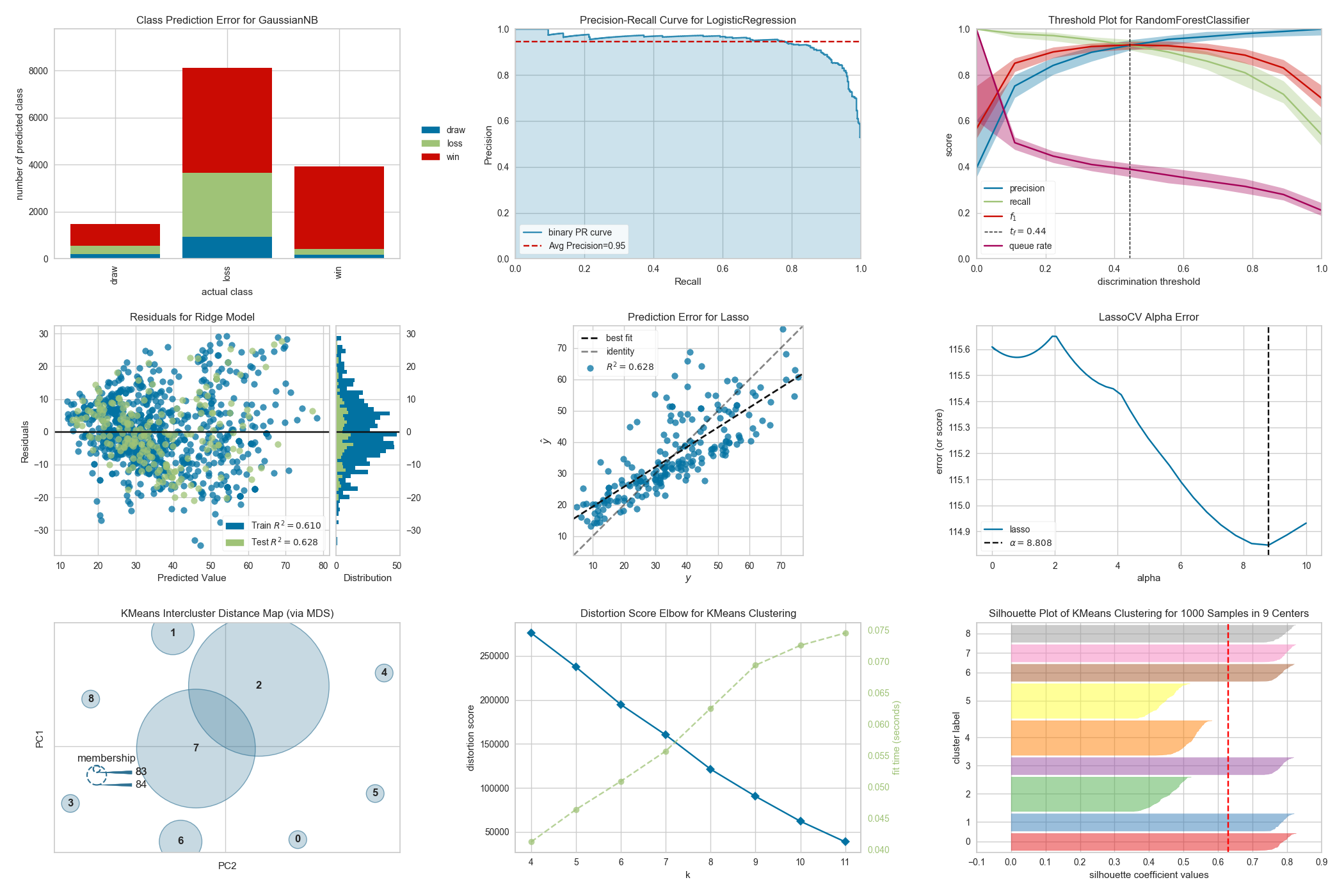
Yellowbrick is a suite of visual analysis and diagnostic tools designed to facilitate machine learning with scikit-learn. The library implements a new core API object, the Visualizer that is an scikit-learn estimator — an object that learns from data. Similar to transformers or models, visualizers learn from data by creating a visual representation of the model selection workflow.
Visualizer allow users to steer the model selection process, building intuition around feature engineering, algorithm selection and hyperparameter tuning. For instance, they can help diagnose common problems surrounding model complexity and bias, heteroscedasticity, underfit and overtraining, or class balance issues. By applying visualizers to the model selection workflow, Yellowbrick allows you to steer predictive models toward more successful results, faster.
The full documentation can be found at scikit-yb.org and includes a Quick Start Guide for new users.
Visualizers
Visualizers are estimators — objects that learn from data — whose primary objective is to create visualizations that allow insight into the model selection process. In scikit-learn terms, they can be similar to transformers when visualizing the data space or wrap a model estimator similar to how the ModelCV (e.g. RidgeCV, LassoCV) methods work. The primary goal of Yellowbrick is to create a sensical API similar to scikit-learn. Some of our most popular visualizers include:
Classification Visualization
- Classification Report: a visual classification report that displays a model's precision, recall, and F1 per-class scores as a heatmap
- Confusion Matrix: a heatmap view of the confusion matrix of pairs of classes in multi-class classification
- Discrimination Threshold: a visualization of the precision, recall, F1-score, and queue rate with respect to the discrimination threshold of a binary classifier
- Precision-Recall Curve: plot the precision vs recall scores for different probability thresholds
- ROCAUC: graph the receiver operator characteristic (ROC) and area under the curve (AUC)
Clustering Visualization
- Intercluster Distance Maps: visualize the relative distance and size of clusters
- KElbow Visualizer: visualize cluster according to the specified scoring function, looking for the "elbow" in the curve.
- Silhouette Visualizer: select
kby visualizing the silhouette coefficient scores of each cluster in a single model
Feature Visualization
- Manifold Visualization: high-dimensional visualization with manifold learning
- Parallel Coordinates: horizontal visualization of instances
- PCA Projection: projection of instances based on principal components
- RadViz Visualizer: separation of instances around a circular plot
- Rank Features: single or pairwise ranking of features to detect relationships
Model Selection Visualization
- Cross Validation Scores: display the cross-validated scores as a bar chart with the average score plotted as a horizontal line
- Feature Importances: rank features based on their in-model performance
- Learning Curve: show if a model might benefit from more data or less complexity
- Recursive Feature Elimination: find the best subset of features based on importance
- Validation Curve: tune a model with respect to a single hyperparameter
Regression Visualization
- Alpha Selection: show how the choice of alpha influences regularization
- Cook's Distance: show the influence of instances on linear regression
- Prediction Error Plots: find model breakdowns along the domain of the target
- Residuals Plot: show the difference in residuals of training and test data
Target Visualization
- Balanced Binning Reference: generate a histogram with vertical lines showing the recommended value point to the bin data into evenly distributed bins
- Class Balance: show the relationship of the support for each class in both the training and test data by displaying how frequently each class occurs as a bar graph the frequency of the classes' representation in the dataset
- Feature Correlation: visualize the correlation between the dependent variables and the target
Text Visualization
- Dispersion Plot: visualize how key terms are dispersed throughout a corpus
- PosTag Visualizer: plot the counts of different parts-of-speech throughout a tagged corpus
- Token Frequency Distribution: visualize the frequency distribution of terms in the corpus
- t-SNE Corpus Visualization: uses stochastic neighbor embedding to project documents
- UMAP Corpus Visualization: plot similar documents closer together to discover clusters
... and more! Yellowbrick is adding new visualizers all the time so be sure to check out our [examples gallery]https://github.com/DistrictDataLabs/yellowbrick/tree/develop/examples) — or even the develop branch — and feel free to contribute your ideas for new Visualizers!
Affiliations

Release history Release notifications | RSS feed


Download files
Download the file for your platform. If you're not sure which to choose, learn more about installing packages.
Source Distribution
Built Distribution
Filter files by name, interpreter, ABI, and platform.
If you're not sure about the file name format, learn more about wheel file names.
Copy a direct link to the current filters
File details
Details for the file yellowbrick2-2.0.tar.gz.
File metadata
- Download URL: yellowbrick2-2.0.tar.gz
- Upload date:
- Size: 38.9 MB
- Tags: Source
- Uploaded using Trusted Publishing? No
- Uploaded via: twine/6.2.0 CPython/3.13.5
File hashes
| Algorithm | Hash digest | |
|---|---|---|
| SHA256 |
82c884e83bd06ef4101ccd71d1a5c75c3b155e93361f30b8d0c92686865f65cf
|
|
| MD5 |
b93de742ce309fd7352d7b31cfea0705
|
|
| BLAKE2b-256 |
7e1302fb2e1d2dc39300a946d2b042349b53de79acc0ad80000e27af97093155
|
File details
Details for the file yellowbrick2-2.0-py3-none-any.whl.
File metadata
- Download URL: yellowbrick2-2.0-py3-none-any.whl
- Upload date:
- Size: 283.4 kB
- Tags: Python 3
- Uploaded using Trusted Publishing? No
- Uploaded via: twine/6.2.0 CPython/3.13.5
File hashes
| Algorithm | Hash digest | |
|---|---|---|
| SHA256 |
70d0dfea9ad5a4f14a0ddb9242134e21fa412e435e3914691f75b6b8fa7b6053
|
|
| MD5 |
87d5741dee6352fd85bed6cfaf431b4a
|
|
| BLAKE2b-256 |
a022410b8d81acb5146513ea46c6fc126e8e89de5f9734153212bd1f582ff3be
|






