
YGKA 🤖



YGKA is an advanced ChatGPT client for shell that acts as Your Genius Knowledgeable Assistant. YGKA supports Unix/Linux pipelines and requires no setting up of tokens or API keys. Furthermore, if you want to use an OpenAI API key, you can easily configure it.
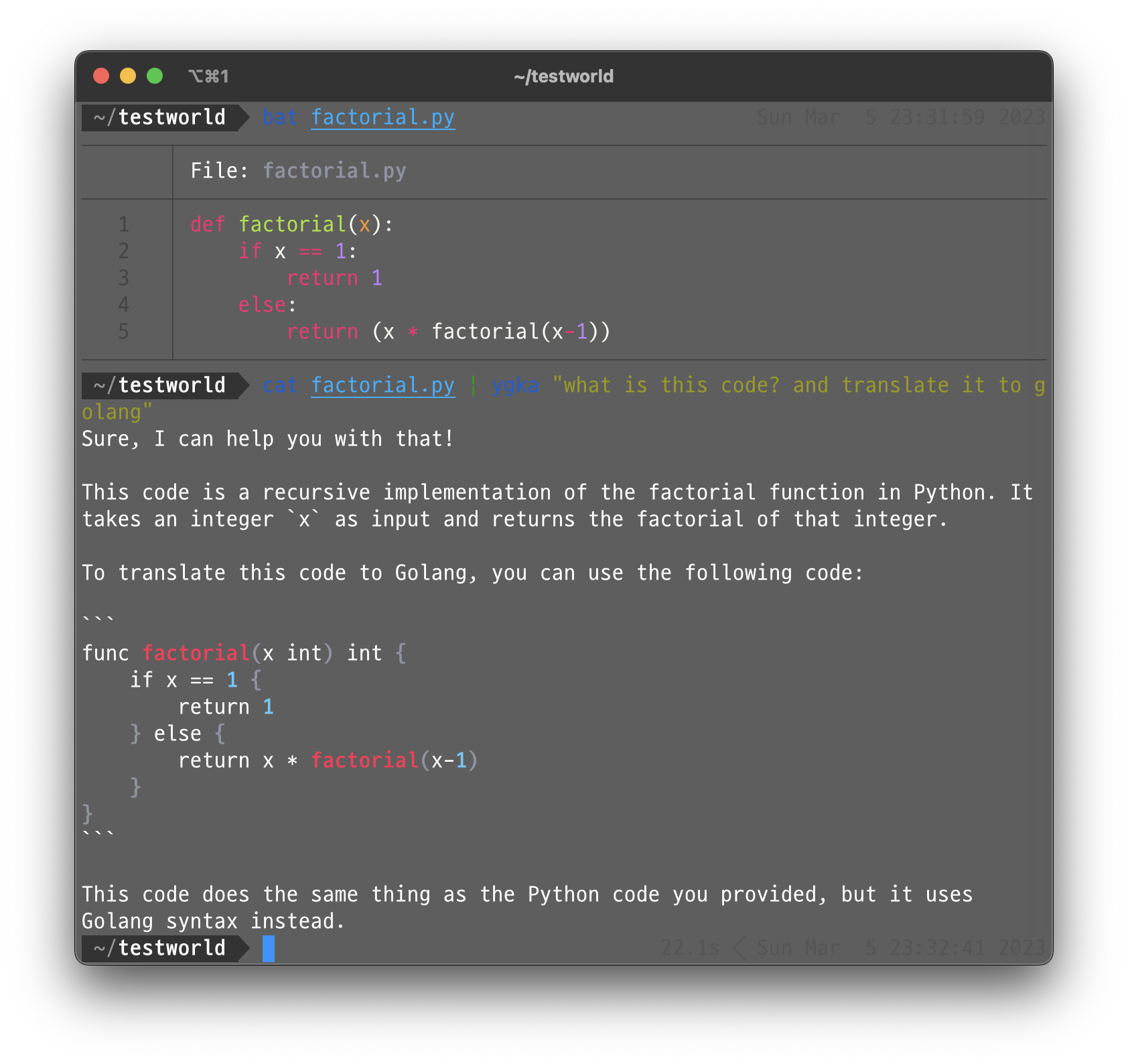
Key Features 💡
- Supports Unix/Linux pipelines
- Ready to use without setting up tokens or API keys
Prerequisites 📚
- Python 3.9+
- ChatGPT Account (or OpenAI Account)
Getting Started 🚀
To begin using YGKA, install it with pip:
pip install ygka
Once you've installed YGKA, you can start using it right away, like following.
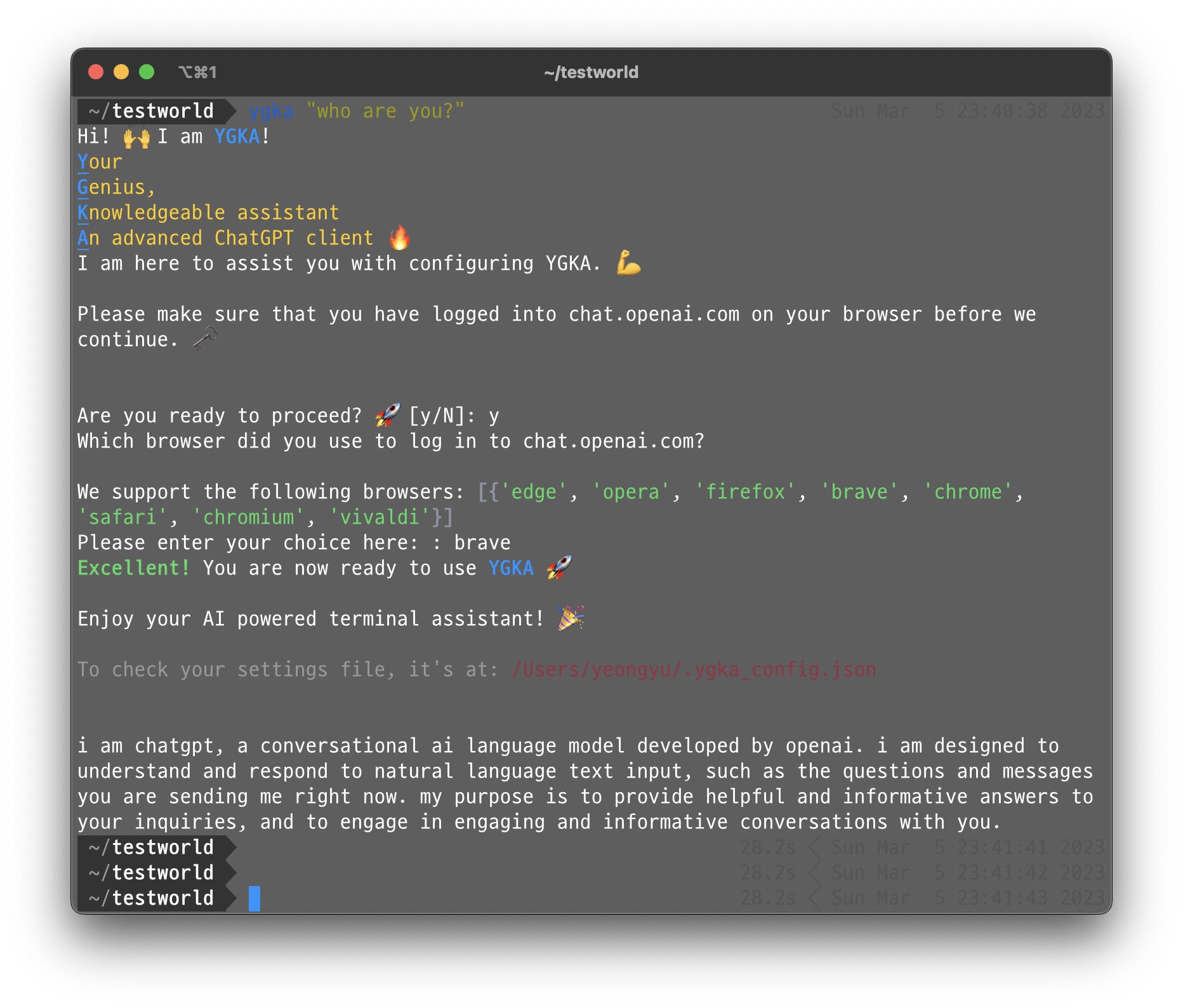
To execute a command, use the following syntax:
ygka "<your command here>"
For example, to ask "hello?" using YGKA, you can use the following command:
ygka "hello?"
You can also use YGKA with Unix pipeline. For example, to ask "what is this file?" while viewing the contents of a text file, you can use the following command:
cat textfile.txt | ygka "what is this file?"
Advanced Settings 🛠
By default, YGKA is configured to use the reverse-engineered ChatGPT client and retrieve login information from your browser, so you don't need to configure anything to use YGKA. However, for those who want to use different models with an OpenAI API Key, you can configure it as follows:
- Create an account on OpenAI.
- Go to https://platform.openai.com/account/api-keys and copy your API key.
- Modify or create the
~/.ygka_config.jsonfile as follows:
{
    ...
    "language_model": <language model of your preference>, //"official_chatgpt"
    "openai_api_key": <your OpenAI API key>
}
Here, you can specify the language model of your preference and add your OpenAI API key.
Inspired By 🎨
- YeonGyu Kim: My name. The project is named after me.
- AiShell: A Natural Language Shell Powered by ChatGPT, is a brother project of YGKA that provides a similar functionality.
- loz: A nodejs version of a GPT3 client that does similar things as YGKA.
Contributions 💬
Feel free to contribute to YGKA by adding more functionality or fixing bugs.
1 maintainer

Metadata
1 maintainer
Release files for ygka 2023.4.16.post1
For a detailed explanation of source distributions (sdists) and built distributions (wheels), please see the package formats documentation.
Source distribution (sdist)
| File | Size | Uploaded | |
|---|---|---|---|
| ygka-2023.4.16.post1.tar.gz | 8.8 kB | Details |
Built distribution (wheel)
| File | Interpreter | ABI | Platform | Reset |
|---|---|---|---|---|
| ygka-2023.4.16.post1-py3-none-any.whl | Python 3 | none | any | Details |
Total release size: 22.0 kB
Release files / ygka-2023.4.16.post1.tar.gz
| Download URL | ygka-2023.4.16.post1.tar.gz |
|---|---|
| Size | 8.8 kB |
| Tags | Source |
|
SHA-256 checksum How to use checksums |
77d983e476db5b691405ae5ebdfa1c73d9f6a58bed49c543f89eea8659975a94
|
|
BLAKE2b-256 checksum How to use checksums |
8c3ef10bcbbbc3f4b3209dad25fab0a07043c8e0a77a8ff823decef3d2afbbd7
|
| Upload date | |
|
Uploaded using Trusted Publishing? What is trusted publishing? |
No |
| Uploaded via |
poetry/1.4.2 CPython/3.9.16 Linux/5.15.0-1035-azure
|
Release files / ygka-2023.4.16.post1-py3-none-any.whl
| Download URL | ygka-2023.4.16.post1-py3-none-any.whl |
|---|---|
| Size | 13.2 kB |
| Tags | Python 3 |
|
SHA-256 checksum How to use checksums |
d22a3f4c49b5f7c2f37d180e59bc76a1f6cf5f818d501d9c14be2a3112977bc8
|
|
BLAKE2b-256 checksum How to use checksums |
b16c68ac2892092a4d00c48d398c12d97c1f44fddec64ef0d133d8990087b286
|
| Upload date | |
|
Uploaded using Trusted Publishing? What is trusted publishing? |
No |
| Uploaded via |
poetry/1.4.2 CPython/3.9.16 Linux/5.15.0-1035-azure
|














