
yhatmodels
Open foundation models from YHat Labs that run on your own computer.
Install · What you can do · Results · Usage guide · Model card
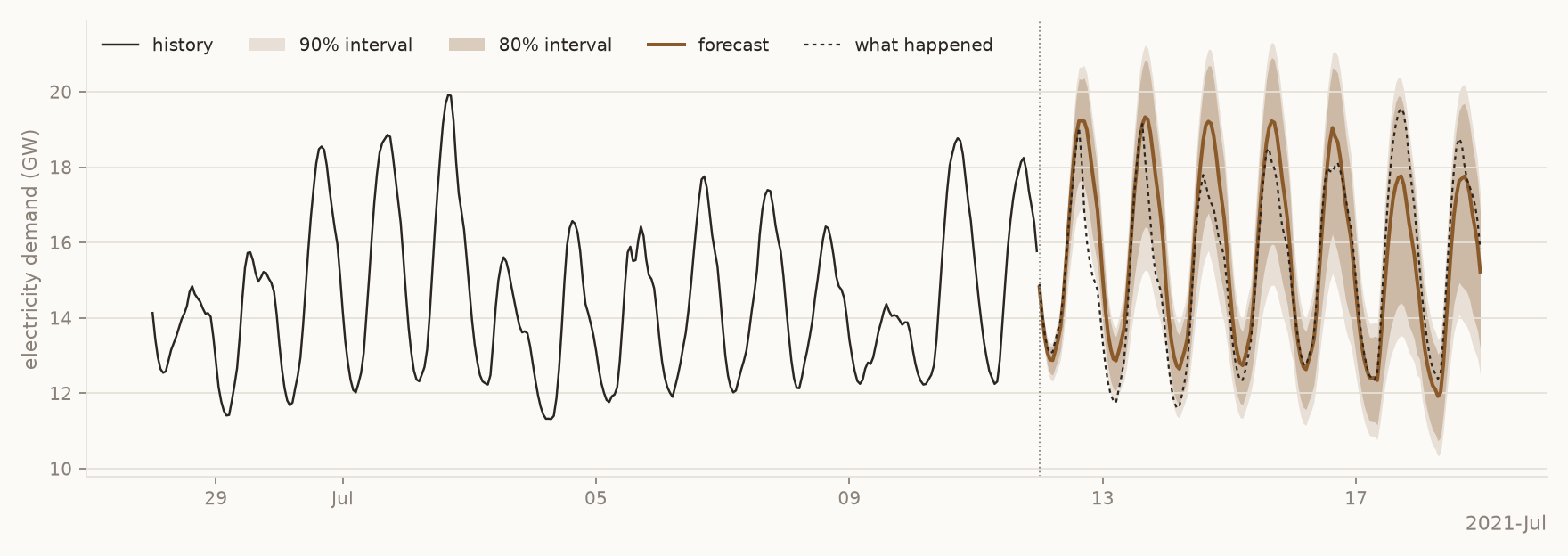
A week of hourly electricity demand on the Texas Gulf Coast, forecast from two weeks of history, with no training.
Data: ERCOT.
Forecasting in production? Use ChakraTS, our flagship model, through the YHat Labs API.
yhatmodels is the Python library and command line to run YHat Labs' open foundation models for time-series forecasting and tabular prediction. A foundation model is pretrained on synthetic and real data, so it works on your data zero-shot: there is no model of your own to train, tune or maintain.
The first model is ChakraTS-OS-10M, for time-series forecasting. Give it the past values of any series, such as daily sales, hourly electricity use or weekly sign-ups, and it predicts the next values with a range of likely outcomes around each one. It can also use what you already know about the future, like planned prices or a weather forecast, and it reads up to 32,768 past values of a series, nearly four years of hourly data, so long seasonal patterns are not cut off. It is a drop-in alternative to ARIMA, Prophet or a model you would train yourself, and with 10.6M parameters it runs on a laptop CPU in a fraction of a second.
For its size it is a frontier model: the most accurate open forecasting model under 100M parameters on fev-bench, and more accurate than most open models up to 100 times its size (see Results).
Quick start
pip install yhatmodels
import numpy as np
from yhatmodels import ChakraTS

model = ChakraTS.from_pretrained("ChakraTS-OS-10M")

history = 10 + np.sin(np.arange(500) / 24 * 2 * np.pi)  # any series: sales, demand, sensor readings, ...
q = model.forecast(history, h=48)                         # the next 48 steps: quantiles 0.1, 0.5 and 0.9
The first download asks you to accept the model license once, with a free yhatlabs.com account (see License). After that the model runs entirely on your computer.
What you can do
Get a range, not just a number
Every forecast comes with a range of likely values, so you can plan for a bad week as well as a typical one; the shaded
bands in the picture at the top are 80% and 90% intervals. Ask for the intervals you need: an 80% interval should
contain the actual value about 80% of the time, and evaluate (below) checks that on your own data.
q = model.forecast(history, h=48, level=[80, 95]) # (48, 5): the 95% and 80% interval edges around the median
Use what you know about the future
If you know something about the coming days, give it to the model: a weather forecast, planned prices, holidays. Name
those columns as known, and put their future values in the rows after your last observation.
# df: one row per hour with ds, y (solar output), sunlight and clouds;
# the last 48 rows hold tomorrow's weather forecast, with y empty
fc = model.forecast(df, h=48, known=["sunlight", "clouds"])
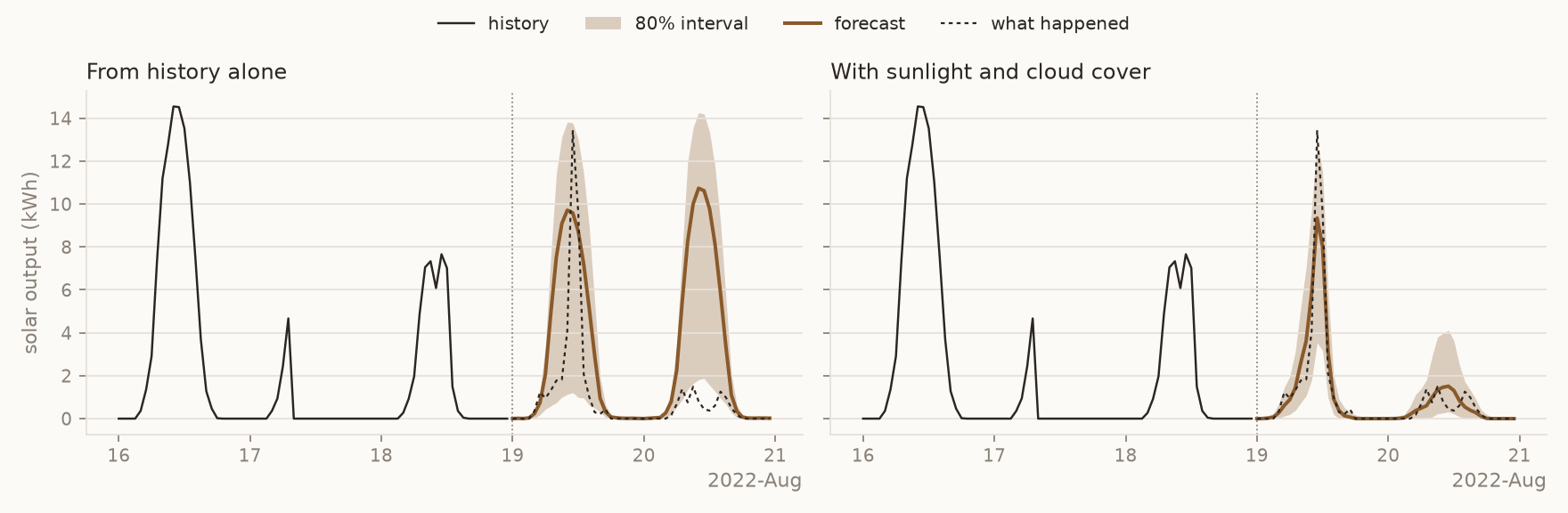
Two days of solar output. From history alone, the model expects another sunny day; with sunlight and cloud cover
it sees the cloudy one coming. Data: Renewable Energy and Weather Conditions (CC0).
Forecast your tables
Most data lives in tables. Pass one row per series and timestamp, and you get a table back: one row per future step, with the quantiles or intervals you ask for.
fc = model.forecast(df, h=7, known=["price", "promo"], level=[80, 95])
fc.head()  # unique_id, ds, q2.5, q10, median, q90, q97.5
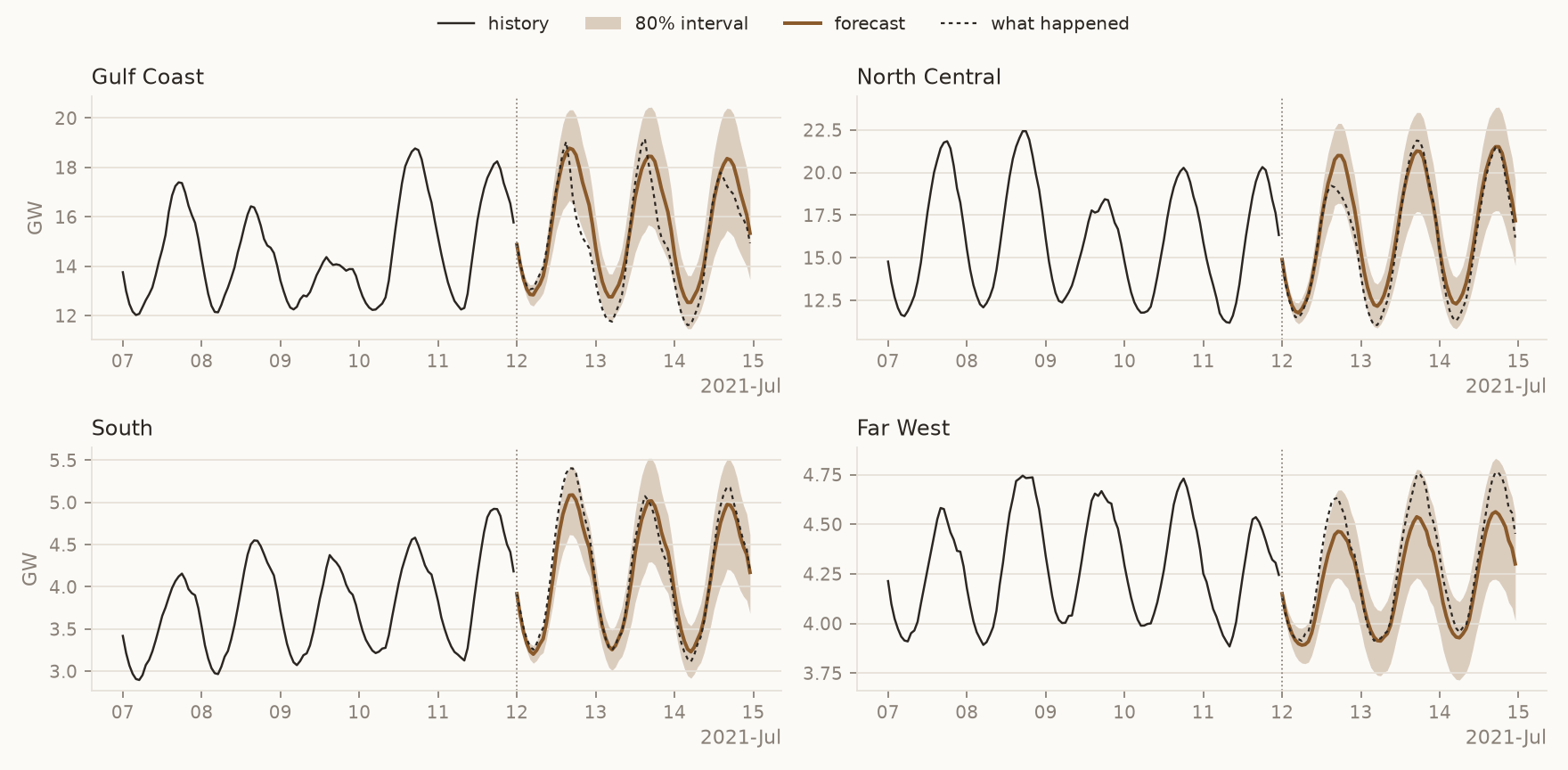
Four regions of the Texas grid, forecast three days ahead in one call, each with its 80% interval. Data:
ERCOT.
Check it on your own history
Before you rely on a forecast, see how it would have done. evaluate goes back to a few points in each series' past,
forecasts from there, and scores the forecasts against what really happened, next to a simple seasonal baseline.
res = model.evaluate(df, h=7, windows=3)
res.summary            # accuracy per model, and how much better than the baseline
res.plot()             # each forecast against what happened (pip install "yhatmodels[plot]")
res.plot_calibration() # do 10% of actual values fall below the 10% quantile, and so on?
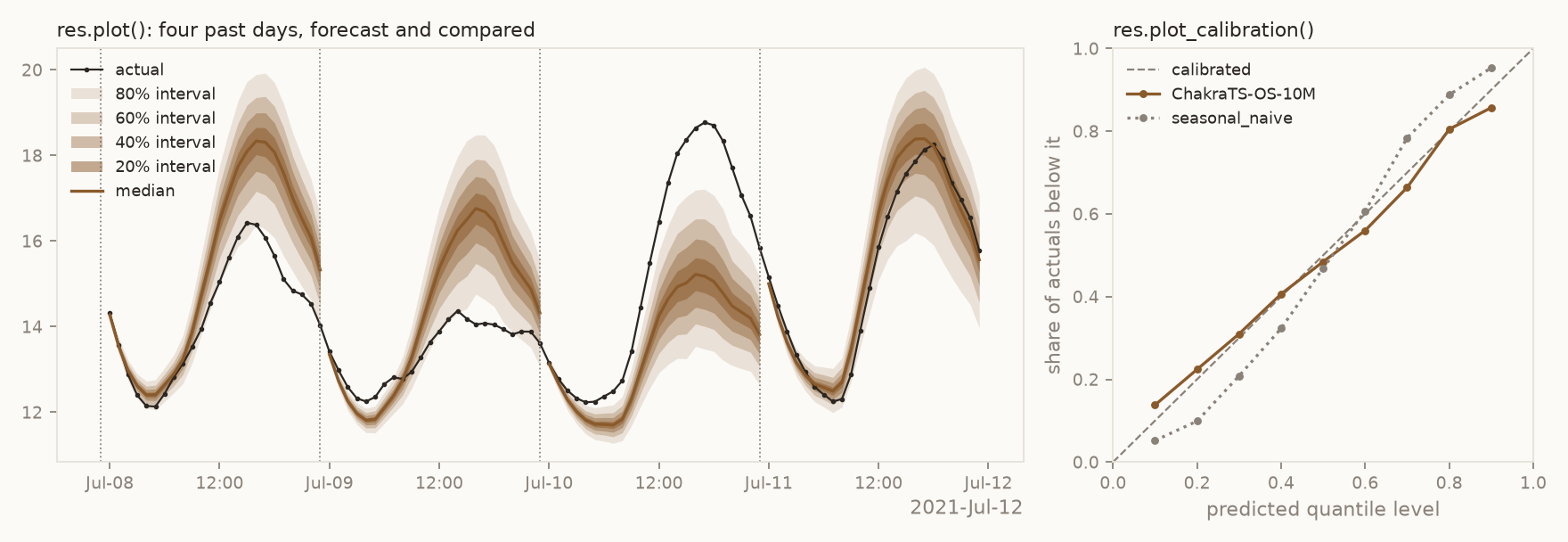
Four past days of Gulf Coast demand, each forecast from the history before it. The third was a hot day the history
gave no sign of, and the forecast misses it; across all four regions, the quantiles stay close to calibrated.
Fine-tune on your data
If your series follow patterns of their own, such as your promotions or paydays, tune adapts the model to your
history in seconds to minutes on a CPU. The tuned model is kept only if it forecasts your held-out history better than
the original.
tuned = model.tune(df, h=7)
tuned.save("my-tuned/")
From the command line
Everything above also works on a CSV or Parquet file, straight from the terminal.
yhatmodels forecast sales.csv --h 7 --known price,promo --level 80,95 -o forecast.csv
yhatmodels evaluate sales.csv --h 7 --windows 3
Every option is in the usage guide.
Results
fev-bench scores forecasting models on 100 tasks from many domains. Its skill score says how much more accurate a model is than a simple seasonal forecast; higher is better. ChakraTS-OS-10M is the most accurate open model under 100M parameters, and more accurate than most open models up to 100 times its size.
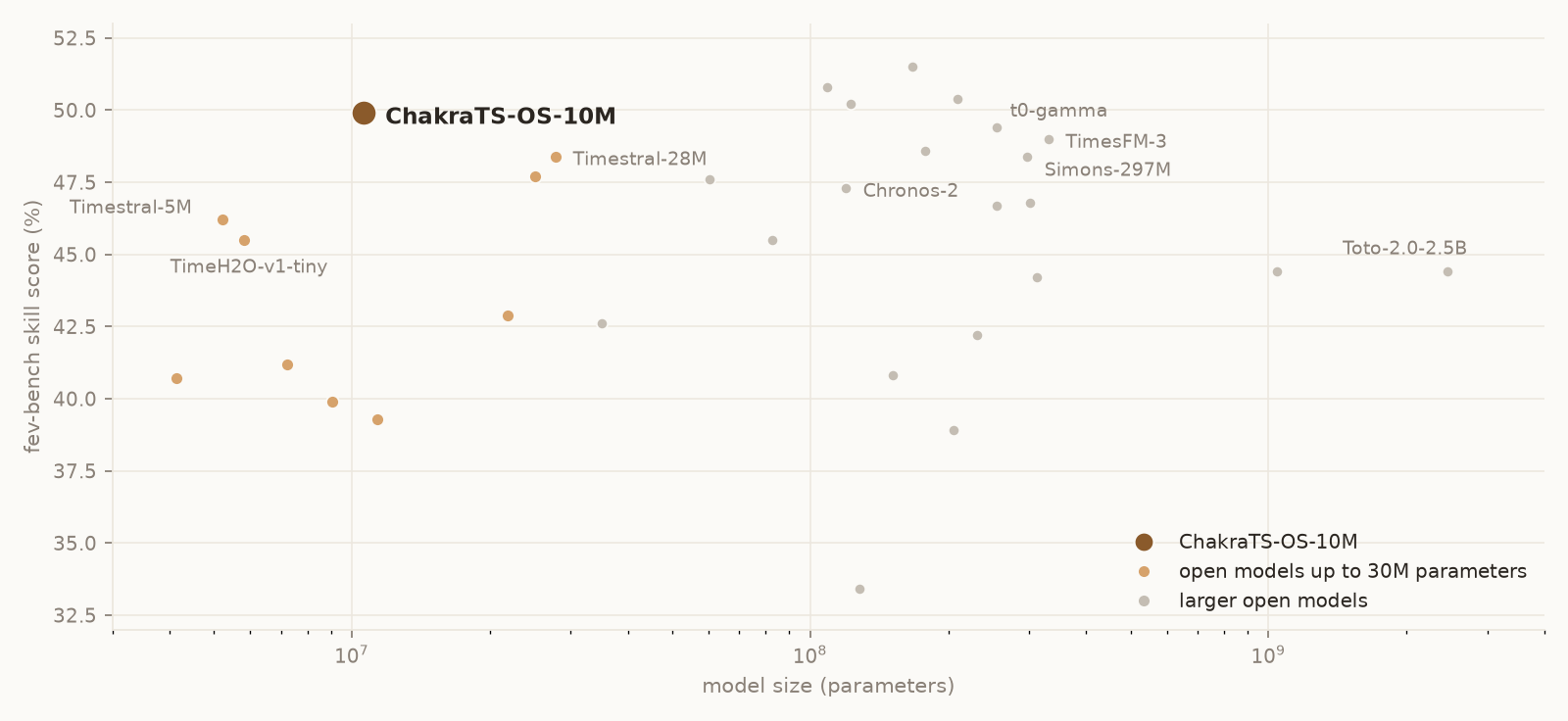
It is at its best when you give it covariates. On the 42 tasks that come with them, it keeps its accuracy, while most models lose some:
| Model | Parameters | All 100 tasks | 42 tasks with covariates |
|---|---|---|---|
| ChakraTS-OS-10M | 10.6M | 49.9 | 50.1 |
| Timestral-5M | 5.2M | 46.2 | 44.5 |
| TimeH2O-v1-tiny | 5.8M | 45.5 | 41.5 |
| Timestral-28M | 28M | 48.4 | 47.7 |
| Chronos-2 | 119M | 47.3 | 47.0 |
| t0-gamma | 256M | 49.4 | 49.3 |
| Simons-297M | 297M | 48.4 | 47.3 |
| TimesFM-3 | 331M | 49.0 | 49.0 |
| Toto-2.0-2.5B | 2.5B | 44.4 | 38.8 |
fev-bench skill score (%), as of November 2026, computed the way the fev-bench leaderboard does from the result files in the fev repository; sizes from the models' Hugging Face pages. The data behind the chart and table is in docs/benchmarks.csv.
Ways to use ChakraTS
yhatmodels (this library) |
The YHat Labs API | |
|---|---|---|
| Model | ChakraTS-OS-10M, open weights | ChakraTS, our flagship model |
| Runs | on your computer | on our servers |
| For | research, evaluation, personal projects, competitions | production and commercial use |
| Start | pip install yhatmodels |
pip install yhatlabs, or try it on yhatlabs.com |
Both use the same argument names, so code moves from one to the other with few changes.
Models
| Model | Task | Parameters | History read | Output | License |
|---|---|---|---|---|---|
| ChakraTS-OS-10M | forecasting | 10.6M | up to 32,768 steps | quantiles at any level | non-commercial |
License
The yhatmodels code is Apache-2.0. The ChakraTS-OS-10M weights are under the
Chakra Non-Commercial Model License: free for research, personal use, internal
evaluation and data science competitions. For commercial use, use the hosted API or write to
licensing@yhatlabs.com.
The first download asks you to accept the license once, with a free yhatlabs.com account:
- On your computer: your browser opens; sign in or create an account, accept, and the download starts.
- Over SSH: the terminal shows a link; open it anywhere and paste back the token it shows.
- In CI or scripts: set
YHAT_MODELS_TOKEN(copy it from yhatlabs.com/models/license), or runyhatmodels accept-license ChakraTS-OS-10Monce in a terminal.
Questions
Does my data leave my computer? No. The model runs locally. The only call to YHat Labs is the license check before the first download, which sends your token and nothing else.
Can I use it offline, or on a server? Yes. Once downloaded, the weights stay in the Hugging Face cache and later runs
need no network. On machines without a browser, set YHAT_MODELS_TOKEN.
Do I need a GPU? No. It is fast on a CPU; an NVIDIA or Apple GPU helps with large batches and long histories.
What can't it do? It returns quantiles rather than sample paths, has no per-series attributes (static covariates), and reads at most the last 32,768 steps of a history. The hosted ChakraTS adds sample paths and static covariates.
Citation
If you use ChakraTS-OS in your work, please cite it:
@misc{yhatlabs2026chakratsos,
  title        = {{ChakraTS-OS}: open-weight time-series forecasting models},
  author       = {{YHat Labs}},
  year         = {2026},
  howpublished = {\url{https://huggingface.co/yhatlabs/ChakraTS-OS-10M}},
  url          = {https://huggingface.co/yhatlabs/ChakraTS-OS-10M}
}
Contact
1 maintainer

Metadata
1 maintainer
Release files for yhatmodels 0.1.0
For a detailed explanation of source distributions (sdists) and built distributions (wheels), please see the package formats documentation.
Source distribution (sdist)
| File | Size | Uploaded | Provenance | Actions |
|---|---|---|---|---|
| yhatmodels-0.1.0.tar.gz | 1.7 MB | With provenance | Details for yhatmodels-0.1.0.tar.gz |
Built distribution (wheel)
| File | Interpreter | ABI | Platform | Actions Reset |
|---|---|---|---|---|
| yhatmodels-0.1.0-py3-none-any.whl | Python 3 | none | any | Details for yhatmodels-0.1.0-py3-none-any.whl |
Total release size: 1.8 MB
Release files / yhatmodels-0.1.0.tar.gz
| Download URL | yhatmodels-0.1.0.tar.gz |
|---|---|
| Size | 1.7 MB |
| Tags | Source |
|
SHA-256 checksum How to use checksums |
54400d5528c9593f0e78f687777a0d4eabf7fda26c74807c1255c213217b1775
|
|
BLAKE2b-256 checksum How to use checksums |
9f94271c80888de327b38032bc4b72c7c9946b3cde9781fd474f45e9e901510b
|
| Upload date | |
|
Uploaded using Trusted Publishing? What is trusted publishing? |
Yes |
| Uploaded via |
twine/7.0.0 CPython/3.13.16
|
Provenance
Provenance describes where a file came from. On PyPI, provenance is shared via attestations, which provide a verifiable record of the build or publishing details. View details, limitations and caveats.


PyPI Publish Attestation
PyPI verified that this artifact, at this checksum, originated from the publisher listed below.
Signed by GitHub Actions, verified by PyPI on Nov 20, 2026.
Transparency logRelease files / yhatmodels-0.1.0-py3-none-any.whl
| Download URL | yhatmodels-0.1.0-py3-none-any.whl |
|---|---|
| Size | 64.7 kB |
| Tags | Python 3 |
|
SHA-256 checksum How to use checksums |
3ef37052acab228afd7550dc3c2d4a9ca401def8fd3f4e76b77cef8e1c2e4b66
|
|
BLAKE2b-256 checksum How to use checksums |
b24847c16d029aa9fcd802519e91356f51a430e6ddb9f109391cb1f1bd4caecb
|
| Upload date | |
|
Uploaded using Trusted Publishing? What is trusted publishing? |
Yes |
| Uploaded via |
twine/7.0.0 CPython/3.13.16
|
Provenance
Provenance describes where a file came from. On PyPI, provenance is shared via attestations, which provide a verifiable record of the build or publishing details. View details, limitations and caveats.
PyPI Publish Attestation
PyPI verified that this artifact, at this checksum, originated from the publisher listed below.
Signed by GitHub Actions, verified by PyPI on Nov 20, 2026.
Transparency logSecurity for yhatmodels 0.1.0
Provenance
Provenance describes where a file came from. On PyPI, provenance is shared via attestations, which provide a verifiable record of the build or publishing details. View details, limitations and caveats.
Full provenance
Both files in this release have been uploaded with provenance metadata.
Attestation for yhatmodels-0.1.0.tar.gz
PyPI Publish Attestation
PyPI verified that this artifact, at this checksum, originated from the publisher listed below.
Signed by GitHub Actions, verified by PyPI on Nov 20, 2026.
Transparency logA note on package security
PyPI is a repository for distributing packages, not a service for auditing them. While third-party security researchers and our staff do their best to detect and remove malicious packages, PyPI cannot guarantee the quality, security or suitability of any given package.
To learn more about protecting yourself from malicious actors, visit our package security documentation.













