
A light weight command line menu that supports Windows, MacOS, and Linux

Project description
# dumb_menu
[](https://pepy.tech/project/dumb-menu)
simple_term_menu don't support windows, so I made dumb_menu.
dumb_menu is not as powerful as simple_term_menu , but this a **GOOD OLD MENU** .
dumb_menu is a light weight command line menu that supports **Windows**, **MacOS**, and **Linux**.
## Installation
```
pip install dumb-menu
```
https://pypi.org/project/dumb-menu/
https://github.com/cornradio/dumb_menu (I want stars ⭐ uwu)
## Usage
example:
```python
import dumb_menu
options = ["[1]Option 1", "[2]Option 2", "[3]Option 3","[q]quit"]
index = dumb_menu.get_menu_choice(options)
print(f"You selected option {index + 1}: {options[index]}")
```
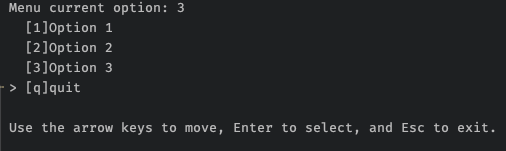
another example:
```python
import os
import dumb_menu
def loopmenu():
options = ["[1]happy",
"[2]sad",
"[3]give me a cookie",
"[q]quit"]
index = dumb_menu.get_menu_choice(options,isclean = True)
# clear screen, cls for windows, clear for linux
os.system('cls')
# Python 3.10+ only,old version could use if-else
match index:
case 0:
print(":)")
case 1:
print(":(")
case 2:
print("🍪ヾ(•ω•`)o")
case 3:
exit()
input('Press ENTER to continue...')
if __name__ == "__main__":
while True:
loopmenu()
```

## Get help
Get help ➡️ [Github issue](https://github.com/cornradio/dumb_menu/issues)
## Update log
`1.0.8` add "return key string" option , add `demo.py` As a straightforward example
```python
dumb_menu.get_menu_choice(options,give_key_str = True)
```
`1.0.7` fix "flickering on mac zsh"
`1.0.6` forget write log in 1.0.5
`1.0.5` fix bug in 1.0.4
`1.0.4` support "clean mode"
`1.0.3` show selected index also when using hotkey
`1.0.2` first useable version
`1.0.1` fix bug
`1.0.0` first release
## how to upload a new version (for me)
en: https://packaging.python.org/tutorials/packaging-projects/
zh: https://python-packaging-zh.readthedocs.io/zh_CN/latest/minimal.html#id2
> make sure have twine installed first
1. change `setup.py`
2. testing `python3 setup.py develop`
3. `python3 setup.py sdist`
4. `twine upload dist/*`
test code :
```
python3
import dumb_menu
dumb_menu.demo()
```
Release history Release notifications | RSS feed


Download files
Download the file for your platform. If you're not sure which to choose, learn more about installing packages.
Source Distribution
yhs_menu-1.0.1.tar.gz
(4.2 kB
view details)






