
markdownserver




Markdown server using yhttp.
Features
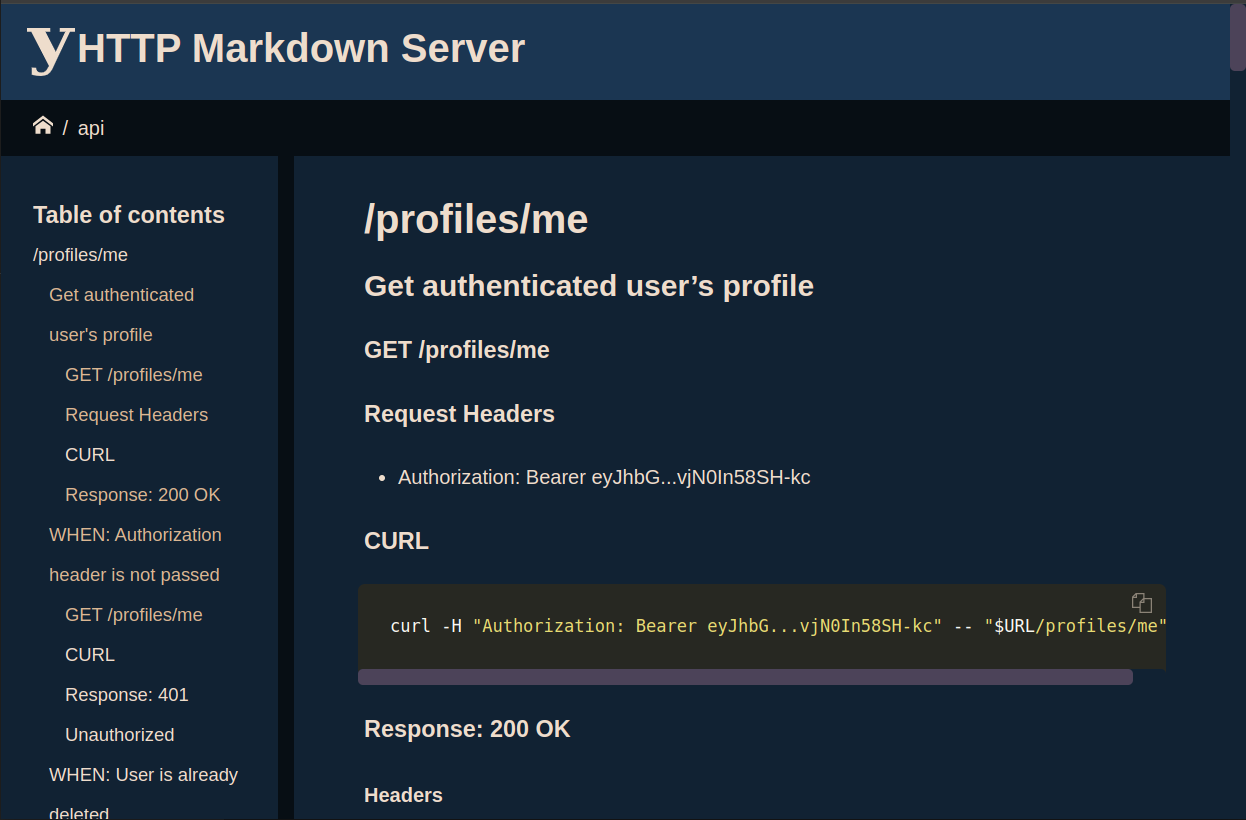
- Serve a directory of markdown files and subdirectories as HTML using markdown2.
- Personalizable favicon, touch-icon logo and etc.
- Syntaxt highlighting for code blocks + themes using pygment.
- Copy-to-clipboard buttons for code-blocks and HTML bookmarks.
- Resizable sidebar and page layout powered by CSS Flexbox.
- Breadcrumbs (path) navigator.
- Change configuration using file and command line interface.
- mermaid support.
Install
pip install yhttp-markdown
Quickstart
Navigate to a directory consist of markdown files, then:
yhttp-markdown serve
Command line interface
yhttp-markdown --help
usage: yhttp-markdown [-h] [-c FILE] [-C DIRECTORY] [-O OPTION] [--version]
                      {serve,s,completion} ...

options:
  -h, --help            show this help message and exit
  -c FILE, --configuration-file FILE
                        Configuration file
  -C DIRECTORY, --directory DIRECTORY
                        Change to this path before starting, default is: `.`
  -O OPTION, --option OPTION
                        Set a configutation entry: -O foo.bar.baz='qux'. this
                        argument can passed multiple times.
  --version

Sub commands:
  {serve,s,completion}
    serve (s)
    completion          Bash auto completion using argcomplete python package.
Bash auto completion
To enable bash auto comletion, first run this command:
yhttp-markdown completion install
Then close and re-open your shell or deactivate/activate the current virtual environment (if using) to apply the change:
deactivate && . activate.sh
Test it:
yhttp-markdown TAB TAB
Nginx + Systemd + Gunicorn
Copy the deploy.sh to target server. then execute the script and answer the
questions.
bob@laptop:~$ scp deploy.sh <server>
bob@laptop:~$ ssh root@<server>
root@server:~# ./deploy.sh
Configuration
yhttp-markdown can be configured using a YAML configuration file
(the -c/--configuration-file) and -O/--option flags at the same time:
yhttp-markdown -c settings.yaml -O highlight.theme=vim -O toc.depth=2 serve
Configuration file
This is the example of default configuration file:
# settings.yaml


# app specific
default: index.md
root: .


# site title
title: HTTP Markdown Server


# table of contents
toc:
  depth: 3


# a list of regex patterns to exclude from TOC and HTTP serve
exclude:


# metadata path
metadata:
  physical: .ymdmetadata
  baseurl: /.ymdmetadata


# syntaxt highlighting theme
highlight:
  theme: monokai
Root directory
By default, yhttp-markdown serves files from the current directory (pwd).
you may navigate to desired path before running the yhttp-markdown command
or set the root configuration entry:
# settings.yaml

root: path/to/www/root
yhttp-markdown -O root=/path/to/www/root serve
You may also use the -C/--directory command line option to cd to a
directory before running the server.
yhttp-markdown -C /path/to/www/root serve
Default document
yhttp-markdown looks for the index.md on requests referring to a
directory (http://example.com/foo/). but, this can be changed using the
default configuration entry:
# settings.yaml

default: default.md
Or, using the command line interface:
yhttp-markdown -O default=default.md serve
Table of contents
yhttp-markdown crawls the *.md files and finds the markdown headdings:
# Header 1
## Header 2
### Header 3
#### Header 4
##### Header 5
###### Header 6
To genrate a tree of HTTP bookmarks and table of contents section of the current requested path.
You can change the toc.depth configuration value to change the behaviour:
yhttp-markdown -Otoc.depth=3 serve
Exclusion
To exclude file and directories from serving use the exclude configuration
entry. it's a collection of regular expression patterns relative to the sites
root (/):
# settings.yaml

exclude:
  - foo\\.md
  - bar/?.*
Or, using the command line interface:
yhttp-markdown -O"exclude=[lorem\.md, bar/?.*]" serve
Site metadata
The default website metadata such as favicon and logo could be overriden
using the .ymdmetadata directory. this directory must be placed dirctly
inside the root. so, these resources will be available at
http://localhost:8080/.ymdmetadata/ when the server is running.
This is an examples of the metadata directory.
.ymdmetadata/
  android-chrome-192x192.png
  android-chrome-512x512.png
  apple-touch-icon.png
  favicon-16x16.png
  favicon-32x32.png
  favicon.ico
  logo.svg
The name and base path are also changable using the metadata.physical and
metadata.baseurl configuration entries:
# settings.yaml

metadata:
  physical: .ymdmetadata
  baseurl: /.ymdmetadata
Code blocks syntax highlighting
yhttp-markdown uses the
fenced-code-blocks
and pygment to make the code blocks prettier.
The pygment theme can be changed using the highlight.theme configuration
entry:
# settings.yaml

highlight:
  theme: monokai
Or, using the command line interface:
yhttp-markdown -O highlight.theme=vim serve
Available themes:
- autumn
- borland
- bw
- colorful
- default
- emacs
- friendly
- fruity
- manni
- monokai
- murphy
- native
- pastie
- perldoc
- tango
- trac
- vim
- vs
See pygments styles page to figure out how they looks like.
Contribuition
Setup development environment
Install python-makelib, then:
cd path/to/yhttp-markdown
make fresh env activate.sh
Test and coverage
make test
make cover
Lint
make lint
Serve
make serve
Or
source activate.sh
yhttp-markdown -C examples serve
NOTE: Do a
make qaormake cover lintbefore commit.
1 maintainer

Metadata
1 maintainer
Release files for yhttp-markdown 4.1.0
For a detailed explanation of source distributions (sdists) and built distributions (wheels), please see the package formats documentation.
Source distribution (sdist)
| File | Size | Uploaded | Provenance | |
|---|---|---|---|---|
| yhttp_markdown-4.1.0.tar.gz | 347.8 kB | Without provenance | Details |
Built distribution (wheel)
| File | Interpreter | ABI | Platform | Reset |
|---|---|---|---|---|
| yhttp_markdown-4.1.0-py3-none-any.whl | Python 3 | none | any | Details |
Total release size: 708.5 kB
Release files / yhttp_markdown-4.1.0.tar.gz
| Download URL | yhttp_markdown-4.1.0.tar.gz |
|---|---|
| Size | 347.8 kB |
| Tags | Source |
|
SHA-256 checksum How to use checksums |
404c6174701cbe2678063205be54f0d622503097ef36d002d02a807841369539
|
|
BLAKE2b-256 checksum How to use checksums |
fe5baf1283e80b6c7b38deeac08c93f071b67161a87440a48cd343d4d8d7b81f
|
| Upload date | |
|
Uploaded using Trusted Publishing? What is trusted publishing? |
No |
| Uploaded via |
twine/6.1.0 CPython/3.13.12
|
Release files / yhttp_markdown-4.1.0-py3-none-any.whl
| Download URL | yhttp_markdown-4.1.0-py3-none-any.whl |
|---|---|
| Size | 360.7 kB |
| Tags | Python 3 |
|
SHA-256 checksum How to use checksums |
1fc914b3511597d123232a6ca3d597af2d792f0e0313a705504646f49b870cf0
|
|
BLAKE2b-256 checksum How to use checksums |
3b3fdab963fa5b9e8de90822cb2485d18b91d0493125f2ee245c812cd835bf3a
|
| Upload date | |
|
Uploaded using Trusted Publishing? What is trusted publishing? |
No |
| Uploaded via |
twine/6.1.0 CPython/3.13.12
|
Security for yhttp-markdown 4.1.0
Provenance
Provenance describes where a file came from. On PyPI, provenance is shared via attestations, which provide a verifiable record of the build or publishing details. View details, limitations and caveats.
No provenance found
None of the files in this release were uploaded with provenance metadata.
A note on package security
PyPI is a repository for distributing packages, not a service for auditing them. While third-party security researchers and our staff do their best to detect and remove malicious packages, PyPI cannot guarantee the quality, security or suitability of any given package.














