
Terminal-first runtime for Claude Code and Codex CLI — durable interactive sessions, Docker isolation, and a web control surface

Project description

yikes!


Run Claude Code and Codex like durable, controllable services — from the terminal, the browser, or Python.
yikes! is a terminal-first runtime for Claude Code and the Codex CLI. One word — yikes claude — starts (or reattaches) a real interactive session for the current project and drops you straight in: as easy as running claude, but durable, reattachable, optionally sandboxed, and reachable from a browser.
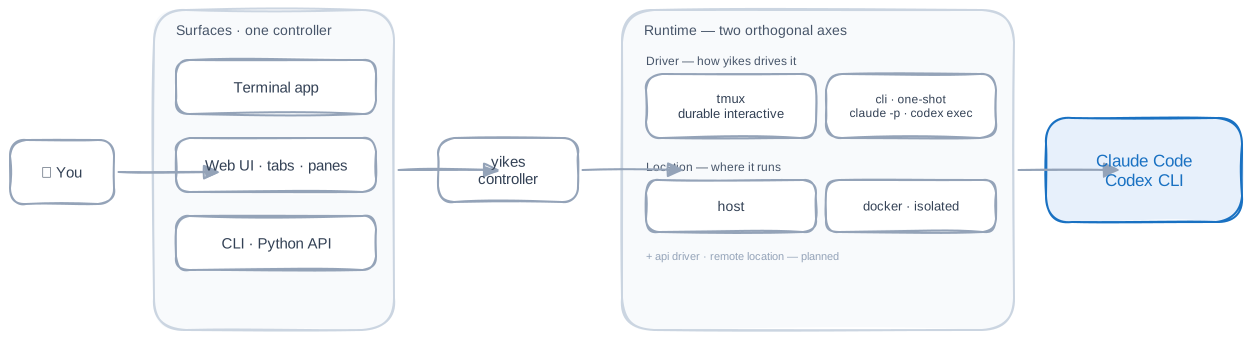
The same runtime is exposed three ways — an interactive terminal app, a login-gated web control surface, and a clean Python/CLI API — all backed by one shared controller.
Why yikes!
For the cases where a one-shot prompt is not enough:
- One-word launchers —
yikes claude/yikes codexstart or reattach a real interactive session for the current directory. The session name follows the git project, so re-running resumes it; concurrent work lives in separate projects. - Durable sessions — every session is a real tmux session that survives disconnects. Reattach from any terminal, list and overtake sessions, and drive them from scripts.
- Docker isolation —
yikes claude -iruns the agent in a container with the project mounted and ports published, so risky work stays contained. - A web control surface —
yikes webserves a login-gated UI with one tab per session and sub-tabs ("panes"): the live terminal, the web app the agent is building (embedded), health tables, and links. - Project config — a committed
yikes.tomldeclares per-project defaults (backend, isolation, ports, panes);yikes setupcan write it by inspecting the repo. - Python-first core — the terminal app, web UI, and CLI share the same controller and service layer, so the runtime embeds cleanly elsewhere.
Install
pip install yikes
yikes
yikes! drives the backend CLIs you already use, so install and log into the ones you want:
Claude Code · Codex CLI. tmux is required for interactive sessions; Docker is optional (only for -i).
Working from a clone instead?
git clone … && cd yikes && pip install -e ., thenbash scripts/install-path.shto putyikeson PATH for new shells.
Quick start
yikes claude                  # start or reattach an interactive Claude session here
yikes codex                   # same, with the Codex CLI
yikes claude -i               # run it isolated in Docker (ports from yikes.toml)
yikes claude -m "scaffold a FastAPI app"   # seed the first prompt
yikes                         # chooser: claude / codex / terminal overview
Each launch shows a short pre-flight panel (mapped ports, how to leave with Ctrl-b d and return with yikes claude), then drops you into the live session. Per-project defaults live in a committed yikes.toml — run yikes init to scaffold one or yikes setup to have the backend inspect the repo and write it for you.
yikes sessions                # list durable sessions
yikes attach <name|id>        # overtake an attachable session
yikes close-all               # close every session (confirms first; -y to skip)
yikes web                     # serve the browser control surface
See the CLI reference for the full command surface, Docker isolation, and project config.
Web control surface
yikes web serves a login-key-gated UI on all interfaces by default — the key is stored user-globally and login is rate-limited against brute force, so it is safe on a LAN. yikes web --url prints the ready-to-open login URL so you can reach it from another machine without copying the key by hand.
Each session tab carries panes (sub-tabs): the live terminal, an embedded view of the web app the agent is building (a full browser bar with reload, history, and a load/unload toggle), auto-refreshing health/status tables, and sidebar links. Panes are declared per project in yikes.toml [[panes]] — by port, never a hardcoded host — or added at runtime with the + web button. A pane with a start command gets a Start/Stop control so yikes can run the dev server for you.
See the Web UI docs and Session panes.
Runtime model
yikes! separates two orthogonal choices, instead of one overloaded mode switch:
| Choice | Options | Meaning |
|---|---|---|
| Location | host · docker · (remote, planned) |
Where the agent runs |
| Driver | cli · tmux · (api, planned) |
How yikes! drives it |
That keeps fast one-shot CLI calls, Docker isolation, and real interactive tmux sessions composable.
Python API
The same service layer that powers the terminal, CLI, and web surfaces is available directly:
from pathlib import Path

from yikes import Backend, ChatService, Driver, ImageAttachment

conversation = ChatService().create_conversation(
    backend=Backend.CLAUDE,
    driver=Driver.DIRECT,
)

answer = conversation.ask(
    "What is shown here?",
    attachments=(ImageAttachment(Path("screenshot.png").resolve()),),
)
print(answer)
Documentation
Full documentation lives in docs/ (architecture, CLI reference, tmux layer, Python library, embedding). Serve it locally with mkdocs serve; the diagrams are clickable with a zoom view.
Development
poetry install                       # runtime + dev dependencies
git config core.hooksPath .githooks  # block accidental commits of raw captures
poetry run pytest -q
poetry run mkdocs build --strict
End-to-end tests that invoke real Claude Code, Codex, Docker, or tmux are opt-in (marked integration) because they depend on local credentials and may spend API credits.
MIT licensed · Copyright © 2026 Michael Ikemann.
Release history Release notifications | RSS feed

Download files
Download the file for your platform. If you're not sure which to choose, learn more about installing packages.
Source Distribution
Built Distribution
Filter files by name, interpreter, ABI, and platform.
If you're not sure about the file name format, learn more about wheel file names.
Copy a direct link to the current filters
File details
Details for the file yikes-0.1.7.tar.gz.
File metadata
- Download URL: yikes-0.1.7.tar.gz
- Upload date:
- Size: 1.7 MB
- Tags: Source
- Uploaded using Trusted Publishing? No
- Uploaded via: twine/6.2.0 CPython/3.14.3
File hashes
| Algorithm | Hash digest | |
|---|---|---|
| SHA256 |
ad504d1f88e3e7a41def19979b2f7a5d04b28d00cf71fcb4876de79c85519ae0
|
|
| MD5 |
9d6c6ab3e49b42ffed6259d442c1c61a
|
|
| BLAKE2b-256 |
eee019585adcd65f28dc8bad4ecbad1eba29f2a9487119879b6454f006ab800f
|
File details
Details for the file yikes-0.1.7-py3-none-any.whl.
File metadata
- Download URL: yikes-0.1.7-py3-none-any.whl
- Upload date:
- Size: 1.7 MB
- Tags: Python 3
- Uploaded using Trusted Publishing? No
- Uploaded via: twine/6.2.0 CPython/3.14.3
File hashes
| Algorithm | Hash digest | |
|---|---|---|
| SHA256 |
0318553f87b55ffc434dfccb8921ae3550c3e1d0280d6bd3d49bd97d251c0db3
|
|
| MD5 |
824dfa4ca6731fd1414ba81dbda650fb
|
|
| BLAKE2b-256 |
545711351468f3aac44826a715ed3e69524621ca747d17175926c8065120d3b1
|






