
A Python linter focused on naming conventions with 5 strictness levels

Project description
yina
A simple, yet opinionated linter for Python that helps you choose more descriptive variable names.
pip install yina


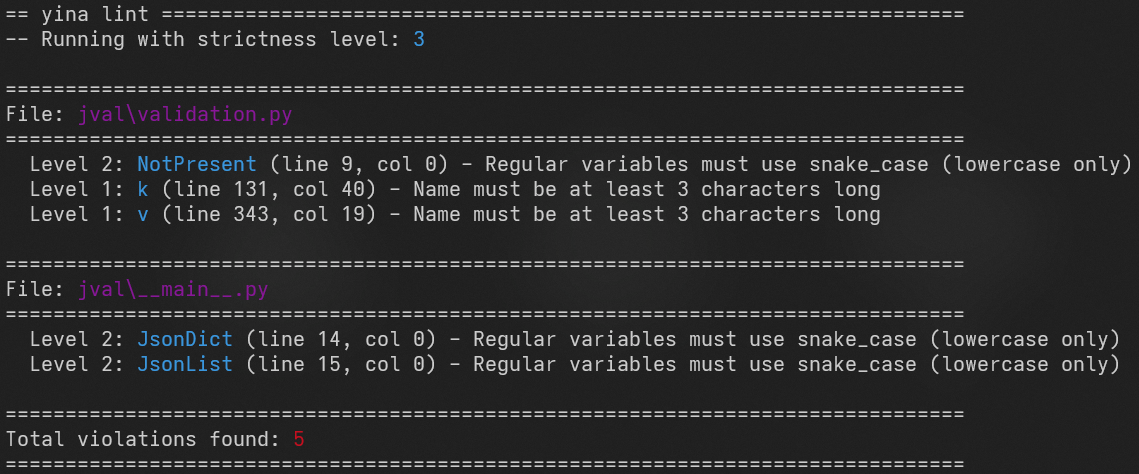
Usage
- Run
yina lint file.pyto lint a file oryina lint src/for a directory. - Use the
--level Noption to specify the strictness level. Defaults to level 3. - With
yina inityou can generate a configuration file for the working directory with default values you can edit.
Strictness levels
Yina lint operates on 5 strictness levels. Each level includes all the rules from the previous levels.
| Level | Rules |
|---|---|
| Level 1: Length and charset | - Variables must be at least 3 characters long. - Variables can only contain characters: a-Z, A-Z, 0-9 and _. - Variables cannot start with a number. |
| Level 2: Naming conventions | - Snake case will be enforced for regular variables and camel case for class names. - All constants must be fully capitalized. - Snake case variables that are not constants cannot have capital letters. |
| Level 3 (default): Word length, max length, repetition | - Max variable length: 32 characters. - No more than 2 underscores in a row. - Applied for each "word" in a variable name, like "one" in "one_two_three": - No more than 2 of the same letter in a row. - At least 3 characters long. |
| Level 4: Pronounceability | - Applied for each "word" in a variable name, like "one" in "one_two_three": - At least one vowel - No more than 4 consonants in a row |
| Level 5: Non vagueness | - No vague words like "item(s)", "thing(s)", "object(s)", "element(s)", "data", "value" or "result". "string" or "dataframe" are also disallowed. Applies only to the entire variable name, vague segments are allowed. - No numbers. |
Configuration
- If there is a
.yina.tomlfile in the working directory, it will be used. - If not, the default
yina-lint/config/yina.tomlfile will be applied.
Release history Release notifications | RSS feed


Download files
Download the file for your platform. If you're not sure which to choose, learn more about installing packages.
Source Distribution
yina-0.1.9.tar.gz
(11.5 kB
view details)
Built Distribution
Filter files by name, interpreter, ABI, and platform.
If you're not sure about the file name format, learn more about wheel file names.
Copy a direct link to the current filters
yina-0.1.9-py3-none-any.whl
(12.3 kB
view details)
File details
Details for the file yina-0.1.9.tar.gz.
File metadata
- Download URL: yina-0.1.9.tar.gz
- Upload date:
- Size: 11.5 kB
- Tags: Source
- Uploaded using Trusted Publishing? No
- Uploaded via: uv/0.9.26 {"installer":{"name":"uv","version":"0.9.26","subcommand":["publish"]},"python":null,"implementation":{"name":null,"version":null},"distro":null,"system":{"name":null,"release":null},"cpu":null,"openssl_version":null,"setuptools_version":null,"rustc_version":null,"ci":null}
File hashes
| Algorithm | Hash digest | |
|---|---|---|
| SHA256 |
2b20db1c8c4b1005c94f2eacc5ac3832b4bbee06306189a376fbad91978330ce
|
|
| MD5 |
89bc27fa933ac78dd14d14a5cc80800e
|
|
| BLAKE2b-256 |
b4ac6dd6348da46ce004109b987dc57df8511eac32c5a67cac52d2454aaaf01d
|
File details
Details for the file yina-0.1.9-py3-none-any.whl.
File metadata
- Download URL: yina-0.1.9-py3-none-any.whl
- Upload date:
- Size: 12.3 kB
- Tags: Python 3
- Uploaded using Trusted Publishing? No
- Uploaded via: uv/0.9.26 {"installer":{"name":"uv","version":"0.9.26","subcommand":["publish"]},"python":null,"implementation":{"name":null,"version":null},"distro":null,"system":{"name":null,"release":null},"cpu":null,"openssl_version":null,"setuptools_version":null,"rustc_version":null,"ci":null}
File hashes
| Algorithm | Hash digest | |
|---|---|---|
| SHA256 |
4b465b8e5a98b064648e9095df3908baedaa3d016799cea68be0249c917fc1b2
|
|
| MD5 |
3291e916eb2ebff904c86736b9bcee13
|
|
| BLAKE2b-256 |
9c372a987891b1a77e3fb4656b2dea1b6a68470b887862205eb0b859be07578e
|






