
Hexagonal Architecture for Provider-Agnostic RAG Pipelines
Demo stack: LangChain, LlamaCpp, Mistral.ai, Qwen Embeddings, PostgreSQL, Telegraf, Prometheus on Docker.
I came across Machine Learning Mastery's guide for "Building a RAG Pipeline with llama.cpp in Python", I tried it to find out some methods got deprecated already in such short period, and I thought, mmmh, I may need a more resilent archeticture and better, if it transition between local on-premise to fully on cloud or just hybrid; I thought to switch to PostgreSQL instead of ChromaDB, due to the data integration and ACID compliance!
- 🧩 Decouples the technology dependency Provider implementations can be replaced without changing core logic, as the architecture relies on interfaces, abstractions & models, while Lazy Imports isolate technology-specific dependencies.
def importOnCall(..):
    from.. import .. # Lazy import
    return ResultModel(..) # tied to Abstracts & Models
- 🔌️ On-premise, hybrid & Multi-platform support Decoupling from certain SDK or API or local implementations keep my options open to plug & play the document sources, different LLM models or vector stores/databases, regardless of being local, hybrid or on cloud services. 🖥️🔄☁️
vectorstore: VectorStore = PGVectorStore(...)
vectorstore: VectorStore = OtherVectorDBService(..)
-
🛠️ Separation of responsibilities Each layer has a focused responsibility:
- 🧠 Domain — business concepts, models, and contracts
- 🔌 Ports — define what the application needs
- ⚙️ Infrastructure — provides concrete implementations
- 🔄 Pipelines/Application — orchestrates the workflow
- 🧩 Composition — selects and wires implementations together
-
📦️ Observability, Containerization & Resource/Network monitoring, Confiurations are pass in form of Environment Variables, see
sample.env. Telegraf is used to monitor the resource consumsion and network traffic, and project metrics to Prometheus. See the 👁️ Observability section.
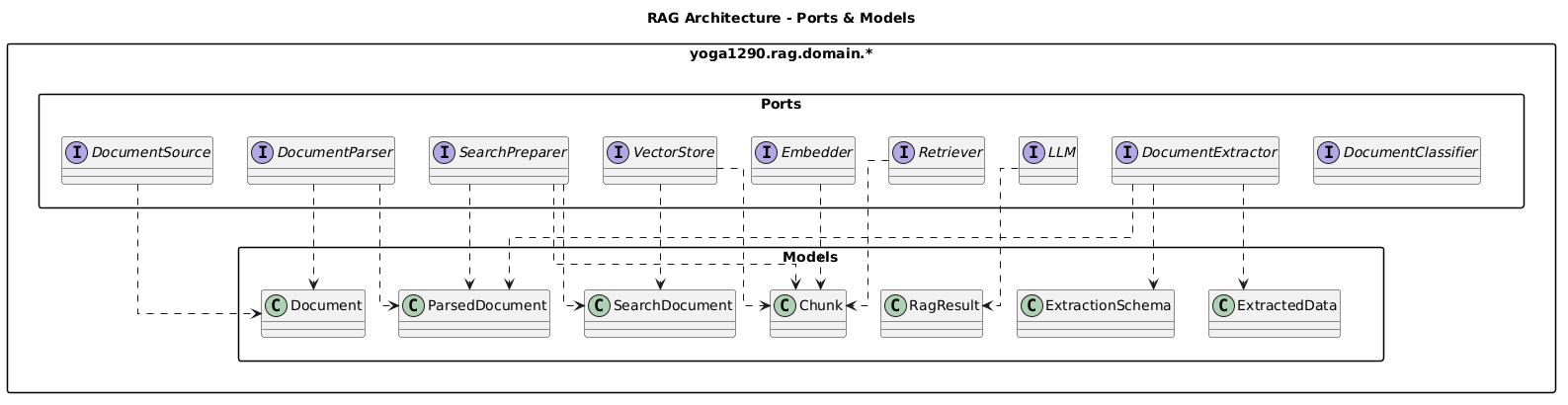
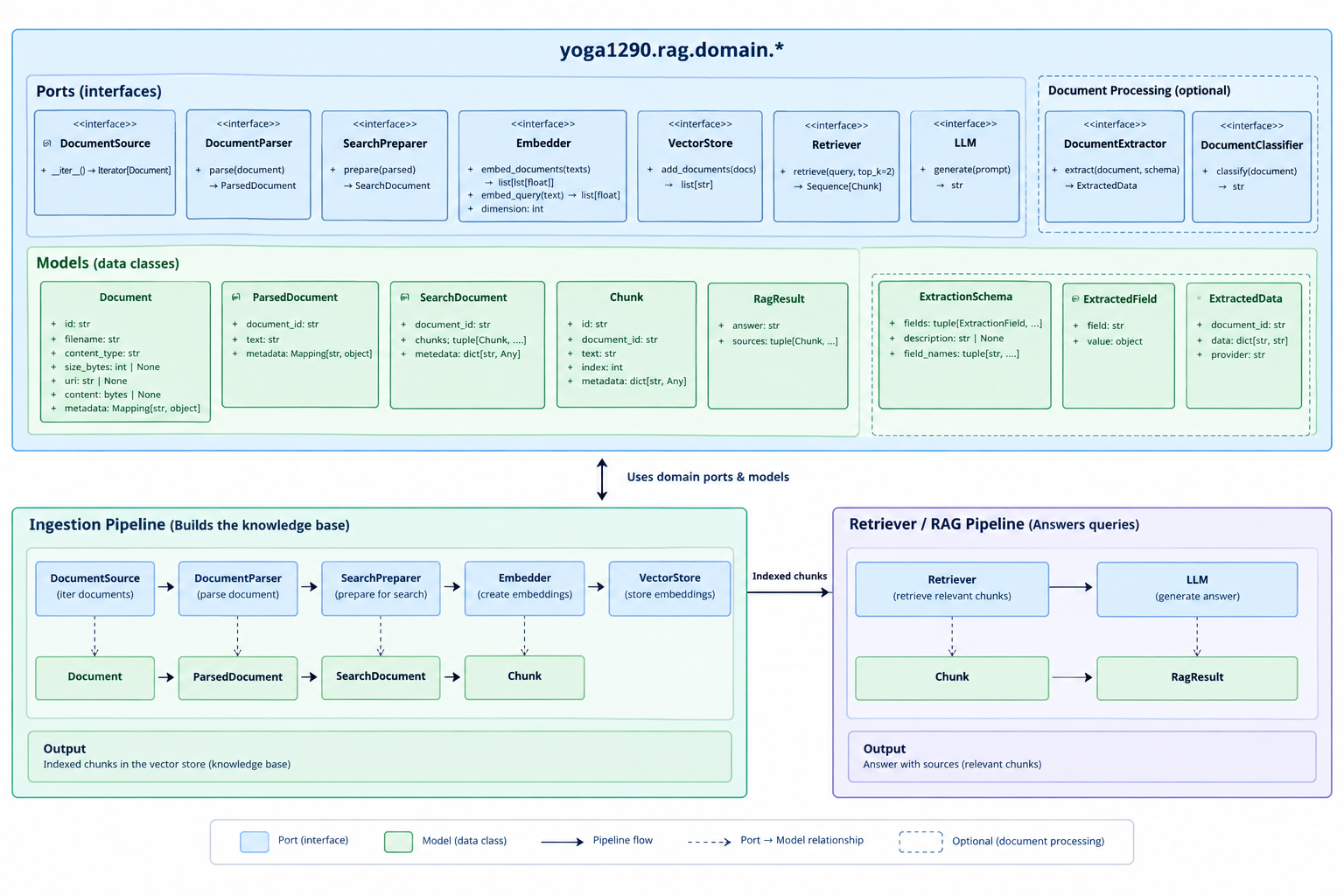
Overview
Startup this Jupiter notebook, PostgressSQL database & Promethus+Grafana servers via: docker compose up notebook.
- 📚️ Ingestion Pipeline
- 🔍️ Retrieval Pipeline
- 🏗️ Extraction Pipeline
- 👁️ Observability
- 🔧️ Turning Implementations
📚️ Ingestion Pipeline
!pip install yoga1290.rag
########################### INTERFACES & MODELS ###########################
from yoga1290.rag.domain.models import (
                            Document,
                            ParsedDocument,
                            SearchDocument)
from yoga1290.rag.domain.ports import (
                            DocumentSource,
                            DocumentParser,
                            VectorStore,
                            SearchPreparer,
                            Embedder)
########################### IMPLEMENTATIONS ###########################
from yoga1290.rag.infrastructure.embeddings import LlamaCppEmbeddings
from yoga1290.rag.infrastructure.vectorstores import PGVectorStore
from yoga1290.rag.infrastructure.local.sources.csv_document_source import CsvDocumentSource
from yoga1290.rag.infrastructure.local.parsing.local_document_parser import LocalDocumentParser
from yoga1290.rag.infrastructure.local.search.local_search_preparer import LocalSearchPreparer

from yoga1290.rag.application.pipelines import IngestionPipeline

document_source: DocumentSource = (
                    CsvDocumentSource(
                        # configuration injected from Environment Variables
                        # csv_path
                        # document_column
                    ))

document_parser: DocumentParser = (
                    LocalDocumentParser())

document_search_preparer: SearchPreparer = (
                    LocalSearchPreparer())

embedder: Embedder = (
                    LlamaCppEmbeddings())

vectorstore: VectorStore = (
                    PGVectorStore(
                        # configration from Environment Variables; connection_string=f"postgresql+psycopg://{os.getenv("POSTGRES_USER")}.."
                        embedder=embedder))

IngestionPipeline(
    parser= document_parser,
    extractor= None,
    classifier= None,
    search_preparer= document_search_preparer,
    vectorstore= vectorstore
).process( documents= document_source )
🔍️ Retrieval Pipeline
!pip install yoga1290.rag
########################### INTERFACES & MODELS ###########################
from yoga1290.rag.domain.models import (
                            Document,
                            ParsedDocument,
                            SearchDocument,
                            )
from yoga1290.rag.domain.ports import (
                            DocumentSource,
                            DocumentParser,
                            VectorStore,
                            SearchPreparer,
                            Embedder,
                            Retriever)
########################### IMPLEMENTATIONS ###########################
from yoga1290.rag.infrastructure.embeddings import LlamaCppEmbeddings
from yoga1290.rag.infrastructure.vectorstores import PGVectorStore, PGVectorRetriever
from yoga1290.rag.infrastructure.local.sources.csv_document_source import CsvDocumentSource
from yoga1290.rag.infrastructure.local.parsing.local_document_parser import LocalDocumentParser
from yoga1290.rag.infrastructure.local.search.local_search_preparer import LocalSearchPreparer

from yoga1290.rag.factories.llm_factory import LLMFactory
from yoga1290.rag.application.pipelines import RetrievalPipeline

embedder: Embedder = (
                    LlamaCppEmbeddings())

vectorstore: VectorStore = (
                    PGVectorStore(
                        #connection_string=f"postgresql+psycopg://{os.getenv("POSTGRES_USER")}.."
                        embedder=embedder))

pgvector_retriever: Retriever = (
                    PGVectorRetriever(vectorstore=vectorstore, ));

llm_llama= LLMFactory.createLocalLlamaCppLLM()
response =  RetrievalPipeline(
                llm= llm_llama,
                retriever= pgvector_retriever,
                top_k=2,
            ).run( question= "Make a good introduction about my backend skillset" )

print(f"Answer {response.answer}")
init: embeddings required but some input tokens were not marked as outputs -> overriding


Answer
"Welcome to my backend skillset! I specialize in the practical, hands-on experience of using AI-assisted development tools such as GitHub Copilot and Claude Code. This allows me to write, review, refactor, debug, and optimize code efficiently.

In addition to my AI-assisted development skills, I have extensive experience with Docker for building and managing container images.

My expertise also extends to API gateway configuration, proxy development, and policy management, using tools such as Apigee or similar API gateways.

While these are my primary skillsets, I also possess a nice-to-have set of skills that include experience with AWS, GCP, or Azure; Kafka or RabbitMQ; Helm charts and/or Kubernetes operators; Jira, Confluence, Atlassian Rovo, and similar tools.

In summary, my backend skillset is well-rounded, with a focus on AI-assisted development, Docker, API gateway configuration, proxy development, and policy management. I also possess a nice-to-have set of skills that include experience with various cloud providers, Kafka or RabbitMQ, Helm charts and/or Kubernetes operators, Jira, Confluence, Atlassian Rovo, and similar tools."
🏗️ Extraction Pipeline
Here's an example of asking the LLM (Mistral on llamaCpp) to extract fields from my receipt emails pulled using yoga1290/python-imap-smtp [docker] that outputs to CSV table. It simply generates inner prompt per each requested field and collects the responses into a dict map.
#docker-compose.yml
pull-documents:
    image: ghcr.io/yoga1290/python-imap-smtp:26.04
    env_file:
      - .env
    environment:
      - OUTPUT_DIR=${DOCUMENTS_PATH}
      - FROM_EMAIL=<my-email>@gmail.com
      - TO_EMAIL=<my-email>+RECEIPTS@gmail.com
    volumes:
      - .${DOCUMENTS_PATH}:/usr/app/${DOCUMENTS_PATH}
# !pip install yoga1290.rag
!pip install ./src
########################### INTERFACES & MODELS ###########################
from yoga1290.rag.domain.models import (
                            ParsedDocument,
                            ExtractedData,)
from yoga1290.rag.domain.ports import (
                            DocumentSource,
                            DocumentParser,
                            DocumentExtractor,)
############################################################################
from yoga1290.rag.infrastructure.local.extraction import LlamaCppDocumentExtractor
from yoga1290.rag.infrastructure.local.sources.csv_document_source import CsvDocumentSource
from yoga1290.rag.infrastructure.local.parsing.local_document_parser import LocalDocumentParser

document_source: DocumentSource = (
                    CsvDocumentSource(
                        # configuration injected from Environment Variables
                        csv_path = "documents/output.csv",
                        document_column = "attachments"
                    ))

document_parser: DocumentParser = (
                    LocalDocumentParser())
document_extractor: DocumentExtractor = (
                    LlamaCppDocumentExtractor())
for document in document_source:
    parsed_document: ParsedDocument = (
                        document_parser.parse(document))
    response: ExtractedData = document_extractor.extract(
                        parsed_document=parsed_document,
                        fields= ['Is there a payment receipt?',
                                 'Total Payment Amount',
                                 'Vendor' ,
                                 'Item name',
                                 'Date of purchase'])
    print(f'response: {response}')
👁️ Container Observability
Monitoring the resource consumption, network traffic & isolation can ideicate how well different LLM models can perform under larger sets.
In my docker-compose.yml configuration, there're the following 3 containers:
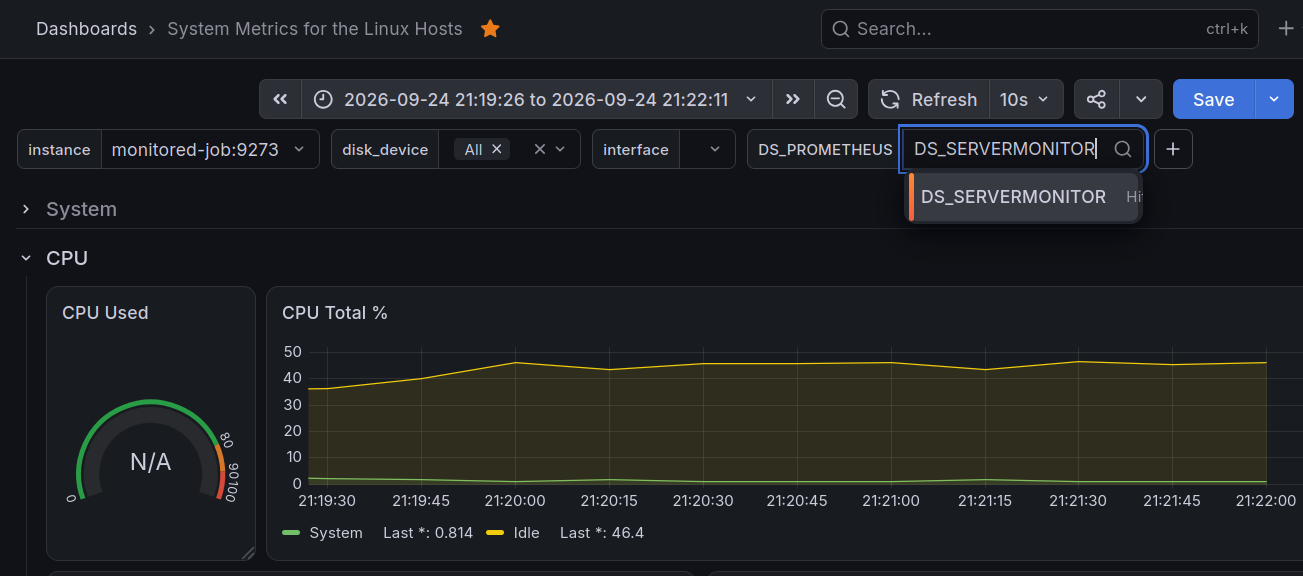
monitored-job: a container with Python & Telegraf pre-installed, see my Dockerfile.Promethus: collecting metric data from the Telegraf server in themonitored-jobGrafana: for visualizingPromethusmetrics into an intuitive dashboard; I used the Grafana's dashboard: System Metrics for the Linux Hosts, which is compatible with Telegraf projected metrics but it needs a tweaks:- Make sure, Prometheus can see the Job container, try query the
monitored-job - Make sure, the
DS_PROMETHEUSdashboard variable matches the name of the Datasource variable in the Grafana'sdatasource.yml, which isDS_SERVERMONITORin my case.
- Make sure, Prometheus can see the Job container, try query the
🔧️ Tuning Implementations
To add support for a new LLM, you will need to implement on the existing abstracts, interfaces & return the domain's data models, for example LlamaCppLLM:
# %load ./src/yoga1290/rag/domain/ports/llm.py
from abc import ABC, abstractmethod
class LLM(ABC):
    @abstractmethod
    def generate(self, prompt: str) -> str:
        """
        Generate a response from a prompt.
        """
        raise NotImplementedError
# %load ./src/yoga1290/rag/infrastructure/local/llm/llama_cpp_llm.py
from yoga1290.rag.domain.ports import LLM

class LlamaCppLLM(LLM):

    def __init__(
        self,
        model_path: str,
        temperature: float = 0.15,
        max_tokens: int = 450,
        context_size: int = 4096,
        batch_size: int = 384,
    ) -> None:
        from langchain_community.llms import LlamaCpp
        self._llm = LlamaCpp(
            model_path=model_path,
            temperature=temperature,
            max_tokens=max_tokens,
            n_ctx=context_size,
            n_batch=batch_size,
            verbose=False,
        )

    def generate(self, prompt: str) -> str:
        return self._llm.invoke(prompt)
1 maintainer

Release files for yoga1290.rag 0.1.12
For a detailed explanation of source distributions (sdists) and built distributions (wheels), please see the package formats documentation.
Source distribution (sdist)
| File | Size | Uploaded | |
|---|---|---|---|
| yoga1290_rag-0.1.12.tar.gz | 24.7 kB | Details |
Built distribution (wheel)
| File | Interpreter | ABI | Platform | Reset |
|---|---|---|---|---|
| yoga1290_rag-0.1.12-py3-none-any.whl | Python 3 | none | any | Details |
Total release size: 63.9 kB
Release files / yoga1290_rag-0.1.12.tar.gz
| Download URL | yoga1290_rag-0.1.12.tar.gz |
|---|---|
| Size | 24.7 kB |
| Tags | Source |
|
SHA-256 checksum How to use checksums |
c9a0a257e0ac2799f437c05ed455c81ab72e246e8e00cc8f32b9fa14f8a41abd
|
|
BLAKE2b-256 checksum How to use checksums |
3694b9060f630f1782118aabf7cd1a2c57abce2fe3038d986a2f906c171f1385
|
| Upload date | |
|
Uploaded using Trusted Publishing? What is trusted publishing? |
Yes |
| Uploaded via |
twine/7.0.0 CPython/3.13.14
|
Provenance
Provenance describes where a file came from. On PyPI, provenance is shared via attestations, which provide a verifiable record of the build or publishing details. View details, limitations and caveats.


PyPI Publish Attestation
PyPI verified that this artifact, at this checksum, originated from the publisher listed below.
Signed by GitHub Actions, verified by PyPI on Sep 25, 2026.
Transparency logRelease files / yoga1290_rag-0.1.12-py3-none-any.whl
| Download URL | yoga1290_rag-0.1.12-py3-none-any.whl |
|---|---|
| Size | 39.2 kB |
| Tags | Python 3 |
|
SHA-256 checksum How to use checksums |
76adfabbd005b923c868b1842b67007dcc3fee43615bc1257dc1d56500ae4e67
|
|
BLAKE2b-256 checksum How to use checksums |
b7d95bcfd8ee5bd4d5a30ae1b3c095cc3a63f3f65107a78db0e7b2e8d9e29d9c
|
| Upload date | |
|
Uploaded using Trusted Publishing? What is trusted publishing? |
Yes |
| Uploaded via |
twine/7.0.0 CPython/3.13.14
|
Provenance
Provenance describes where a file came from. On PyPI, provenance is shared via attestations, which provide a verifiable record of the build or publishing details. View details, limitations and caveats.
PyPI Publish Attestation
PyPI verified that this artifact, at this checksum, originated from the publisher listed below.
Signed by GitHub Actions, verified by PyPI on Sep 25, 2026.
Transparency log













