
Yoker





A Python-first agent harness framework with configurable tools, guardrails, and multi-provider LLM backend integration.
Installation
pip install yoker
Quick Start
Run Yoker interactively (default — equivalent to yoker chat):
python -m yoker
Or with an agent definition:
python -m yoker --agents-definition examples/agents/researcher.md
Run an agentic package non-interactively:
python -m yoker run pkgq
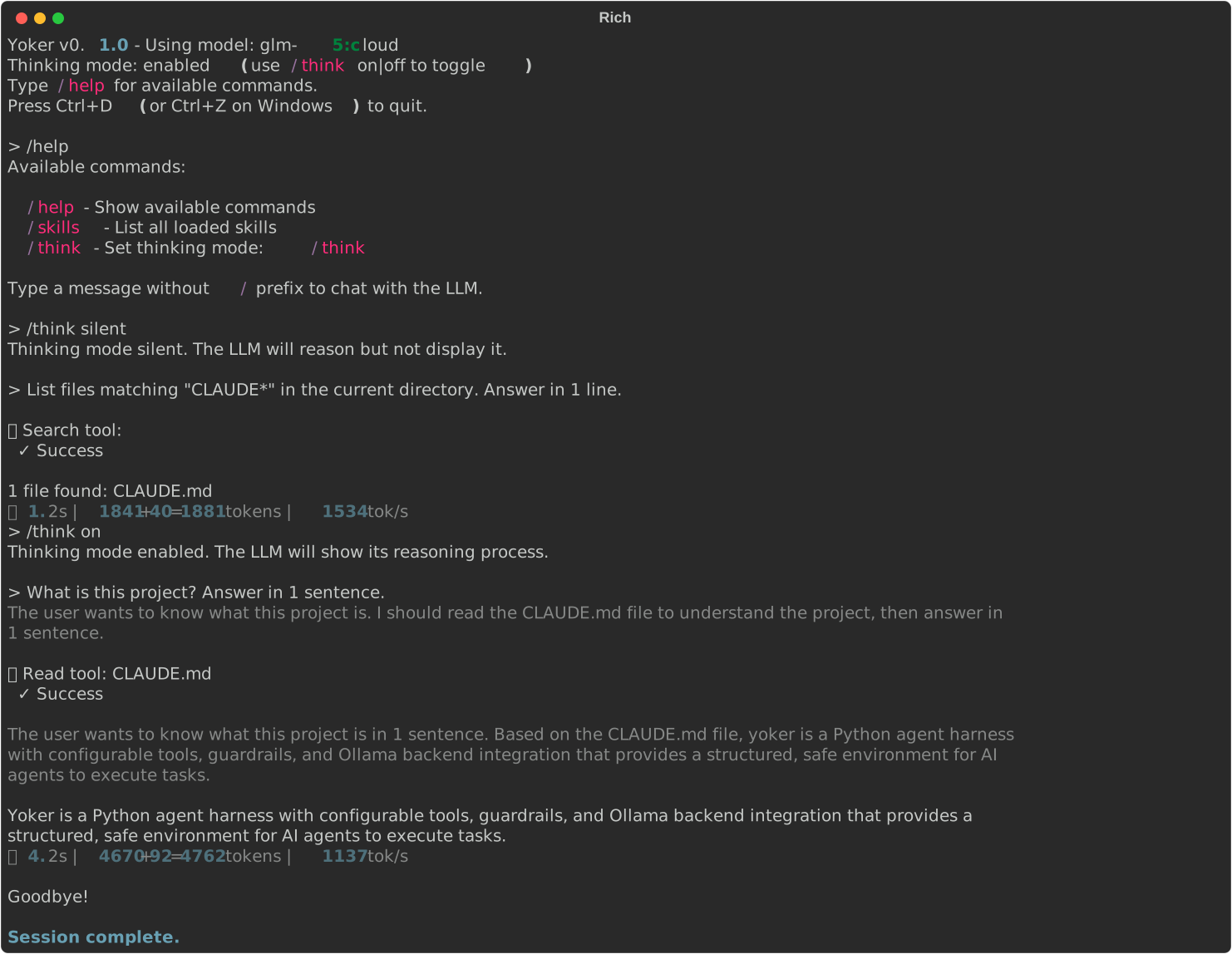
Example session:
CLI Commands
Yoker provides seven subcommands. When no subcommand is given, chat is assumed
for backward compatibility — yoker --backend-ollama-model X routes to
yoker chat --backend-ollama-model X.
| Command | Description |
|---|---|
yoker chat |
Start the interactive REPL (default subcommand) |
yoker run <source> |
Run an agentic package non-interactively |
yoker loop <source> |
Run an agentic package at intervals |
yoker inspect <source> |
Display a read-only report about a source |
yoker init |
Generate a default configuration file |
yoker config |
Display the effective configuration |
yoker container <source> |
Generate container setup for an agentic package |
yoker --help            # list all subcommands
yoker run --help        # show flags for a specific subcommand
yoker chat — Interactive REPL
The default subcommand. Provides a rich terminal UI with multiline input, command history, streaming output, and tool call display. Runs the bootstrap wizard on first use when no config file exists.
yoker                           # same as `yoker chat`
yoker chat                      # explicit
yoker chat --ui-mode batch       # batch mode (stdin/stdout)
yoker chat --with pkgq           # load a plugin
yoker chat --agents-definition examples/agents/researcher.md
Key flags (all Config flags are available — see yoker chat --help):
| Flag | Effect |
|---|---|
--ui-mode {interactive,batch} |
Select UI handler |
--ui-show-thinking |
Show LLM reasoning trace |
--ui-show-tool-calls |
Show tool call details |
--ui-show-stats |
Show turn statistics |
--with <package> |
Load a plugin package |
--agents-definition <path> |
Load an agent definition file |
yoker run <source> — Run an Agentic Package
The flagship capability. Loads a source (Python module, GitHub URL, folder, or
zip file) containing an agent.toml manifest and runs it non-interactively.
The manifest specifies which agent to use and what initial prompt to send.
yoker run pkgq                                       # Python module
yoker run https://github.com/christophevg/pkgq        # GitHub URL
yoker run ./my-folder                                 # local folder
yoker run ./my-package.zip                            # zip file

yoker run pkgq --agent researcher --prompt "analyze"  # override manifest
yoker run pkgq --dry-run                             # preview without executing
yoker run pkgq --persist --session-id my-run          # persist session
Key flags:
| Flag | Effect |
|---|---|
<source> |
Source to run (module, URL, folder, or zip) |
--agent <name> |
Override the manifest's agent |
--prompt <text> |
Override the manifest's prompt |
--dry-run |
Resolve and print manifest info without executing |
--persist |
Enable context persistence (saves session to JSONL) |
--session-id <id> |
Session ID for persistence |
Trust model: sources must pass the trust gate before any code is executed.
The trust gate uses your own config (not the source's manifest overrides), so a
source cannot influence its own trust decision. Trust a source by adding it to
your yoker.toml:
[plugins]
enabled = true

[plugins.trusted]
pkgq = true  # or "github:owner/repo@sha", "folder:/abs/path", "zip:<sha256>"
Use yoker inspect <source> to safely preview a source before trusting it.
See Creating Agentic Packages for
the agent.toml manifest format and how to create your own runnable packages.
yoker loop <source> — Interval Execution
Runs an agentic package at intervals, reusing the yoker run execution path.
The source is resolved, trusted, and loaded once; each iteration sends the same
prompt through the agent.
yoker loop pkgq --interval 60                        # run every 60 seconds
yoker loop pkgq --interval 60 --max-iterations 3    # stop after 3 runs
yoker loop pkgq --persist --session-id loop-1       # reuse context across runs
yoker loop pkgq --max-duration 3600                 # stop after 1 hour
Key flags (in addition to all yoker run flags):
| Flag | Default | Effect |
|---|---|---|
--interval <seconds> |
300 | Seconds between iterations |
--max-iterations <n> |
100 | Stop after N iterations |
--max-duration <seconds> |
none | Stop after a wall-clock time limit |
The loop stops on --max-iterations, --max-duration, 3 consecutive failures
(with exponential backoff), or Ctrl+C (graceful shutdown with a summary).
yoker inspect <source> — Read-Only Source Report
Displays a human-readable report about a source without executing any code. No
trust gate is required — this is safe to run on untrusted sources. For module
sources, the Python __YOKER_MANIFEST__ cannot be discovered without importing
the package, so the report notes that trust is required.
yoker inspect pkgq                    # inspect a Python module
yoker inspect ./my-folder             # inspect a local folder
yoker inspect https://github.com/x/y # clone and inspect (read-only)
The report shows:
- What it contains: skills (names), agent definitions (names), tools (declared
tools_module— listed but not imported) - What it uses: dependencies from
pyproject.toml,tools_moduledeclaration - What it does: the agent and prompt from the manifest's
[run]section - Config overrides: any config fields the manifest overrides
yoker init — Generate Configuration
Creates a ~/.yoker.toml configuration file. Interactive mode (default) runs
the bootstrap wizard for guided first-run setup. Non-interactive mode writes a
default config with all values at defaults.
yoker init                          # interactive wizard (default)
yoker init --no-interactive         # write defaults without prompting
yoker init --path ./my-config.toml  # write to a custom location
yoker init --force                  # overwrite an existing file
Key flags:
| Flag | Effect |
|---|---|
--no-interactive |
Write a default config without the wizard |
--path <path> |
Write to a custom location instead of ~/.yoker.toml |
--force |
Overwrite an existing config file |
Written files always have chmod 600 permissions. The --path flag rejects
forbidden system prefixes (e.g. /etc, /usr).
Master Switch: enabled
Yoker gives an LLM agent access to your filesystem, network, and
code-execution tools. This carries real risks. To acknowledge these risks and
enable Yoker, set enabled = true in your config:
enabled = true # Master switch — set to true to acknowledge the risks
Without this, Yoker refuses to run. The default yoker init output writes
enabled = false; you must manually change it to true.
yoker config — Display Effective Configuration
Loads the merged config (user TOML + project TOML + CLI args) and prints it.
API keys are masked by default; use --reveal to show them in full.
yoker config              # print config as TOML
yoker config --json       # print config as JSON
yoker config --show-path  # print config file paths
yoker config --reveal     # show API keys unmasked
Key flags:
| Flag | Effect |
|---|---|
--json |
Output as JSON instead of TOML |
--show-path |
Print the config file paths that were found |
--reveal |
Show API key values in full (masked by default) |
yoker container <source> — Generate Container Setup
Generates a Dockerfile (or Containerfile for podman) and ignore file for
running a yoker agentic package in a container. The generated Dockerfile uses
JSON-array form exclusively, includes a non-root USER directive, pins the
yoker version, and does not bake API keys into the image.
yoker container pkgq                          # generate Dockerfile
yoker container pkgq --engine podman          # generate Containerfile
yoker container pkgq --output-dir ./container/ # write to a custom directory
yoker container pkgq --compose                # also generate docker-compose.yml
Key flags:
| Flag | Default | Effect |
|---|---|---|
<source> |
— | Source to containerize (module, URL, folder, zip) |
--engine {docker,podman} |
docker | Container engine |
--output-dir <path> |
. |
Where to write generated files |
--base-image <image> |
python:3.12-slim |
Base image for the Dockerfile |
--compose |
off | Also generate a docker-compose.yml |
Usage Modes
Yoker supports three ways to run: interactive CLI, batch/non-interactive, and as a library.
Interactive Mode
Interactive mode is the default. It provides a rich terminal UI with multiline input, command history, streaming output, and tool call display.
python -m yoker

# With an agent definition
python -m yoker --agents-definition examples/agents/researcher.md

# Hide tool calls and statistics
python -m yoker --ui-mode interactive
See Interactive Input and Slash Commands for the available keyboard shortcuts and commands.
Batch Mode
Batch mode reads input from stdin and writes response content to stdout. Thinking, tool calls, errors, and statistics are written to stderr. This makes Yoker usable in pipelines and scripts.
# Single prompt
python -m yoker --ui-mode batch
Hello, how can you help me?
^D

# Pipe input
printf "Hello\nWhat is 2+2?\n" | python -m yoker --ui-mode batch

# Show thinking and tool calls on stderr
printf "Hello\n" | python -m yoker --ui-mode batch --ui-show-thinking --ui-show-tool-calls
Batch mode options:
| Flag | Effect |
|---|---|
--ui-mode batch |
Enable batch mode |
--ui-show-thinking |
Print thinking/trace output to stderr |
--ui-show-tool-calls |
Print tool call information to stderr |
--ui-show-stats |
Print turn statistics to stderr |
Library Usage
Yoker is designed to be embedded as a library. The top-level yoker package
exposes a thin Pythonic facade (MBI-003) as the recommended high-level API,
plus a lower-level Agent + UIBridge path for full control.
Python API (recommended)
| Function | Use |
|---|---|
yoker.process(prompt, **kwargs) |
One-shot turn; returns the response string. |
yoker.do(skill_name, prompt, args="", **kwargs) |
One-shot skill invocation. |
yoker.agent(**kwargs) -> Agent |
Builder that returns a reusable Agent. |
yoker.session(id=..., *, persist=True, fresh=False, **kwargs) |
Async context manager yielding a multi-turn Session with context persistence. |
yoker.run_sync(coro) |
Wraps asyncio.run for synchronous callers (scripts, notebooks, REPLs). |
import asyncio

import yoker


async def main():
  # One-shot turn.
  answer = await yoker.process("What is 2+2?")
  print(answer)

  # Reusable agent with a tool whitelist and event handler.
  reviewer = yoker.agent(
    model="qwen3.5:cloud",
    system_prompt="You are a security-focused code reviewer. Cite file:line.",
    tools=["read", "search", "list"],
  )
  report = await reviewer.process("Review src/yoker/plugins/security.py for vulnerabilities.")
  print(report)

  # Multi-turn conversation with automatic context persistence.
  async with yoker.session(id="refactor-auth") as session:
    await session.agent.process("Read src/auth.py and identify the main responsibilities.")
    await session.agent.process("Suggest a refactor that splits authentication from session management.")


asyncio.run(main())
Sync callers (scripts, notebooks):
import yoker

answer = yoker.run_sync(yoker.process("What files are in the current directory?"))
print(answer)
See examples/python_api/ for the full set of facade examples (one_shot.py,
agent_builder.py, session.py, run_skill.py, workflow.py,
event_handling.py, sync_usage.py) and the Quick start docs.
Low-level event-driven API (advanced)
The Agent class emits events; your application implements a UIHandler (or uses the built-in handlers) and wires events through UIBridge.
import asyncio
from yoker import Agent
from yoker.config import get_yoker_config
from yoker.ui import BatchUIHandler, UIBridge

async def main():
  config = get_yoker_config(cli=False)
  agent = Agent(config=config)

  ui = BatchUIHandler(show_thinking=True, show_tool_calls=True)
  bridge = UIBridge(ui)
  agent.on_event(bridge)

  await ui.start(agent)
  try:
    response = await agent.process("Hello, how can you help me?")
    print(response)
  finally:
    await ui.shutdown("complete")

asyncio.run(main())
See the examples/ directory for more complete examples:
examples/batch_mode.py- Batch mode with predefined messagesexamples/library_usage.py- Using Yoker as a library without the CLIexamples/custom_handler.py- Implementing a customUIHandlerexamples/research_workflow.py- Running a researcher agent programmatically
Plugins
Yoker can load tools, skills, and agents from external Python packages via the plugin system.
Quick Start
Plugins are disabled by default for security. Enable them in your configuration:
# Create yoker.toml
cat > yoker.toml << EOF
[plugins]
enabled = true
EOF

# Secure the configuration file
chmod 600 yoker.toml
Load plugins with --with:
# Using uvx (recommended)
uvx --with pkgq yoker --with pkgq

# Or install first
pip install pkgq
python -m yoker --with pkgq
Security Workflow
When you load a plugin for the first time, Yoker shows a confirmation dialog with the plugin's components (tools, skills, agents). Review them carefully—plugins can execute arbitrary code.
After accepting, Yoker displays instructions to trust the plugin permanently:
[plugins.trusted]
pkgq = true
Using Plugin Components
Verify loaded components with:
> /skills     # List all skills (including plugin skills)
> /tools      # List all tools (including plugin tools)
> /pkgq:create  # Invoke a plugin skill directly
Available Plugins
- pkgq - Package documentation tools (PyPI:
pip install pkgq)pkgq:findtool - Find Python package documentationpkgq:createskill - Generate PACKAGE.md for a projectpkgq:updateskill - Update documentation for new versions
Developing Plugins
See examples/plugins/demo/README.md for a complete plugin development guide.
For comprehensive plugin documentation including security best practices, configuration reference, and troubleshooting, see docs/plugins.md.
Why Yoker?
Yoker fills a unique gap in the coding agent ecosystem: a library-first, transparent agent harness designed for developers who want full control, visibility, and simplicity.
Key Differentiators:
- Library-first - Embed in your applications, not locked into a CLI
- LLM-neutral - Choose your provider, your model, your cost model
- No hidden manipulation - All prompts visible, editable, configurable
- Static permissions - Deterministic boundaries, not runtime prompts
- Full transparency - Event-driven, everything inspectable
See docs/rationale.md for the full rationale and comparison with other solutions.
Features
Current Features:
- CLI subcommands -
chat,run,loop,inspect,init,config,container - Agentic packages - Run sources (module, GitHub, folder, zip) via
yoker runwithagent.tomlmanifest - Chat loop - Interactive conversation with any configured provider
- Multi-provider backends - Ollama (native SDK), OpenAI, Anthropic, Google Gemini, and 100+ providers via LiteLLM
- Bootstrap wizard - Interactive first-run setup that writes
~/.yoker.tomlfor you - Tool calling - Structured tool execution with parameters
-
readtool - Read file contents with guardrails -
listtool - Directory listing with pattern filtering and visible reporting of entries hidden by ignore rules -
writetool - Write files with overwrite protection, automatic parent-directory creation, and a diff of the applied change in the result -
updatetool - Edit existing files with replace, insert, and delete operations, anchor-based insertion relative to a unique anchor, and a diff of the applied change in the result -
searchtool - Search file contents with regex or filenames with glob, with visible reporting of matches hidden by ignore rules -
existencetool - Check if files or folders exist with security hardening -
mkdirtool - Create directories with recursive parent creation and depth limits -
gittool - Git operations (status, log, diff, branch, show) with permission-controlled commit/push -
githubtool - GitHub operations viaghCLI (issues, PRs, workflows, releases, labels; read ops always available, write ops likeissue_create,issue_comment,issue_edit,label_create,pr_createrequire config opt-in; write ops may omitrepoto use the current git repository) -
maketool - Execute Makefile targets (e.g.,make check,make test) with target validation, per-target env var allowlist, and process-group timeout enforcement. -
websearchtool - Web search with SSRF protection, domain filtering, and rate limiting -
webfetchtool - Fetch web content with SSRF protection, URL validation, and size limits -
sleeptool - Pause execution (1–300s) for polling intervals between checks -
agenttool - Spawn subagents with isolated context and recursion limits; spawned agents start with a FRESH context (context files and system prompt pre-loaded, no conversation history) and persistent agents occupy a session slot until released -
skilltool - Invoke skills dynamically by name with full content loading - Slash commands - Built-in commands:
/help,/think on|off|silent,/skills,/context,/tools,/agents - Thinking mode - LLM reasoning trace with gray output (on/off/silent)
- Streaming - Real-time token streaming from any provider
- Configuration - TOML-based configuration system via Clevis
- Agent definitions - Load agents from Markdown files with YAML frontmatter
- Package plugins - Load tools, skills, and agents from Python packages with
--with - Multiline input -
Esc+Enterfor newlines,Enterto submit - Rich output - Styled terminal output with Rich
- Event-driven architecture - Library-first design with event emission
- Context persistence - Session resumption with JSONL storage
- Event logging - Full session replay capability
- Demo scripts - Generate documentation screenshots from Markdown scripts
- Schema-driven guardrails - Tool parameters are annotated with
yoker.tools.annotationsmarkers (Path,Url,Query,Text); the harness strips the metadata before sending schemas to the model and dispatches the matching guardrail at execution time - Protected files - SOFT guardrail blocking agent
write/updateto a configurable denylist (Makefile,pyproject.toml,yoker.toml,uv.lock,.git/config,.github/workflows/*.yml, ...) with interactive approve-on-diff inyoker chatand a simple block in batch/yoker run; empty tuple opts out - Permissions - Static TOML-based access control
- Secure API key handling - Masked input during bootstrap, config files written with
chmod 600 - Multi-agent orchestration - Run coordinated agent teams (
Session.spawn(), inter-agent messaging, ephemeral agents withrelease_agent) - Token usage tracking - Every LLM API call logged (model, agent, input/output tokens, duration) to
~/.yoker/usage.jsonl, enabled by default and configurable via[usage]inyoker.toml - Retry-limit escalation - After
agent.max_consecutive_tool_failures(default 3) consecutive failed tool calls, a one-time system note tells the model to stop retrying and reconsider strategy - Effective-configuration summary - The environment reminder embeds a redacted snapshot of the effective config (permission grants, paths, write-protection, backend, trusted plugins) so agents see config effects up front
Planned Features:
- Keyring integration - Store API keys in the OS keychain instead of config files (TODO S.1)
- Tool timing metrics - Performance tracking
- Tool result caching - Reduce redundant calls
- Parallel tool execution - Concurrent read operations
Interactive Input
The interactive session supports:
- Multiline input: Press
Esc+Enterto add newlines,Enterto submit - Command history: Up/Down arrows navigate previous messages
- History search:
Ctrl+Rto search through history - Keyboard navigation: Arrow keys, Ctrl+A/E for cursor positioning
- Text selection: Click and drag to select output, copy with Ctrl+Shift+C or Cmd+C
Slash Commands
| Command | Description |
|---|---|
/help |
Show available commands |
/think on|off |
Enable/disable LLM thinking trace |
/skills |
List available skills |
/context |
Show current conversation context |
/tools |
List available tools and their availability |
/agents |
Show loaded and available agents |
Thinking Mode
When thinking is enabled, the LLM shows its reasoning process:
[Thinking]
Let me analyze this step by step...
First, I need to understand the file structure...

[Response]
Based on my analysis, here's what I found...
Demo Session Script
Generate terminal screenshots for documentation from Markdown script files:
# Run default demo script (demos/session.md)
python scripts/demo_session.py

# Run a specific demo script
python scripts/demo_session.py --script demos/list-tool.md

# Run all demo scripts in a directory
python scripts/demo_session.py --scripts-dir demos/

# Real LLM + log conversation for replay
python scripts/demo_session.py --script demos/session.md --log

# Replay from log (no LLM calls)
python scripts/demo_session.py --script demos/session.md --replay

# With an agent definition
python scripts/demo_session.py --script demos/session.md --agent examples/agents/markdown.md
Or via Makefile targets:
make demo          # Generate main session screenshot
make demos         # Generate all demo screenshots
make demos-to-docs # Copy generated screenshots to docs/_static/
Configuration
Yoker auto-discovers configuration files:
./yoker.toml(current directory)~/.yoker.toml(user home directory)- Built-in defaults
# Zero-configuration startup - uses auto-discovered config
python -m yoker
Or create a yoker.toml file for explicit configuration. Yoker supports multiple
providers — Ollama (native SDK), and OpenAI, Anthropic, Google Gemini, plus any
LiteLLM-supported provider (e.g. Groq, Cohere, Azure, Mistral) via the LiteLLM backend:
[harness]
name = "my-yoke"

[logging]
level = "INFO"

[backend]
provider = "ollama"  # or "openai", "anthropic", "gemini", or any litellm provider

[backend.ollama]
base_url = "http://localhost:11434"
api_key = ""  # Optional API key for authenticated Ollama endpoints
model = "qwen3.5:cloud"

[agents]
definition = "./agents/researcher.md"  # Optional: agent definition file

[tools.read]
enabled = true
allowed_extensions = [".txt", ".md", ".py"]
make tool configuration
The make tool executes Makefile targets with target validation, a
per-target env var allowlist, and process-group timeout enforcement. The
make tool requires POSIX process-group support and is not available on
Windows.
[tools.make]
timeout_ms = 300000       # default per-call timeout
max_output_kb = 100       # per-stream (stdout/stderr) truncation limit
max_env_var_bytes = 4096  # per-env-var value byte limit

# Per-target env var allowlist (deny-by-default). Keys are Makefile
# target names; values are the env var names that target may receive.
# Targets not listed deny all env vars.
[tools.make.allowed_env_vars]
test = ["TEST"]
lint = ["LINT_FLAGS", "LINT_CONFIG"]
The same allowed_env_vars may also be written as inline tables:
[tools.make]
timeout_ms = 300000
allowed_env_vars = {test = ["TEST"], lint = ["LINT_FLAGS", "LINT_CONFIG"]}
Env-inheritance residual risk: Makefile recipes inherit the yoker
process env, so any secret present in yoker's env (API keys, tokens) is
readable by recipes. The per-target allowlist and framework hard-denylist
only govern agent-supplied env_vars — they do not filter the inherited
env. Load sensitive API keys from a secrets store (not plain env vars)
when running untrusted agents.
Protected Files (SOFT guardrail)
permissions.protected_files is a glob (fnmatch) denylist of files
protected against agent write/update calls. Reading is never blocked.
[permissions]
# Defaults to a 16-entry denylist: Makefile, makefile, GNUmakefile,
# Justfile, justfile, Taskfile.yml, pyproject.toml, tox.ini, setup.py,
# setup.cfg, yoker.toml, .git/config, .git/hooks/*,
# .github/workflows/*.yml, uv.lock, poetry.lock.
protected_files = ["Makefile", "pyproject.toml", ".github/workflows/*.yml"]

protected_files = []  # explicit opt-out: disable all protections
Patterns match against the relative path from the project root and the
basename, so Makefile matches at any depth, not just the root.
SOFT guardrail — not a security boundary. It protects against powerful
mistakes (an agent rewriting your Makefile or uv.lock), not against a
malicious agent that can shell out or write Python scripts to bypass
Yoker's tools.
Behavior:
- Interactive mode (
yoker chat): a write/update to a protected file shows a unified diff and promptsy/N. Apply on approval, block on denial. Empty input, EOF, orCtrl+Cdeny (fail-safe). - Batch mode (
--ui-mode batch) and non-interactiveyoker run: protected writes are blocked with an error returned to the agent.
Custom UI handlers implement confirm_approval(path, diff) -> bool on
the UIHandler protocol; see examples/custom_handler.py. Library
users can wire Agent._approval_handler (a
Callable[[str, str], Awaitable[bool]] | None) to enable interactive
approval outside the CLI.
Example for OpenAI:
[backend]
provider = "openai"

[backend.openai]
api_key = "${OPENAI_API_KEY}"  # Interpolated from environment variables
model = "gpt-4o-mini"
The bootstrap wizard (run python -m yoker with no config present) writes
~/.yoker.toml for you interactively, including masked API key entry and
chmod 600 file permissions. See Model Catalog for the
curated model lists per provider.
See examples/yoker.toml for the full configuration reference.
Architecture
Yoker uses an event-driven architecture for library-first design. The Agent emits events; the UI layer receives them through UIBridge and decides how to present them.
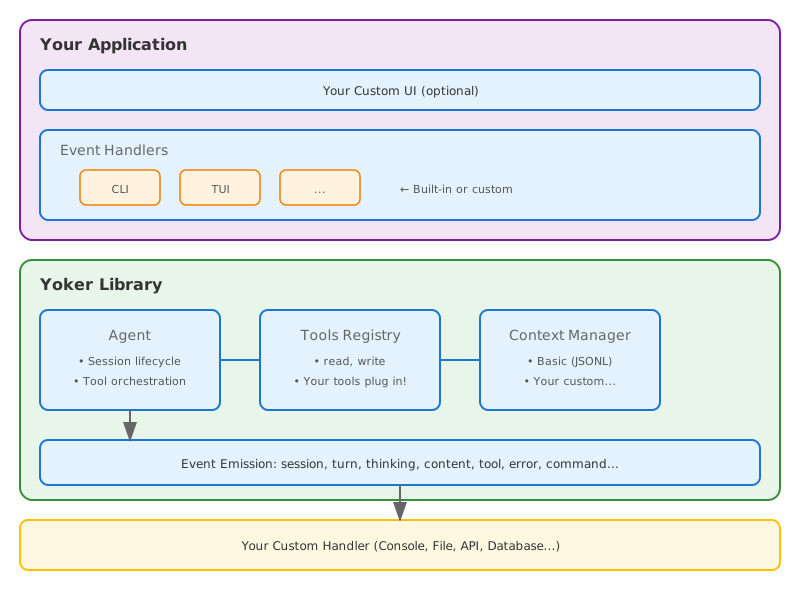
Agent layer (yoker.core): Configuration, context management, tool execution, and event emission. It has no terminal or presentation logic.
Backend layer (yoker.backends): Provider-neutral streaming chat backend. OllamaBackend uses the native Ollama SDK; LitellmBackend unifies OpenAI, Anthropic, Gemini, and 100+ LiteLLM-supported providers. The ModelBackend Protocol normalizes streaming into provider-agnostic ChatChunk events.
UI layer (yoker.ui): Implements the UIHandler protocol. Built-in implementations:
InteractiveUIHandler- Rich terminal UI with streaming outputBatchUIHandler- stdin/stdout/stderr for scripts and pipelines
Bridge (yoker.ui.UIBridge): Converts agent events into UIHandler method calls so the agent stays independent of presentation details.
Event Types: Turn (start/end), Thinking (start/chunk/end), Content (start/chunk/end), Tool (call/result/content), Command
Providers
Yoker supports multiple LLM providers through a dual backend architecture:
| Provider | Backend | API key required | Free tier |
|---|---|---|---|
| Ollama | Native Ollama SDK | No (app path) or yes (API key) | Yes |
| OpenAI | LiteLLM | Yes | No |
| Anthropic | LiteLLM | Yes | No |
| Google Gemini | LiteLLM | Yes | Yes (limited) |
| Any LiteLLM provider | LiteLLM | Varies | Varies |
The bootstrap wizard offers curated model lists for each provider. See
Model Catalog for the full list, or run python -m yoker
with no config to launch the wizard.
Security: API keys are collected via masked input during bootstrap, and
config files are written with chmod 600 permissions. API keys can also be
injected from environment variables using Clevis interpolation
(${OPENAI_API_KEY}). Keyring integration for OS keychain storage is planned
(TODO S.1).
Documentation
- Full documentation
- Installation guide
- Quick start
- CLI reference - Subcommands, flags, and examples
- Creating agentic packages -
agent.tomlmanifest format and trust model - Model catalog - Curated models per provider
- Why Yoker? - Project rationale and comparison
- Disclaimer - What Yoker is, does, and the risks involved
- Contributing - How to contribute to Yoker
- Architecture
Development
git clone https://github.com/christophevg/yoker.git
cd yoker
make env-dev  # Create virtual environment and install dependencies

make test     # Run tests with coverage
make check    # Type checking + linting
make docs     # Build documentation
Requires Python 3.10+. Uses uv for dependency management. See AGENTS.md for project conventions.
Contributing
Contributions welcome! Please read CONTRIBUTING.md for the full guide on setting up a development environment, code conventions, and the pull request process. See AGENTS.md for project conventions and development guidelines.
Changelog
See GitHub Releases for version history.
License
MIT License - see LICENSE for details.
Name: "yoker" - One who yokes. The agent noun from "yoke" (PIE yeug- meaning "to join"). Pairs with "clitic" (both are joining tools). See docs/NAME.md for full etymology.
1 maintainer

Download files
Download the file for your platform. If you're not sure which to choose, learn more about installing packages.
Source Distribution
Built Distribution
Filter files by name, interpreter, ABI, and platform.
If you're not sure about the file name format, learn more about wheel file names.
Copy a direct link to the current filters
File details
Details for the file yoker-0.12.0.tar.gz.
File metadata
- Download URL: yoker-0.12.0.tar.gz
- Upload date:
- Size: 8.9 MB
- Tags: Source
- Uploaded using Trusted Publishing? No
- Uploaded via:
twine/6.2.0 CPython/3.10.20
File hashes
| Algorithm | Hash digest | |
|---|---|---|
| SHA256 |
830c174401fbb70219c55526776dfeddffff4e4aff1c84e39a7a0d3f901f5958
|
|
| MD5 |
c66ec7dd542f10c9e0da3ad111134d0a
|
|
| BLAKE2b-256 |
6b63b4bc53544c128f2b2344be88d961c3cb839d39cc3158577f36c8c900ba01
|
File details
Details for the file yoker-0.12.0-py3-none-any.whl.
File metadata
- Download URL: yoker-0.12.0-py3-none-any.whl
- Upload date:
- Size: 364.4 kB
- Tags: Python 3
- Uploaded using Trusted Publishing? No
- Uploaded via:
twine/6.2.0 CPython/3.10.20
File hashes
| Algorithm | Hash digest | |
|---|---|---|
| SHA256 |
3d603e97350c9a9f5d5f052bd459c9caf9a1044c0700b9eda11aff6b27b5b396
|
|
| MD5 |
27eb5d0154f2d16cf2f454e5a67b3f29
|
|
| BLAKE2b-256 |
88ca41e4f37d1b0d8b386cab228e0a8284565a79a413c648f13417553d289e3b
|














