




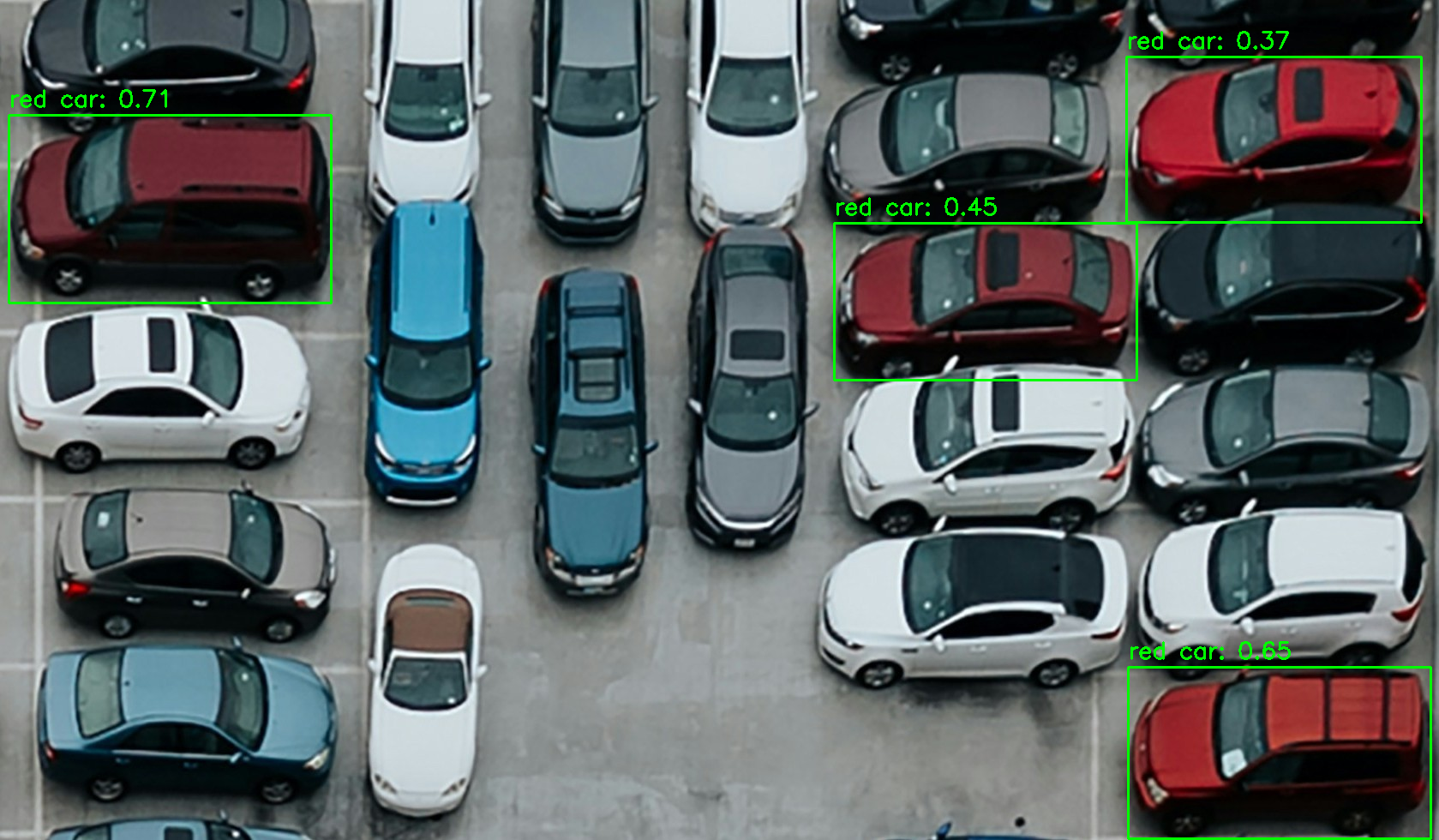
YOLO-World-ONNX is a Python package that enables running inference on YOLO-WORLD open-vocabulary object detection models using ONNX runtime. It provides a user-friendly interface for performing object detection on images or videos. The package leverages ONNX models to deliver fast inference time, making it suitable for a wide range of object detection applications.
Installation
You can install YOLO-World-ONNX using pip:
pip install yolo-world-onnx
Usage
Inference
Here's an example of how to perform inference using YOLO-World-ONNX:
import cv2 as cv
from yolo_world_onnx import YOLOWORLD

# Load the YOLO model
model_path = "path/to/your/model.onnx"

# Select a device 0 for GPU and for a CPU is cpu
model = YOLOWORLD(model_path, device="0")

# Set the class names
class_names = ["person", "car", "dog", "cat"]
model.set_classes(class_names)

# Retrieve the names
names = model.names

# Load an image
image = cv.imread("path/to/your/image.jpg")

# Perform object detection
boxes, scores, class_ids = model(image, conf=0.35, imgsz=640, iou=0.7)

# Process the results
for box, score, class_id in zip(boxes, scores, class_ids):
    x, y, w, h = box
    x1, y1 = int(x - w / 2), int(y - h / 2)
    x2, y2 = int(x + w / 2), int(y + h / 2)
    class_name = names[class_id]
    print(f"Detected {class_name} with confidence {score:.2f} at coordinates (x1={x1}, y1={y1}, x2={x2}, y2={y2})")
The model function performs object detection on the input image and returns three values:
-
boxes: A list of bounding box coordinates for each detected object. Each box is represented as a tuple of four values(x, y, w, h), where:xandyare the coordinates of the center of the bounding box.wandhare the width and height of the bounding box.- The coordinates are in the original image size.
-
scores: A list of confidence scores for each detected object. The confidence score represents the model's confidence in the detection, ranging from 0 to 1. -
class_ids: A list of class indices for each detected object. The class index corresponds to the index of the class name in thenameslist.
The names list contains the class names that were set using the set_classes method. It is used to map the class indices to their corresponding class names.
In the example code, the results are processed by iterating over the boxes, scores, and class_ids lists simultaneously using zip. For each detected object:
- The bounding box coordinates
(x, y, w, h)are extracted from theboxtuple. - The top-left and bottom-right coordinates of the bounding box are calculated using
(x1, y1)and(x2, y2), respectively. - The class name is obtained by indexing the
nameslist with theclass_id. - The class name, confidence score, and bounding box coordinates are printed.
You can customize the processing of the results based on your specific requirements, such as drawing the bounding boxes on the image, filtering the detections based on confidence scores, or performing further analysis on the detected objects.
Image Inference
Here's an example of performing inference on an image and drawing the results:
import cv2 as cv
from yolo_world_onnx import YOLOWORLD

# Load the YOLO model
model_path = "path/to/your/model.onnx"

# Select a device 0 for GPU and for a CPU is cpu
model = YOLOWORLD(model_path, device="0")

# Set the class names
class_names = ["person", "car", "dog", "cat"]
model.set_classes(class_names)

# Retrieve the names
names = model.names

# Load an image
image = cv.imread("path/to/your/image.jpg")

# Perform object detection
boxes, scores, class_ids = model(image, conf=0.35, imgsz=640, iou=0.7)

# Draw bounding boxes on the image
for box, score, class_id in zip(boxes, scores, class_ids):
    x, y, w, h = box
    x1, y1 = int(x - w / 2), int(y - h / 2)
    x2, y2 = int(x + w / 2), int(y + h / 2)
    cv.rectangle(image, (x1, y1), (x2, y2), (0, 255, 0), 2)
    class_name = names[class_id]
    cv.putText(image, f"{class_name}: {score:.2f}", (x1, y1 - 10), cv.FONT_HERSHEY_SIMPLEX, 0.9, (0, 255, 0), 2)

# Display the image
cv.imshow("Object Detection", image)
cv.waitKey(0)
cv.destroyAllWindows()
Video Inference
Here's an example of performing inference on a video and drawing the results:
import cv2 as cv
from yolo_world_onnx import YOLOWORLD

# Load the YOLO model
model_path = "path/to/your/model.onnx"

# Select a device 0 for GPU and for a CPU is cpu
model = YOLOWORLD(model_path, device="0")

# Set the class names
class_names = ["person", "car", "dog", "cat"]
model.set_classes(class_names)

# Retrieve the names
names = model.names

# Open a video file or capture from a camera
video_path = "path/to/your/video.mp4"
cap = cv.VideoCapture(video_path)

while True:
    # Read a frame from the video
    ret, frame = cap.read()
    if not ret:
        break

    # Perform object detection
    boxes, scores, class_ids = model(frame, conf=0.35, imgsz=640, iou=0.7)

    # Draw bounding boxes on the frame
    for box, score, class_id in zip(boxes, scores, class_ids):
        x, y, w, h = box
        x1, y1 = int(x - w / 2), int(y - h / 2)
        x2, y2 = int(x + w / 2), int(y + h / 2)
        cv.rectangle(frame, (x1, y1), (x2, y2), (0, 255, 0), 2)
        class_name = names[class_id]
        cv.putText(frame, f"{class_name}: {score:.2f}", (x1, y1 - 10), cv.FONT_HERSHEY_SIMPLEX, 0.9, (0, 255, 0), 2)

    # Display the frame
    cv.imshow("Object Detection", frame)
    if cv.waitKey(1) & 0xFF == ord('q'):
        break

cap.release()
cv.destroyAllWindows()
ONNX Models
| Model Type | mAP | mAP50 | mAP75 | Image Size | Model |
|---|---|---|---|---|---|
| yolov8s-worldv2 | 37.7 | 52.2 | 41.0 | 640 | Download |
| yolov8m-worldv2 | 43.0 | 58.4 | 46.8 | 640 | Download |
| yolov8l-worldv2 | 45.8 | 61.3 | 49.8 | 640 | Download |
| yolov8x-worldv2 | 47.1 | 62.8 | 51.4 | 640 | Download |
Custom Models
YOLO-World-ONNX supports custom ONNX models that are exported in the same format as the models provided in this repository. The code is designed to work dynamically with models of any number of classes. Even if the model is exported on 100 classes and the user specifies only 3 classes to be detected in the run, YOLO-World-ONNX will detect those 3 classes accordingly.
If you want to use a custom model with a different resolution or detect more classes, you can follow the guide on exporting custom models in the ONNX-YOLO-World-Open-Vocabulary-Object-Detection repository.
Credits
The original source code for this package is based on the work by Ibai Gorordo in the ONNX-YOLO-World-Open-Vocabulary-Object-Detection repository.
Image reference is Here
License
This project is licensed under the MIT License. See the LICENSE file for more information.
1 maintainer

Metadata
1 maintainer
Release files for yolo-world-onnx 0.1.1
For a detailed explanation of source distributions (sdists) and built distributions (wheels), please see the package formats documentation.
Source distribution (sdist)
| File | Size | Uploaded | |
|---|---|---|---|
| yolo_world_onnx-0.1.1.tar.gz | 6.4 kB | Details |
Built distribution (wheel)
| File | Interpreter | ABI | Platform | Reset |
|---|---|---|---|---|
| yolo_world_onnx-0.1.1-py3-none-any.whl | Python 3 | none | any | Details |
Total release size: 12.7 kB
Release files / yolo_world_onnx-0.1.1.tar.gz
| Download URL | yolo_world_onnx-0.1.1.tar.gz |
|---|---|
| Size | 6.4 kB |
| Tags | Source |
|
SHA-256 checksum How to use checksums |
7fe4eca696242c620490ce65661251946b42a0fc00299cf830dbafd96dd671e7
|
|
BLAKE2b-256 checksum How to use checksums |
873f1fd84c0871d80577cdc215dc59c4246137fb1376a1166c9921798e6a1395
|
| Upload date | |
|
Uploaded using Trusted Publishing? What is trusted publishing? |
No |
| Uploaded via |
twine/5.0.0 CPython/3.10.12
|
Release files / yolo_world_onnx-0.1.1-py3-none-any.whl
| Download URL | yolo_world_onnx-0.1.1-py3-none-any.whl |
|---|---|
| Size | 6.3 kB |
| Tags | Python 3 |
|
SHA-256 checksum How to use checksums |
f0937880be96017d7f807587a92b6b63f911ea45e4572a9995233ab3c4c610fd
|
|
BLAKE2b-256 checksum How to use checksums |
09b10302e0a5e1d25d41761c52d28b57298e256f1a6c386652f3efad402d2fd9
|
| Upload date | |
|
Uploaded using Trusted Publishing? What is trusted publishing? |
No |
| Uploaded via |
twine/5.0.0 CPython/3.10.12
|













