
packaged ultralytics/yolov5
pip install yolo5




Overview
You can finally install YOLOv5 object detector using pip and integrate into your project easily.
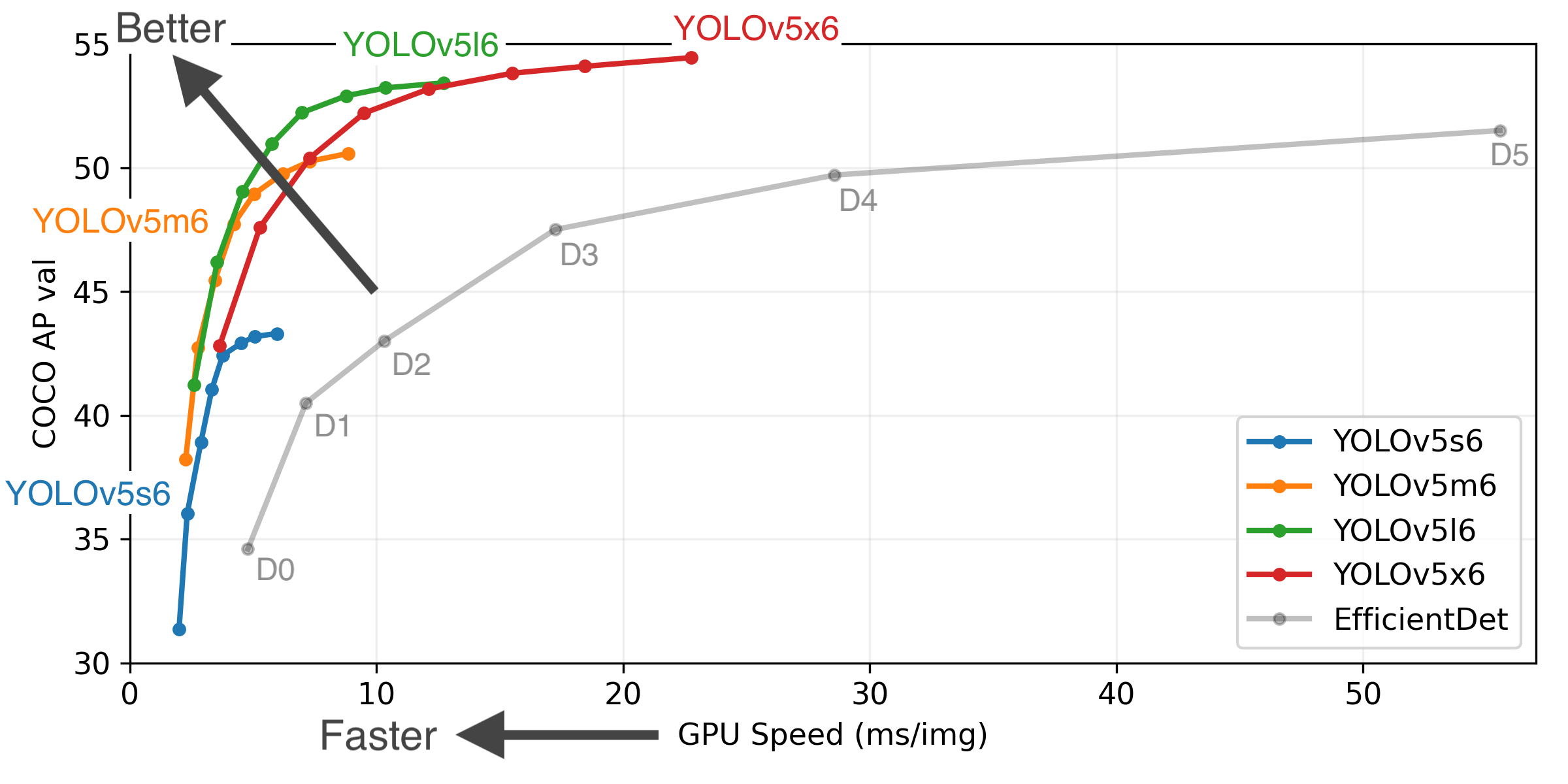
Installation
- Install yolov5 using pip
(for Python >=3.7):
pip install yolo5
- Install yolov5 using pip
(for Python 3.6):
pip install "numpy>=1.18.5,<1.20" "matplotlib>=3.2.2,<4"
pip install yolov5
Basic Usage
import yolov5

# model
model = yolov5.load('yolov5s')

# image
img = 'https://github.com/ultralytics/yolov5/raw/master/data/images/zidane.jpg'

# inference
results = model(img)

# inference with larger input size
results = model(img, size=1280)

# inference with test time augmentation
results = model(img, augment=True)

# show results
results.show()

# save results
results.save(save_dir='results/')
Alternative Usage
from yolov5 import YOLOv5

# set model params
model_path = "yolov5/weights/yolov5s.pt" # it automatically downloads yolov5s model to given path
device = "cuda" # or "cpu"

# init yolov5 model
yolov5 = YOLOv5(model_path, device)

# load images
image1 = 'https://github.com/ultralytics/yolov5/raw/master/data/images/zidane.jpg'
image2 = 'https://github.com/ultralytics/yolov5/blob/master/data/images/bus.jpg'

# perform inference
results = yolov5.predict(image1)

# perform inference with larger input size
results = yolov5.predict(image1, size=1280)

# perform inference with test time augmentation
results = yolov5.predict(image1, augment=True)

# perform inference on multiple images
results = yolov5.predict([image1, image2], size=1280, augment=True)

# show detection bounding boxes on image
results.show()

# save results into "results/" folder
results.save(save_dir='results/')
Scripts
You can call yolo_train, yolo_detect and yolo_test commands after installing the package via pip:
Training
Run commands below to reproduce results on COCO dataset (dataset auto-downloads on first use). Training times for YOLOv5s/m/l/x are 2/4/6/8 days on a single V100 (multi-GPU times faster). Use the largest --batch-size your GPU allows (batch sizes shown for 16 GB devices).
$ yolo_train --data coco.yaml --cfg yolov5s.yaml --weights '' --batch-size 64
                                    yolov5m                                40
                                    yolov5l                                24
                                    yolov5x                                16
Inference
yolo_detect command runs inference on a variety of sources, downloading models automatically from the latest YOLOv5 release and saving results to runs/detect.
$ yolo_detect --source 0  # webcam
                       file.jpg  # image
                       file.mp4  # video
                       path/  # directory
                       path/*.jpg  # glob
                       rtsp://170.93.143.139/rtplive/470011e600ef003a004ee33696235daa  # rtsp stream
                       rtmp://192.168.1.105/live/test  # rtmp stream
                       http://112.50.243.8/PLTV/88888888/224/3221225900/1.m3u8  # http stream
To run inference on example images in yolov5/data/images:
$ yolo_detect --source yolov5/data/images --weights yolov5s.pt --conf 0.25
Status
Builds for the latest commit for Windows/Linux/MacOS with Python3.6/3.7/3.8:

Status for the train/detect/test scripts:

1 maintainer

Metadata
1 maintainer
Release files for yolo5 0.0.1
For a detailed explanation of source distributions (sdists) and built distributions (wheels), please see the package formats documentation.
Source distribution (sdist)
| File | Size | Uploaded | |
|---|---|---|---|
| yolo5-0.0.1.tar.gz | 4.0 kB | Details |
Built distribution (wheel)
| File | Interpreter | ABI | Platform | Reset |
|---|---|---|---|---|
| yolo5-0.0.1-py36.py37.py38-none-any.whl | Python 3.8, Python 3.7, Python 3.6 | none | any | Details |
Total release size: 7.2 kB
Release files / yolo5-0.0.1.tar.gz
| Download URL | yolo5-0.0.1.tar.gz |
|---|---|
| Size | 4.0 kB |
| Tags | Source |
|
SHA-256 checksum How to use checksums |
907dd7b3099b5666bde681b1f2af9a41040211acb3cd8888cc75667776b8b774
|
|
BLAKE2b-256 checksum How to use checksums |
6436794c29dd5c549ca6d1abfb722e289fd937bf82b4b97bfa2d4ec14480d8cc
|
| Upload date | |
|
Uploaded using Trusted Publishing? What is trusted publishing? |
No |
| Uploaded via |
twine/3.4.1 importlib_metadata/4.3.1 pkginfo/1.7.0 requests/2.25.1 requests-toolbelt/0.9.1 tqdm/4.61.0 CPython/3.9.5
|
Release files / yolo5-0.0.1-py36.py37.py38-none-any.whl
| Download URL | yolo5-0.0.1-py36.py37.py38-none-any.whl |
|---|---|
| Size | 3.2 kB |
| Tags | Python 3.6 Python 3.7 Python 3.8 |
|
SHA-256 checksum How to use checksums |
66054e78abb01dfa9b34425c42f4a8c552a474656a1ae11ec86d9ede9d01bae1
|
|
BLAKE2b-256 checksum How to use checksums |
b00715a2969c18dd12736db37c41bdf6fdadf2ef4580c33970751a91f55d1297
|
| Upload date | |
|
Uploaded using Trusted Publishing? What is trusted publishing? |
No |
| Uploaded via |
twine/3.4.1 importlib_metadata/4.3.1 pkginfo/1.7.0 requests/2.25.1 requests-toolbelt/0.9.1 tqdm/4.61.0 CPython/3.9.5
|













