
packaged ultralytics/yolov5
pip install yolov5






Overview
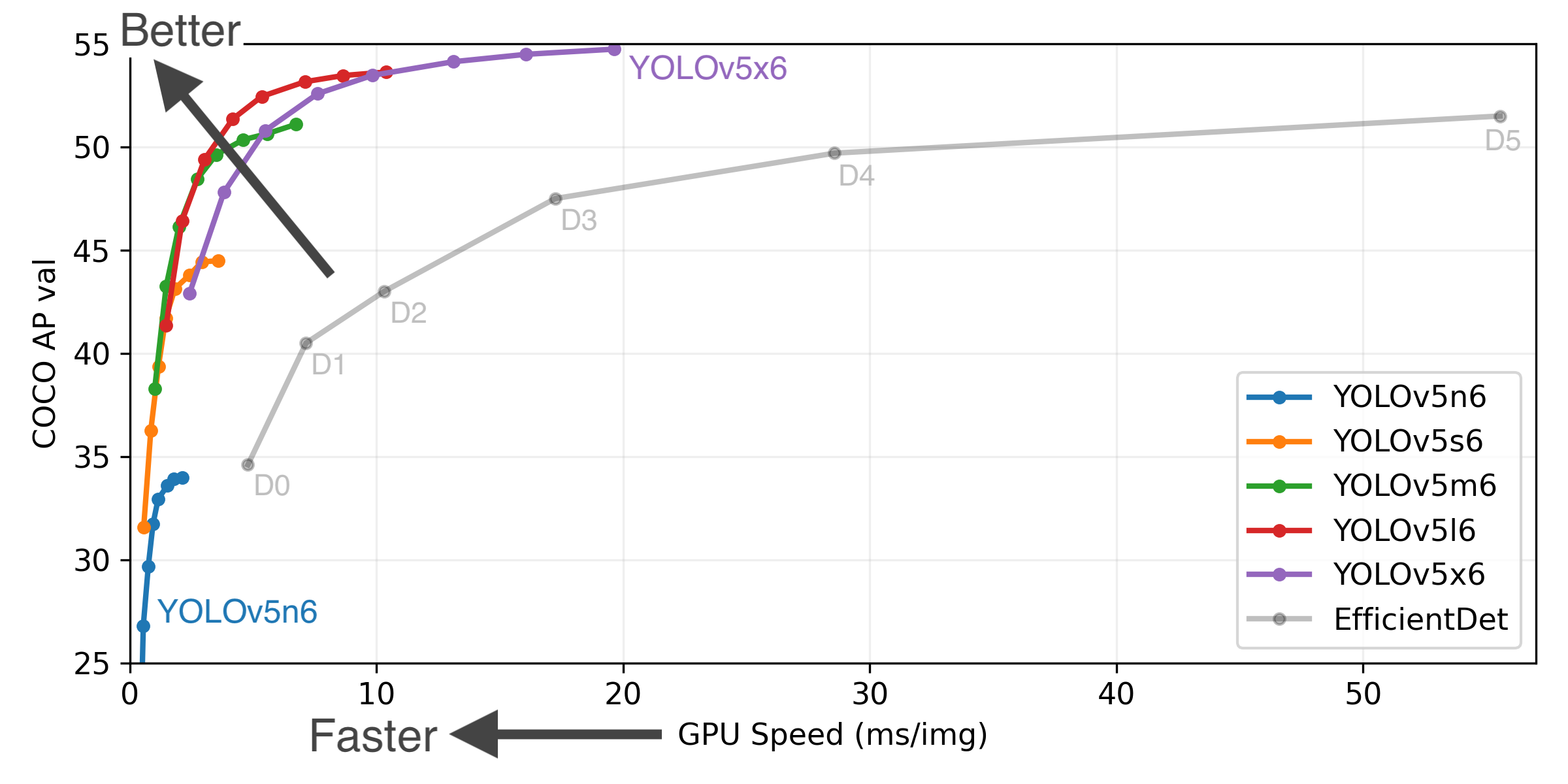
This yolov5 package contains everything from ultralytics/yolov5 at this commit plus:
1. Easy installation via pip: `pip install yolov5`
2. Full CLI integration with fire package
3. COCO dataset format support (for training)
4. S3 support (model and dataset upload)
5. NeptuneAI logger support (metric, model and dataset logging)
6. Classwise AP logging during experiments
Install
Install yolov5 using pip (for Python >=3.7)
pip install yolov5
Install yolov5 using pip `(for Python 3.6)`
pip install "numpy>=1.18.5,<1.20" "matplotlib>=3.2.2,<4"
pip install yolov5
Use from Python
Basic
import yolov5

# load model
model = yolov5.load('yolov5s')

# set model parameters
model.conf = 0.25  # NMS confidence threshold
model.iou = 0.45  # NMS IoU threshold
model.agnostic = False  # NMS class-agnostic
model.multi_label = False  # NMS multiple labels per box
model.max_det = 1000  # maximum number of detections per image

# set image
img = 'https://github.com/ultralytics/yolov5/raw/master/data/images/zidane.jpg'

# perform inference
results = model(img)

# inference with larger input size
results = model(img, size=1280)

# inference with test time augmentation
results = model(img, augment=True)

# parse results
predictions = results.pred[0]
boxes = predictions[:, :4] # x1, y1, x2, y2
scores = predictions[:, 4]
categories = predictions[:, 5]

# show detection bounding boxes on image
results.show()

# save results into "results/" folder
results.save(save_dir='results/')
Alternative
from yolov5 import YOLOv5

# set model params
model_path = "yolov5/weights/yolov5s.pt"
device = "cuda:0" # or "cpu"

# init yolov5 model
yolov5 = YOLOv5(model_path, device)

# load images
image1 = 'https://github.com/ultralytics/yolov5/raw/master/data/images/zidane.jpg'
image2 = 'https://github.com/ultralytics/yolov5/blob/master/data/images/bus.jpg'

# perform inference
results = yolov5.predict(image1)

# perform inference with larger input size
results = yolov5.predict(image1, size=1280)

# perform inference with test time augmentation
results = yolov5.predict(image1, augment=True)

# perform inference on multiple images
results = yolov5.predict([image1, image2], size=1280, augment=True)

# parse results
predictions = results.pred[0]
boxes = predictions[:, :4] # x1, y1, x2, y2
scores = predictions[:, 4]
categories = predictions[:, 5]

# show detection bounding boxes on image
results.show()

# save results into "results/" folder
results.save(save_dir='results/')
Train/Detect/Test/Export
- You can directly use these functions by importing them:
from yolov5 import train, val, detect, export

train.run(imgsz=640, data='coco128.yaml')
val.run(imgsz=640, data='coco128.yaml', weights='yolov5s.pt')
detect.run(imgsz=640)
export.run(imgsz=640, weights='yolov5s.pt')
- You can pass any argument as input:
from yolov5 import detect

img_url = 'https://github.com/ultralytics/yolov5/raw/master/data/images/zidane.jpg'

detect.run(source=img_url, weights="yolov5s6.pt", conf_thres=0.25, imgsz=640)
Use from CLI
You can call yolov5 train, yolov5 detect, yolov5 val and yolov5 export commands after installing the package via pip:
Training
- Finetune one of the pretrained YOLOv5 models using your custom
data.yaml:
$ yolov5 train --data data.yaml --weights yolov5s.pt --batch-size 16 --img 640
                                          yolov5m.pt              8
                                          yolov5l.pt              4
                                          yolov5x.pt              2
- Start a training using a COCO formatted dataset:
# data.yml
train_json_path: "train.json"
train_image_dir: "train_image_dir/"
val_json_path: "val.json"
val_image_dir: "val_image_dir/"
$ yolov5 train --data data.yaml --weights yolov5s.pt
- Visualize your experiments via Neptune.AI (neptune-client>=0.10.10 required):
$ yolov5 train --data data.yaml --weights yolov5s.pt --neptune_project NAMESPACE/PROJECT_NAME --neptune_token YOUR_NEPTUNE_TOKEN
- Automatically upload weights and datasets to AWS S3 (with Neptune.AI artifact tracking integration):
export AWS_ACCESS_KEY_ID=YOUR_KEY
export AWS_SECRET_ACCESS_KEY=YOUR_KEY
$ yolov5 train --data data.yaml --weights yolov5s.pt --s3_upload_dir YOUR_S3_FOLDER_DIRECTORY --upload_dataset
- Add
yolo_s3_data_dirintodata.yamlto match Neptune dataset with a present dataset in S3.
# data.yml
train_json_path: "train.json"
train_image_dir: "train_image_dir/"
val_json_path: "val.json"
val_image_dir: "val_image_dir/"
yolo_s3_data_dir: s3://bucket_name/data_dir/
Inference
yolov5 detect command runs inference on a variety of sources, downloading models automatically from the latest YOLOv5 release and saving results to runs/detect.
$ yolov5 detect --source 0  # webcam
                         file.jpg  # image
                         file.mp4  # video
                         path/  # directory
                         path/*.jpg  # glob
                         rtsp://170.93.143.139/rtplive/470011e600ef003a004ee33696235daa  # rtsp stream
                         rtmp://192.168.1.105/live/test  # rtmp stream
                         http://112.50.243.8/PLTV/88888888/224/3221225900/1.m3u8  # http stream
Export
You can export your fine-tuned YOLOv5 weights to any format such as torchscript, onnx, coreml, pb, tflite, tfjs:
$ yolov5 export --weights yolov5s.pt --include 'torchscript,onnx,coreml,pb,tfjs'
1 maintainer

Metadata
1 maintainer
Release files for yolov5-thin 6.1.6
For a detailed explanation of source distributions (sdists) and built distributions (wheels), please see the package formats documentation.
Source distribution (sdist)
| File | Size | Uploaded | |
|---|---|---|---|
| yolov5_thin-6.1.6.tar.gz | 736.9 kB | Details |
Built distribution (wheel)
| File | Interpreter | ABI | Platform | Reset |
|---|---|---|---|---|
| yolov5_thin-6.1.6-py3-none-any.whl | Python 3 | none | any | Details |
Total release size: 1.5 MB
Release files / yolov5_thin-6.1.6.tar.gz
| Download URL | yolov5_thin-6.1.6.tar.gz |
|---|---|
| Size | 736.9 kB |
| Tags | Source |
|
SHA-256 checksum How to use checksums |
230bde0736581385d496fa1c87b6e56562b13d3ff86d39c12953200b640e9fbf
|
|
BLAKE2b-256 checksum How to use checksums |
23ef814632d9f95e120302383fb6b716c1e23928a792c8513b4977d3cea3ce1b
|
| Upload date | |
|
Uploaded using Trusted Publishing? What is trusted publishing? |
No |
| Uploaded via |
twine/5.1.1 CPython/3.10.8
|
Release files / yolov5_thin-6.1.6-py3-none-any.whl
| Download URL | yolov5_thin-6.1.6-py3-none-any.whl |
|---|---|
| Size | 762.3 kB |
| Tags | Python 3 |
|
SHA-256 checksum How to use checksums |
3332bb0fe9d8ec6de8e6816b0709e7660d5d4dc143ce840ed3e11b813ac861ff
|
|
BLAKE2b-256 checksum How to use checksums |
55013ce1029f82dd969023cdd9affa6884702edf73ada1db732bbe160f1af779
|
| Upload date | |
|
Uploaded using Trusted Publishing? What is trusted publishing? |
No |
| Uploaded via |
twine/5.1.1 CPython/3.10.8
|














