
ONNX YOLOv9 MIT Object Detection
Python scripts performing object detection using the YOLOv9 MIT model in ONNX.
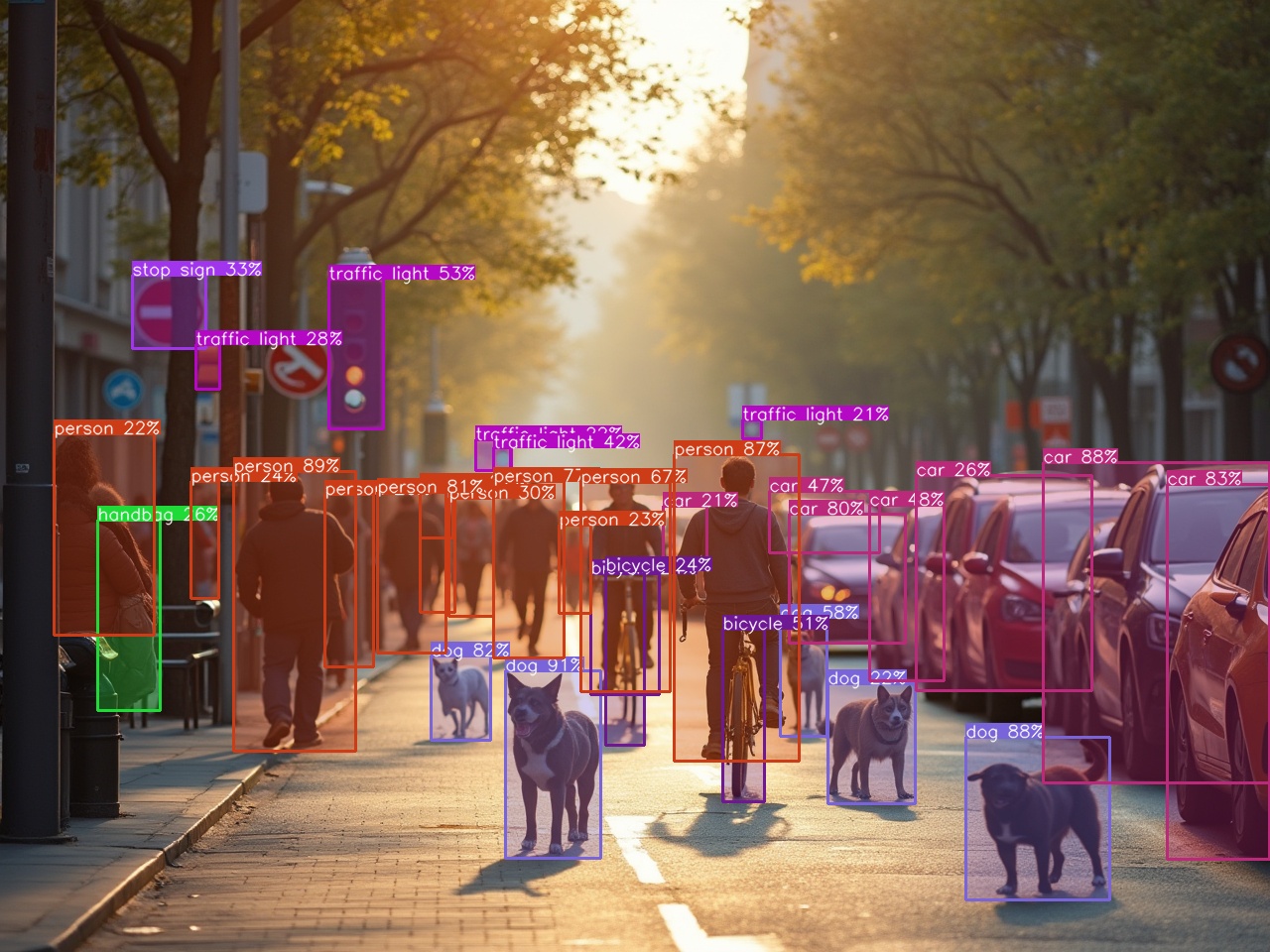
[!CAUTION] I skipped adding the pad to the input image when resizing, which might affect the accuracy of the model if the input image has a different aspect ratio compared to the input size of the model. Always try to get an input size with a ratio close to the input images you will use.
Requirements
- Check the requirements.txt file.
- For ONNX, if you have a NVIDIA GPU, then install the onnxruntime-gpu, otherwise use the onnxruntime library.
Installation 
pip install yolov9-onnx
Or, clone this repository:
git clone https://github.com/ibaiGorordo/ONNX-YOLOv9-MIT-Object-Detection.git
cd ONNX-YOLOv9-MIT-Object-Detection
pip install -r requirements.txt
ONNX Runtime
For Nvidia GPU computers:
pip install onnxruntime-gpu
Otherwise:
pip install onnxruntime
ONNX model
- If the model file is not found in the models directory, it will be downloaded automatically from the release page.
- Or, for exporting the models with a different input size, use the Google Colab notebook to convert the model:
- Available models:
- MIT: v9-s_mit.onnx, v9-m_mit.onnx, v9-c_mit.onnx
- Official: gelan-c.onnx, gelan-e.onnx, yolov9-c.onnx, yolov9-e.onnx

Original YOLOv9 MIT model
The original YOLOv9 MIT model can be found in this repository: YOLOv9 MIT Repository
- The License of the models is MIT license: License
Usage
import cv2
from yolov9 import YOLOv9, draw_detections

detector = YOLOv9("v9-c_mit.onnx")

img = cv2.imread("image.jpg")

class_ids, boxes, confidences = detector(img)

combined_img = draw_detections(img, boxes, confidences, class_ids)
cv2.imshow("Detections", combined_img)
cv2.waitKey(0)
Examples
- Image inference:
python image_object_detection.py
- Webcam inference:
python webcam_object_detection.py
- Video inference: https://youtu.be/X_XVkEqgCUM
python video_object_detection.py
https://github.com/user-attachments/assets/71b3ef97-92ef-4ddb-a62c-5e52922a396d
References:
- YOLOv9 MIT model: https://github.com/WongKinYiu/YOLO
- YOLOv9 model: https://github.com/WongKinYiu/yolov9
1 maintainer

Release files for yolov9-onnx 0.8.0
For a detailed explanation of source distributions (sdists) and built distributions (wheels), please see the package formats documentation.
Source distribution (sdist)
| File | Size | Uploaded | |
|---|---|---|---|
| yolov9_onnx-0.8.0.tar.gz | 6.2 kB | Details |
Built distribution (wheel)
| File | Interpreter | ABI | Platform | Reset |
|---|---|---|---|---|
| yolov9_onnx-0.8.0-py3-none-any.whl | Python 3 | none | any | Details |
Total release size: 13.0 kB
Release files / yolov9_onnx-0.8.0.tar.gz
| Download URL | yolov9_onnx-0.8.0.tar.gz |
|---|---|
| Size | 6.2 kB |
| Tags | Source |
|
SHA-256 checksum How to use checksums |
bfdb8fec3f133e9ba456f18f5b8ea14807251f09fa1d53cf6ccf6b7502045b4d
|
|
BLAKE2b-256 checksum How to use checksums |
d21ff02d2f7756649819a87a3e85803450a4b7de16f11be81a58f8c87586ab17
|
| Upload date | |
|
Uploaded using Trusted Publishing? What is trusted publishing? |
No |
| Uploaded via |
twine/5.1.1 CPython/3.10.8
|
Release files / yolov9_onnx-0.8.0-py3-none-any.whl
| Download URL | yolov9_onnx-0.8.0-py3-none-any.whl |
|---|---|
| Size | 6.8 kB |
| Tags | Python 3 |
|
SHA-256 checksum How to use checksums |
04887ac39b9f4cc53e573aa98382f2e9289353596a94a1d5ac9eb83ea8370297
|
|
BLAKE2b-256 checksum How to use checksums |
ebf15b6173515f2bb7c38f09363ef45718cbc42b011c895ce28020e82e43fa24
|
| Upload date | |
|
Uploaded using Trusted Publishing? What is trusted publishing? |
No |
| Uploaded via |
twine/5.1.1 CPython/3.10.8
|














