

YourBench: A Dynamic Benchmark Generation Framework

[GitHub] · [Dataset] · [Documentation] · [Paper]
Generate high-quality QA pairs and evaluation datasets from any source documents. YourBench transforms your PDFs, Word docs, and text files into structured benchmark datasets with configurable output formats. Appearing at COLM 2025. 100% free and open source.
Features
- Document Ingestion – Parse PDFs, Word docs, HTML, and text files into standardized Markdown
- Question Generation – Create single-hop and multi-hop questions with customizable schemas
- Custom Output Schemas – Define your own Pydantic models for question/answer format
- Multi-Model Support – Use different LLMs for different pipeline stages
- HuggingFace Integration – Push datasets directly to the Hub or save locally
- Quality Filtering – Citation scoring and deduplication built-in
Quick Start
Use uv to run the packaged CLI directly:
uvx --from yourbench yourbench run example/default_example/config.yaml --debug
The example config works out-of-the-box with env vars from .env (see .env.template).
Install locally if you prefer:
uv pip install yourbench
yourbench run example/default_example/config.yaml
Installation
Requires Python 3.12+.
# With uv (recommended)
uv pip install yourbench

# With pip
pip install yourbench
From source:
git clone https://github.com/huggingface/yourbench.git
cd yourbench
pip install -e .
Usage
Minimal config:
hf_configuration:
  hf_dataset_name: my-benchmark

model_list:
  - model_name: openai/gpt-4o-mini
    api_key: $OPENAI_API_KEY

pipeline:
  ingestion:
    source_documents_dir: ./my-documents
  summarization:
  chunking:
  single_hop_question_generation:
  prepare_lighteval:
yourbench run config.yaml
With custom output schema:
pipeline:
  single_hop_question_generation:
    question_schema: ./my_schema.py  # Must export DataFormat class
# my_schema.py
from pydantic import BaseModel, Field

class DataFormat(BaseModel):
    question: str = Field(description="The question")
    answer: str = Field(description="The answer")
    difficulty: str = Field(description="easy, medium, or hard")
CLI Commands
YourBench provides several CLI commands:
| Command | Description |
|---|---|
yourbench run <config> |
Run the full pipeline |
yourbench validate <config> |
Check config without running |
yourbench estimate <config> |
Estimate token usage |
yourbench init |
Generate starter config interactively |
yourbench stages |
List available pipeline stages |
yourbench version |
Show version |
See CLI Reference for full documentation.
Documentation
| Guide | Description |
|---|---|
| Configuration | Full config reference with all options |
| Custom Schemas | Define your own output formats |
| How It Works | Pipeline architecture and stages |
| CLI Reference | All CLI commands and options |
| FAQ | Common questions and troubleshooting |
| OpenAI-Compatible Models | Use vLLM, Ollama, etc. |
| Dataset Columns | Output field descriptions |
| Academic Paper | COLM 2025 submission |
Try Online
No installation needed:
- Demo Space – Upload a document, get a benchmark
- Advanced Space – Full config control in browser
Example Configs
The example/ folder contains ready-to-use configurations:
default_example/– Basic setup with sample documentsharry_potter_quizz/– Generate quiz questions from bookscustom_prompts_demo/– Custom prompts for domain-specific questionslocal_vllm_private_data/– Use local models for private datarich_pdf_extraction_with_gemini/– LLM-based PDF extraction for charts/figures
Run any example:
yourbench run example/default_example/config.yaml
API Keys
Set in environment or .env file:
HF_TOKEN=hf_xxx              # For Hub upload
OPENAI_API_KEY=sk-xxx        # For OpenAI models
Use $VAR_NAME in config to reference environment variables.
Contributing
PRs welcome! Open an issue first for major changes.
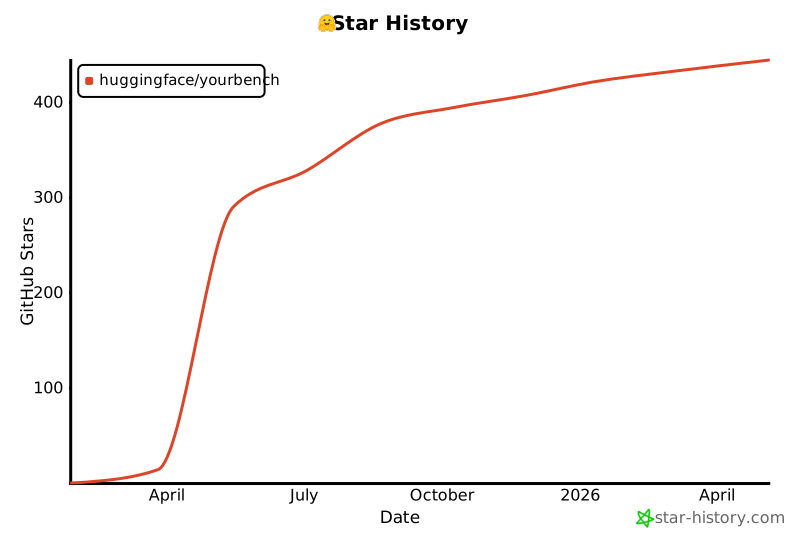
📈 Progress
📜 License
Apache 2.0 – see LICENSE.
📚 Citation
@misc{shashidhar2025yourbencheasycustomevaluation,
      title={YourBench: Easy Custom Evaluation Sets for Everyone},
      author={Sumuk Shashidhar and Clémentine Fourrier and Alina Lozovskia and Thomas Wolf and Gokhan Tur and Dilek Hakkani-Tür},
      year={2025},
      eprint={2504.01833},
      archivePrefix={arXiv},
      primaryClass={cs.CL},
      url={https://arxiv.org/abs/2504.01833}
}
1 maintainer

Metadata
1 maintainer
Release files for yourbench 0.9.0
For a detailed explanation of source distributions (sdists) and built distributions (wheels), please see the package formats documentation.
Source distribution (sdist)
| File | Size | Uploaded | |
|---|---|---|---|
| yourbench-0.9.0.tar.gz | 79.1 kB | Details |
Built distribution (wheel)
| File | Interpreter | ABI | Platform | Reset |
|---|---|---|---|---|
| yourbench-0.9.0-py3-none-any.whl | Python 3 | none | any | Details |
Total release size: 177.2 kB
Release files / yourbench-0.9.0.tar.gz
| Download URL | yourbench-0.9.0.tar.gz |
|---|---|
| Size | 79.1 kB |
| Tags | Source |
|
SHA-256 checksum How to use checksums |
b79255cbed3936e2cf448229abc68582adf245844dfbad311299813facc2a261
|
|
BLAKE2b-256 checksum How to use checksums |
4ae9e16040b6be9286290e5da377d725368dc668b370d4a396dc432e096b968c
|
| Upload date | |
|
Uploaded using Trusted Publishing? What is trusted publishing? |
Yes |
| Uploaded via |
twine/6.1.0 CPython/3.13.7
|
Provenance
Provenance describes where a file came from. On PyPI, provenance is shared via attestations, which provide a verifiable record of the build or publishing details. View details, limitations and caveats.


PyPI Publish Attestation
PyPI verified that this artifact, at this checksum, originated from the publisher listed below.
Signed by GitHub Actions, verified by PyPI on Dec 29, 2025.
Transparency logRelease files / yourbench-0.9.0-py3-none-any.whl
| Download URL | yourbench-0.9.0-py3-none-any.whl |
|---|---|
| Size | 98.1 kB |
| Tags | Python 3 |
|
SHA-256 checksum How to use checksums |
f1d51cd8f2f07c902abbae690a8ab47e62271dd7879926db4bd7cb33729352ce
|
|
BLAKE2b-256 checksum How to use checksums |
25dd106d779c73f2d73b43acff7ba0fed218509b949e6f762fcf46d123a6ef36
|
| Upload date | |
|
Uploaded using Trusted Publishing? What is trusted publishing? |
Yes |
| Uploaded via |
twine/6.1.0 CPython/3.13.7
|
Provenance
Provenance describes where a file came from. On PyPI, provenance is shared via attestations, which provide a verifiable record of the build or publishing details. View details, limitations and caveats.
PyPI Publish Attestation
PyPI verified that this artifact, at this checksum, originated from the publisher listed below.
Signed by GitHub Actions, verified by PyPI on Dec 29, 2025.
Transparency log













