
🎙️ youtube-dubber




Dub any YouTube video into Hindi (and 19 other languages) with a casual, engaging neural voice — like a desi YouTuber, not a robotic narrator.
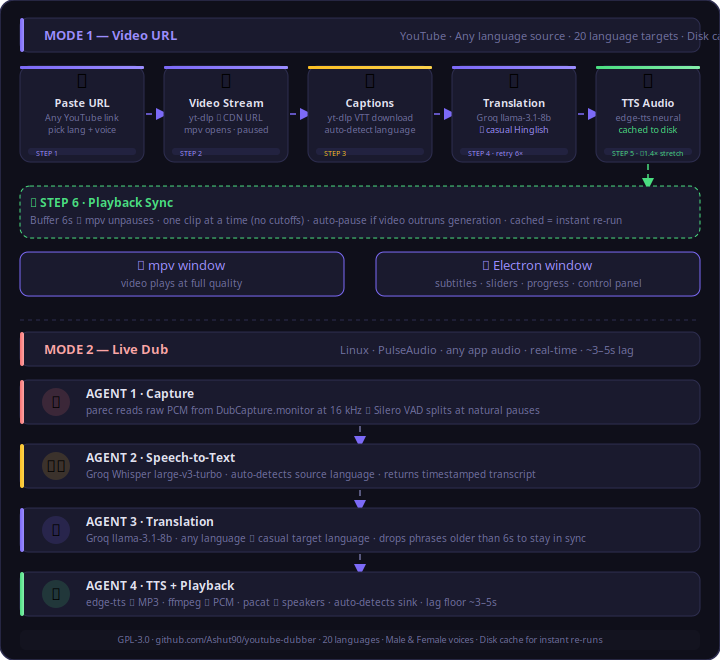
Give it a URL → it pulls the captions, translates them to natural casual speech, generates a neural voice, and saves synced dubbed audio clips + a manifest. Fully headless — use it in scripts, servers, or pipelines.
⚡ Quick start
pip install youtube-dubber
export GROQ_API_KEY=gsk_xxxxxxxx        # free key → https://console.groq.com/keys
from youtube_dubber import dub

manifest = dub(
    "https://www.youtube.com/watch?v=VIDEO_ID",
    lang="hindi",       # any of 20 languages
    gender="female",    # "male" or "female"
    out="./out",
)
print(len(manifest["segments"]), "segments dubbed")
Or from the command line:
youtube-dubber --url https://youtu.be/VIDEO_ID --lang hindi --gender female --out ./out
Output: out/audio/<videoId>_<lang>_<gender>/seg_NNNNN.mp3 clips + out/manifest.json.
⚠️ System Requirements
pip install brings the Python code, but you must also have these on your system (they are not pip-installable Python packages):
| Requirement | Why | Install |
|---|---|---|
| 🐍 Python 3.10+ | runtime | — |
| 🎬 ffmpeg | audio conversion / time-stretch | sudo apt install ffmpeg · brew install ffmpeg · windows |
| ⬇️ yt-dlp | fetches captions & stream info | pip install -U yt-dlp |
| 🔑 Groq API key | translation + Whisper STT (free tier) | console.groq.com/keys |
| 🌐 Internet | edge-tts calls Microsoft's neural voices | — |
💡 Install yt-dlp alongside the package:
pip install "youtube-dubber[ytdlp]"ffmpeg must be on your PATH — it is a system binary, not a pip package.
🌍 Supported languages (20)
Indian (casual Hinglish / code-switch style — tech terms stay English): Hindi · Tamil · Telugu · Bengali · Marathi · Gujarati · Kannada · Malayalam · Punjabi · Urdu
International (full translation): Spanish · French · German · Japanese · Chinese · Korean · Arabic · Portuguese · Russian · Italian
Each has a male & female neural voice. Source language is auto-detected — dub an Arabic, Chinese, or English video into Hindi, all the same way.
🧠 Live progress (callback API)
from youtube_dubber import Dubber

def on_event(ev):
    if ev["type"] == "progress":
        print(f"[{ev['step']}] {ev['pct']}%  {ev['msg']}")
    elif ev["type"] == "segment":
        print("dubbed:", ev["dubbed"])

Dubber(lang="hindi", gender="male", out_dir="./out", on_event=on_event).run(url)
Event types: stream_url · progress · segment · done · error
✨ Why it's different
- Casual, not robotic — prompt-tuned to sound like a real creator ("तो भाई, scene ये है…"), not a textbook
- Auto language detection — works on any source language out of the box
- Disk cache — re-running the same video is instant (no re-translation/TTS)
- Rate-limit resilient — automatic retries so segments never silently vanish
- Fit-to-window timing — clips are speed-matched (≤1.4×) so dubbing stays in sync without sounding sped-up
🖥️ Want the desktop app instead?
This package is the headless engine. There's also a full Electron desktop app (paste a URL, watch the dubbed video live with subtitles) and a real-time Live Dub mode — see the GitHub repo:
👉 github.com/Ashut90/youtube-dubber
📄 License
GPL-3.0 — © 2026 Ashutosh (@Ashut90). Forks must stay open source and credit the original. See LICENSE.
1 maintainer

Metadata
1 maintainer
Release files for youtube-dubber 0.2.0
For a detailed explanation of source distributions (sdists) and built distributions (wheels), please see the package formats documentation.
Source distribution (sdist)
| File | Size | Uploaded | Provenance | Actions |
|---|---|---|---|---|
| youtube_dubber-0.2.0.tar.gz | 29.4 kB | Without provenance | Details for youtube_dubber-0.2.0.tar.gz |
Built distribution (wheel)
| File | Interpreter | ABI | Platform | Actions Reset |
|---|---|---|---|---|
| youtube_dubber-0.2.0-py3-none-any.whl | Python 3 | none | any | Details for youtube_dubber-0.2.0-py3-none-any.whl |
Total release size: 52.5 kB
Release files / youtube_dubber-0.2.0.tar.gz
| Download URL | youtube_dubber-0.2.0.tar.gz |
|---|---|
| Size | 29.4 kB |
| Tags | Source |
|
SHA-256 checksum How to use checksums |
819481ec29d249aca941758def96ef9d95b88770b15a4d2b6ebe2fc81f01434d
|
|
BLAKE2b-256 checksum How to use checksums |
8ea8bcf6f7d45f89ade6883509f9774540fbb5933d7844ba400918094f74ec0a
|
| Upload date | |
|
Uploaded using Trusted Publishing? What is trusted publishing? |
No |
| Uploaded via |
twine/6.2.0 CPython/3.11.15
|
Release files / youtube_dubber-0.2.0-py3-none-any.whl
| Download URL | youtube_dubber-0.2.0-py3-none-any.whl |
|---|---|
| Size | 23.1 kB |
| Tags | Python 3 |
|
SHA-256 checksum How to use checksums |
6ebb1ff48121ebdf35cf6a5fc432d54bb5e2d4a36039515c02433a20f91c55fd
|
|
BLAKE2b-256 checksum How to use checksums |
4c393dbc88b3d4e0460071aeb355e624438b25b6805d43da971d8043968c15a7
|
| Upload date | |
|
Uploaded using Trusted Publishing? What is trusted publishing? |
No |
| Uploaded via |
twine/6.2.0 CPython/3.11.15
|
Security for youtube-dubber 0.2.0
Provenance
Provenance describes where a file came from. On PyPI, provenance is shared via attestations, which provide a verifiable record of the build or publishing details. View details, limitations and caveats.
No provenance found
None of the files in this release were uploaded with provenance metadata.
A note on package security
PyPI is a repository for distributing packages, not a service for auditing them. While third-party security researchers and our staff do their best to detect and remove malicious packages, PyPI cannot guarantee the quality, security or suitability of any given package.
To learn more about protecting yourself from malicious actors, visit our package security documentation.














