
YouTube Helper




YouTube Helper belongs to a collection of libraries called AI Helpers developed for building Artificial Intelligence.
The Promise
Local-first by design. youtube-helper runs entirely on your machine: it fetches only the media you ask for, and your data is never uploaded to a third-party service. No telemetry, no account, no cloud lock-in. You own the whole pipeline. Part of the AI Helpers suite: sovereignty over your data through local-first open source.
(youtube-helper does reach the internet: it downloads media from the source site you point it at. The promise is about no exfiltration and no telemetry, nothing about you or your requests is ever sent anywhere except the site hosting the media you asked for.)

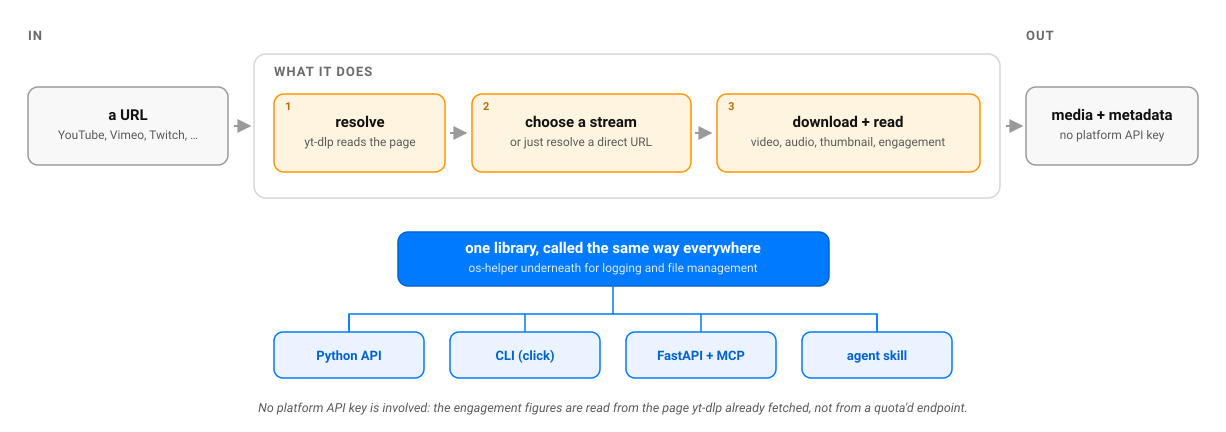
YouTube Helper is a Python library of utility functions for downloading videos, audio and thumbnails from platforms like YouTube, Vimeo and DailyMotion.
The fetching itself goes through yt-dlp, an open-source tool that already knows how to talk to hundreds of video sites, each with its own quirks. youtube-helper wraps it in one consistent Python interface, so you never have to learn those quirks yourself.
It also covers the post-processing: converting or merging media files with ffmpeg, the standard command-line tool for reading, converting and combining audio and video.
YouTube Helper is battle-tested. Every change ships through automated tests and continuous integration before it reaches PyPI, and versions follow Semantic Versioning (currently v2.7.0).
It stands in a dependency graph other shipped code already relies on, in both directions:
- downstream,
podcast-helper— a separate published package in the suite — builds directly on top of it in production; - upstream, it depends on
os-helper(the shared foundation every library in the suite uses for logging and file management), plusaudio-helperandvideo-helperfor the conversion step afteryt-dlpfetches the raw media.
That is what "battle-tested" means here: not a claim, but a graph other code stands on.
Documentation
Features
Downloads (to disk), in youtube_helper.main:
download_video(url, output_path, max_height)/download_audio(url, output_path, target_sample_rate)/download_thumbnail(url, output_path), each returning the path it wrote.video_url_meta_data(url)/is_valid_video_url(url)for cheap metadata probes.default_ytdlp_options(...)andheight_capped_format(max_height)for customisable yt-dlp options.
Stream catalog and direct-URL resolution, in youtube_helper.streaming:
resolve_direct_url(url, prefer="audio"|"video"): a quick "give me one direct ffmpeg-ready URL".list_video_streams(url): enumerate every video format yt-dlp finds (codec, resolution, fps, bitrate, and more).pick_video_stream(url, prefer_codec=, prefer_format=, max_fps=, language=, cookies_from_browser=): constrained picker, returns oneVideoStreamInfoready to feedvideo_helper.extract_frames.extract_frames_stream(url, ..., **extract_frames_kwargs): one-call composition ofpick_video_streamandvideo_helper.extract_frames. It auto-wires headers and forwards anyextract_frameskwarg (destination,device,batch_size,output_width,frame_step, and more), the shortest path from a YouTube, Vimeo, or Twitch URL to ML-ready frames.- The audio stream catalog and picker intentionally live in podcast-helper, the suite's single owner for audio PCM streaming.
No-API engagement metadata, in youtube_helper.branding:
-
channel_info(url)/channel_videos(url, max_videos, include_shorts, include_lives): a channel snapshot plus a paginated video list, with normalised engagement metrics on a cross-platform schema. -
video_engagement(url)/engagement_batch([urls]): per-video views, likes, comments, and channel follower count, with a tolerant batched variant. -
video_subtitles(url, output_dir, langs=("fr","en")): auto-subtitle download. -
video_comments(url, max_count, cookies_from_browser="firefox"|"chrome"|...): a comments sample. -
is_short(meta)/ensure_recent_ytdlp(min_version): helpers. -
Built on yt-dlp's public metadata only: no Google Data API, no Vimeo API, no OAuth, no quota. The official platform APIs ask for three things before you read anything:
- register an application;
- obtain credentials through OAuth — the login handshake that proves your app is allowed to act on a user's behalf;
- stay under a quota — a hard cap on how many requests you can make per day.
Reading the same public page a browser sees needs none of them: no account to register, no key to request, no daily ceiling to run into.
How it works
Installation
Prerequisites: Python 3.10-3.13, git, yt-dlp, and ffmpeg, cross-platform:
- 🍎 macOS (Homebrew):
brew install python git yt-dlp ffmpeg - 🐧 Ubuntu/Debian:
sudo apt update && sudo apt install -y python3 python3-pip git yt-dlp ffmpeg - 🪟 Windows (PowerShell):
winget install Python.Python.3.12 Git.Git yt-dlp.yt-dlp Gyan.FFmpeg
Optional — Tor (only needed for the last tier of the download resilience ladder):
- 🍎 macOS (Homebrew):
brew install tor && brew services start tor - 🐧 Ubuntu/Debian:
sudo apt update && sudo apt install -y tor(the package's systemd service starts automatically; if not,sudo systemctl enable --now tor) - 🪟 Windows:
choco install tor(Chocolatey), then runtorin a terminal — or install the Tor Browser and setYOUTUBE_HELPER_TOR_PROXY=socks5h://127.0.0.1:9150(its bundled proxy listens on 9150, not the standalone daemon's default 9050)
We recommend using Python environments. Check this link if you're unfamiliar with setting one up: 🥸 Tech tips.
From PyPI (recommended)
pip install youtube-helper

# Optional surfaces
pip install "youtube-helper[api]"       # FastAPI HTTP surface
pip install "youtube-helper[mcp]"       # the same app plus the MCP endpoint
From source (no PyPI)
git clone https://github.com/warith-harchaoui/youtube-helper.git
cd youtube-helper
pip install -e .

# Optional surfaces
pip install -e ".[api]"
Quick start
Probe a URL's metadata without downloading anything, fetch the video, then pull its audio track on its own:
import os

import audio_helper as ah
import os_helper as osh
import video_helper as vh
import youtube_helper as yth

osh.verbosity(0)

youtube_url = "https://www.youtube.com/watch?v=YE7VzlLtp-4"  # Big Buck Bunny

folder = "yt_tests"
osh.make_directory(folder)

# No download happens here. The result is yt-dlp's own info dict, so `title`,
# `channel`, `duration`, `view_count`, `formats` and the rest are all in it;
# `title` and `description` are additionally coerced to strings, because some
# extractors omit them entirely and used to crash every caller downstream.
meta = yth.video_url_meta_data(youtube_url)
print(meta["title"], "—", meta["channel"], f"({meta['duration']}s)")

# Each download_* returns the path it actually wrote.
video = yth.download_video(youtube_url, os.path.join(folder, "big-buck-bunny.mp4"))
audio = yth.download_audio(youtube_url, os.path.join(folder, "big-buck-bunny.mp3"))

print(vh.video_dimensions(video))
# {'width': 1920, 'height': 1080, 'duration': 596.458333, 'frame_rate': 24.0, 'has_sound': True}

print(ah.get_audio_duration(audio))
# 596.474195
Those last two lines are measured on this repository's own yt_tests/
fixtures. The duration is the film's and will not move; the resolution is not
a constant, because download_video with no max_height takes whatever the
best available format is on the day — pass max_height=720, or set
YOUTUBE_HELPER_MAX_HEIGHT, when you need a predictable ceiling.
audio_helper.load_audio is deliberately not used above: it decodes to a
torch tensor and so needs audio-helper[demucs], which this package does not
pull in. get_audio_duration works on the base install.
For the full catalog of recipes (downloads, stream catalog and picker,
direct-URL resolver, composing with video-helper, branding metadata,
subtitles, comments, and the command line), see
📋 EXAMPLES.md.
Download resilience
Every yt-dlp call in the package funnels through one chokepoint,
main._run_ytdlp — the download helpers, the branding helpers, and the
streaming catalog and resolvers alike. That is where the retry ladder lives,
so a tier added there reaches everything instead of one module. When the
normal approach gets blocked (rate-limiting, bot checks, IP bans), the request
is retried down progressively more invasive tiers:
- Normal: the default request, as configured by
default_ytdlp_options. - Browser User-Agent: retried with a fully-populated, up-to-date desktop
Chrome User-Agent and matching headers. Override with the
YOUTUBE_HELPER_USER_AGENTenvironment variable. - Another YouTube client:
web_embedded, thentv,android_vr, thenmweb— one retry each. YouTube serves several apps and does not apply the same checks to all of them, so a video refused for one client often loads for another.- Why it comes before the two below. It costs nothing, reads nobody's private data, and routes through no third party.
web_embeddedadditionally publishes no HLS at all, which matters because YouTube throttles fragmented HLS far harder than a direct https format. - Overrides.
YOUTUBE_HELPER_PLAYER_CLIENTSsets the chain (comma-separated; empty disables the rung). Pin one client withdefault_ytdlp_options(player_clients=[...])and the ladder leaves your choice alone.
- Why it comes before the two below. It costs nothing, reads nobody's private data, and routes through no third party.
- Cookies from browser (opt-in, skipped by default): retried with session cookies pulled straight from a local browser profile, through yt-dlp's
--cookies-from-browsermechanism.- What it fixes. In practice this is the tier that actually clears YouTube's "Sign in to confirm you're not a bot" challenge. A browser User-Agent alone does not, and neither does Tor — exit nodes are themselves commonly flagged.
- How to enable it. Reading another app's cookie store is invasive enough that it never happens silently: set
YOUTUBE_HELPER_COOKIES_FROM_BROWSERto a yt-dlp-recognized browser name (chrome,firefox,edge,brave,opera,vivaldi,safari,whale,chromium). - One macOS caveat. Safari's cookie store also needs Full Disk Access granted to the calling process or terminal, or extraction raises "Operation not permitted". Chrome and Firefox need no such grant.
- Tor: retried again over a local Tor SOCKS proxy.
- Why it helps. Tor routes the request through a chain of relays before it reaches the site, so the site sees a different, unrelated IP address instead of yours, and a block keyed on your IP no longer applies. A SOCKS proxy is simply a local relay point a program can send its traffic through instead of connecting directly, which is how an application hands its requests off to Tor.
- Configuration.
socks5h://127.0.0.1:9050by default, with DNS lookups routed through Tor too, so the site name itself is never leaked outside the tunnel. Override the proxy URL withYOUTUBE_HELPER_TOR_PROXY. Requires a Tor daemon — the background process that runs the relay chain — running locally; see the per-OS install commands under Installation. - Why it is the last rung. Kept as the last resort for environments with no logged-in browser to borrow cookies from. Tor exit nodes are themselves commonly flagged, so it is not a reliable primary fix for the bot challenge.
If every tier fails, the original error from the last attempt is raised.
Every read is bounded. The same chokepoint sets yt-dlp's socket_timeout to 30 seconds, overridable with YOUTUBE_HELPER_SOCKET_TIMEOUT.
Left to itself, yt-dlp inherits Python's default of no timeout at all, so a connection the remote has half-closed is waited on forever. A caption fetch was observed sitting at 0 % CPU for nine minutes with its sockets in CLOSE_WAIT; only a kill ended it.
The wider damage is not one slow call. Every tier of the ladder above runs only once an attempt returns — so an unbounded read disables the whole ladder, and the library looks hung rather than degraded. The bound is what keeps the retries reachable.
A lost fragment fails loudly. yt-dlp's own default is to drop an unavailable HLS/DASH fragment once its retries are spent and finalise the container anyway. What lands on disk is then a valid, playable file that honestly reports its shorter duration — and no downstream check objects.
This package passes skip_unavailable_fragments=False and raises fragment_retries to 25 instead, since the failures seen in the field were transient throttling rather than missing data.
Two escape hatches: YOUTUBE_HELPER_ALLOW_LOSSY_FRAGMENTS=1 restores yt-dlp's skip-and-continue behaviour, and YOUTUBE_HELPER_FRAGMENT_RETRIES changes the patience.
Legal and Ethical Use
YouTube Helper is a thin wrapper around yt-dlp and ffmpeg. You are responsible for how you use it.
Only download or process media that falls into one of these:
- you own it;
- it is in the public domain, or under a permissive licence such as Creative Commons;
- you have explicit permission from the rights holder.
Respect each platform's Terms of Service, and any applicable copyright, privacy and data-protection laws in your jurisdiction. The authors provide this library for legitimate uses — personal archiving, accessibility, research, content you have rights to — not for circumventing access controls or redistributing copyrighted material.
Multi-surface exposure
youtube-helper is not just a library. The same functions are exposed through four more doors:
| Door | What it is |
|---|---|
| CLI | a program you drive by typing commands rather than writing Python |
| FastAPI HTTP surface | the same functions reachable over the network, as a small web service |
| MCP tools | the Model Context Protocol: a standard that lets an AI agent call a program's functions directly, the same way a human would call them from the command line |
| Browser GUI | a point-and-click page |
Four doors onto the same underlying code, so a script, a web service, an AI agent and a human at a browser all reach the exact same download logic:
# Python library (default)
import youtube_helper as yth

# Command line (installed automatically)
youtube-helper metadata     --url https://www.youtube.com/watch?v=YE7VzlLtp-4
youtube-helper audio        --url https://www.youtube.com/watch?v=YE7VzlLtp-4 --output out.mp3
youtube-helper resolve      --url https://www.youtube.com/watch?v=YE7VzlLtp-4 --prefer audio
youtube-helper channel-info --url https://www.youtube.com/@blender

# FastAPI HTTP surface (needs the [api] extra)
pip install "youtube-helper[api]"
uvicorn youtube_helper.api:app --port 8000
# → OpenAPI docs at http://localhost:8000/docs

# Browser GUI (needs the [api] extra): paste a URL, pick audio or video
uvicorn youtube_helper.api:app --port 8000
# → open http://localhost:8000/gui  (or just http://localhost:8000/)

# MCP tools (needs the [mcp] extra): same app, plus an /mcp endpoint
pip install "youtube-helper[mcp]"
youtube-helper-mcp
There is exactly one command line, built with click: youtube-helper carries
fifteen subcommands, and the HTTP surface mirrors them one-to-one, so a flag
name learned in the terminal is the field name in the JSON body. The full list
is in the
📋 examples.
Download bench GUI (GET /gui): a single self-contained page (Tailwind via
CDN + vanilla JS, no build step). Paste a YouTube (or any yt-dlp-supported) URL,
choose audio (with a sample rate) or video, hit Download, and the result
plays inline with a download link. It POSTs to the same /audio / /video
endpoints, zero extra server logic. Local-first: the page only talks to your
local API.
See TRIGGERS.md for the exhaustive catalogue of what fires each operation.
Docker image:
docker build -t youtube-helper .
docker run --rm -p 8000:8000 youtube-helper
A richer GUI plan (video library board, channel comparator, batch downloader) lives in GUI.md.
Use it as an agent skill
skills/youtube-helper/ packages youtube-helper as a Claude Skill and an OpenCode
skill, so an agent can reach for it on your behalf. See
skills/README.md to install it (symlink into
~/.claude/skills/ and ~/.opencode/skills/), and
TRIGGERS.md for the exhaustive trigger catalogue —
scripts/check_triggers.py keeps the skill's description in sync with it, and
the test suite fails if a capability stops being named.
Rust rewrite
A companion crate, youtube-helper-rs,
wraps the same yt-dlp binary from Rust instead of Python —
fetch_metadata and download_audio, nothing more yet (no video download,
thumbnails, stream catalog, channel metadata, subtitles, or Tor fallback,
all present here). The interest: it's a thin std::process::Command
wrapper with typed results and a thiserror error enum, so a Rust program
that already shells out to yt-dlp gets consistent, typed error handling
with no Python runtime in the deployment image at all.
Author
Acknowledgements
Special thanks to Mohamed Chelali and Bachir Zerroug for fruitful discussions.
License
This project is licensed under the BSD-3-Clause License. See the LICENSE file for details.
1 maintainer

Metadata
1 maintainer
Release files for youtube-helper 2.7.1
For a detailed explanation of source distributions (sdists) and built distributions (wheels), please see the package formats documentation.
Source distribution (sdist)
| File | Size | Uploaded | Provenance | Actions |
|---|---|---|---|---|
| youtube_helper-2.7.1.tar.gz | 86.7 kB | Without provenance | Details for youtube_helper-2.7.1.tar.gz |
Built distribution (wheel)
| File | Interpreter | ABI | Platform | Actions Reset |
|---|---|---|---|---|
| youtube_helper-2.7.1-py3-none-any.whl | Python 3 | none | any | Details for youtube_helper-2.7.1-py3-none-any.whl |
Total release size: 145.7 kB
Release files / youtube_helper-2.7.1.tar.gz
| Download URL | youtube_helper-2.7.1.tar.gz |
|---|---|
| Size | 86.7 kB |
| Tags | Source |
|
SHA-256 checksum How to use checksums |
8d0b6f9ae09f319a1e8a3fb9352e05f8e84b38f4d34d18381fffa41dcda8b763
|
|
BLAKE2b-256 checksum How to use checksums |
2f6fb07512b27c3cd9a068bd06ee7c1ab53abc90b0b7a4f42304cb8afd81baa2
|
| Upload date | |
|
Uploaded using Trusted Publishing? What is trusted publishing? |
No |
| Uploaded via |
twine/7.0.0 CPython/3.13.13
|
Release files / youtube_helper-2.7.1-py3-none-any.whl
| Download URL | youtube_helper-2.7.1-py3-none-any.whl |
|---|---|
| Size | 59.0 kB |
| Tags | Python 3 |
|
SHA-256 checksum How to use checksums |
e921dd94cac7481135cb56fb09270b5bbdce634b07434a9b0935b89704f20dce
|
|
BLAKE2b-256 checksum How to use checksums |
b6d1bf03e00eca1ed6f8434c39b251bde67624ef8417e0f422561e89d061ab53
|
| Upload date | |
|
Uploaded using Trusted Publishing? What is trusted publishing? |
No |
| Uploaded via |
twine/7.0.0 CPython/3.13.13
|
Security for youtube-helper 2.7.1
Provenance
Provenance describes where a file came from. On PyPI, provenance is shared via attestations, which provide a verifiable record of the build or publishing details. View details, limitations and caveats.
No provenance found
None of the files in this release were uploaded with provenance metadata.
A note on package security
PyPI is a repository for distributing packages, not a service for auditing them. While third-party security researchers and our staff do their best to detect and remove malicious packages, PyPI cannot guarantee the quality, security or suitability of any given package.
To learn more about protecting yourself from malicious actors, visit our package security documentation.














