
youtube-kit




YouTube CLI (ytk) and MCP server, built for agents and humans. Let Claude Code, Codex, Cursor, Claude Desktop or ChatGPT work on your channel: analytics, uploads, metadata, playlists and comment moderation. It handles several channels, and you can run the same commands in your own terminal.
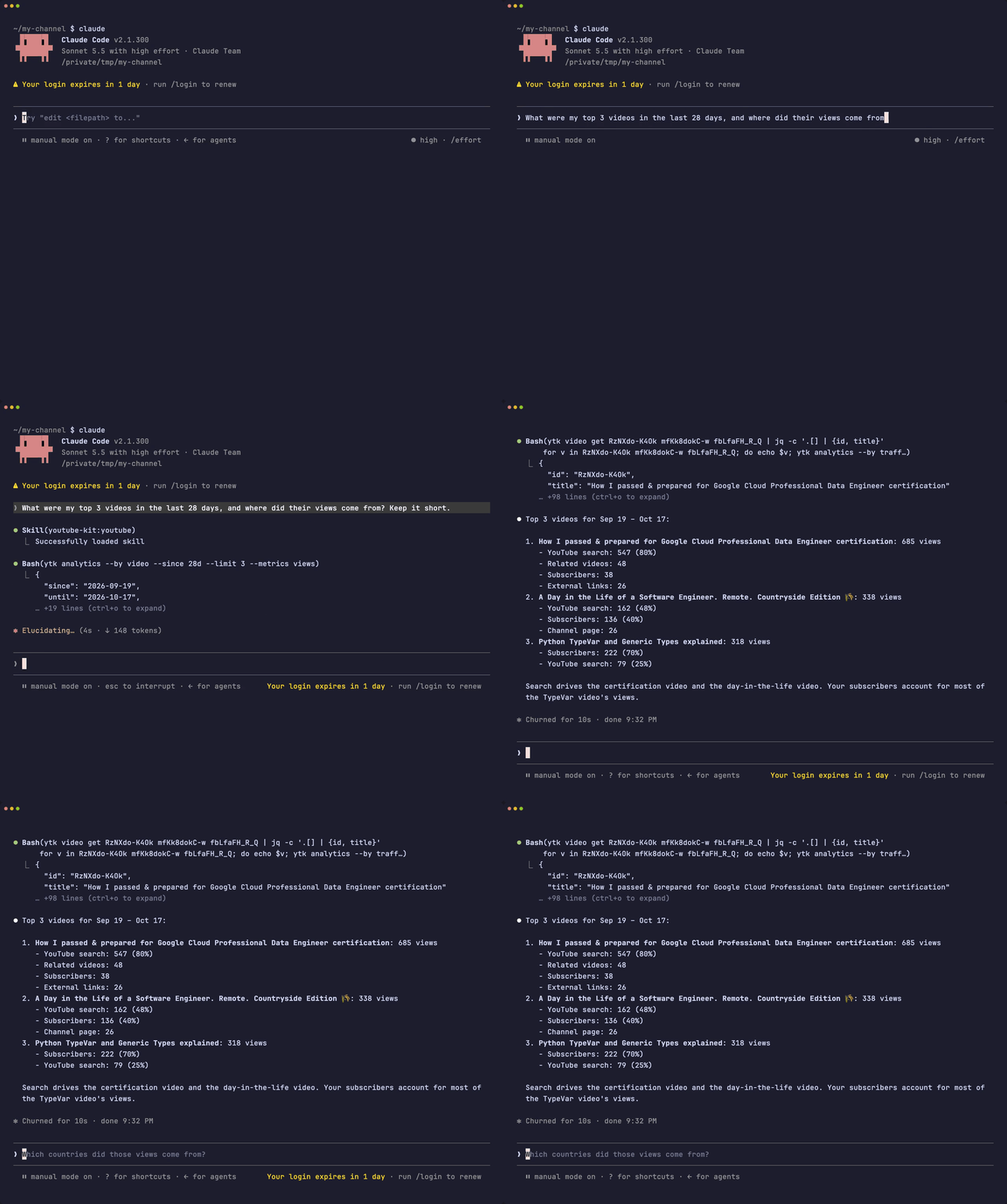
Quick start
uv tool install youtube-kit
ytk auth login      # one-time Google Cloud setup, then pick your channel
You need a Google account with a YouTube channel, and uv (brew install uv on macOS). The first ytk auth login takes about 5 minutes: it opens each Google Cloud page, says what to click and picks up the file you download.
ytk analytics --by video --since 90d --limit 5     # your top videos of the last 90 days
ytk comment list --status held                     # comments waiting for review
ytk channel get @mkbhd | jq .stats                 # any public channel
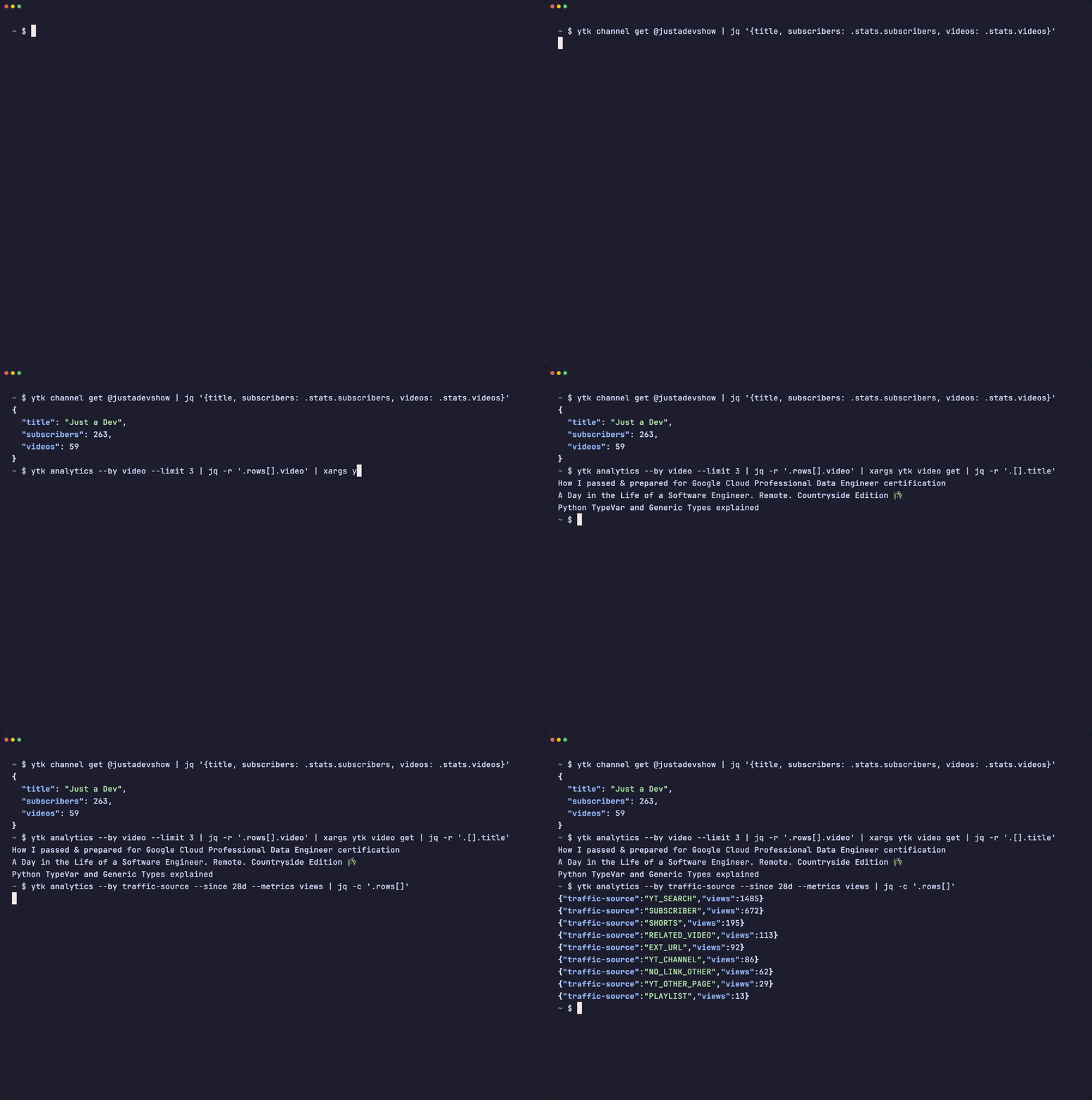
Or ask your agent: "Which of my videos got the most views this month, and are any comments waiting for review?"
Use it from your agent
Skill: Claude Code, Codex, Cursor and other shell agents
A short skill teaches the agent the CLI. It loads only when a YouTube task comes up.
claude plugin install youtube-kit --marketplace eukosh/youtube-kit   # Claude Code
codex plugin marketplace add eukosh/youtube-kit                      # Codex, then:
codex plugin add youtube-kit@youtube-kit
npx skills add eukosh/youtube-kit -g                                 # Cursor and others
The plugins follow ytk releases. Codex updates them at startup; Claude Code does once you turn on auto-update under /plugin → Marketplaces. With npx skills, run npx skills update.
MCP: Claude Desktop, ChatGPT and other MCP clients
ytk mcp serves the same operations as tools. In Claude Code:
claude mcp add youtube -- uvx --from youtube-kit ytk mcp
In clients configured with JSON (Claude Desktop, Cursor and others):
{
  "mcpServers": {
    "youtube": { "command": "uvx", "args": ["--from", "youtube-kit", "ytk", "mcp"] }
  }
}
In the ChatGPT desktop app: Settings → MCP servers → Add server → STDIO, with the command uvx --from youtube-kit ytk mcp. Codex shares that setting (codex mcp add youtube -- uvx --from youtube-kit ytk mcp).
The server uses your ytk auth login logins. Not set up yet? The model can walk you through it with the setup_guide tool.
What it covers
| Area | Operations |
|---|---|
| Analytics | totals, or breakdowns by day, month, video, country, device, OS, traffic source, playback location, age, gender or subscribed status |
| Videos | get, categories, upload (resumable, with progress), update metadata, set thumbnail, wait for processing, like or dislike, check your rating, delete |
| Comments | list (published, held for review, likely spam, rejected), replies, post, reply, edit, delete, approve, hold, reject, ban the author |
| Playlists | list, get, items, create, update, set image, add, remove, move, delete |
| Channel | get, recent activity, your logged-in channels, about info (description, keywords, country, language, trailer), banner, watermark, home page sections |
| Search | videos, channels and playlists, filtered by channel or date |
| Subscriptions | list, subscribe, unsubscribe |
Not covered: captions, localizations, live streaming and channel memberships. ytk --help lists every command, and the skill fits them on one page with jq recipes.
Channels and login
ytk auth login connects one channel. Run it again for each of your other channels, including brand channels: pick the one you want when Google asks.
ytk channel mine                                           # your channels; one is the default
ytk auth switch @second                                    # change the default
ytk video upload clip.mp4 --title Hi --my-channel @third   # use another channel for one command
ytk auth logout @third
Commands work on the default channel unless --my-channel names another. MCP tools take my_channel the same way, so you can say "upload this to my gaming channel". YOUTUBE_CHANNEL sets the default for one shell or one MCP server.
Why your own Google Cloud client. YouTube's daily quota of 10,000 units belongs to a Cloud project. A client shipped inside ytk would split one quota among all its users. Yours is shared by your channels only.
Let an agent set it up. ytk auth guide (setup_guide over MCP) lists what's left, with links and the values to enter. With the gcloud CLI signed in, the agent can create the project and enable the APIs for you. The rest needs your browser. Already have the client JSON? Run ytk auth login --client-secrets FILE.
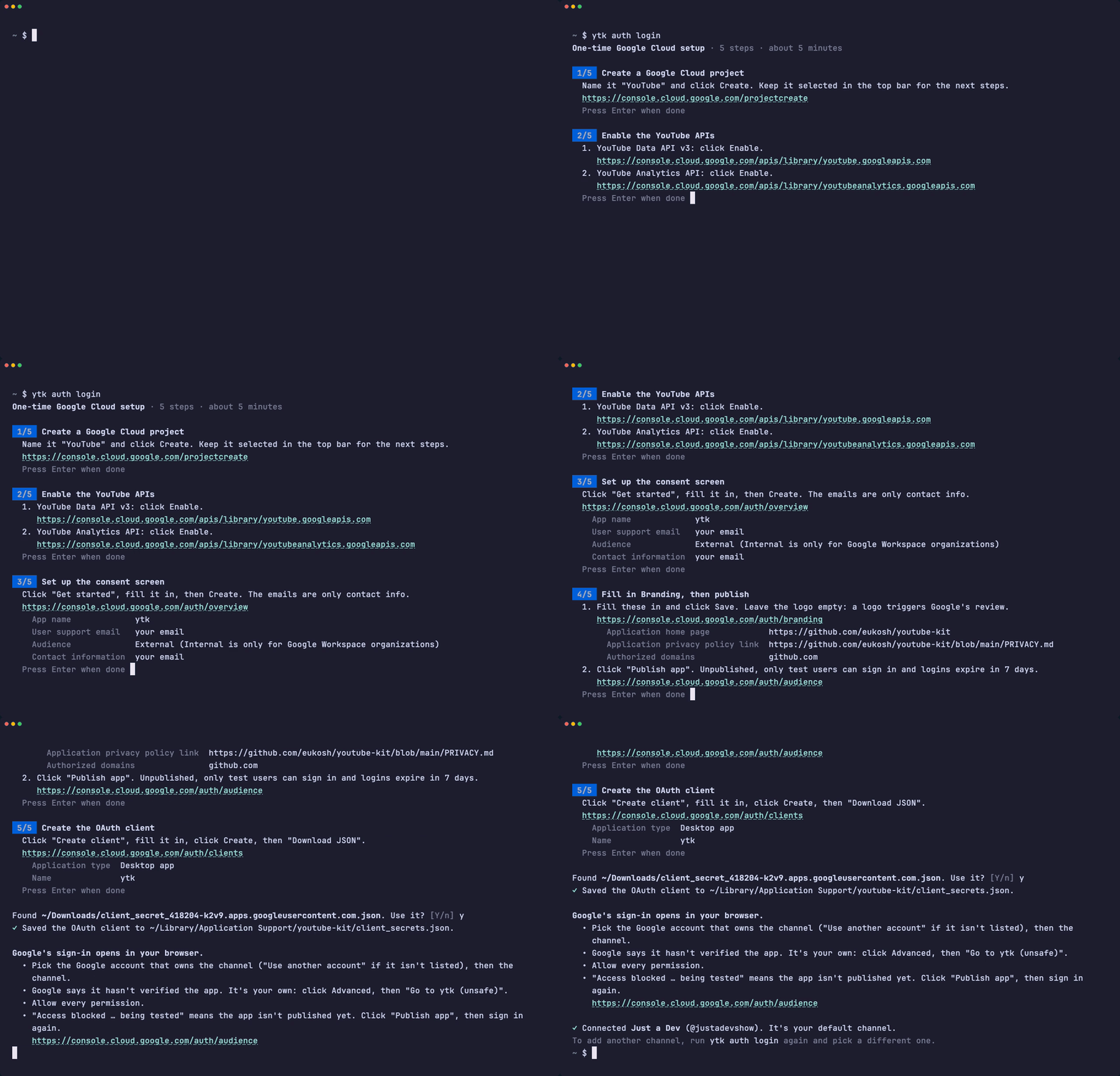
Manual setup, files and environment variables
The guided setup does this:
- In the Google Cloud Console, create a project and enable YouTube Data API v3 and YouTube Analytics API.
- In Google Auth Platform, click Get started (audience External). On Branding, fill in the home page (
https://github.com/eukosh/youtube-kit), the privacy policy link (https://github.com/eukosh/youtube-kit/blob/main/PRIVACY.md) and the authorized domaingithub.com; Google won't publish without them. Then on Audience click Publish app. While the app is in Testing, only listed test users can sign in and Google logs them out after 7 days. - Under Clients, create a client of type Desktop app and download its JSON.
ytk auth login --client-secrets path/to/client_secret.json. Google warns that it hasn't verified the app: it's your own, so click Advanced, then Go to ytk (unsafe).
Public data (search, videos, channels, playlists, comments) also works with just an API key: create one in the same project and export YOUTUBE_API_KEY=..., or put it in the MCP server's env. Without a key, ytk reads public data through your login.
ytk remembers each channel's handle from when you logged in. After renaming a channel on YouTube, name it by its UC… ID or run ytk auth login for it again.
Credentials and config.toml live in the user config directory (~/Library/Application Support/youtube-kit/ on macOS, ~/.config/youtube-kit/ on Linux). ytk auth status prints the exact paths. These environment variables override them:
| Variable | Purpose |
|---|---|
YOUTUBE_API_KEY |
API key for public data |
YOUTUBE_CLIENT_SECRETS |
Path to the OAuth client JSON |
YOUTUBE_TOKEN_DIR |
Directory of stored logins, one file per channel |
YOUTUBE_CHANNEL |
Channel to work on by default (UC… ID or @handle), overriding ytk auth switch |
YOUTUBE_CONFIG_FILE |
Path to config.toml (delete limits) |
Built for agents
- JSON out, exit codes for failures. Every command prints one JSON document on stdout. On failure, stdout stays empty, stderr gets
{"error": {"type": "not_found", "message": "..."}}, and the exit code names the type: 2 bad input, 3 not found, 4 not authorized, 5 quota exceeded, 6 forbidden, 7 network, 8 confirmation required, 9 protected, 10 timeout, 1 anything else. The skill tells agents what to do about each. At a terminal you get colored JSON and plain-sentence errors. - Forgiving inputs. Pass IDs or pasted YouTube URLs,
@handlesfor channels, and dates or spans like90d. - Quota costs up front. Each command's
--helpand each MCP tool description states what it spends. - One core. The CLI and the MCP server are thin layers over the same code, and a test fails if either misses an operation.
- Guarded deletes. See below.
Deleting
YouTube has no trash, and agents make mistakes. So deleting videos, playlists and comments is guarded:
-
Two steps. The first call deletes nothing. At a terminal you get a
[y/N]prompt. An agent gets exit 8 with a description of the target and must run the command again with--confirm <id>, so the approval always names the exact thing being deleted. -
Damage limit. A video with more than 100 views, or one that is public and was uploaded more than 7 days ago, can't be deleted here at all (exit 9). Delete those in YouTube Studio. The limits live in
config.toml(ytk auth statusshows where):[delete_protection] max_views = 100 max_public_age_days = 7
-
Harness approval. Have your agent ask you before every delete. In Claude Code, add this to
.claude/settings.json:{"permissions": {"ask": ["Bash(ytk video delete:*)", "Bash(ytk playlist delete:*)", "Bash(ytk comment delete:*)"]}}
-
Idempotent. Deleting something that is already gone succeeds with
"already_gone": true.
This stops mistakes, not a determined agent. Anything holding your OAuth token can call the API directly.
Quota
Google gives each Cloud project 10,000 units a day, resetting at midnight Pacific time. Reads cost 1 unit per request, search 100 per page of 50 results, most writes 50, guarded deletes 52 (they look up the target and check ownership first), and an upload 1,600. ytk analytics uses the separate YouTube Analytics API quota.
Contributing
See CONTRIBUTING.md for the development setup and CHANGELOG.md for what changed. Report security issues privately, as SECURITY.md describes.
License
MIT. youtube-kit is not affiliated with or endorsed by Google or YouTube. YouTube is a trademark of Google LLC.
1 maintainer

Metadata
1 maintainer
Release files for youtube-kit 0.5.0
For a detailed explanation of source distributions (sdists) and built distributions (wheels), please see the package formats documentation.
Source distribution (sdist)
| File | Size | Uploaded | |
|---|---|---|---|
| youtube_kit-0.5.0.tar.gz | 48.4 kB | Details |
Built distribution (wheel)
| File | Interpreter | ABI | Platform | Reset |
|---|---|---|---|---|
| youtube_kit-0.5.0-py3-none-any.whl | Python 3 | none | any | Details |
Total release size: 109.2 kB
Release files / youtube_kit-0.5.0.tar.gz
| Download URL | youtube_kit-0.5.0.tar.gz |
|---|---|
| Size | 48.4 kB |
| Tags | Source |
|
SHA-256 checksum How to use checksums |
8b821f49aeb5399b519ba80a4d388b82c031f94ce757f13b7bb8c52886875be1
|
|
BLAKE2b-256 checksum How to use checksums |
91a5f5aae38b29c338f5799d33d608decd41eec9149b1d79bde87117994793f0
|
| Upload date | |
|
Uploaded using Trusted Publishing? What is trusted publishing? |
Yes |
| Uploaded via |
twine/7.0.0 CPython/3.13.14
|
Provenance
Provenance describes where a file came from. On PyPI, provenance is shared via attestations, which provide a verifiable record of the build or publishing details. View details, limitations and caveats.


PyPI Publish Attestation
PyPI verified that this artifact, at this checksum, originated from the publisher listed below.
Signed by GitHub Actions, verified by PyPI on Oct 18, 2026.
Transparency logRelease files / youtube_kit-0.5.0-py3-none-any.whl
| Download URL | youtube_kit-0.5.0-py3-none-any.whl |
|---|---|
| Size | 60.8 kB |
| Tags | Python 3 |
|
SHA-256 checksum How to use checksums |
0f34da0e61e8ebc45b41a8ab40bb12ed4344bff563224ff1e7046e41fddf3039
|
|
BLAKE2b-256 checksum How to use checksums |
8559b008cc50bcdd2963dc4a8c0d54e1310ae5320a4d6bfd46973171b0ece766
|
| Upload date | |
|
Uploaded using Trusted Publishing? What is trusted publishing? |
Yes |
| Uploaded via |
twine/7.0.0 CPython/3.13.14
|
Provenance
Provenance describes where a file came from. On PyPI, provenance is shared via attestations, which provide a verifiable record of the build or publishing details. View details, limitations and caveats.
PyPI Publish Attestation
PyPI verified that this artifact, at this checksum, originated from the publisher listed below.
Signed by GitHub Actions, verified by PyPI on Oct 18, 2026.
Transparency log













