
Convert YouTube videos into structured docs, summaries, audio, and visual assets for easier discovery

Project description
youtube-to-docs

Click on the image below to see a demo of YouTube to docs:
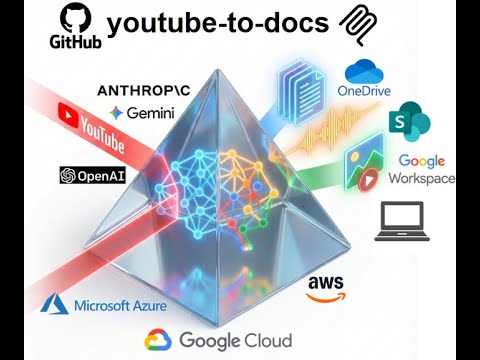
Convert YouTube videos into structured docs, summaries, audio, and visual assets for easier discovery.
View all available CLI options:
uvx youtube-to-docs --help
Optional Features
To keep the installation light, some features are optional. You can enable them by specifying "extras":
audio: Required for TTS and audio processing (usesyt-dlp).video: Required for video generation (usesstatic-ffmpeg).workspace: Required for Google Drive integration.m365: Required for Microsoft SharePoint/OneDrive integration.aws: AWS Bedrock support.azure: Required for Azure OpenAI models.gcp: Required for Google Gemini, Vertex AI models, and GCP Cloud TTS (usesgoogle-genaiand google-cloud libs).app: Web app with browser-based UI (usesfastapi,uvicorn).all: Installs everything.
Example: Run with audio and video support
uvx --with "youtube-to-docs[audio,video]" youtube-to-docs ...
Example: Run with everything
uvx --with "youtube-to-docs[all]" youtube-to-docs ...
Note: The commands above require uv. You can install it via:
- macOS/Linux:
curl -LsSf https://astral.sh/uv/install.sh | sh - Windows:
powershell -ExecutionPolicy ByPass -c "irm https://astral.sh/uv/install.ps1 | iex"
Install as a Gemini CLI extension:
gemini extensions install https://github.com/DoIT-Artificial-Intelligence/youtube-to-docs.git
Install as a Claude Code plugin:
/plugin marketplace add DoIT-Artificial-Intelligence/youtube-to-docs
/plugin install youtube-to-docs@youtube-to-docs
Run as a web app:
uvx --with "youtube-to-docs[app]" youtube-to-docs-app
Then open http://localhost:8000 in your browser. See the Web App docs for details.
Install as an MCP server for Claude Code:
claude mcp add youtube-to-docs -- uvx --with "youtube-to-docs[all]" python -m youtube_to_docs.mcp_server
Created with the help of AI. All artifacts have been checked and work as expected.
Release history Release notifications | RSS feed


Download files
Download the file for your platform. If you're not sure which to choose, learn more about installing packages.
Source Distribution
Built Distribution
Filter files by name, interpreter, ABI, and platform.
If you're not sure about the file name format, learn more about wheel file names.
Copy a direct link to the current filters
File details
Details for the file youtube_to_docs-0.0.80.tar.gz.
File metadata
- Download URL: youtube_to_docs-0.0.80.tar.gz
- Upload date:
- Size: 685.9 kB
- Tags: Source
- Uploaded using Trusted Publishing? No
- Uploaded via: twine/6.2.0 CPython/3.14.2
File hashes
| Algorithm | Hash digest | |
|---|---|---|
| SHA256 |
875d0685501b08e7eb6de6201a79265f04c6c31bd9ac6354c392523fd1e8d9a8
|
|
| MD5 |
962c00df8d8a11ab18f18935aacc5246
|
|
| BLAKE2b-256 |
64d12556221221e3f0c2cfdc71eabaa346415c9549ab48b628540117ceef6957
|
File details
Details for the file youtube_to_docs-0.0.80-py3-none-any.whl.
File metadata
- Download URL: youtube_to_docs-0.0.80-py3-none-any.whl
- Upload date:
- Size: 662.5 kB
- Tags: Python 3
- Uploaded using Trusted Publishing? No
- Uploaded via: twine/6.2.0 CPython/3.14.2
File hashes
| Algorithm | Hash digest | |
|---|---|---|
| SHA256 |
0a4398039f8432278cb1cce50e9a4896c78da4db91c5fb27df07ef2b5c7f4011
|
|
| MD5 |
54897171befe2e8d52c164778328e0e0
|
|
| BLAKE2b-256 |
c385e05214a4bf7415f4a9429b8b0cb1adf482b2edf2292c22f5f05ca4297a58
|






