
Yr Weather CLI


yr.no has a great weather service but poor search functionality, especially for South African place names. yr is a simple CLI that combines OpenStreetMaps search engine with yr's location forecast to provide precise weather forecasts from place names in the command line.
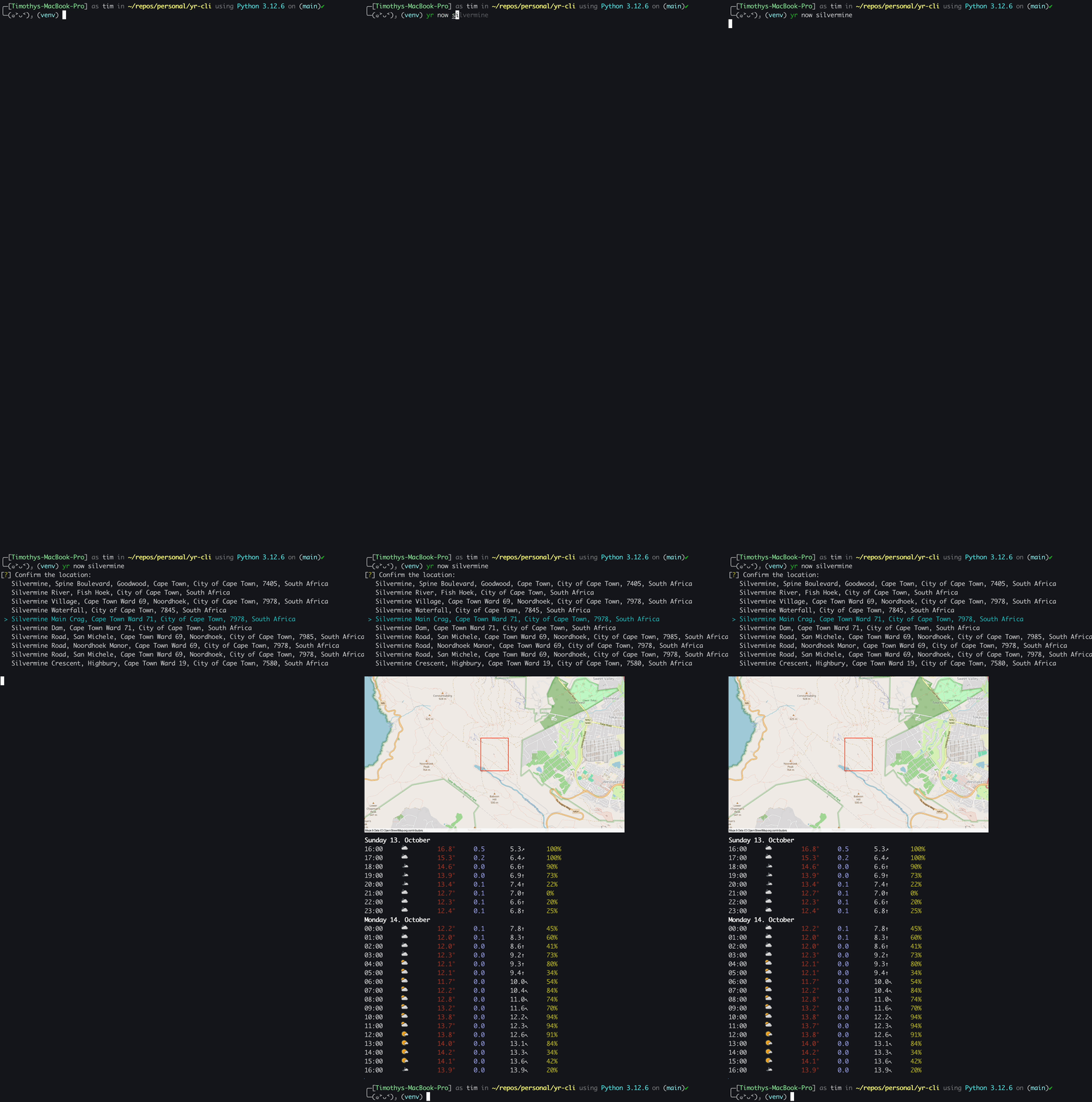
Table of contents
Features
- Provides detailed forecasts for the next 24 hours, summary forecasts for the next
ndays, and forecasts for the next weekend - Enables location search by name and optionally displays a map of the selected location
- Displays forecasts with images and icons in terminal with iTerm2 with automatic fallback to Rich output for other terminals
- Forecasts provide the following information:
- Forecast interval
- Forecast summary icon
- Air temperature (°C)
- Precipitation amount (mm)
- Wind speed (m/s) and direction
- Cloud cover (%)
- Displays forecasts at the highest time resolution available from yr's API (hourly short term, six-hour medium term)
- Allows searches in different countries and handles timezone conversion automatically
Snags
Installation
pip install yr-cli
Usage
You can use the
--helpoption to get more details about the commands and their options
yr <command> [options]
Now
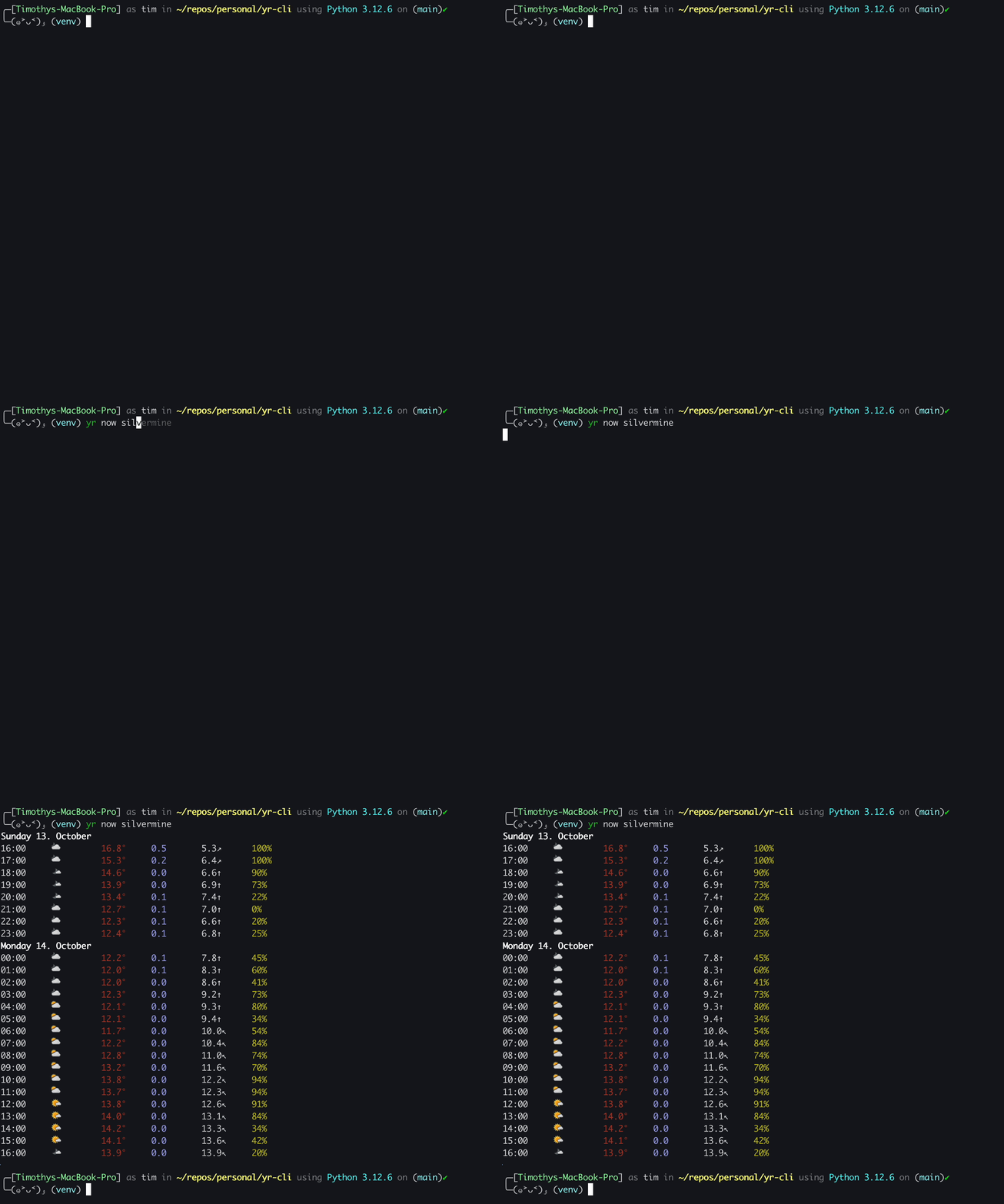
Detailed forecast for the next 24 hours
yr now <location>
Options
--limit                 INTEGER  Maximum number of location results [default: 10]
--country-code          TEXT     Country code for location search [default: za]
--no-cache                       Bypass cache and fetch fresh data
--map           -m               Show a map of the selected location
Examples
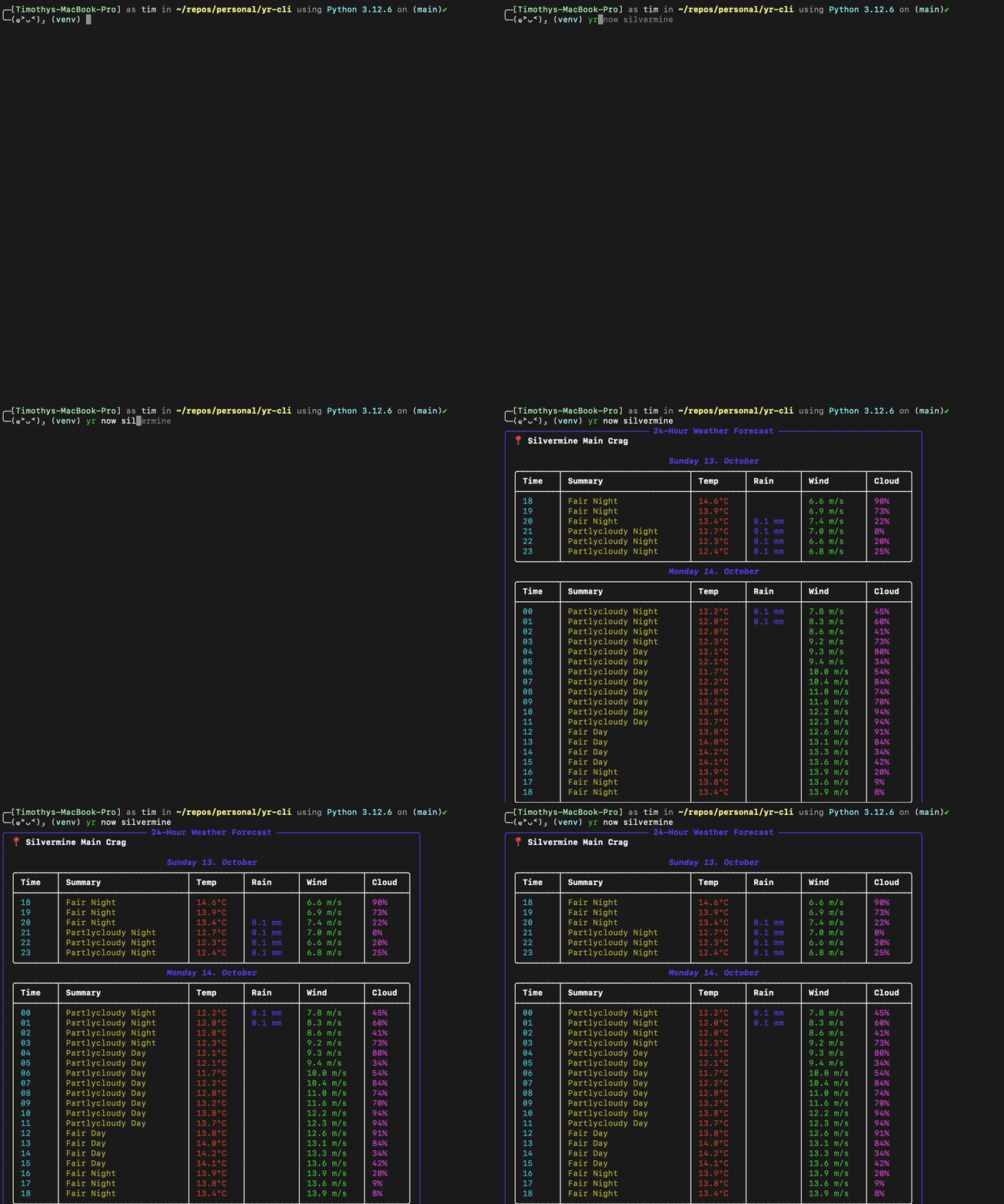
yr now silvermine                            Give a detailed forecast for Silvermine, South Africa
yr now silvermine -m --country-code ca       Give a detailed forecast for Silvermine, Canada, showing a map
Summary
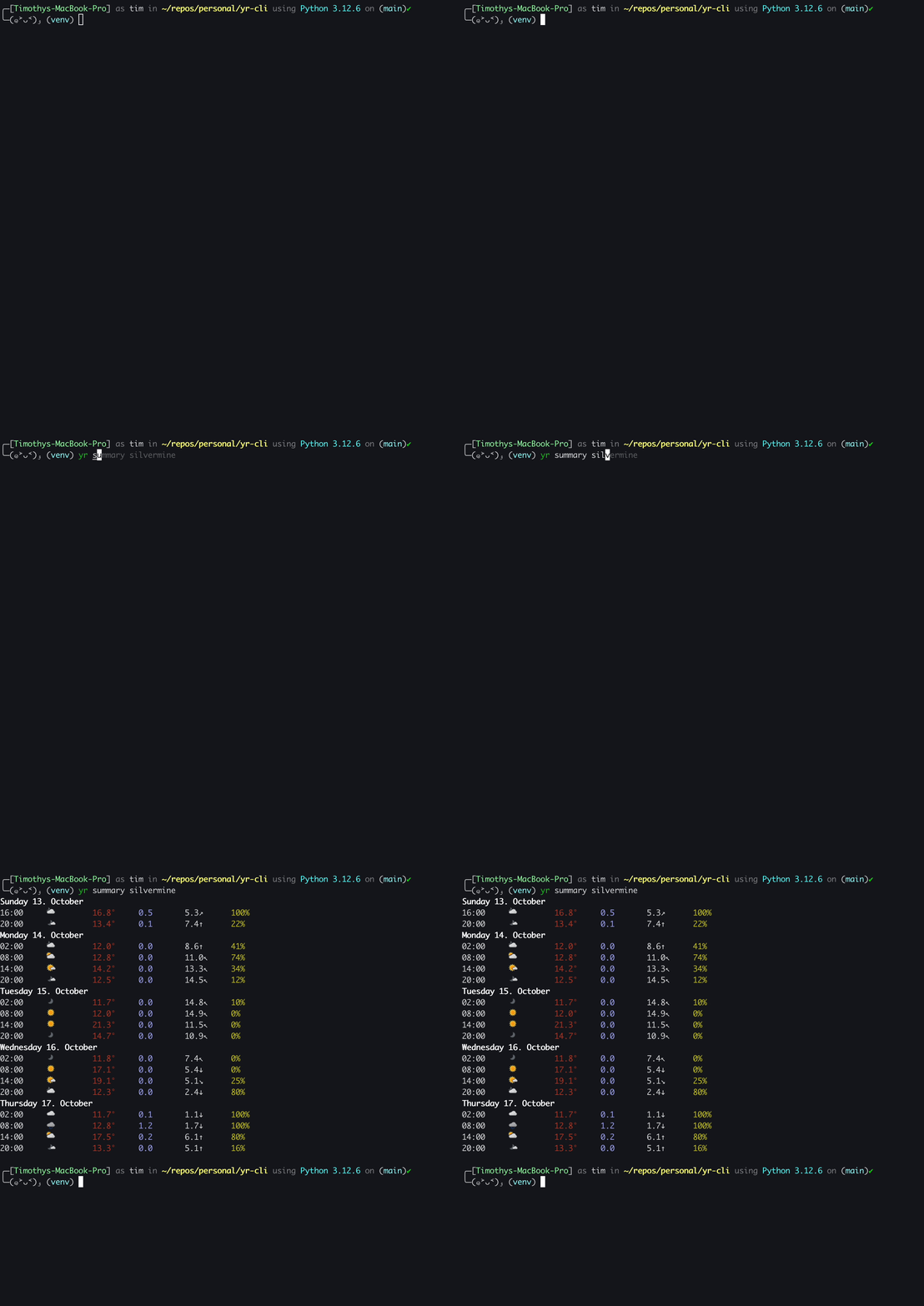
Summary forecast for the next (default 5) days
yr summary <location>
Options
--days                  INTEGER  Number of days for summary forecast [default: 5]
--limit                 INTEGER  Maximum number of location results [default: 10]
--country-code          TEXT     Country code for location search [default: za]
--no-cache                       Bypass cache and fetch fresh data
--map           -m               Show a map of the selected location
Examples
yr summary 'de pakhuys' --limit 5      Give a summary forecast for De Pakhuys, South Africa with at most 5 results
yr summary 'de pakhuys' --days 7       Give a summary forecast for De Pakhuys, South Africa for the next 7 days
Weekend
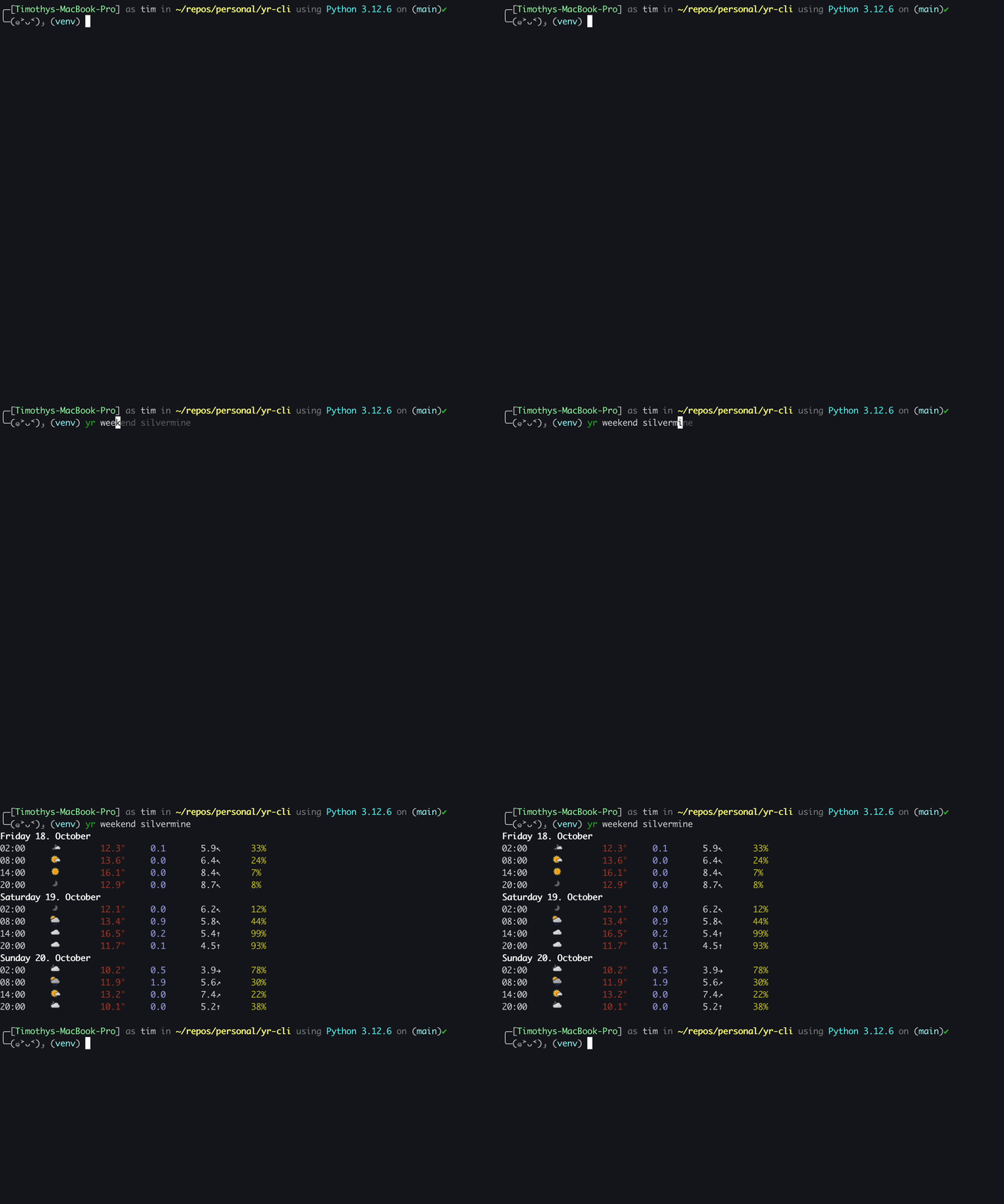
Forecast for the next weekend
yr weekend <location>
Options
--limit                 INTEGER  Maximum number of location results [default: 10]
--country-code          TEXT     Country code for location search [default: za]
--no-cache                       Bypass cache and fetch fresh data
--map           -m               Show a map of the selected location
Examples
yr weekend 'sassies bouldering' Give a weekend forecast for Sassies Bouldering, Rocklands, South Africa
Clear cache
Clear the cache of saved locations
yr clear-cache
Display fallback
If you are not using iTerm2, yr will fallback to using Rich to display the weather table.
Development
To install yr-cli for development, run:
pip install -e '.[dev]'
Code for this repository is checked using pre-commit. After cloning this repository please run the following steps to initialise pre-commit:
pre-commit install --install-hooks
The following hooks are automatically run when new commits are made:
- From pre-commit hooks:
- end-of-file-fixer
- trailing-whitespace
- check-yaml
- check-added-large-files (max. 500kb)
- black Python code format checking
- flake8 Python code linting
- isort Python code import ordering
1 maintainer

Metadata
1 maintainer
Release files for yr-cli 0.0.4
For a detailed explanation of source distributions (sdists) and built distributions (wheels), please see the package formats documentation.
Source distribution (sdist)
| File | Size | Uploaded | Provenance | |
|---|---|---|---|---|
| yr_cli-0.0.4.tar.gz | 724.5 kB | Without provenance | Details |
Built distribution (wheel)
| File | Interpreter | ABI | Platform | Reset |
|---|---|---|---|---|
| yr_cli-0.0.4-py3-none-any.whl | Python 3 | none | any | Details |
Total release size: 1.5 MB
Release files / yr_cli-0.0.4.tar.gz
| Download URL | yr_cli-0.0.4.tar.gz |
|---|---|
| Size | 724.5 kB |
| Tags | Source |
|
SHA-256 checksum How to use checksums |
d286c4139db10d3a5e40fa085f0593d361a5c33776f97e174890181130e52ed6
|
|
BLAKE2b-256 checksum How to use checksums |
d24aa49dc0f413c95deca09e287a94db2b1158e07e6f7d128eada09f3b07d397
|
| Upload date | |
|
Uploaded using Trusted Publishing? What is trusted publishing? |
No |
| Uploaded via |
twine/5.1.1 CPython/3.12.7
|
Release files / yr_cli-0.0.4-py3-none-any.whl
| Download URL | yr_cli-0.0.4-py3-none-any.whl |
|---|---|
| Size | 741.8 kB |
| Tags | Python 3 |
|
SHA-256 checksum How to use checksums |
c834c311d3e4e131ae200cc732347edb3c78667f246f4379a33d629e1618ab70
|
|
BLAKE2b-256 checksum How to use checksums |
18d1927ddf06153aa3dfa5843d07ebe0ad7f4bd7545149b3ce6dfc9acf98aa71
|
| Upload date | |
|
Uploaded using Trusted Publishing? What is trusted publishing? |
No |
| Uploaded via |
twine/5.1.1 CPython/3.12.7
|
Security for yr-cli 0.0.4
Provenance
Provenance describes where a file came from. On PyPI, provenance is shared via attestations, which provide a verifiable record of the build or publishing details. View details, limitations and caveats.
No provenance found
None of the files in this release were uploaded with provenance metadata.
A note on package security
PyPI is a repository for distributing packages, not a service for auditing them. While third-party security researchers and our staff do their best to detect and remove malicious packages, PyPI cannot guarantee the quality, security or suitability of any given package.
To learn more about protecting yourself from malicious actors, visit our package security documentation.














