

YouTube Quick Insights is a Python webapp designed to help users rapidly extract insights from YouTube content. This application enables you to summarize videos, extract key information, and analyze entire playlists without spending hours watching them.





About the Project • Installation • Usage • Limitations • Known Issues • Roadmap • Contact
About the Project
With the overwhelming volume of content on YouTube, finding relevant information can be time-consuming and inefficient. YouTube Quick Insights solves this by instantly summarizing videos, extracting key information, and analyzing entire playlists. This AI-powered app saves time and enhances knowledge retention, making learning from YouTube content easier and more effective. You can also read more about this project in my Medium blog post.
Key Features
- 🎥 Video Insights: Extract relevant information from individual YouTube videos using various extraction methods.
- ❓ Question-Based Insights: Ask specific questions about a video to get targeted information.
- 📚 Playlist Analysis: Analyze each video in a playlist and generate a comprehensive summary of the playlist's content.
- 🔧 Flexible Extraction Methods: Choose from pre-defined extraction methods or create custom ones to suit your needs.
Why it's valuable?
- ⏱️ Time-Saving: Obtain critical information from videos without spending hours watching them.
- 🎛️ Customizable Analysis: Tailor the extraction process to focus on specific aspects of the content.
- 📈 Scalable: Effortlessly analyze individual videos or entire playlists.
- 🧠 Enhanced Learning & Retention: Use generated summaries for personal notes to review content later, improving long-term retention.
- 🖱️ Ease of Use: Simple and user-friendly web interface.
Build with


Installation
Recommended: Create and activate a virtual environment before installing the tool.
Using pip
pip install yt-quick-insights
Using poetry
poetry add yt-quick-insights
To verify that everything works
insights --help
Usage
To launch the application, open your terminal and run the following command:
insights run
The webapp should open automatically in your default browser. If not, navigate to:
http://localhost:8501.
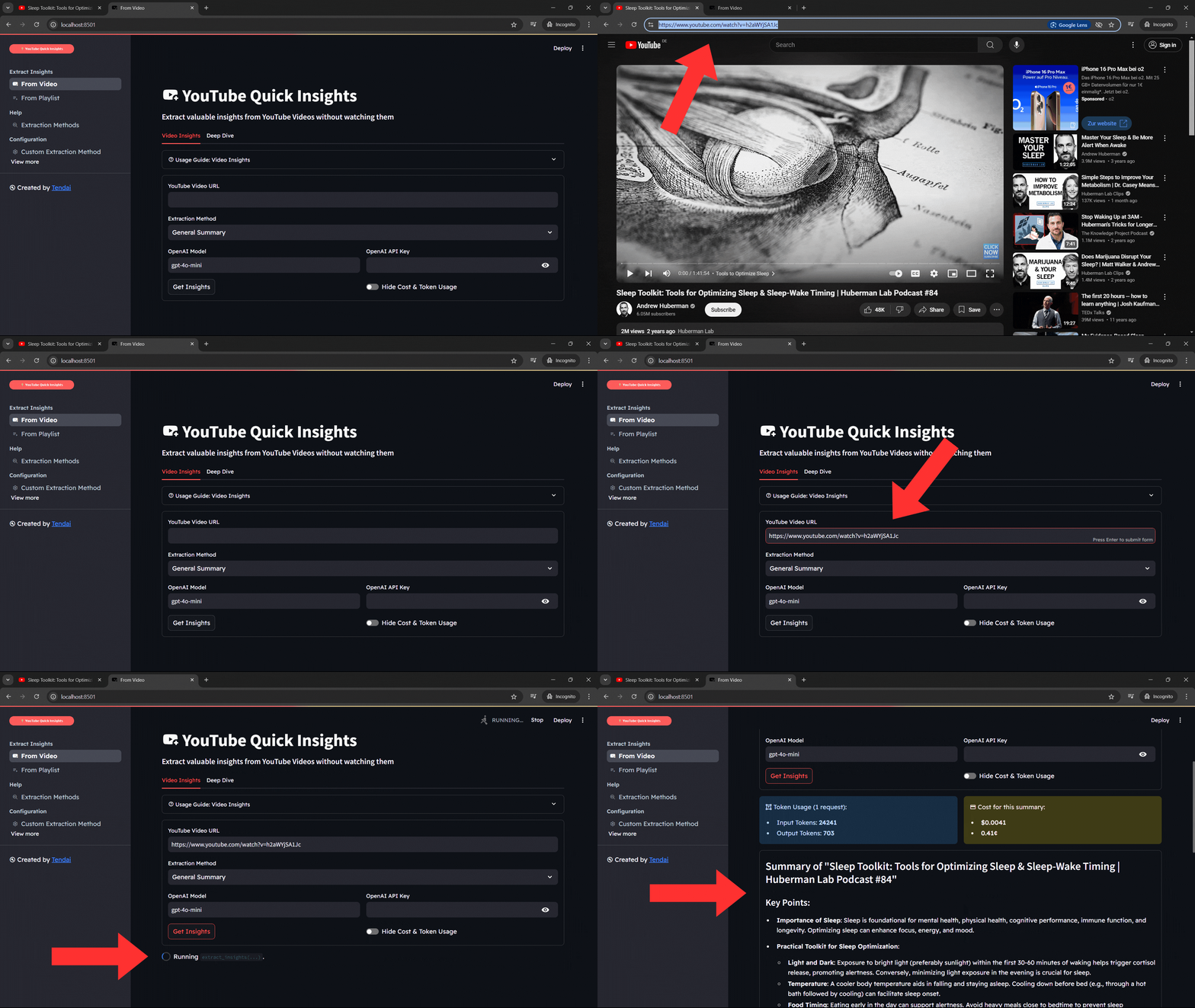
- Enter YouTube URL: Paste the URL of the YouTube video you want to summarize in the designated field.
- Set OpenAI API Key: You have three options to provide your OpenAI API key:
- Enter it directly in the designated field
- Set it in the
.envfile - Store the key in an environment variable called:
OPENAI_API_KEY
- Generate Insights: Click on the "Get Insights" button to start summarizing the video content.
(Optional Settings)
- Select Extraction Method: Choose a specific method for extracting information based on the video content,
defaults to
General Summary. - Choose OpenAI Model: Select any available OpenAI model for generating insights, defaults to
gpt-4.1-mini.
For detailed usage instructions, please refer to the in-app Usage Guide. To set up a .env file or create a custom
Extraction Method, navigate to the "Configuration" section in the app's navigation bar.
Limitations
- Relies on the availability and accuracy of video transcripts.
- Requires an OpenAI API key for operation.
- May not capture visual information or context that isn't described in the audio.
- Only OpenAI LLMs are supported at this time.
Known Issues
- The YouTube transcript download feature does not work when using a VPN (tested with NordVPN).
- For more details, refer to this issue thread.
Roadmap
- Publish on PyPI
- Transform the CLI into a web app
- Deploy the web app (Simplify user experience: no need to install locally)
- Implement parallelization for extracting insights from YouTube Playlists
Contact
- 🌐 Website: https://charura.com
- 📧 Email: tendai@charura.com
- 👨💻 GitHub: @t-charura
If you find YouTube Quick Insights helpful, please consider giving it a ⭐️ on GitHub!
1 maintainer

Metadata
1 maintainer
Release files for yt-quick-insights 1.0.2
For a detailed explanation of source distributions (sdists) and built distributions (wheels), please see the package formats documentation.
Source distribution (sdist)
| File | Size | Uploaded | Provenance | |
|---|---|---|---|---|
| yt_quick_insights-1.0.2.tar.gz | 27.5 kB | Without provenance | Details |
Built distribution (wheel)
| File | Interpreter | ABI | Platform | Reset |
|---|---|---|---|---|
| yt_quick_insights-1.0.2-py3-none-any.whl | Python 3 | none | any | Details |
Total release size: 62.5 kB
Release files / yt_quick_insights-1.0.2.tar.gz
| Download URL | yt_quick_insights-1.0.2.tar.gz |
|---|---|
| Size | 27.5 kB |
| Tags | Source |
|
SHA-256 checksum How to use checksums |
a0df2c81cedecd878c8c2754773bf2a4e857bca91358e695117faec183abc20f
|
|
BLAKE2b-256 checksum How to use checksums |
a47eaf5a288a7851bde6fed23e15019a70b1de0e545d1b587c6b1d9d2de5695d
|
| Upload date | |
|
Uploaded using Trusted Publishing? What is trusted publishing? |
No |
| Uploaded via |
poetry/1.8.3 CPython/3.11.9 Windows/10
|
Release files / yt_quick_insights-1.0.2-py3-none-any.whl
| Download URL | yt_quick_insights-1.0.2-py3-none-any.whl |
|---|---|
| Size | 35.0 kB |
| Tags | Python 3 |
|
SHA-256 checksum How to use checksums |
f7babf1a0b8a51ee5aeb8a3d7d45515a8f09ea20e00dac8894879072a75aac0e
|
|
BLAKE2b-256 checksum How to use checksums |
05389473684c92704de0f064783b10948c8f4aa1132f2998219076a999852563
|
| Upload date | |
|
Uploaded using Trusted Publishing? What is trusted publishing? |
No |
| Uploaded via |
poetry/1.8.3 CPython/3.11.9 Windows/10
|
Security for yt-quick-insights 1.0.2
Provenance
Provenance describes where a file came from. On PyPI, provenance is shared via attestations, which provide a verifiable record of the build or publishing details. View details, limitations and caveats.
No provenance found
None of the files in this release were uploaded with provenance metadata.
A note on package security
PyPI is a repository for distributing packages, not a service for auditing them. While third-party security researchers and our staff do their best to detect and remove malicious packages, PyPI cannot guarantee the quality, security or suitability of any given package.














