
A GUI YouTube downloader powered by yt-dlp

Project description
🎬 YTGet — Cross-Platform YouTube Downloader
YTGet GUI is a modern, lightweight, and user-friendly desktop application built with Python and PySide6.
Powered by yt-dlp, it makes downloading YouTube videos, playlists, and music simple and efficient.
- 🖥️ Cross-Platform: Runs seamlessly on Windows, macOS, and Linux.
- 📦 Standalone: Each release comes with all dependencies bundled, so it works right out of the box.
- ⚡ Optimized & Stable: Designed for smooth performance with smart resource handling, and built-in update management.
- 🎵 Versatile: Supports full videos, playlists, and music downloads in multiple formats.
Whether you’re grabbing a single clip or archiving an entire channel, YTGet delivers a polished and seamless experience on every operating system.
📊 Repository Stats
🌟 Community



🐛 Issues & 🔀 Pull Requests




📥 Downloads


💻 Codebase




⏱️ Activity


☄️ How to Install
🪟 Windows
- Download the latest
YTGet-Windows.ziprelease. - Extract the contents.
- Run
YTGet.exe.
🐧 Linux
- Install required dependencies:
sudo apt-get update && sudo apt-get install -y libxcb-cursor0 libxcb-xinerama0 libxcb-xinput0 libxcb-xfixes0 libxcb-shape0 libxcb-render-util0 libxcb-icccm4 libxcb-image0 libxcb-keysyms1 libxcb-randr0 libxcb-render0 libxcb-shm0 libxcb-sync1 libxcb-util1 libxcb-xkb1
- Download the latest
YTGet-Linux.tar.gzrelease. - Extract the contents.
tar -xzf YTGet-Linux.tar.gz
- Make it executable and launch:
chmod +x YTGet
./YTGet
🍎 macOS
- Download the latest
YTGet-macOS.tar.gzrelease. - In Terminal, run:
tar -xzf YTGet-macOS.tar.gz
This will produce a YTGet.app bundle in your current directory.
- Remove Quarantine Flag If you see “cannot be opened because Apple cannot check it for malicious software,” you need to strip the quarantine attribute:
xattr -d com.apple.quarantine YTGet.app
This lets macOS trust your app without popping security dialogs every launch.
- Set Executable Permission
chmod +x YTGet.app/Contents/MacOS/YTGet
- Move to Applications (Optional)
For a cleaner setup, drag YTGet.app into your /Applications folder or run:
mv YTGet.app /Applications/
- Launch YTGet
Choose one:
- From Finder: double-click /Applications/YTGet.app.
- From Terminal:
open /Applications/YTGet.app - Or run the binary directly:
/Applications/YTGet.app/Contents/MacOS/YTGet
🐍 PyPI Installation
YTGet GUI depends on FFmpeg to process and convert media. Follow these steps to get everything up and running:
1️⃣ Install YTGet GUI
pip install ytget-gui
2️⃣ Set Up FFmpeg
Choose one of the two methods below:
2.1 Add FFmpeg to Your PATH (Recommended)
-
Download the latest FFmpeg build for your platform from this Link.
-
Extract the archive.
-
Add the bin/ directory to your system PATH:
On Windows: update Environment Variables → Path.
On macOS/Linux: edit ~/.bashrc or ~/.zshrc with
export PATH="/path/to/ffmpeg/bin:$PATH" -
Verify installation:
ffmpeg -version
2.2 Copy Binaries into the YTGet Folder (Alternative)
-
Download the static FFmpeg binaries for your OS.
-
Copy ffmpeg (or ffmpeg.exe) and ffprobe (or ffprobe.exe) into the same directory where the ytget-gui executable lives.
🔄 How to Update (PyPI version)
To upgrade your PyPI installation to the latest release:
pip install --upgrade ytget-gui
This command fetches and installs the newest version, replacing your current one automatically.
✨ Extra Tips You Might Find Useful
- On macOS, you can also use Homebrew:
brew install ffmpeg
- On Debian/Ubuntu:
sudo apt update && sudo apt install ffmpeg
✨ Features
🖥️ Interface
- 🎯 Clean Qt GUI — Intuitive layout with dark-friendly visuals.
- 🛑 Cancel Anytime — Gracefully stop downloads at any moment.
- 🔒 Offline Capable — No Python installation required.
📥 Download Options
- 📹 Multiple Formats — Download videos from 480p up to 8K.
- 🎵 MP3 Mode — High-quality audio extraction with embedded thumbnails & metadata.
- 📄 Subtitles — Auto-fetch subtitles (multi-language).
- 📂 Playlist Support — Download entire playlists in audio/video mode.
🔧 Advanced Features
- ⚙️ Persistent Settings — All settings saved to
config.json. - 🚀 Improved Playlist Support — Reverse order, select items, archive tracking.
- ✂️ Clip Extraction — Download video portions by start/end time.
- ⏭️ SponsorBlock — Skip sponsored content, intros, and outros.
- 🧩 Chapters Handling — Embed or split videos by chapters.
- 🎼 YouTube Music Metadata — Accurate music info and album data.
🛠 Functionality
- 🌐 Proxy Support — Configure proxies for downloads.
- 📅 Date Filter — Download videos uploaded after a specified date.
- 🧪 Custom FFmpeg Args — Add advanced arguments for power users.
- 🔊 Audio Normalization — Uniform volume for all downloads.
- 🗃 Channel Organization — Auto-sort videos into uploader folders.
- ⚡ Performance Enhancements — Smart rate limiting and retry logic.
🖼 Screenshots
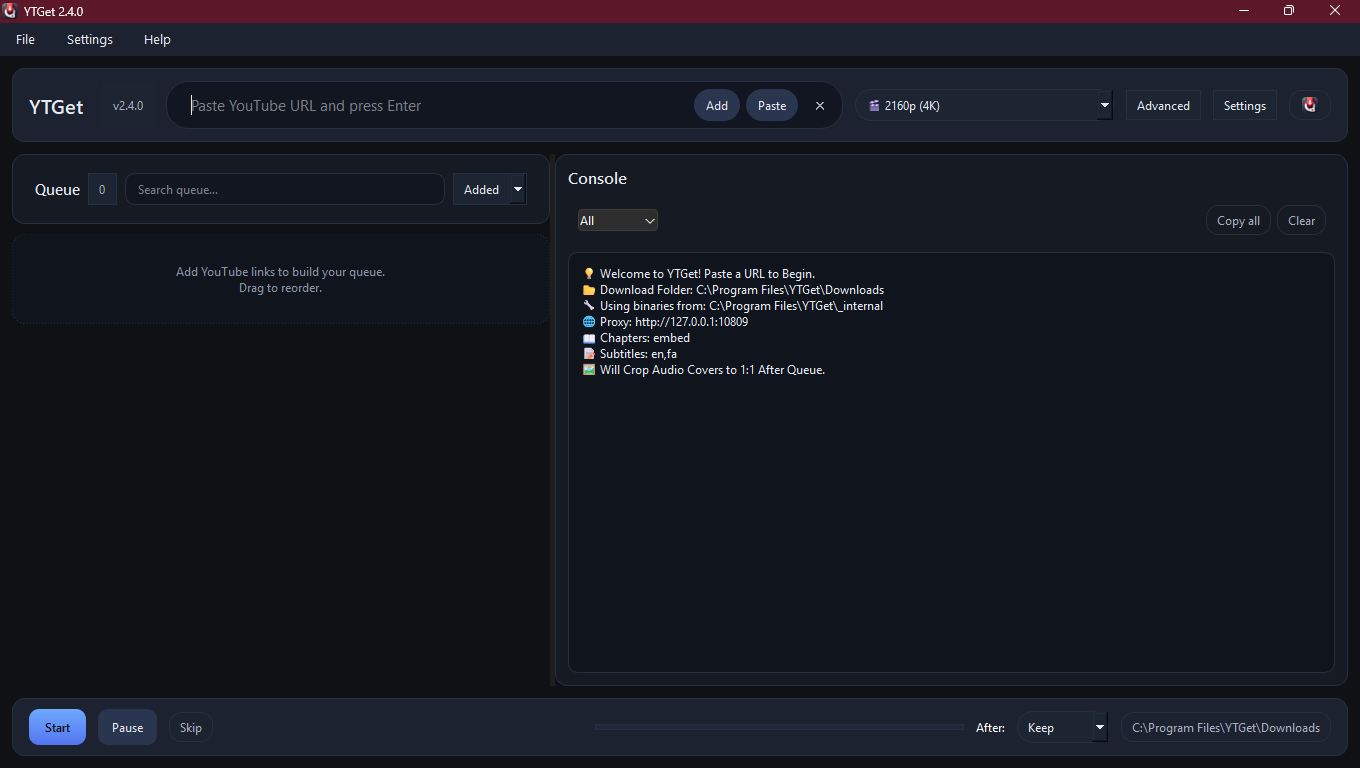
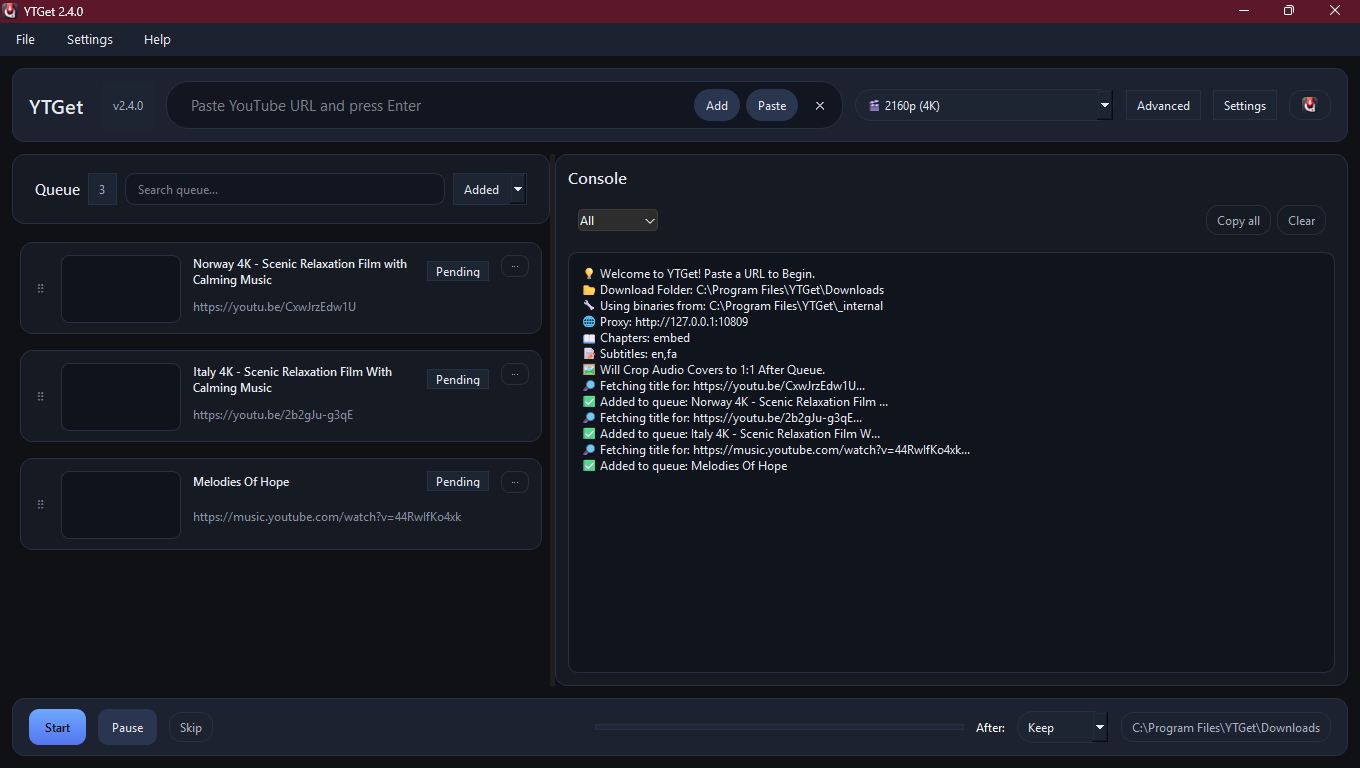
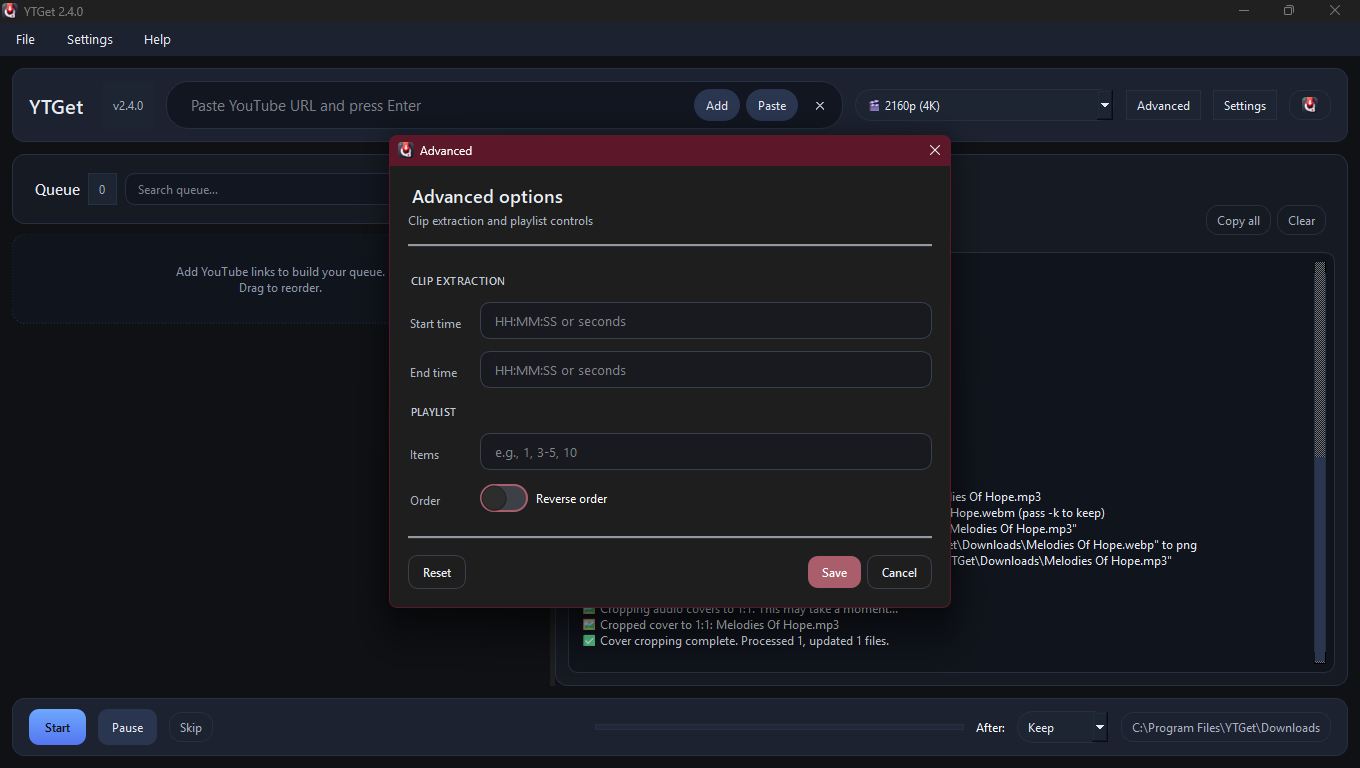
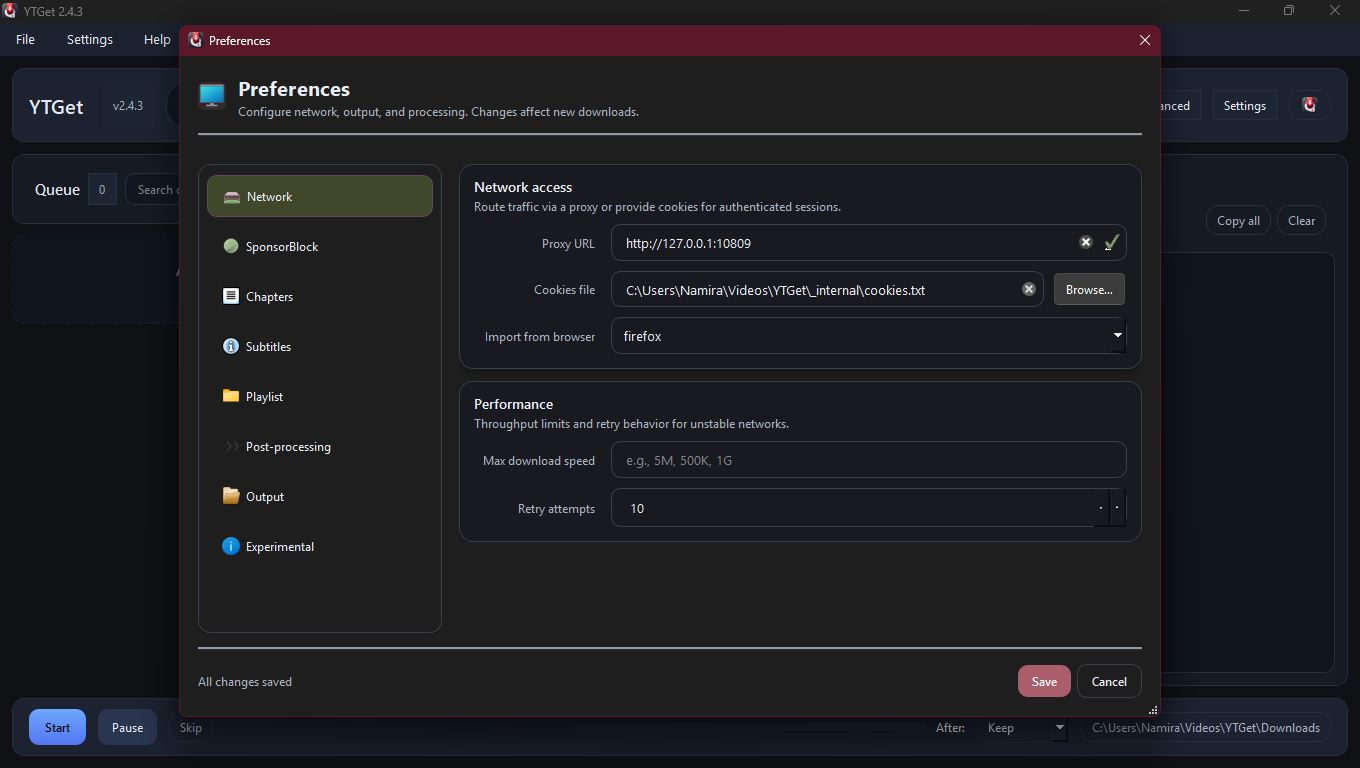
🧰 How to Use
- ▶️ Launch
YTGet. - 🔗 Paste a YouTube URL.
- 🎚️ Select format (e.g., 1080p MKV or MP3).
- ⬇️ Click ➕ Add to Queue.
- ⬇️ Click ▶️ Start Queue.
📁 Output
- ✅ Clean filenames:
%(title)s.ext - 🎵 Audio downloads include:
- Embedded album art
- Metadata tags (artist, title, etc.)
🧩 Format Options
| Format | Description |
|---|---|
| 🎞️ 480p–8K | MKV, MP4, WebM video with merged best audio |
| 🎵 FLAC Audio | High-quality audio with tags & thumbnails |
| 🎵 MP3 Audio | High-quality audio with tags & thumbnails |
| 📃 Playlist MP3 | Batch audio extraction from playlists |
🔒 Cookies Support
For age-restricted or private content:
- Export cookies using Get cookies.txt extension.
- Place the file in
_internal/cookies.txt.
⚙️ Requirements
- ✅ No installation — just unzip and run.
- 🪟 Windows 10+ (64-bit).
🔧 Development Setup
Prerequisites
- Python 3.13+
- FFmpeg (Add to PATH or project folder)
Setup
# Clone the repo
git clone https://github.com/ErfanNamira/ytget-gui.git

# Navigate to project
cd ytget-gui

# Create & activate virtual environment
python -m venv venv
# Linux/Mac
source venv/bin/activate
# Windows
venv\Scripts\activate

# Install dependencies
pip install -r requirements.txt

# Run app
python -m ytget_gui
🤝 Contribution Guide
-
Fork & clone the repo
-
Create a feature branch: git checkout -b my-feature
-
Commit & push: git commit -m "msg" && git push origin my-feature
-
Open a Pull Request
📄 License
This project is licensed under the MIT License. See the LICENSE file for full details.
📦 Download
Release history Release notifications | RSS feed


Download files
Download the file for your platform. If you're not sure which to choose, learn more about installing packages.
Source Distribution
Built Distribution
Filter files by name, interpreter, ABI, and platform.
If you're not sure about the file name format, learn more about wheel file names.
Copy a direct link to the current filters
File details
Details for the file ytget_gui-2.4.7.2.tar.gz.
File metadata
- Download URL: ytget_gui-2.4.7.2.tar.gz
- Upload date:
- Size: 232.0 kB
- Tags: Source
- Uploaded using Trusted Publishing? No
- Uploaded via: twine/6.1.0 CPython/3.13.7
File hashes
| Algorithm | Hash digest | |
|---|---|---|
| SHA256 |
f92316f57c4b527d839402955043f72471223d7b95497701bb4a697e3e539dda
|
|
| MD5 |
e4964458e9892d21936bdd6301a772cf
|
|
| BLAKE2b-256 |
32899ecbf465a8201c429eae52cb15a01eebd3bee7f2e16bfc3c56ab1a251683
|
File details
Details for the file ytget_gui-2.4.7.2-py3-none-any.whl.
File metadata
- Download URL: ytget_gui-2.4.7.2-py3-none-any.whl
- Upload date:
- Size: 234.5 kB
- Tags: Python 3
- Uploaded using Trusted Publishing? No
- Uploaded via: twine/6.1.0 CPython/3.13.7
File hashes
| Algorithm | Hash digest | |
|---|---|---|
| SHA256 |
06dd8c3c7956214224ed0236505ae94c3b3df5d67d958d242c626b9f449827f9
|
|
| MD5 |
062198d61f58c18d4b74e08d9fda9648
|
|
| BLAKE2b-256 |
b69bc8e76301b53220c459ba1ad628873e03f5e3df059d0a2d7e35ec396fe9cf
|






