
Modern YouTube downloader with a clean PySide6 interface.

Project description







A modern YouTube downloader with a clean PySide6 interface.
Download videos in any quality, extract audio, fetch subtitles, and more.
Installation • Features • Usage • Screenshots • Troubleshooting • Contributing
❓ Why YTSage?
YTSage is designed for users who want a simple yet powerful YouTube downloader. Unlike other tools, it offers:
- A clean, modern PySide6 interface
- One-click downloads for video, audio, and subtitles
- Advanced features like SponsorBlock, subtitle merging, and playlist selection
- Cross-platform support and easy installation
✨ Features
| Core Features | Advanced Features | Extra Features |
|---|---|---|
| 🎥 Format Table | 🚫 SponsorBlock Integration | 🎞️ FPS/HDR Display |
| 🎵 Audio Extraction | 📝 Multi-Subtitle Select & Merge | 🔄 Auto-Update yt-dlp |
| ✨ Simple UI | 💾 Save Description & Thumbnail | 🛠️ FFmpeg/yt-dlp/Deno Detection |
| 📋 Playlist Support & Selector | 🚀 Speed Limiter | ⚙️ Custom Commands |
| 📑 Embed Chapters | ✂️ Trim Video Sections | 🍪 Login with Cookies |
| 📜 Download History | 🔄 Release Channel Selection | 🌐 Proxy Support |
| 🎚️ Audio Format Conversion | 🎬 Video Format Settings | 🆙 Built-in Updater Tab |
🚀 Installation
⚡ Quick Install (Recommended)
Install YTSage from PyPI:
pip install ytsage
Then launch the app:
ytsage
📦 Pre-built Executables
🪟 Windows
| Format | Description |
|---|---|
 |
Standard installer |
 |
With FFmpeg bundled |
 |
Portable version, no installation required |
 |
Portable with FFmpeg, zipped |
🐧 Linux
| Format | Description |
|---|---|
 |
Debian package |
 |
AppImage, portable |
 |
RPM package |
🍎 macOS
| Format | Description |
|---|---|
 |
Zipped application for Apple Silicon |
 |
Disk image installer for Apple Silicon |
🛠️ Manual Installation from Source
1. Clone the Repository
git clone https://github.com/oop7/YTSage.git
cd YTSage
2. Install Dependencies
⚡ With uv
uv pip install -r requirements.txt
📦 Or with standard pip
pip install -r requirements.txt
3. Run the Application
python main.py
📸 Screenshots
 |
 |
| Download Settings | Playlist Download |
 |
 |
| Audio Format | Custom Options |
📖 Usage
🎯 Basic Usage
- Launch YTSage
- Paste YouTube URL (or use "Paste URL" button)
- Click "Analyze"
- Select Format:
Videofor video downloadsAudio Onlyfor audio extraction
- Choose Options:
- Enable subtitles & select language
- Enable subtitle merge
- Save thumbnail
- Remove sponsor segments
- Save description
- Embed chapters
- Select Output Directory
- Click "Download"
💡 The default download directory is the user's "Downloads" folder.
📋 Playlist Download
- Paste Playlist URL
- Click "Analyze"
- Select videos from the playlist selector (optional, defaults to all)
- Choose desired format/quality
- Click "Download"
💡 The application automatically handles the download queue
🧰 Advanced Options
- Subtitle Options: Filter languages and embed into video file
- Subtitle Merge: Merge subtitles into video file for hardcoded subtitles
- Custom Commands: Access advanced yt-dlp features via command line arguments
- Save Description: Save the description of the video as a text file
- Save Thumbnail: Save the thumbnail of the video as an image file
- Embed Chapters: Embed chapter markers as metadata in the downloaded video file for compatible video players
- Remove Sponsor Segments: Remove sponsor segments from the video using SponsorBlock
- Speed Limiter: Limit the download speed (e.g.,
500Kfor 500 KB/s) - Login with Cookies: Login to YouTube using cookies to access private content
How to use it:- Recommended: Use the built-in "Extract cookies from browser" option in the app. Select your browser (Chrome, Firefox, etc.) and then select Profile (optional).
- Alternatively, extract cookies manually:
a. Extract cookies from your browser using an extension like cookie-editor
b. Copy the cookies in Netscape format
c. Create a file named
cookies.txtand paste the cookies into it d. Select thecookies.txtfile in the app
- Save Download Path: Save the default download path for future downloads. Available in Download Settings → Download Path.
- Updater Tab: Unified tab in Custom Options for managing all updates:
- yt-dlp Updates: Check and update yt-dlp to the latest version, with release channel selection (Stable/Nightly)
- FFmpeg Version Checker: Check your FFmpeg version with direct links to installation guides
- Deno Updates: Check and update Deno runtime to the latest version
- FFmpeg/yt-dlp/Deno Detection: Automatically detect FFmpeg/yt-dlp/Deno path and version. You can use this option by clicking on about button.
- Trim Video: Download only specific parts of a video by specifying time ranges (HH:MM:SS format)
- Proxy Support: Use a proxy server for downloads (e.g.,
http://<proxy-server>:<port>) - Force Output Format: Force video downloads in a specific container format (e.g.,
mp4,webm,mkv). Available in Download Settings → Audio Format Settings. - Audio Format Conversion: Convert audio-only downloads to preferred formats (
AAC,MP3,FLAC,WAV,Opus,M4A,Vorbis, orBest). Ideal for video editing software like DaVinci Resolve. Available in Download Settings → Audio Format Settings. - Download History: View past downloads with thumbnails and statuses. You can use this option by clicking on download settings button.
🌍 Localization
YTSage supports 14 languages for worldwide accessibility. Select your preferred language from Custom Options → Language.
Supported Languages
| Language | Code | Language | Code |
|---|---|---|---|
| 🇺🇸 English | en |
🇪🇸 Spanish | es |
| 🇸🇦 Arabic | ar |
🇫🇷 French | fr |
| 🇩🇪 German | de |
🇮🇳 Hindi | hi |
| 🇮🇩 Indonesian | id |
🇮🇹 Italian | it |
| 🇯🇵 Japanese | ja |
🇵🇱 Polish | pl |
| 🇧🇷 Portuguese | pt |
🇷🇺 Russian | ru |
| 🇹🇷 Turkish | tr |
🇨🇳 Chinese | zh |
💡 Want to contribute a translation? Check out the Contributing section to help us add more languages!
🛠️ Troubleshooting
Click to view common issues and solutions
- Format table not displaying: Update yt-dlp to the latest version, and switch to yt-dlp nightly.
- Download fails: Check your internet connection and ensure the video is available.
- Specific download errors:
- Private videos: Use cookie authentication to access private content.
- Age-restricted content: Login to YouTube account to view age-restricted videos.
- Geo-blocked videos: Consider using a VPN to bypass regional restrictions.
- Removed/deleted videos: Video is no longer available on YouTube.
- Live streams: Live streams cannot be downloaded; wait for the stream to end.
- Network errors: Check your internet connection and try again.
- Invalid URLs: Ensure the URL is correct and from a supported platform.
- Premium content: Requires YouTube Premium membership.
- Copyright blocks: Content is blocked due to copyright restrictions.
- Separate video and audio files after download: This happens when FFmpeg is missing or not detected. YTSage requires FFmpeg to merge high-quality video and audio streams.
- Solution: Ensure FFmpeg is installed and accessible in your system's PATH. For Windows users, the easiest option is to download the
YTSage-v<version>-ffmpeg.exefile, which comes bundled with FFmpeg.
- Solution: Ensure FFmpeg is installed and accessible in your system's PATH. For Windows users, the easiest option is to download the
🛡️ Windows Defender / Antivirus Warning
Some antivirus software may flag the .exe files as false positives. This is a known limitation of packaged applications.
Why this happens:
- Antivirus heuristics can misidentify packed executables as suspicious
Safe alternatives:
- ✅ Use pip installation:
pip install ytsage(recommended) - ✅ Build from source: by following this guide
- ✅ Whitelist the application in your antivirus software
🍎 macOS: "App is damaged and can’t be opened"
If you see this error on macOS Sonoma or newer, you need to remove the quarantine attribute.
- Open Terminal (you can find it using Spotlight).
- Type the following command but do not press Enter yet. Make sure to include the space at the end:
xattr -d com.apple.quarantine
- Drag the
YTSage.appfile from your Finder window and drop it directly into the Terminal window. This will automatically paste the correct file path. - Press Enter to run the command.
- Try opening YTSage.app again. It should now launch correctly.
Configuration Locations (Advanced)
- Windows:
%LOCALAPPDATA%\YTSage - macOS:
~/Library/Application Support/YTSage - Linux:
~/.local/share/YTSage
👥 Contributing
We welcome contributions! Here's how you can help:
- 🍴 Fork the repository
- 🌿 Create your feature branch:
git checkout -b feature/AmazingFeature
- 💾 Commit your changes:
git commit -m 'Add some AmazingFeature'
- 📤 Push to the branch:
git push origin feature/AmazingFeature
- 🔄 Open a Pull Request
📂 Project Structure
YTSage - Project Structure
This document describes the organized folder structure of YTSage.
📁 Project Structure
YTSage/
├── 📁 .github/                   # GitHub configuration
│   ├── 📁 ISSUE_TEMPLATE/         # Issue templates
│   │   └── 🐛-bug-report.md       # Bug report template
│   ├─── 📁 workflows/              # GitHub Actions workflows
│   │   ├── build-linux.yml        # Linux build workflow
│   │   ├── build-macos.yml        # macOS build workflow
│   │   └── build-windows.yml      # Windows build workflow
│   └── 📄 CI_CD_README.md        # CI/CD documentation
├──  📁 assets/                    # Static assets and resources
│   ├── 📁 branding/              # Branding assets
│   │   ├── 📁 icons/             # Application icons
│   │   │   ├── icon.icns         # macOS icon
│   │   │   ├── icon.png          # PNG icon
│   │   │   └── YTSage.ico        # Windows icon
│   │   ├── 📁 screenshots/       # Screenshots for documentation
│   │   │   ├── audio_format.png
│   │   │   ├── Custom-Option.png
│   │   │   ├── Download-Settings.png
│   │   │   ├── playlist.png
│   │   │   └── main.png
│   │   └── 📁 svg/               # SVG assets
│   │       └── ytsage-wordmark.svg
│   │       └── ytsage-wordmark.svg
│   ├── 📁 Icon/                  # Legacy icon directory
│   │   └── icon.png
│   └── 📁 sound/                 # Audio files
│       └── notification.mp3
├── 📁 languages/                 # Localization files
│   ├── 📄 ar.json                # Arabic translation
│   ├── 📄 de.json                # German translation
│   ├── 📄 en.json                # English translation
│   ├── 📄 es.json                # Spanish translation
│   ├── 📄 fr.json                # French translation
│   ├── 📄 hi.json                # Hindi translation
│   ├── 📄 id.json                # Indonesian translation
│   ├── 📄 it.json                # Italian translation
│   ├── 📄 ja.json                # Japanese translation
│   ├── 📄 pl.json                # Polish translation
│   ├── 📄 pt.json                # Portuguese translation
│   ├── 📄 ru.json                # Russian translation
│   ├── 📄 tr.json                # Turkish translation
│   └── 📄 zh.json                # Chinese translation
├── 📄 LICENSE                    # License file
├── 📄 main.py                    # Application entry point
├── 📄 README.md                  # Project documentation
├── 📄 .gitignore                 # Git ignore rules
├── 📄 requirements.txt           # Python dependencies
└── 📁 src/                       # Source code
    |
    ├── 📁 core/                  # Core business logic
    │   ├── 📄 __init__.py        # Core package init
    │   ├── 📄 ytsage_deno.py     # Deno integration
    │   ├── 📄 ytsage_downloader.py # Download functionality
    │   ├── 📄 ytsage_ffmpeg.py   # FFmpeg integration
    │   ├── 📄 ytsage_utils.py    # Utility functions
    │   └── 📄 ytsage_yt_dlp.py   # yt-dlp integration
    ├── 📁 gui/                   # User interface components
    │   ├── 📄 __init__.py        # GUI package init
    │   ├── 📄 ytsage_gui_format_table.py # Format table functionality
    │   ├── 📄 ytsage_gui_main.py # Main application window
    │   ├── 📄 ytsage_gui_video_info.py # Video information display
    │   └── 📁 ytsage_gui_dialogs/ # Dialog classes
    │       ├── 📄 __init__.py    # Dialogs package init
    │       ├── 📄 ytsage_dialogs_base.py     # Basic dialogs
    │       ├── 📄 ytsage_dialogs_custom.py   # Custom functionality dialogs
    │       ├── 📄 ytsage_dialogs_ffmpeg.py   # FFmpeg-related dialogs
    │       ├── 📄 ytsage_dialogs_history.py  # History dialogs
    │       ├── 📄 ytsage_dialogs_selection.py # Selection dialogs
    │       ├── 📄 ytsage_dialogs_settings.py  # Settings dialogs
    │       ├── 📄 ytsage_dialogs_update.py    # Update dialogs
    │       └── 📄 ytsage_dialogs_updater.py    # Updater dialogs
    └── 📁 utils/                 # Utility modules
        ├── 📄 __init__.py        # Utils package init
        ├── 📄 ytsage_config_manager.py # Configuration management
        ├── 📄 ytsage_constants.py # Application constants
        ├── 📄 ytsage_history_manager.py # History management
        ├── 📄 ytsage_localization.py # Localization utilities
        └── 📄 ytsage_logger.py   # Logging utilities
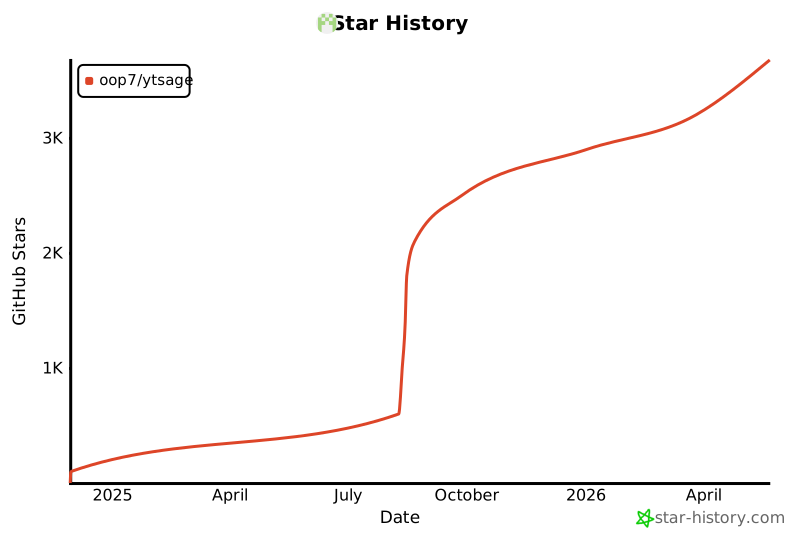
⭐️ Star History
Star History
📜 License
This project is licensed under the MIT License - see the LICENSE file for details.
🙏 Acknowledgments
Show Acknowledgments
A heartfelt thank you to everyone who has contributed to this project by opening an issue to suggest an improvement or report a bug.
| Core Components | |
|---|---|
| yt-dlp | Download Engine |
| FFmpeg | Media Processing |
| Deno | Runtime for integration with yt-dlp |
| Libraries & Frameworks | |
| PySide6 | GUI Framework |
| Pillow | Image Processing |
| requests | HTTP Requests |
| packaging | Version & Package Handling |
| markdown | Markdown Rendering |
| pyglet | Audio Playback |
| loguru | Logging |
| Assets & Contributors | |
| New Notification 09 by Universfield | Notification Sound |
| viru185 | Code Contributor |
⚠️ Disclaimer
This tool is for personal use only. Please respect YouTube's terms of service and content creators' rights.
Made with ❤️ by oop7
Release history Release notifications | RSS feed


Download files
Download the file for your platform. If you're not sure which to choose, learn more about installing packages.
Source Distribution
Built Distribution
Filter files by name, interpreter, ABI, and platform.
If you're not sure about the file name format, learn more about wheel file names.
Copy a direct link to the current filters
File details
Details for the file ytsage-4.9.7.tar.gz.
File metadata
- Download URL: ytsage-4.9.7.tar.gz
- Upload date:
- Size: 275.7 kB
- Tags: Source
- Uploaded using Trusted Publishing? No
- Uploaded via: twine/6.2.0 CPython/3.14.0
File hashes
| Algorithm | Hash digest | |
|---|---|---|
| SHA256 |
2564e21139ebdeb73d5e02b19c79699c7185b1015729172793288f9a322a1149
|
|
| MD5 |
8d4ebdc2fcaae43a238a5420a9e683c8
|
|
| BLAKE2b-256 |
2494df5e9c8bdab5e8666c28136929f1755c1fd63892493396df401661e6501c
|
File details
Details for the file ytsage-4.9.7-py3-none-any.whl.
File metadata
- Download URL: ytsage-4.9.7-py3-none-any.whl
- Upload date:
- Size: 298.7 kB
- Tags: Python 3
- Uploaded using Trusted Publishing? No
- Uploaded via: twine/6.2.0 CPython/3.14.0
File hashes
| Algorithm | Hash digest | |
|---|---|---|
| SHA256 |
e968414effb2da1539a1df1b72be94190dfda78eefbc0d11f277d89886021a5d
|
|
| MD5 |
77d38afd20e062962b440cc97f174f47
|
|
| BLAKE2b-256 |
46b6c9158bfd92efdfec5e206e3367bd54888715ec31644c9d2e58d235c1cc21
|






