
MCP Server to extract transcript from a YouTube video

Project description
ytt-mcp: YouTube Transcript MCP Server
MCP Server to fetch transcripts for YouTube videos.
Installing and Running
The most convenient way to install and run is to use uv and then invoke the package using uvx
Claude Desktop
Go to Settings → Developer, and then click on Edit Config. This will open the claude-desktop-config.json file in your default editor. Make the following addition
{
  "mcpServers": {
    …<rest of the config>…
    "ytt-mcp": {
      "command": "uvx",
      "args": ["ytt-mcp"]
    }
  }
}
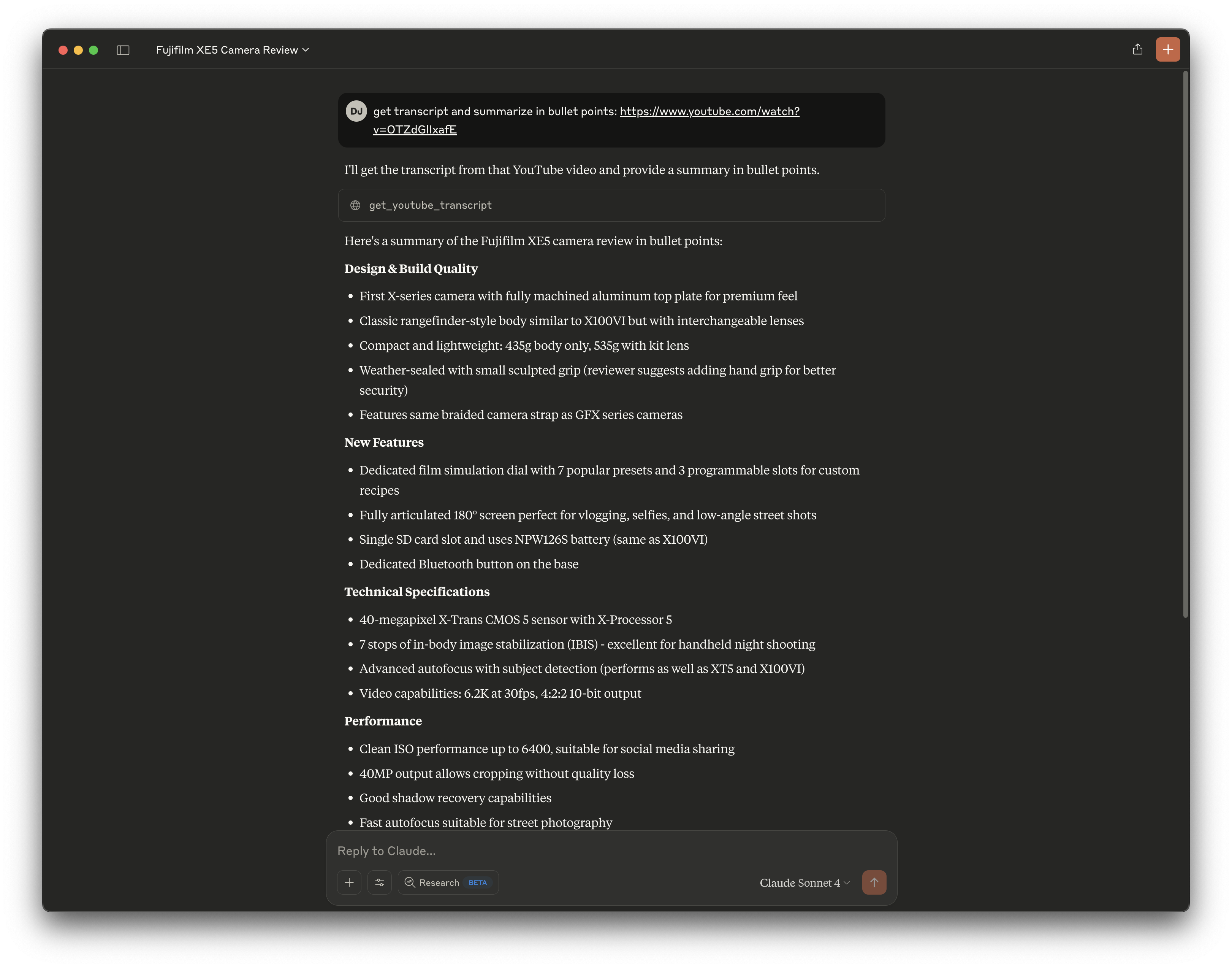
Relaunch Claude config and try out the server as shown in the screenshot below
Raycast
If you are using Raycast, you can install the MCP server by invoking the Install Server command from the MCP extension.
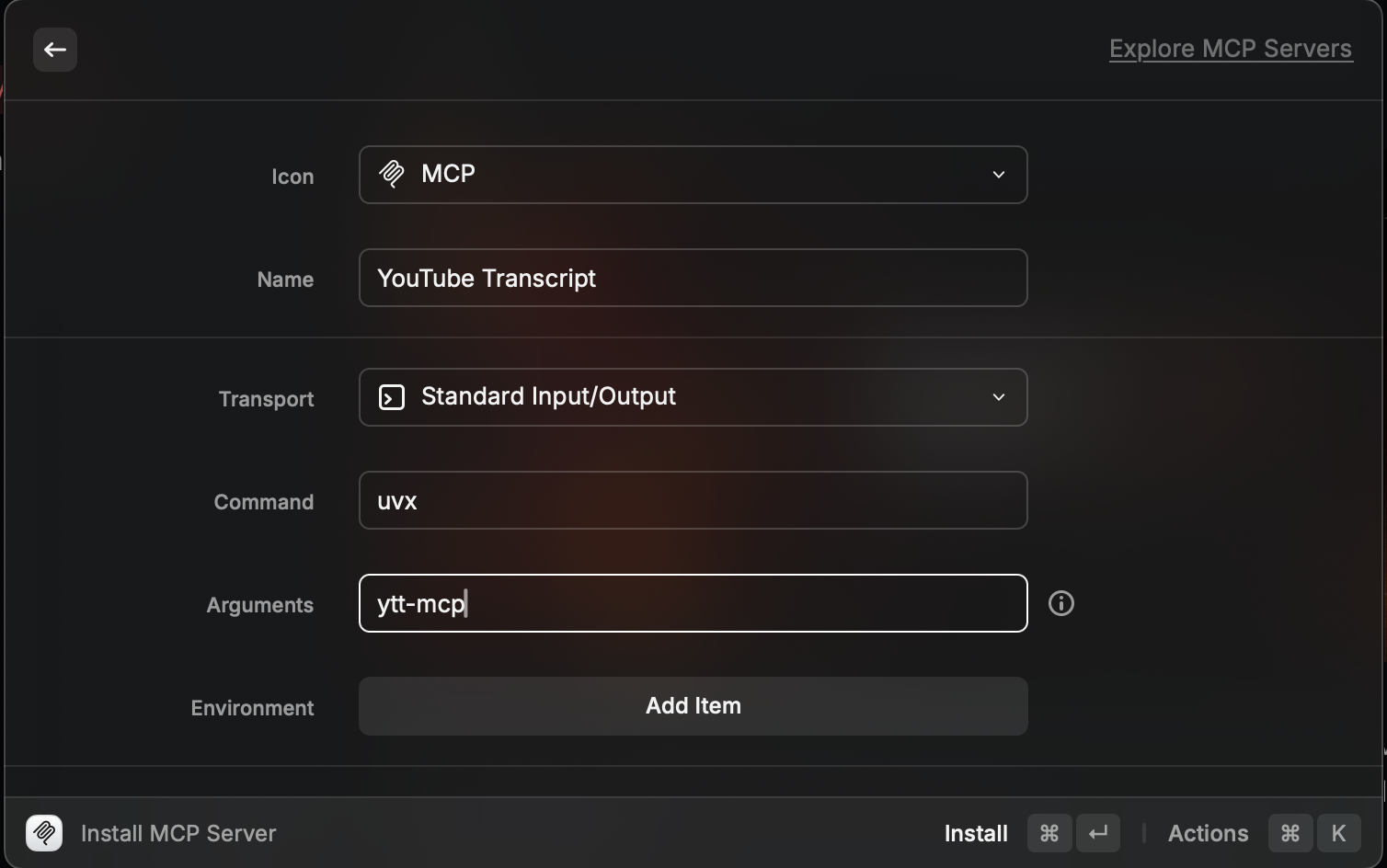
After that you can refer to the MCP server as @youtube-transcript and interact with it. You can also use it in a Raycast AI Command with a prompt. For example, here is a prompt I use to extract and summarize a YouTube URL in the clipboard
@youtube-transcript fetch the Youtube transcript of the video: {clipboard | raw}

Comprehensively summarize the transcript with the following format:
"""
### Key Takeaways

- <EXACTLY three bullet points with the key takeaways, keep the bullet points as short as possible>
"""

### Theme Wise Breakdown
<divide the transcript into thematic sections and summarize each section comprehensively. reuse any existing section delimiters the article already has. If not add your own. keep the content of the breakdown in the same order as it appears in the webpage text.>

Some rules to follow precisely:
- ALWAYS capture the perspective and POV of the author
- NEVER come up with additional information
See video demo below
https://github.com/user-attachments/assets/e6530768-3483-4cb9-988a-7ec7a999d505


Download files
Download the file for your platform. If you're not sure which to choose, learn more about installing packages.
Source Distribution
Built Distribution
Filter files by name, interpreter, ABI, and platform.
If you're not sure about the file name format, learn more about wheel file names.
Copy a direct link to the current filters
File details
Details for the file ytt_mcp-0.0.4.tar.gz.
File metadata
- Download URL: ytt_mcp-0.0.4.tar.gz
- Upload date:
- Size: 42.5 kB
- Tags: Source
- Uploaded using Trusted Publishing? No
- Uploaded via: uv/0.7.13
File hashes
| Algorithm | Hash digest | |
|---|---|---|
| SHA256 |
75b6093acc4d7fa215120b5f4b733b7633f9494b8913ab741abde376b2f60d85
|
|
| MD5 |
5a670350bd6dc3185eb743ff590abe12
|
|
| BLAKE2b-256 |
9fe289d2e50693b6cd6188da89e8814d033c6eb38f66ab6fff283b5111faab17
|
File details
Details for the file ytt_mcp-0.0.4-py3-none-any.whl.
File metadata
- Download URL: ytt_mcp-0.0.4-py3-none-any.whl
- Upload date:
- Size: 4.4 kB
- Tags: Python 3
- Uploaded using Trusted Publishing? No
- Uploaded via: uv/0.7.13
File hashes
| Algorithm | Hash digest | |
|---|---|---|
| SHA256 |
d54533100d2b852437f4af8cdba0bd97138c4348d2d8c1b53a1f2f51b6874f39
|
|
| MD5 |
3fe6ee516da0abc657403d4da2498e92
|
|
| BLAKE2b-256 |
628666b952dd645fb221dec1f251965cd97d7d4f0289716f51df4a51e1503182
|






