
⚡ YTUI
A sleek, keyboard-driven, high-density Terminal User Interface (TUI) client and download manager for yt-dlp.









📖 Overview
YTUI brings the unmatched downloading power of yt-dlp and FFmpeg into a modern, interactive terminal interface built with Python, Textual, and Rich.
No more memorizing complex CLI flags or wrestling with stream formats:
- 🎯 Visual Stream Selector: Pick exact video (4K, 2K, 1080p...) and audio (320k, 256k, 192k...) streams side-by-side.
- ⚡ Background Queue Manager: Track active downloads with live speed, ETA, progress bars, and stdout logs.
- 📑 Playlist Configurator: Select, deselect, or invert tracks with live size and duration estimations.
- 🏷️ Rich Media Embedding: Embed subtitles, high-res thumbnails/cover art, artist/album metadata tags, and video chapter markers directly into your files.
- 🛡️ Network Auto-Resume: Automatically recovers interrupted downloads from exact byte offsets.
- 🎨 17 Handcrafted Themes: Tailored dark and light themes (Shadcn Zinc, Tokyo Night, Catppuccin, Dracula, Nord, OLED Black, and more).
- 🌍 Native RTL Text Engine: Clean rendering for Arabic, Hebrew, Persian, and Urdu metadata without character corruption.
✨ Key Features
🔍 Multi-Platform Search & URL Extraction
- 1,000+ Supported Sites: Works seamlessly with YouTube, X/Twitter, TikTok, Twitch, SoundCloud, Vimeo, Reddit, Bilibili, Facebook, Instagram, and more.
- Direct Search: Search YouTube directly by typing search terms (
ytsearch) without opening a browser. - Interactive Results: View title, uploader, duration, view counts, and upload dates before downloading.
🎛️ Dual-Column Side-by-Side Stream Matrix
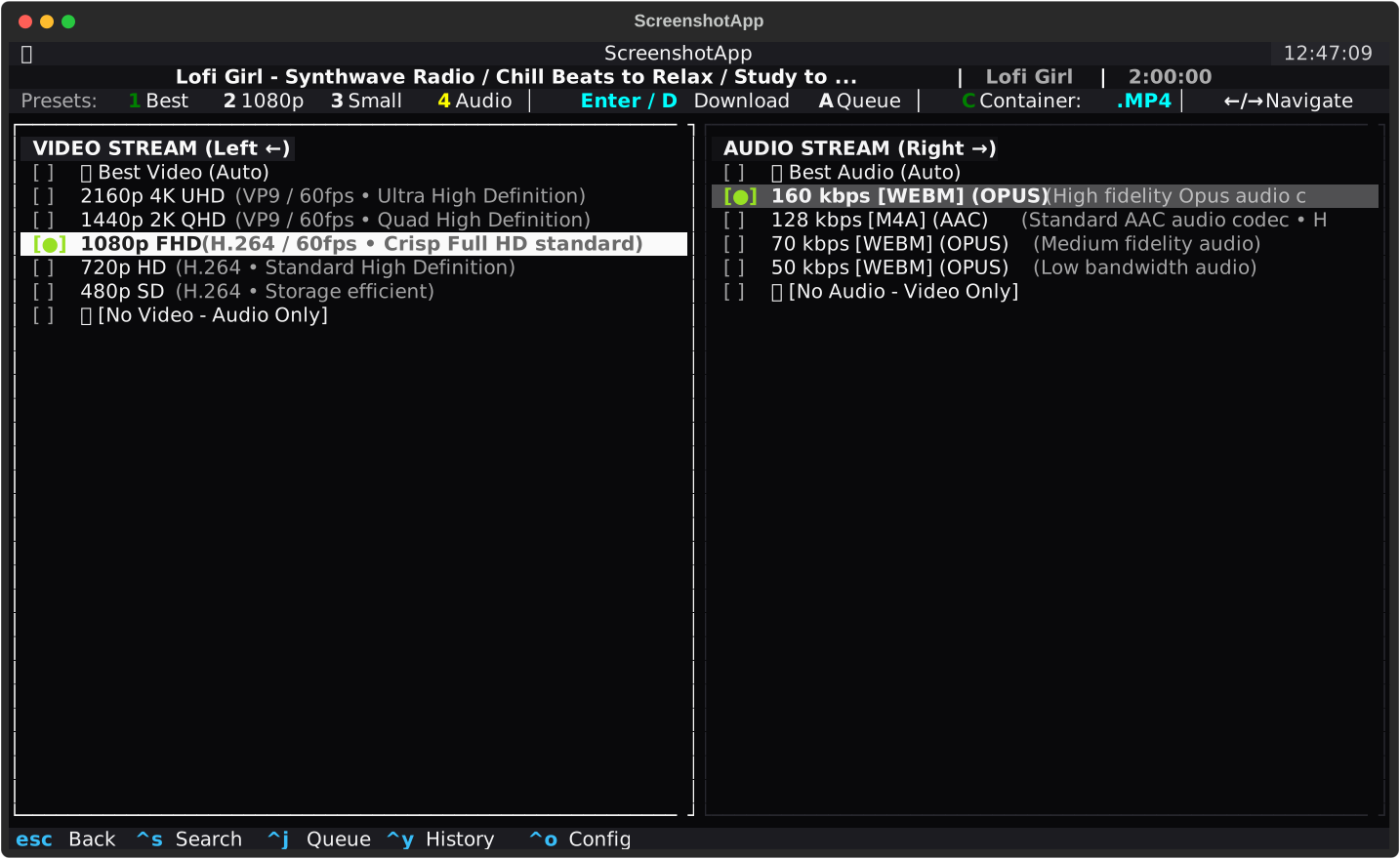
- Independent Stream Pairing:
- Left Column (Video): Choose 4K, 2K, 1080p, 720p, 480p, 360p, or
🚫 No Video (Audio Only). - Right Column (Audio): Choose 320 kbps, 256 kbps, 192 kbps, 128 kbps, 64 kbps, or
🔇 No Audio (Video Only).
- Left Column (Video): Choose 4K, 2K, 1080p, 720p, 480p, 360p, or
- Container Flexibility: Select target containers (
MP4,MKV,WEBM,MP3,M4A,FLAC,OPUS,WAV,AAC). - 1-Click Presets:
1: ⭐ Best Quality (Best available video + best audio)2: 🎬 1080p FHD (Crisp Full HD standard)3: 📦 Smallest Size (Storage-efficient resolution)4: 🎵 Audio Only MP3 (Extracted high-bitrate music)
📑 Interactive Playlist & Batch Downloader
- Track Selection Dialog: Interactive checkboxes to pick specific videos from albums, playlists, or channels.
- Batch Tools:
Select All(Ctrl+A),Deselect All(Ctrl+D), andInvert Selection(I). - Dynamic Estimations: Live calculation of total selected tracks, combined runtime, and estimated download size.
📥 Multi-Worker Queue & Download Manager (Ctrl+J)
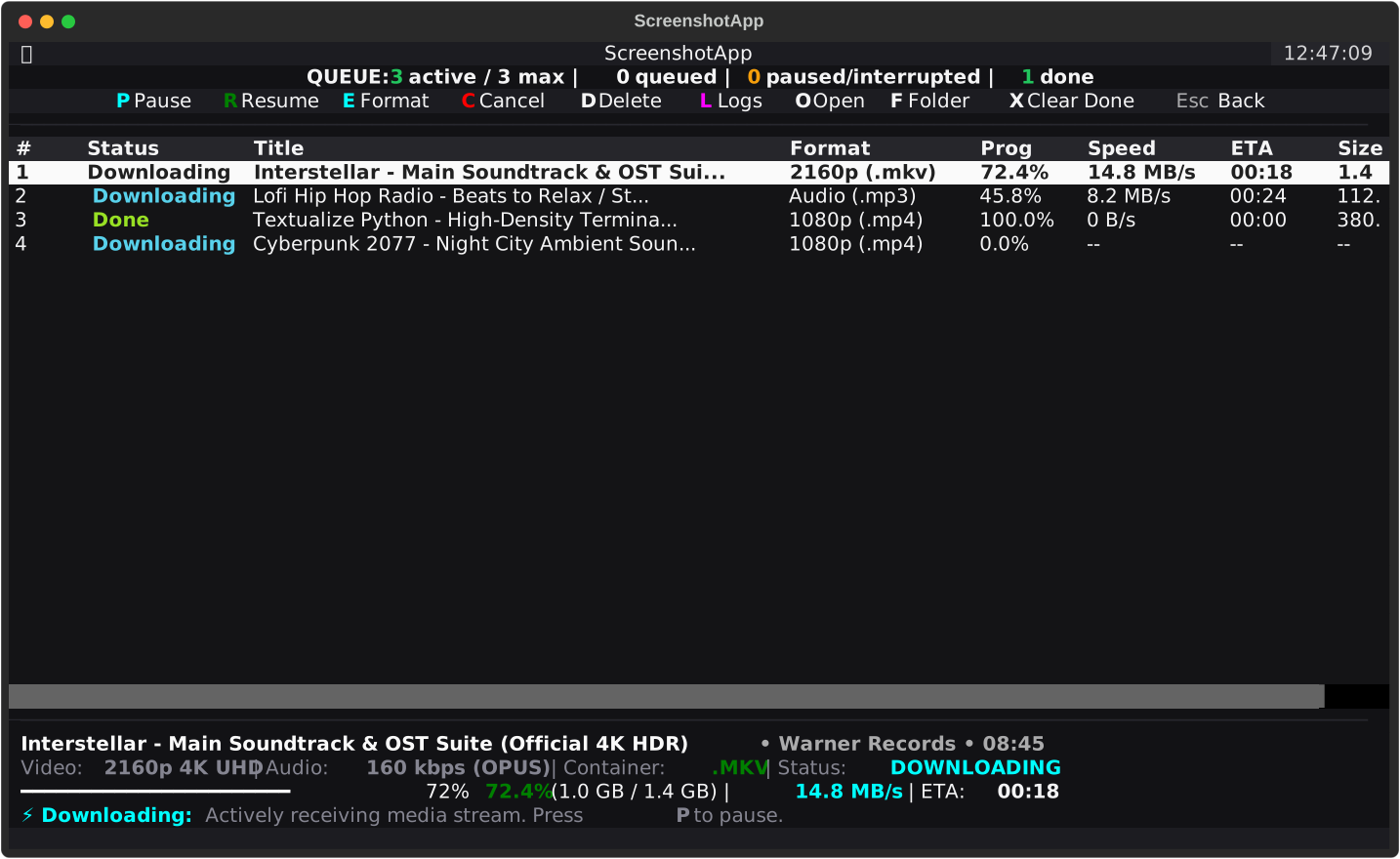
- Concurrent Workers: Download multiple tasks simultaneously in the background.
- Live Statistics: Real-time download speed, percentage, transferred bytes, and estimated completion time (ETA).
- Task Controls: Pause (
P), Resume / Retry (R), Edit Format (E), Cancel (C), Delete (D), and Clear Completed (X). - Real-Time Logs: Press
Lto toggle the live yt-dlp stdout log stream for deep diagnostics. - Quick File Launch: Open downloaded files in your default media player (
O/Enter) or reveal the destination directory in File Explorer (F).
📚 Download History & Library (Ctrl+Y)
- Persistent Media Archive: Automatically logs every completed download with title, format, file size, download timestamp, and destination path.
- Instant Search & Filter: Press
/orCtrl+Ffor real-time, case-insensitive searching across your entire library. - 1-Click Management: Launch files in your default media player (
Enter/O), reveal in File Explorer (F), re-download with updated formats (R), or delete entries (D). - Atomic Persistence: Thread-safe, corruption-resistant storage keeping your library safe across app restarts.
🛡️ Network Resiliency & Smart Auto-Resume
- Byte-Offset Resumption: Partial
.partfiles are automatically resumed from where they stopped (continuedl: True). - Connection Drop Recovery: Automatic exponential retry backoff (up to 10 retries by default) for unstable networks.
- HTTP 403 Forbidden Auto-Fallback: Automatically retries with embedded web clients if YouTube throttles format downloads.
🍪 Authentication & Cookies Suite
- Browser Extraction: One-click session cookie extraction for Google Chrome, Mozilla Firefox, Microsoft Edge, Brave, Opera, Vivaldi, and Apple Safari.
- Custom
cookies.txtSupport: Fully compatible with exported Netscape format cookies for age-restricted and member-only videos. - Built-in Auth Tester: Test your cookie file directly inside the Settings screen to verify active login sessions.
✂️ SponsorBlock, Embeddings & Media Post-Processing
- Embed Subtitles: Download and hard-embed or soft-embed subtitles directly into video streams (
MP4,MKV,WEBM) with multi-language selection and AI/auto-generated caption support, or export as standalone.srtfiles. - Embed Thumbnails & Artwork: Embed high-resolution video thumbnails and cover art directly into media files (
MP4,MKV,MP3,M4A,FLAC, etc.) with native Mutagen integration. - Embed Artist & Metadata: Automatically tag downloads with Artist, Title, Album, Channel/Uploader, and Year/Release Date metadata for a clean music and video library.
- Embed Chapter Markers & Splitting: Embed chapter markers directly into containers for instant chapter navigation in players (VLC, mpv, etc.), or split long videos into separate per-chapter tracks (
--split-chapters). - SponsorBlock Integration: Automatically detect and remove community-reported sponsored segments, self-promotions, intros, and outros from media files.
🎨 17 Handcrafted Themes & Settings (Ctrl+O)
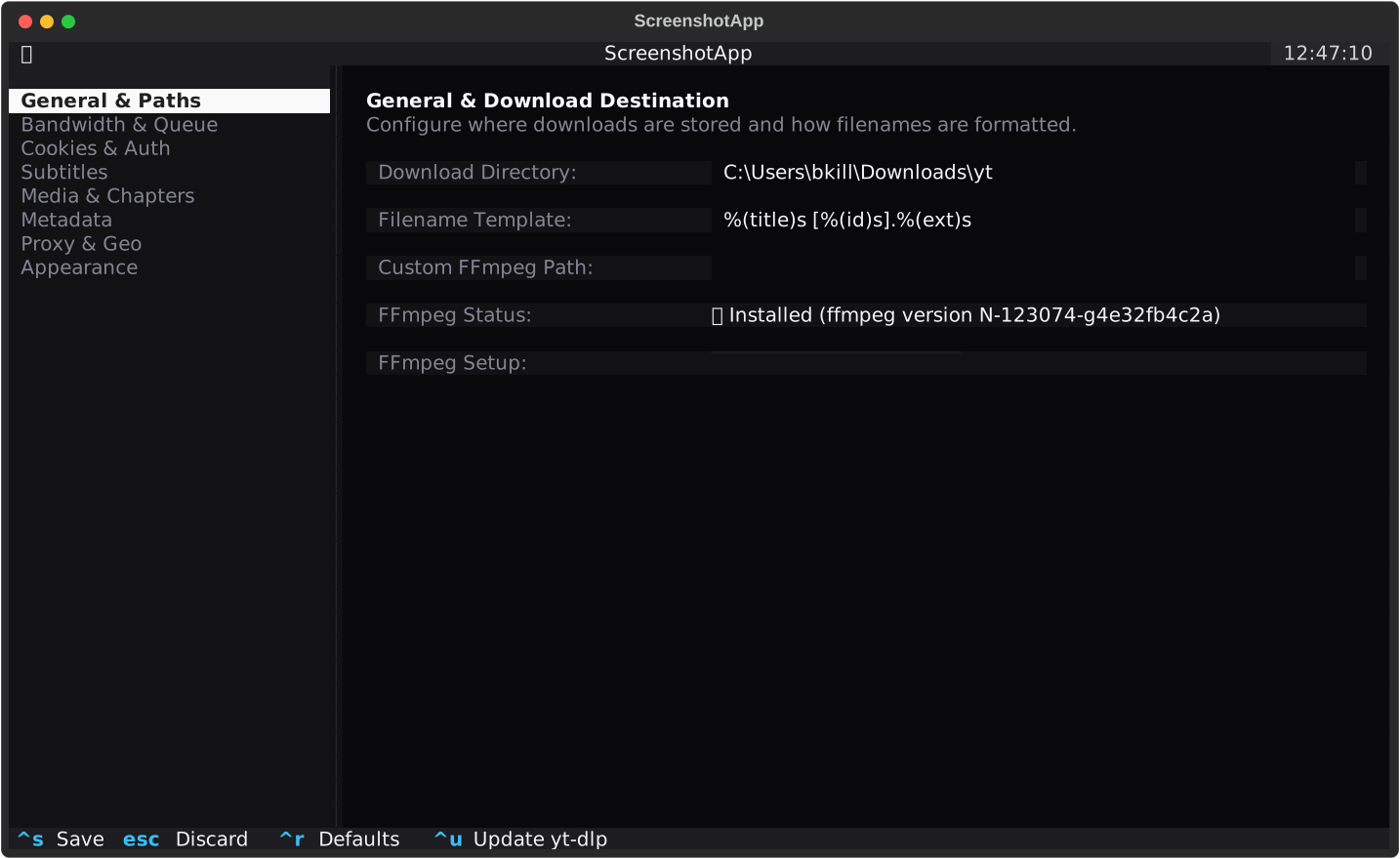
Switch between modern terminal aesthetics via Ctrl+O → Appearance:
- Dark Profiles:
Shadcn Zinc,Tokyo Night,Catppuccin Mocha,Dracula Pro,Nord Polar,Gruvbox Dark,Monokai Pro,Cyberpunk Neon,Midnight Amethyst,Matrix Emerald,Rosé Pine,Solarized Dark,Synthwave '84,OLED Jet Black. - Light Profiles:
Catppuccin Latte,Solarized Light,Titanium Light.
🌍 Arabic & RTL Text Engine
- First-class support for Right-to-Left (RTL) languages including Arabic, Hebrew, Persian, and Urdu.
- Resolves broken disconnected characters and reversed terminal text with automatic glyph shaping and Unicode BiDi algorithm.
- Multiple selectable modes:
Reshaped + BiDi,Native Terminal RTL,BiDi Order Only, orDisabled.
🚀 Setup & Installation
Option A: Install via PyPI / pipx (Recommended for Terminal Users)
You can install and run YTUI in an isolated terminal environment with pipx or standard pip:
# Using pipx (recommended)
pipx install ytui-media

# Or using pip
pip install ytui-media
Then simply launch from any directory:
ytui
# or
yt-dlp-tui
Option B: Standalone Executable (No Python Required)

- Download: Click the download button above or get
dist/yt-dlp-tui.exe. - FFmpeg Setup: On first launch, the app will automatically prompt to download and configure FFmpeg in 1 click if not found on your system.
- Launch: Double-click
yt-dlp-tui.exeto run immediately.
Option C: Run from Source (Python 3.10+)
1. Prerequisites
- Python 3.10 or higher: Verify with
python --version. - FFmpeg:
- Windows:
winget install Gyan.FFmpegorscoop install ffmpeg/choco install ffmpeg - macOS:
brew install ffmpeg - Linux:
sudo apt install ffmpeg/sudo pacman -S ffmpeg/sudo dnf install ffmpeg
- Windows:
2. Clone & Install Dependencies
# Clone the repository
git clone https://github.com/bkallash/YTUI.git
cd YTUI

# Create and activate a virtual environment (recommended)
python -m venv .venv

# On Windows:
.venv\Scripts\activate

# On Linux / macOS:
source .venv/bin/activate

# Install required Python packages
pip install -r requirements.txt
3. Launch the Application
python app.py
On Windows, you can also double-click or run:
.\tui.bat
⌨️ Keyboard Shortcuts Cheat Sheet
🌐 Global Navigation
| Shortcut | Action |
|---|---|
Ctrl+S |
Switch to Search & URL Input screen |
Ctrl+J |
Switch to Download Queue Manager screen |
Ctrl+Y |
Switch to Download History & Library screen |
Ctrl+O |
Switch to Settings & Configuration screen |
Ctrl+Q |
Graceful exit (saves config and stops active workers) |
🔍 Search Screen
| Shortcut | Action |
|---|---|
Enter (in input) |
Start extraction / YouTube search |
Up / Down |
Navigate search results table |
Enter (on row) |
Select video and open format selector |
Esc |
Clear input / Return to previous state |
🎛️ Stream & Format Selector
| Shortcut | Action |
|---|---|
Left / Right (h/l) |
Switch focus between Video and Audio columns |
Up / Down (j/k) |
Navigate available format streams in active column |
1 / 2 / 3 / 4 |
Select Preset: 1 Best, 2 1080p, 3 Smallest, 4 Audio Only |
C |
Cycle target container format (MP4, MKV, WEBM, etc.) |
Q |
Cycle audio bitrate quality (320k, 256k, 192k, 128k, V0) |
Enter / D |
Start download immediately and switch to Queue |
A |
Add task to Queue in background without leaving screen |
Esc |
Return to Search screen |
📑 Playlist Configurator
| Shortcut | Action |
|---|---|
Space |
Toggle inclusion checkbox for selected track |
Ctrl+A |
Select all tracks |
Ctrl+D |
Deselect all tracks |
I |
Invert selection |
Left / Right |
Switch focus between Tracks list and Format selector |
Enter / D |
Queue all selected tracks for download |
Esc |
Cancel and return to search |
📥 Download Queue Manager (Ctrl+J)
| Shortcut | Action |
|---|---|
P |
Pause selected download |
R |
Resume / Retry selected download |
E |
Edit format for selected task |
C |
Cancel active download |
D / Delete |
Delete task from queue |
L |
Toggle live stdout logs drawer |
O / Enter |
Open completed media file in default system player |
F |
Open destination folder in File Explorer / Finder |
X |
Clear all finished and cancelled tasks |
📚 Download History (Ctrl+Y)
| Shortcut | Action |
|---|---|
/ or Ctrl+F |
Focus real-time filter input |
Enter / O |
Open media file in default player |
F |
Reveal file in Explorer / Finder |
R |
Re-download URL with format selector |
D |
Remove record from history |
C |
Clear entire download history |
⚙️ Settings Screen (Ctrl+O)
| Shortcut | Action |
|---|---|
Up / Down |
Navigate settings categories sidebar |
Tab / Shift+Tab |
Move focus between fields |
Left / Right |
Cycle dropdown / selector values |
Ctrl+S |
Save configuration |
Ctrl+R |
Reset configuration to default values |
Ctrl+U |
Self-update yt-dlp to latest upstream version |
Esc |
Discard unsaved changes and go back |
🍪 Cookies & Authentication (Windows / YouTube Guide)
For age-restricted, private, or subscriber-only videos, YouTube requires active account cookies.
Why Direct Chrome Extraction Fails on Windows
- SQLite Database File Lock: When Google Chrome is running on Windows, it holds an exclusive lock on its cookie database (
Network/Cookies), preventing other applications from reading it. - App-Bound Encryption (Chrome 127+): Recent versions of Chrome encrypt stored credentials with Windows App-Bound Encryption, blocking third-party process access.
Recommended 100% Reliable Fix (cookies.txt):
- Install an extension like Get cookies.txt LOCALLY in Chrome or Firefox.
- Open YouTube, click the extension icon, and click Export.
- In YTUI, press
Ctrl+O→Cookies & Auth. - Set Browser Cookies to
None (No Cookies)and paste your file path intoCustom Cookies.txt Path(e.g.C:\Users\username\Downloads\youtube.com_cookies.txt). - Click
▶ Test Cookie Setup & Authto verify login detection.
⚙️ Configuration
Configuration is automatically persisted to:
- Windows:
%APPDATA%\ytui\config.json - Linux / macOS:
~/.config/ytui/config.json
Sample config.json:
{
  "download_dir": "C:\\Users\\user\\Downloads",
  "filename_template": "%(title)s [%(id)s].%(ext)s",
  "max_concurrent_downloads": 3,
  "rate_limit": "0",
  "retries": 10,
  "continuedl": true,
  "browser_cookies": "none",
  "cookies_file": "",
  "download_subtitles": false,
  "auto_generated_subtitles": false,
  "subtitle_mode": "embed",
  "subtitle_langs": "en",
  "download_thumbnail": false,
  "thumbnail_mode": "embed",
  "embed_chapters": false,
  "split_chapters": false,
  "remove_sponsor_segments": false,
  "sponsorblock_categories": "sponsor,selfpromo",
  "embed_metadata": true,
  "proxy": "",
  "geo_bypass": true,
  "theme": "shadcn-zinc",
  "rtl_mode": "reshaped_bidi"
}
📦 Building Standalone Executable (.exe)
You can package the entire application into a standalone Windows binary without requiring Python to be installed on target machines:
Option 1: One-Click Build Script (Windows)
.\build.bat
Option 2: Command Line
pip install -r requirements.txt
pyinstaller --noconfirm --clean yt-dlp-tui.spec
The resulting standalone executable will be exported to:
dist/yt-dlp-tui.exe
🧪 Running Tests
The test suite covers configuration management, yt-dlp format extraction, download queue management, Arabic/RTL text rendering, and asynchronous Textual UI screens:
python -m pytest tests/ -v
🛠️ Built With
- Textual: Modern async TUI application framework for Python.
- Rich: Terminal formatting, tables, styled markup, and rendering.
- yt-dlp: Feature-rich command-line audio/video downloader.
- arabic-reshaper & python-bidi: Advanced Right-to-Left (RTL) text shaping.
- mutagen: Native audio & video tag and artwork embedding.
📄 License
This project is licensed under the MIT License — see the LICENSE file for details.
1 maintainer

Download files
Download the file for your platform. If you're not sure which to choose, learn more about installing packages.
Source Distribution
Built Distribution
Filter files by name, interpreter, ABI, and platform.
If you're not sure about the file name format, learn more about wheel file names.
Copy a direct link to the current filters
File details
Details for the file ytui_media-0.1.4.tar.gz.
File metadata
- Download URL: ytui_media-0.1.4.tar.gz
- Upload date:
- Size: 102.5 kB
- Tags: Source
- Uploaded using Trusted Publishing? No
- Uploaded via:
twine/7.0.0 CPython/3.14.6
File hashes
| Algorithm | Hash digest | |
|---|---|---|
| SHA256 |
200c7739c4f06eff499df6ef3251e3eaa0ee3db67947a9e289c72e40923c6fff
|
|
| MD5 |
b1e9a093e576cf87f7175a7fef67ef7c
|
|
| BLAKE2b-256 |
e78c2507095d599cdeeb6db1eee38b271e736919aaf40220d95c00a974a71bc4
|
File details
Details for the file ytui_media-0.1.4-py3-none-any.whl.
File metadata
- Download URL: ytui_media-0.1.4-py3-none-any.whl
- Upload date:
- Size: 82.9 kB
- Tags: Python 3
- Uploaded using Trusted Publishing? No
- Uploaded via:
twine/7.0.0 CPython/3.14.6
File hashes
| Algorithm | Hash digest | |
|---|---|---|
| SHA256 |
39db77aebec284ed9d7629b4b9b41b3c66936d89f6e08f2786c6c925a9598f29
|
|
| MD5 |
9c4a1482f87d8ad6a39f82d5cce72119
|
|
| BLAKE2b-256 |
95e63f0e70ba7d47d2f374e8d8d15018ccf966b9793e04492333d6ef569cdd8d
|














