
YTWS: YouTube Download and Faster-Whisper Subtitle Generation CLI Tool 🔥
One command to download and transcript youtube video
ytws dt -u "https://www.youtube.com/watch?v=XXXXXXXX" -m large-v3
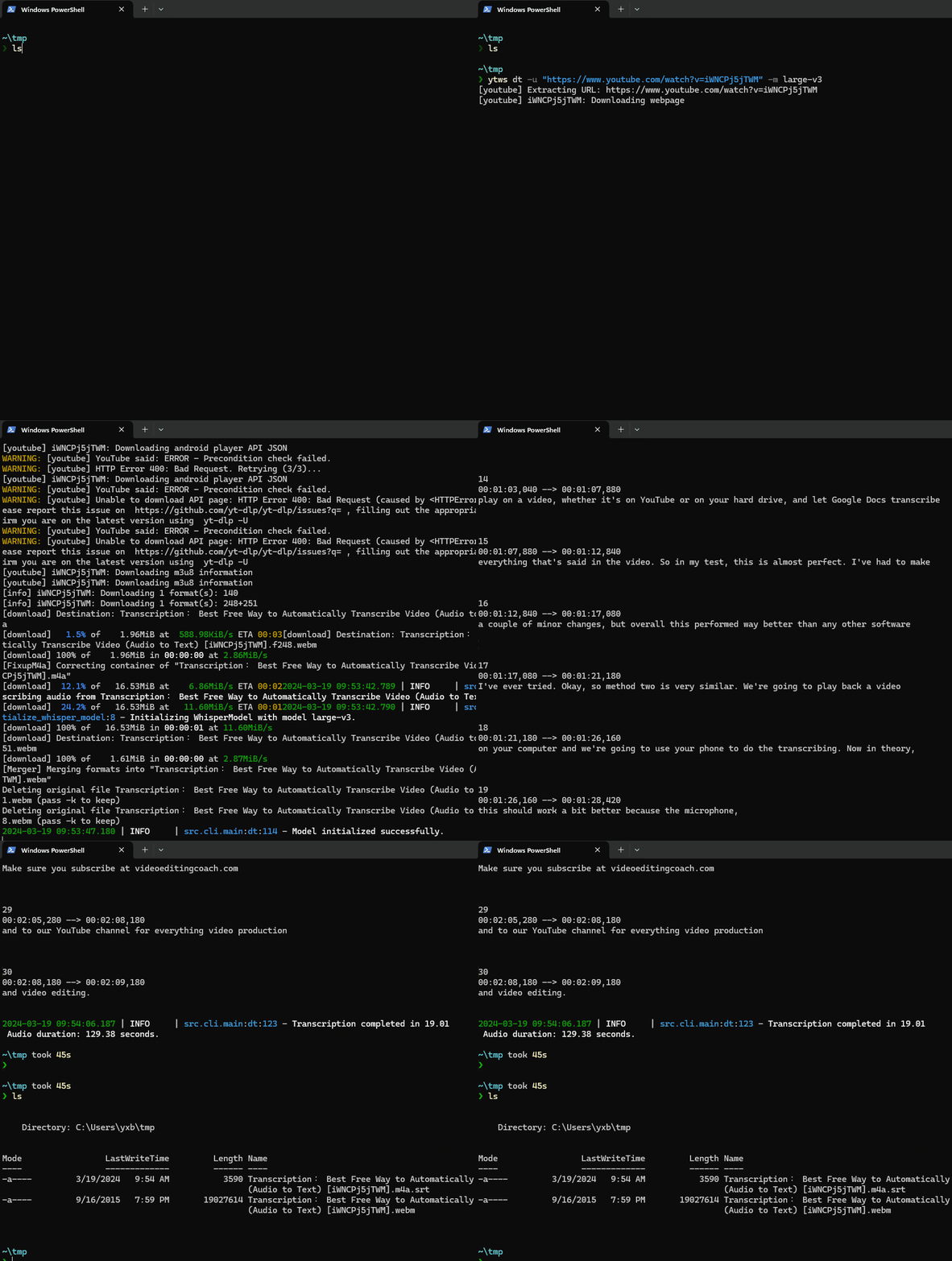
YTWS, is a simple CLI tool that downloads YouTube videos and creates subtitles quickly. It uses yt-dlp for downloading and faster-whisper for transcribing, making it easy and efficient to use.
Essentially, YTWS is a user-friendly wrapper integrating yt-dlp and faster-whisper, simplifying the user experience.
YTWS is short for YouTube Whisper.
⭐ Features
- Easy to Use: Start without any hassle.
- Fast Subtitle Generation: Harness the speed of
faster-whisper. - GPU Acceleration: A simple guide for harnessing GPU power.
🪄 Functional
- Downloading and Transcribing YouTube Videos/Audios
- Only Downloading YouTube Videos/Audios
- Only Transcribing Videos/Audios
⚙ Requirements
ffmpeg
Install ffmpeg
For Ubuntu:
sudo apt install ffmpeg
For Python virtual environment (recommended):
conda install ffmpeg
For Windows scoop users:
scoop install ffmpeg
⚙ Installation YTWS
Install YTWS easily with these commands:
pip install ytws
or
pip install git+https://github.com/faker2048/youtube-whisper.git
🚀 Usage
Downloading and Transcribing YouTube Videos/Audios
To download and transcribe a video, simply run:
Example:
# Download (bestvideo+bestauido) format and transcribe the video
ytws dt -u "https://www.youtube.com/watch?v=XXXXXXXX" -m large-v3
# Specify the format using the -f option
ytws dt -u "https://www.youtube.com/watch?v=XXXXXXXX" -m large-v3 -f "bestvideo+bestaudio/best"
# Audio only
ytws dt -u "https://www.youtube.com/watch?v=XXXXXXXX" -m large-v3 -f "worstaudio[tbr>100]"
After running the command, the media file and the generated subtitles will be saved in the same directory as the video file.
See more details
❯ ytws dt --help
Usage: ytws dt [OPTIONS]

  Download video/audio from Youtube and generate subtitles.

Options:
  -u, --url TEXT         Youtube URL.  [required]
  -n, --threads INTEGER  Number of threads to use.
  -f, --format TEXT      Download format. See: https://github.com/yt-dlp/yt-
                         dlp#format-selection-examples
  -t, --translate        Translate the subtitles to English.
  -m, --model_name TEXT  Name of the model to use. e.g.  (tiny, tiny.en, base,
                         base.en, small, small.en,          medium, medium.en,
                         large-v1, or large-v2, or large-v3), recommended: (large-v3)
  -r, --model_root TEXT  Root directory for the models.
  --cpu                  Use CPU instead of GPU. This is useful if you do not
                         have a GPU.
  -s, --srt_only         Only generate subtitles. Do not download video.
  -v, --video_only       Only download video. Do not generate subtitles.
  --help                 Show this message and exit.
Only Downloading YouTube Videos/Audios
To download a video, simply run:
Example:
ytws d -u "https://www.youtube.com/watch?v=XXXXXXXX" -f "bestvideo+bestaudio/best"
See more details
❯ ytws d --help
Usage: ytws d [OPTIONS]

  Download a video/audio from YouTube.

Options:
  -u, --url TEXT         The URL of the YouTube video or the filename to be
                         downloaded.  [required]
  -n, --threads INTEGER  The number of threads to use for downloading. Default
                         is 16.
  -f, --format TEXT      The download format. Options include:
                         'worstaudio[tbr>100]/bestaudio/best' for audio only,
                         'bestvideo[height>=1080]/bestvideo' for video only,
                         'bestvideo+bestaudio/best' for both video and audio
                         (default). Use 'best' for the best quality or specify
                         particular formats.
  --help                 Show this message and exit.
Only Transcribing Videos/Audios
To transcribe a video, simply run:
Example:
ytws t -f "video.mp4" -m large-v3
After running the command, the generated subtitles will be saved in the same directory as the video file.
See more details
❯ ytws t --help
Usage: ytws t [OPTIONS]

  Transcribe a video/audio file.

Options:
  -f, --file TEXT        The media file to be transcribed.  [required]
  -t, --translate        Translate the subtitles to English.
  -m, --model_name TEXT  Name of the model to use. e.g.  (tiny, tiny.en, base,
                         base.en, small, small.en,          medium, medium.en,
                         large-v1, or large-v2), recommended: (large-v2)
  -r, --model_root TEXT  Root directory for the models.
  --cpu                  Use CPU instead of GPU. This is useful if you do not
                         have a GPU.
  --help                 Show this message and exit.
🛫 GPU Acceleration
For easy CUDA and cuDNN installation:
- Linux:
conda install cudnn
- Windows:
Although using additional torch libraries may not be ideal, it's a straightforward approach for Windows (compared to Nvidia's official CUDA installation). Any alternative methods or suggestions are welcome!
pip3 install torch --index-url https://download.pytorch.org/whl/cu118
After these settings, YTWS should work with a GPU.
🪄 Available Models
Visit here for more details.
🌟 Contributing to YTWS
We welcome contributions to YTWS! Your support makes a difference.
How to Contribute
- Fork, Clone, Branch: Start by forking and cloning the repository, then work in separate branches.
- Commit: Follow the project standards and commit your changes.
- Pull Request: Submit a concise pull request (PR) to the main branch.
Using Pre-Commit
To maintain code format:
pip install pre-commit
pre-commit install
Pre-commit will guide you through necessary checks and corrections. Feel free to reach out if you have any questions or suggestions!
1 maintainer

Metadata
1 maintainer
Release files for ytws 0.4.3
For a detailed explanation of source distributions (sdists) and built distributions (wheels), please see the package formats documentation.
Source distribution (sdist)
| File | Size | Uploaded | |
|---|---|---|---|
| ytws-0.4.3.tar.gz | 9.4 kB | Details |
Built distribution (wheel)
| File | Interpreter | ABI | Platform | Reset |
|---|---|---|---|---|
| ytws-0.4.3-py3-none-any.whl | Python 3 | none | any | Details |
Total release size: 18.3 kB
Release files / ytws-0.4.3.tar.gz
| Download URL | ytws-0.4.3.tar.gz |
|---|---|
| Size | 9.4 kB |
| Tags | Source |
|
SHA-256 checksum How to use checksums |
82c8d9fbce8b866ee69991497b8d3eccb0dc81a56a1cac68739f46ace58f8a48
|
|
BLAKE2b-256 checksum How to use checksums |
2acfb9ebf76e6f34b8a8df28f590122c66648a032f4465c6be12712343b681cf
|
| Upload date | |
|
Uploaded using Trusted Publishing? What is trusted publishing? |
No |
| Uploaded via |
twine/6.2.0 CPython/3.9.24
|
Release files / ytws-0.4.3-py3-none-any.whl
| Download URL | ytws-0.4.3-py3-none-any.whl |
|---|---|
| Size | 8.9 kB |
| Tags | Python 3 |
|
SHA-256 checksum How to use checksums |
32e6ca607a9c22e8f0876b6fd854219bcd0efd86916ce322efa4195c5a752338
|
|
BLAKE2b-256 checksum How to use checksums |
6b738abb9a90797e9f8441fa056b3021afef67cdd968bf98400740378c73a7c3
|
| Upload date | |
|
Uploaded using Trusted Publishing? What is trusted publishing? |
No |
| Uploaded via |
twine/6.2.0 CPython/3.9.24
|














