
Yumi — open-source self-hosted AI agent framework: cross-language tool edges + Telegram/LINE/Discord chat

Project description
Yumi



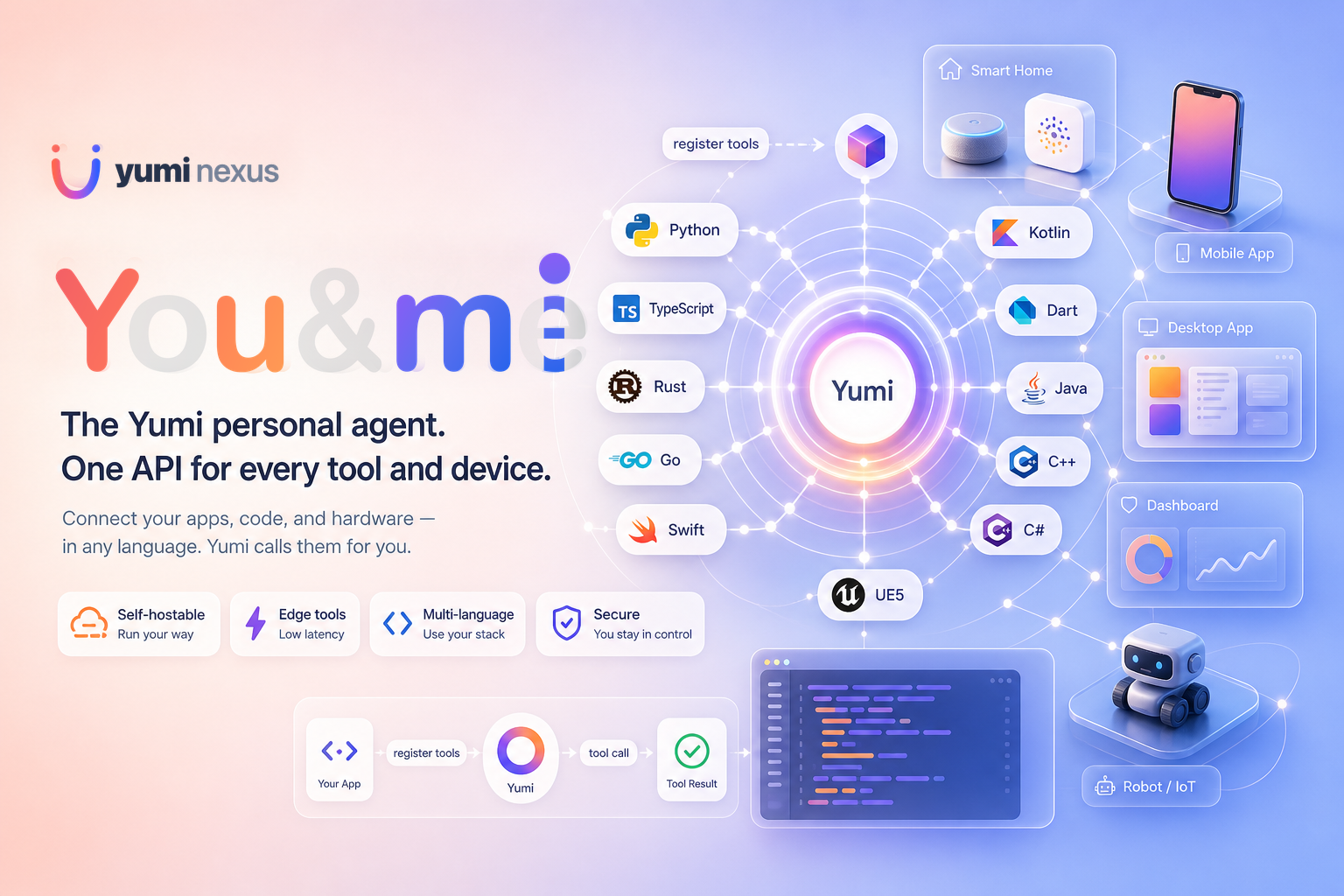
One API to let AI call functions in any language, on any device.
Register a function. AI calls it. Python, Rust, Kotlin, Dart, C++, Swift, TypeScript, Go, Java, C# — same pattern everywhere.
Status: alpha. The core workflows are usable today, but APIs, generated templates, and UX may still change as the project stabilizes.
Quick Start
pip install yumi-agent       # or, from source: git clone … && pip install .
yumi --server                # first run walks you through provider/model setup
yumi --demo                  # in another terminal: launches Smart Home + Planner
yumi --chat                  # ask AI to control them in natural language
Connect your own app:
cd my_project
yumi --edge --lang python    # also: typescript, swift, go, rust, kotlin, dart, java, csharp, cpp, ue5
yumi --edge scaffolds a yumi_tools/ directory. Edit the generated setup file, call its init function from your app entry point, and your functions appear as AI tools. Full walkthrough in Getting Started.
Demo
yumi --demo launches two independent Python GUIs at once:
- Smart Home — lights, TV, thermostat, coffee machine, locks (room cards + status)
- Planner — tkinter schedule app with a mini calendar and day timeline
Both windows are display-only. Open yumi --chat or yumi --ui and try:
Turn on the kitchen lights and add a "Cook dinner" event at 18:00 for 1 hour, category personal.
The demo requires a graphical desktop session. On Linux, install Tk first (sudo apt install python3-tk on Debian/Ubuntu). More example prompts are in Getting Started.
Same pattern, every language
The flow is the same in every language: run yumi --edge → implement tools in any module you like → import them in the generated setup file, register them, and define init_yumi / initYumi → call that init function once from your app's entry point. There is no required folder layout; only the imports in setup need to reach your functions.
Python
# my_app/tools.py
def analyze_data(path: str) -> str:
    """Load a CSV and return a short summary."""
    return "summary"
# yumi_tools/python/yumi_setup.py
from my_app.tools import analyze_data
from .yumi_sdk import YumiAgent

def init_yumi():
    agent = YumiAgent(edge_name="My Server")
    agent.register(analyze_data, "Analyze CSV at path and return a short summary")
    return agent

# Standalone script:  init_yumi().run()              (blocks until Ctrl+C)
# Embedded in an app: init_yumi().run_in_background() (returns immediately)
# your app entry point
from yumi_tools.python.yumi_setup import init_yumi
init_yumi()
# … rest of your program …
If you embed Yumi inside an already-installed Python package, from yumi.sdk import YumiAgent works directly without the yumi_tools/ tree.
TypeScript
// yumi_tools/typescript/yumiSetup.ts
import { YumiAgent } from "./yumi_sdk/src";
import { searchProducts } from "../src/catalog";

export function initYumi() {
  const agent = new YumiAgent({ edgeName: "My Web App" });
  agent.register({
    name: "searchProducts",
    description: "Search the product catalog",
    handler: async (args) => searchProducts(args.string("query") ?? ""),
  });
  agent.runInBackground();
  return agent;
}
Other languages
C++, Swift, Go, Java, C#, Rust, Kotlin, Dart, and UE5 follow the same pattern with idiomatic syntax. See the Edge Tools Guide for full code samples in each language.
How It Works
flowchart TB
  subgraph ai [AI Brain]
    LLM[LLM Provider]
    Server[Yumi Server]
  end
  subgraph devices [Your Devices — Any Language]
    RPi["Raspberry Pi · C++"]
    Phone["iPhone · Swift"]
    Desktop["Desktop App · Python"]
    Web["Web App · TypeScript"]
    IoT["IoT Gateway · Go"]
  end
  LLM <--> Server
  Server <-->|WebSocket| RPi
  Server <-->|WebSocket| Phone
  Server <-->|WebSocket| Desktop
  Server <-->|WebSocket| Web
  Server <-->|WebSocket| IoT
Your app connects to the Yumi server over WebSocket and registers functions as tools. The LLM sees them alongside server-side tools and calls whichever it needs. Results flow back through the same connection.
Main Commands
| Command | What it does |
|---|---|
yumi --server |
Start the backend API server |
yumi --server --telegram |
Start the API and a Telegram bot together (same machine) |
yumi --telegram |
Run only the Telegram bot; connects to the API like yumi --chat |
yumi --server --discord |
Start the API and a Discord bot together (same machine) |
yumi --discord |
Run only the Discord bot; connects to the API like yumi --chat |
yumi --server --line |
Start the API and a LINE webhook sidecar (default port 8788) |
yumi --line |
Run only the LINE webhook server; core API must already be reachable |
yumi --server --voice |
Start the API with a microphone wake-word loop (say "hi yumi" to talk) |
yumi --speak "..." |
Synthesize text with the configured TTS and play it (smoke test) |
yumi --ui |
Start the web UI (chat, tools, settings) |
yumi --chat |
Start terminal chat |
yumi --edge |
Interactively scaffold an edge workspace in the current directory |
yumi --run-edge --lang python |
Run a generated standalone edge template |
yumi --demo |
Run the Smart Home + Planner (schedule) demo |
yumi --setup |
Reconfigure models and providers |
yumi --config |
Create/update ~/.yumi/config.json with all known settings and defaults |
yumi --cleanup |
Delete all Yumi user data (~/.yumi/) |
yumi --cleanup-models |
Delete local model caches managed by Yumi (~/.yumi/models/) |
yumi --cleanup-models --include-ollama |
Also remove configured Ollama models |
yumi --cleanup-memory |
Delete saved chat memory and embeddings only |
Optional Integrations
- Telegram — chat with Yumi from a Telegram bot. Get a token from @BotFather, then run
yumi --server --telegram(single machine) oryumi --telegram(bot only). Token, allowlist, and timer-push details: Configuration → Telegram. - Discord — chat with Yumi from a Discord bot. Create an application + bot in the Discord Developer Portal, enable the Message Content intent, then run
yumi --server --discord(single machine) oryumi --discord(bot only). Token, allowlist, and timer-push details: Configuration → Discord. - LINE — chat from LINE via the Messaging API webhook. Run
yumi --server --line(single machine, default port 8788) oryumi --line(webhook sidecar only). Credentials and webhook setup: Configuration → LINE. - Voice — talk to Yumi through your microphone. Say the wake word ("hi yumi") and Yumi transcribes the rest of your sentence and runs it as a chat turn. Transcription runs locally with Whisper, or with no model download through a cloud provider that reuses your existing key —
openai,gemini, ordashscope(Qwen3-ASR). Coexists with Telegram /--chat/--uiso the same Yumi instance can listen and type at once, and recent voice/Telegram/CLI turns are merged into each prompt. Mic capture needs a Picovoice access key. Setup: Configuration → Voice. - Spoken replies (TTS) — Yumi can talk back. Pick a backend in
yumi --setup:system(Windows SAPI, macOSsay, or Linuxespeak),openai(OpenAI TTS, reuses youropenai_api_key),dashscope(Qwen3-TTS via the DashScope API), orqwen(Qwen3-TTS run locally on a GPU via the optional[tts-local]extra). In voice mode replies are spoken automatically; on Telegram / Discord,/voice on(!voice on) switches a chat to audio replies. Test any time withyumi --speak "hello".
Supported Providers
| Provider | Chat | Embedding | Notes |
|---|---|---|---|
| Ollama | Yes | Yes | Local models, no API key needed |
| OpenAI | Yes | Yes | Also works with OpenAI-compatible endpoints via openai_base_url |
| Gemini | Yes | Yes | Google Gemini |
| FastEmbed | No | Yes | Local multilingual embeddings downloaded by yumi --setup; no Ollama needed |
| Claude | Yes | No | Anthropic Claude (use another provider for embeddings) |
| DeepSeek | Yes | No | OpenAI-compatible chat API; use FastEmbed, Ollama, OpenAI, or Gemini for embeddings |
| Grok | Yes | No | xAI Grok chat API; use FastEmbed, Ollama, OpenAI, or Gemini for embeddings |
You can mix providers — for example OpenAI for chat and Ollama for embeddings.
Edge SDKs
| Language | Runtime | Install |
|---|---|---|
| Python | websockets |
pip install . or yumi --edge --lang python |
| TypeScript | ws (Node) / native (browser) |
npm install yumi-sdk or yumi --edge --lang typescript |
| C++ | CMake, IXWebSocket | yumi --edge --lang cpp |
| Swift | SwiftPM | yumi --edge --lang swift |
| Go | gorilla/websocket |
yumi --edge --lang go |
| Java | JDK 11+ native WebSocket | yumi --edge --lang java |
| C# | .NET 6+ native WebSocket | yumi --edge --lang csharp |
| Rust | Tokio + tokio-tungstenite |
yumi --edge --lang rust |
| Kotlin | OkHttp (JVM) | yumi --edge --lang kotlin |
| Dart | web_socket_channel (VM / Flutter) |
yumi --edge --lang dart |
| UE5 | Unreal Engine module | yumi --edge --lang ue5 |
Documentation
| Document | Description |
|---|---|
| Getting Started | Installation, first run, providers, UI, terminal chat |
| Edge Tools Guide | Connect your app, device, or game as an edge tool host |
| Tool Registration | All tool registration parameters, confirmation, proactive options |
| Configuration | ~/.yumi/config.json, environment variables, Telegram, Discord, LINE, Docker |
| Deployment | Install, first run, Docker, production notes (TLS, CORS, health checks) |
| Architecture | System design, plugin ports, API stability |
| HTTP API | Chat NDJSON stream, all routes, curl examples |
| Memory | Session history and LanceDB embeddings |
| Testing | Running and writing tests |
How Yumi Differs
Yumi is not another Python-only LLM chaining library. It ships a runnable server, terminal UI, and web UI, plus first-class edge tool hosts across eleven languages. The focus is on device-side tool execution: your game, phone app, IoT sensor, or desktop program exposes functions, and the AI calls them directly in your process.
Core Scope
This package (yumi-agent) is the open-source, self-hosted core — run your own server at home. You chat with it remotely through Telegram, LINE, or Discord bridges, while edge devices register tools on the same machine or your LAN. No account scoping, no quotas — a complete single-user agent on your own hardware.
Use it locally through the terminal chat or web UI, connect messaging bridges when you want remote chat, and add your own apps/devices through Edge SDKs. The API is local-first and single-user by default, so keep it on localhost or a trusted network unless you put your own access controls in front.
License
Release history Release notifications | RSS feed


Download files
Download the file for your platform. If you're not sure which to choose, learn more about installing packages.
Source Distribution
Built Distribution
Filter files by name, interpreter, ABI, and platform.
If you're not sure about the file name format, learn more about wheel file names.
Copy a direct link to the current filters
File details
Details for the file yumi_agent-0.0.1.tar.gz.
File metadata
- Download URL: yumi_agent-0.0.1.tar.gz
- Upload date:
- Size: 3.6 MB
- Tags: Source
- Uploaded using Trusted Publishing? No
- Uploaded via: twine/6.2.0 CPython/3.13.11
File hashes
| Algorithm | Hash digest | |
|---|---|---|
| SHA256 |
f1b5ef828172cb7a7b1ba2bd87df36d2987b72d190cb6195aeade8c57a640abf
|
|
| MD5 |
bc1d7a53cfa0c6383edb97960d4cb0e7
|
|
| BLAKE2b-256 |
d4ab10c39604e8393e9308f5ffa2559a0e654f23521b6ad8e189057a01e6db04
|
File details
Details for the file yumi_agent-0.0.1-py3-none-any.whl.
File metadata
- Download URL: yumi_agent-0.0.1-py3-none-any.whl
- Upload date:
- Size: 1.2 MB
- Tags: Python 3
- Uploaded using Trusted Publishing? No
- Uploaded via: twine/6.2.0 CPython/3.13.11
File hashes
| Algorithm | Hash digest | |
|---|---|---|
| SHA256 |
410a9559a70a1e17ad5c4e60cf1bb07a2862c1a6eda5d3d8f1648c8e42dcbe73
|
|
| MD5 |
f94b1104f4b18c4be063f361014baa94
|
|
| BLAKE2b-256 |
731323c8ebad2219bba894dabac1d4ddd2d12a9905a07d435c3cce76a6fa3afe
|






