
Headless control + animation daemon for the ReSpeaker USB Mic Array v2.0 pixel ring
Verified details
These details have been verified by PyPIProject links
GitHub Statistics
Maintainers

Project description
Pixel Ring





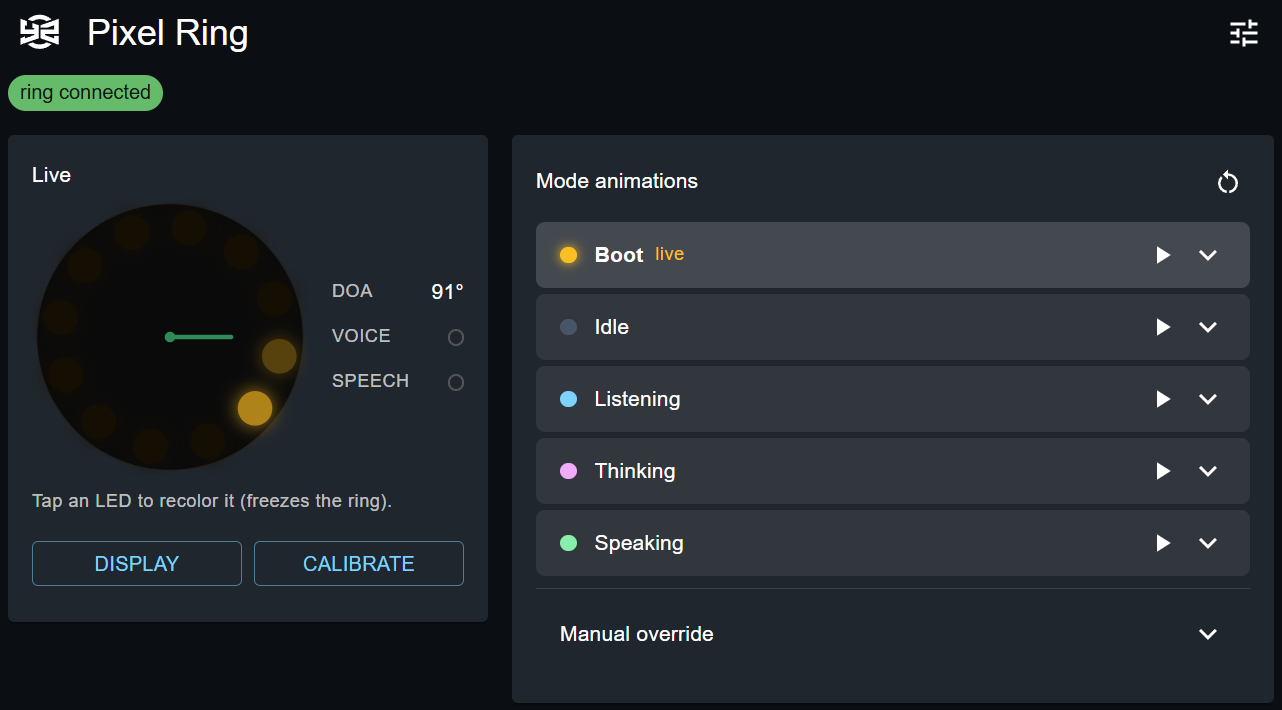
A headless daemon + web UI to drive the ReSpeaker USB Mic Array v2.0 LED ring
(USB 0x2886:0x0018, XVSR3000). It mirrors a voice assistant's state on the ring,
doubles as a LedFx output device, and gives you
full manual control over animations, colors, and the on-board DSP.
Independent and MIT-licensed. The device's USB protocol is public (Seeed wiki); the driver and DSP code here are clean-room rewrites — no GPL respeaker code is reused. (The old Raspberry-Pi SPI/APA102 path is gone.)
Features
- Animation engine — Echo/Google-style assistant animations (wakeup/listen/think/speak) plus creative effects (rainbow/comet/breathe/wipe/chase), recolorable, all rendered host-side and pushed to the ring via USB.
- Assistant mode mirroring — connects as a client to a voice assistant's WebSocket
and animates the ring per mode (
idle/listening/thinking/speaking/boot). The assistant needs no changes; it's purely a consumer of its publicmodebroadcast. - LedFx output device — listens for DDP frames, so LedFx can drive the ring with zero
LedFx changes (add a DDP device →
127.0.0.1:4048, 12 pixels). - REST + WebSocket API — manual control, per-LED override, live ~20 fps frame stream.
- Web control UI — a Vite/React/MUI app served by the daemon (also builds as an embeddable IIFE for a host frontend).
- DSP access — read/write all XVSR3000 tuning parameters (DOA, VAD, AGC, AEC, noise…).
- Calibration & display — DOA offset/flip, output gamma, and a preview-orientation transform, all persisted.
Requirements
- A libusb backend + USB access to the device's vendor interface (one-time per OS — see USB device setup). This is the only hard requirement — it's a system driver, needed whether you run from source or the standalone binary.
- To run from source: Python ≥ 3.10 and
uv(or pip). Node 18+ only if you want to build the UI yourself. - To run the standalone binary: nothing else — Python, uv and Node are all baked in.
The daemon and UI are cross-platform (Windows / Linux / macOS). Only the USB setup and the autostart mechanism differ per OS; nothing in the code changes.
USB device setup (one-time)
- Windows — bind a WinUSB/libusb driver to the device's vendor/control interface with Zadig (pick the ReSpeaker control interface, not the audio one).
- Linux —
libusbis usually already present. For non-root access, add a udev rule:echo 'SUBSYSTEM=="usb", ATTRS{idVendor}=="2886", ATTRS{idProduct}=="0018", MODE="0666"' \ | sudo tee /etc/udev/rules.d/99-respeaker.rules sudo udevadm control --reload-rules && sudo udevadm trigger
(or just run the daemon withsudo). - macOS —
brew install libusb.
LED control + DSP tuning use endpoint-0 control transfers, so they coexist with the mic (the USB audio interface stays usable) on all three.
Quick start
Three ways to run it — all serve the same UI/API on :9700:
Install (have Python?) — one command, cross-platform, web UI bundled in:
uv tool install yz-pixel-ring    # installs the `yz-pixel-ring` command, on PATH
#   or:  uvx yz-pixel-ring        (run without installing)
#   or:  pipx install yz-pixel-ring
Standalone binary (no Python needed) — run yz-pixel-ring(.exe) directly. See
Standalone binary for how to build it.
From source (devs):
uv venv
uv pip install -e .              # or: uv pip install -e ".[dev]" for tests + mock
uv run yz-pixel-ring             # follow assistant + REST/UI on :9700, DDP on :4048
#   (equivalently: python -m yz_pixel_ring)
Any way, open http://127.0.0.1:9700 for the control UI. (All still need the one-time USB driver step.)
Useful flags / env:
--port / RING_DAEMON_PORT     REST + UI + WS port (default 9700)
--ws-url / JARVYZ_WS_URL      assistant WebSocket (default ws://127.0.0.1:8765/ws)
--no-jarvyz                   don't connect to the assistant
--ddp-port / RING_DDP_PORT    DDP listen port (default 4048)
--no-ledfx                    don't listen for LedFx DDP frames
How it works
The daemon owns the USB ring and runs a ~20 fps frame loop. Frames come from one of three input sources, by priority:
LedFx (DDP, UDP :4048) > manual (REST) > assistant mode (WebSocket)
LedFx takes over while DDP frames arrive and falls back after a 1 s timeout. The current frame + live state are broadcast over a WebSocket so the UI renders a live ring preview without polling.
REST API (port 9700)
| Method & path | Purpose |
|---|---|
GET /health, GET /state |
liveness; full snapshot |
POST /mode {state} |
inject an assistant mode |
POST /follow {enabled} |
follow assistant (auto) vs. manual |
POST /effect {kind,name,style,color,palette,intensity,doa_*} |
manual animation |
POST /color {r,g,b,intensity} · POST /off |
solid color / off |
POST /leds {leds:[[r,g,b],…]} |
raw per-LED frame (custom) |
GET /modes · PUT /modes/{mode} · POST /modes/reset |
per-mode animation config |
GET /tuning · GET|POST /tuning/{name} |
DSP parameters |
POST /doa_offset {value,flip} · POST /gamma {value} · POST /preview {rotation,mirror} |
calibration / display |
WS /ws |
live frame + state stream |
LedFx integration
In LedFx, add a DDP device → host 127.0.0.1, port 4048, pixel count 12. While LedFx
streams, the ring shows its output; when it stops, the daemon resumes assistant/manual.
Tip: let LedFx own brightness and keep the daemon's gamma at 1.0.
Configuration & persistence
Stored under ~/.yz-pixel-ring/:
modes.json— per-mode animations (colors, DOA settings).config.json— DOA calibration (doa_offset/doa_flip),gamma, preview orientation.daemon.log— output when run headless (e.g. via Task Scheduler).
DSP tuning parameters live on the device (runtime only; reset on power loss).
Standalone binary (no Python)
For a friendlier hand-off, the daemon (web UI bundled in) can be packaged into a
single self-contained executable with PyInstaller —
no Python or uv needed on the target machine:
cd ui && npm install && npm run build:pages && cd ..   # build the UI once
uv run --extra build python tools/build_exe.py         # -> dist/yz-pixel-ring(.exe)
Then just run dist/yz-pixel-ring (or double-click it). It serves the UI on
http://127.0.0.1:9700 exactly like uv run yz-pixel-ring, and takes the same
flags/env vars.
Build knobs (env vars, forwarded to yz-pixel-ring.spec):
YZ_CONSOLE=0   no console window — output goes to ~/.yz-pixel-ring/daemon.log
YZ_ONEDIR=1    a folder instead of one file (faster start, fewer AV false positives)
⚠️ The binary still needs the one-time USB driver step. PyInstaller bundles Python and the deps, but it can't bundle a kernel driver — the libusb backend is a system driver (installed by Zadig on Windows / udev on Linux /
brew libusbon macOS, see USB device setup). The exe removes the Python prerequisite, not the driver prerequisite. PyInstaller produces a binary for the OS you build on, so build on each target OS.
Autostart
Run the daemon at login with auto-restart. Replace <dir> with the project path
(or point at the standalone binary above instead of the .venv Python).
Windows (Task Scheduler)
$exe = "$PWD\.venv\Scripts\pythonw.exe"
$action  = New-ScheduledTaskAction -Execute $exe -Argument "-m yz_pixel_ring" -WorkingDirectory "$PWD"
$trigger = New-ScheduledTaskTrigger -AtLogOn -User $env:USERNAME
$settings = New-ScheduledTaskSettingsSet -RestartCount 3 -RestartInterval (New-TimeSpan -Minutes 1) -ExecutionTimeLimit ([TimeSpan]::Zero)
Register-ScheduledTask -TaskName "PixelRingDaemon" -Action $action -Trigger $trigger -Settings $settings -Force
Linux (systemd user service)
~/.config/systemd/user/yz-pixel-ring.service:
[Unit]
Description=yz-pixel-ring daemon

[Service]
WorkingDirectory=<dir>
ExecStart=<dir>/.venv/bin/python -m yz_pixel_ring
Restart=always

[Install]
WantedBy=default.target
systemctl --user enable --now yz-pixel-ring
macOS (launchd agent)
~/Library/LaunchAgents/com.yeonv.yz-pixel-ring.plist:
<?xml version="1.0" encoding="UTF-8"?>
<plist version="1.0"><dict>
  <key>Label</key><string>com.yeonv.yz-pixel-ring</string>
  <key>ProgramArguments</key>
  <array><string><dir>/.venv/bin/python</string><string>-m</string><string>yz_pixel_ring</string></array>
  <key>WorkingDirectory</key><string><dir></string>
  <key>RunAtLoad</key><true/>
  <key>KeepAlive</key><true/>
</dict></plist>
launchctl load ~/Library/LaunchAgents/com.yeonv.yz-pixel-ring.plist
Project layout
yz_pixel_ring/
  __main__.py            python -m yz_pixel_ring -> daemon
  daemon.py              the daemon (REST + WS + DDP + assistant bridge)
  animations.py          pure frame engine
  led.py                 USB LED control
  tuning.py              DSP read/write (DOA / VAD / AGC / AEC / …)
tools/mock_jarvyz_ws.py  mock assistant WebSocket (offline testing)
ui/                      web control UI (Vite + React + MUI)
docs/                    device reference notes
Development
uv run pytest                    # hardware-free engine tests
cd ui && npm install
npm run dev                      # Vite dev server on :9701 (talks to the daemon via CORS)
npm run build:pages              # standalone SPA -> yz_pixel_ring/_ui (served by the daemon)
npm run build:lib                # IIFE -> ui/dist-lib (host-embeddable, window.YzPixelRing)
See ui/README.md for the web UI (build modes, structure, how it talks to the daemon).
Cutting a release
python tools/release.py            # bump patch, commit "Release x.y.z", push
#   --minor / --major / --set X.Y.Z   other bumps;  --no-push to stop before pushing
The push triggers the Builder workflow, which builds the per-OS binaries + IIFE + wheel, publishes a GitHub Release, and uploads the wheel to PyPI (OIDC, no token).
License
MIT © Yeon (Blade)
Project details
Verified details
These details have been verified by PyPIProject links
GitHub Statistics
Maintainers
Release history Release notifications | RSS feed


Download files
Download the file for your platform. If you're not sure which to choose, learn more about installing packages.
Source Distributions
Built Distribution
Filter files by name, interpreter, ABI, and platform.
If you're not sure about the file name format, learn more about wheel file names.
Copy a direct link to the current filters
File details
Details for the file yz_pixel_ring-0.2.3-py3-none-any.whl.
File metadata
- Download URL: yz_pixel_ring-0.2.3-py3-none-any.whl
- Upload date:
- Size: 482.1 kB
- Tags: Python 3
- Uploaded using Trusted Publishing? Yes
- Uploaded via: twine/6.1.0 CPython/3.13.12
File hashes
| Algorithm | Hash digest | |
|---|---|---|
| SHA256 |
6c99424968e43e7d41bc13fec9c89d1ca2547cee98668ab2f88dad0e2a7c69cf
|
|
| MD5 |
913a968ad106b9e0a8ad48d501341435
|
|
| BLAKE2b-256 |
315b6655079ce8c7871ae9e057a40cfb5915f38968fb4cafbcc81ba8b48fbccb
|
Provenance
The following attestation bundles were made for yz_pixel_ring-0.2.3-py3-none-any.whl:
Publisher:
release.yml on YeonV/yz-pixel-ring
-
Statement:
-
Statement type:
https://in-toto.io/Statement/v1 -
Predicate type:
https://docs.pypi.org/attestations/publish/v1 -
Subject name:
yz_pixel_ring-0.2.3-py3-none-any.whl -
Subject digest:
6c99424968e43e7d41bc13fec9c89d1ca2547cee98668ab2f88dad0e2a7c69cf - Sigstore transparency entry: 1826318460
- Sigstore integration time:
-
Permalink:
YeonV/yz-pixel-ring@f8fe726754a015c270828854977f762dea19dc67 -
Branch / Tag:
refs/heads/main - Owner: https://github.com/YeonV
-
Access:
public
-
Token Issuer:
https://token.actions.githubusercontent.com -
Runner Environment:
github-hosted -
Publication workflow:
release.yml@f8fe726754a015c270828854977f762dea19dc67 -
Trigger Event:
push
-
Statement type:






