
Zscaler AI Red Teaming Proxy SDK
A Python SDK for building proxy servers that connect your applications to the Zscaler AI Security Platform. It handles authentication, request routing, structured logging, and error handling so you can focus on your integration logic.
Referred to throughout the docs as the Zscaler AIRT Proxy SDK; the distribution is published to PyPI as z-airt-proxy-sdk and imported as z_airt_proxy_sdk.
Built on FastAPI — your proxy server is a standard ASGI app with full access to FastAPI's ecosystem.
Installation
# poetry
poetry add z-airt-proxy-sdk

# pip
pip install z-airt-proxy-sdk
Requires Python 3.11+.
Quick Start
from uuid import uuid4

from fastapi import Request

from z_airt_proxy_sdk import (
    CloseSessionRequest,
    CloseSessionResponse,
    OpenSessionRequest,
    OpenSessionResponse,
    SendMessageRequest,
    SendMessageResponse,
    Server,
)


class MyProxy(Server):
    async def open_session(
        self, request: OpenSessionRequest, raw: Request
    ) -> OpenSessionResponse:
        session_id = request.session_id or str(uuid4())
        return OpenSessionResponse(session_id=session_id)

    async def close_session(
        self, request: CloseSessionRequest, raw: Request
    ) -> CloseSessionResponse:
        return CloseSessionResponse()

    async def send_message(
        self, request: SendMessageRequest, raw: Request
    ) -> SendMessageResponse:
        return SendMessageResponse(
            session_id=request.session_id,
            message=f"Echo: {request.message}",
        )


# Set Z_AIRT_PROXY_API_KEY env variable before starting
app = MyProxy()
Run it:
export Z_AIRT_PROXY_API_KEY="your-secret-key"
uvicorn main:app --reload
The AI Security Platform must be able to reach the host and port you expose.
Testing App
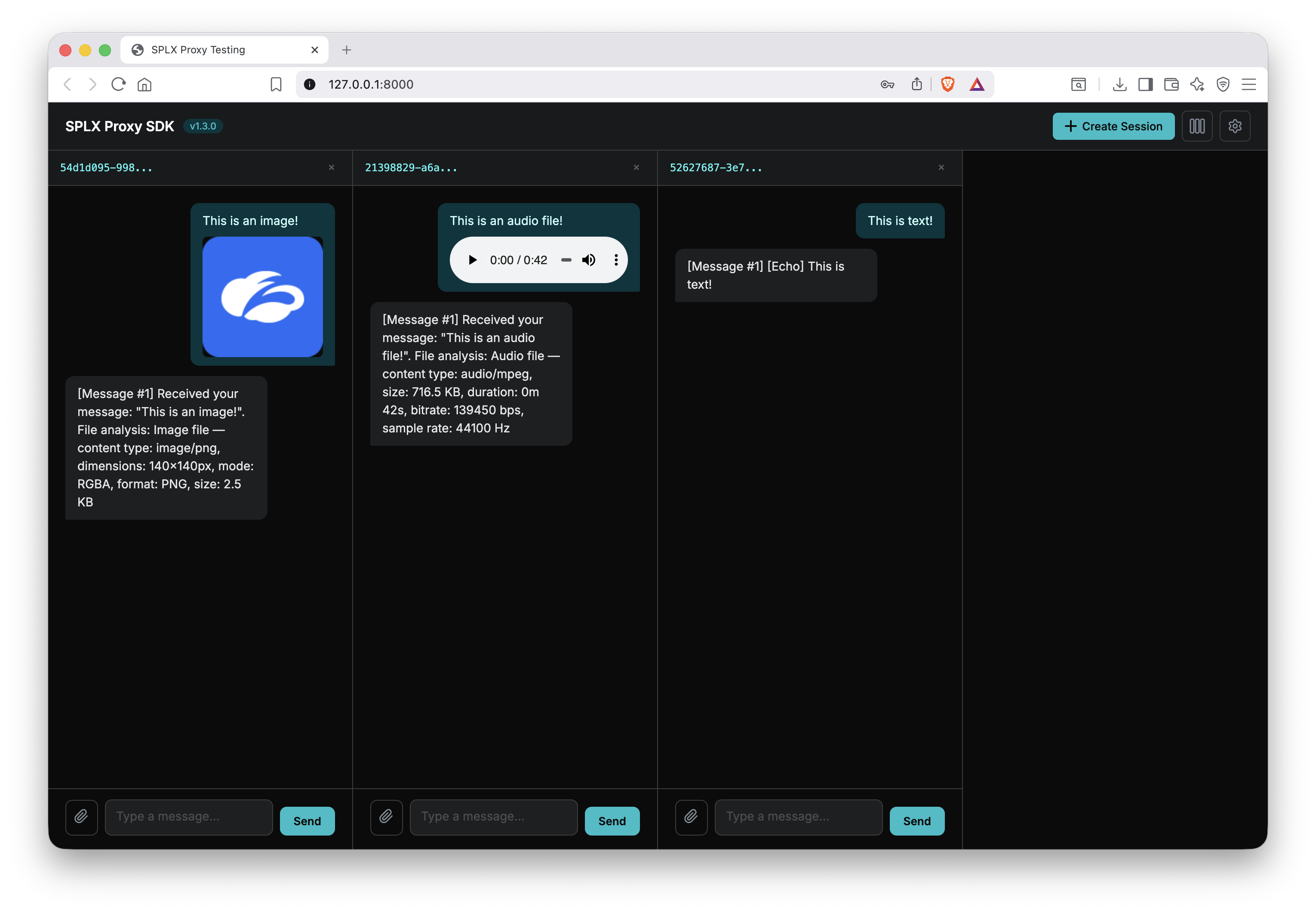
The SDK ships with a lightweight testing app mounted at / so you can test your proxy endpoints without leaving the browser. Launch your server locally, then open http://localhost:8000/ to see the UI. The settings panel lets you set the proxy URL and API key, and attach custom HTTP headers (as a JSON object) to every request sent to your proxy.
How It Works
The SDK defines three endpoints that the AI Security Platform calls on your proxy:
| Endpoint | Method | Purpose |
|---|---|---|
/open-session |
POST | Initialize a new session. Return a session_id. |
/send-message |
POST | Handle a user message. Return the response. |
/close-session |
POST | Clean up when a session ends. |
You subclass Server and implement these three methods. The SDK handles authentication, request parsing, logging, and error serialization.
Since Server extends FastAPI, you can add your own routes, middleware, startup/shutdown events, and anything else FastAPI supports.
Features
Authentication
Every request from the AI Security Platform includes an x-api-key header. The SDK validates it automatically against the Z_AIRT_PROXY_API_KEY environment variable. Invalid keys get a 401 Unauthorized response.
This variable must be set before the server starts — the SDK raises a RuntimeError on startup if it's missing.
Extra Arguments
You can pass custom, typed arguments to any endpoint using generics. Define a Pydantic model and parametrize your Server:
from pydantic import BaseModel

class ExtraArgs(BaseModel):
    tone: str = "friendly"
    max_tokens: int = 1000

class MyProxy(Server[ExtraArgs]):
    async def send_message(
        self, request: SendMessageRequest[ExtraArgs], raw: Request
    ) -> SendMessageResponse:
        if request.extra_args:
            print(f"Tone: {request.extra_args.tone}")
            print(f"Max tokens: {request.extra_args.max_tokens}")
        # ...
The extra_args field is optional and defaults to None. If omitted, Server works without any type parameter — Server is equivalent to Server[None]. Unknown fields in extra_args are ignored rather than rejected.
Multimodal Content
The SDK supports sending and receiving images, audio, and documents. Multimodal content is sent as base64-encoded Data URIs.
from z_airt_proxy_sdk import MultiModal, MultiModalType

async def send_message(self, request, raw):
    if request.multimodal:
        for name, modal in request.multimodal.items():
            # modal.type is one of: MultiModalType.IMAGE, AUDIO, DOCUMENT
            # modal.content is the base64 Data URI string
            mime_type, base64_data = MultiModal.parse_content(modal.content)
            # mime_type: e.g. "image/png"
            # base64_data: the raw base64 string
Logging
All requests and responses are logged as structured JSON via Loguru, with a timestamp on every log line. Sensitive headers and fields are redacted by default.
Configure via LoggingConfig in code:
from z_airt_proxy_sdk import LoggingConfig

app = MyProxy(logging_config=LoggingConfig(
    enabled=True,
    log_request_body=True,
    log_response_body=False,
    max_body_length=2048,
    redact_headers=("x-api-key", "authorization"),
    redact_fields=("password", "secret", "token"),
))
Or via environment variables:
| Variable | Default | Description |
|---|---|---|
Z_AIRT_PROXY_LOG_ENABLED |
True |
Enable/disable logging |
Z_AIRT_PROXY_LOG_REQUEST_BODY |
True |
Log request bodies |
Z_AIRT_PROXY_LOG_RESPONSE_BODY |
True |
Log response bodies |
Z_AIRT_PROXY_LOG_MAX_BODY_LENGTH |
4096 |
Truncate bodies beyond this length |
Z_AIRT_PROXY_LOG_REDACT_HEADERS |
x-api-key |
Comma-separated headers to redact |
Z_AIRT_PROXY_LOG_REDACT_FIELDS |
api_key,access_token,refresh_token,token,secret,password,authorization |
Comma-separated JSON fields to redact |
Error Handling
The SDK provides typed exception classes that produce structured JSON error responses understood by the AI Security Platform:
| Exception | Status Code | Default Code |
|---|---|---|
BadRequestException |
400 | BAD_REQUEST |
UnauthorizedException |
401 | UNAUTHORIZED |
ForbiddenException |
403 | FORBIDDEN |
NotFoundException |
404 | NOT_FOUND |
TooManyRequestsException |
429 | TOO_MANY_REQUESTS |
SessionClosedException |
452 | SESSION_CLOSED |
InternalServerErrorException |
500 | INTERNAL_SERVER_ERROR |
Basic usage:
from z_airt_proxy_sdk import NotFoundException, SessionClosedException

# Session doesn't exist
raise NotFoundException(details="Session not found.")

# Session has been closed
raise SessionClosedException(details="This session has ended.")
Exception Configuration
Use ProxyExceptionConfig to attach metadata that the AI Security Platform (Probe) understands:
from datetime import timedelta
from z_airt_proxy_sdk import ProxyExceptionConfig, TooManyRequestsException

raise TooManyRequestsException(
    details="Rate limit exceeded.",
    config=ProxyExceptionConfig(
        session_closed=False,        # Session is still open
        retry_after=timedelta(seconds=30),  # Retry-After header
        headers={"X-Custom": "value"},      # Additional headers
    ),
)
session_closed— tells Probe whether the session was closed as a result of this error (setsX-Zscaler-Session-Statusheader)retry_after— tells Probe when to retry (setsRetry-Afterheader)headers— any additional headers to include in the response
Session Storage
Proxies need to store per-session state (conversation history, backend thread IDs, etc.) across requests. SessionStore does this in memory by default — the same thing every example above does by hand — and switches to Redis when Z_AIRT_PROXY_SESSION_REDIS_URL is set, with no other code changes. That's what makes it safe to scale a proxy to more than one worker or replica.
from uuid import uuid4

from pydantic import BaseModel

from z_airt_proxy_sdk import SessionClosedException, SessionStore

class MySession(BaseModel):
    message_history: list[dict[str, str]] = []

_SESSIONS = SessionStore(MySession, prefix="my_proxy")

class MyProxy(Server):
    async def open_session(self, request, raw):
        session_id = request.session_id or str(uuid4())
        await _SESSIONS.set(session_id, MySession())
        return OpenSessionResponse(session_id=session_id)

    async def send_message(self, request, raw):
        session = await _SESSIONS.get(request.session_id)
        if session is None:
            raise SessionClosedException("Session not found or expired.")
        session.message_history.append({"role": "user", "content": request.message})
        reply = f"Echo: {request.message}"
        await _SESSIONS.set(request.session_id, session)
        return SendMessageResponse(session_id=request.session_id, message=reply)

    async def close_session(self, request, raw):
        await _SESSIONS.delete(request.session_id)
        return CloseSessionResponse()
get()/set() read like a dict and are a complete way to use the store on their own. If a session could receive overlapping requests and losing a mutation would matter, use edit() instead — it locks the session for the block and writes back the result automatically, and raises SessionClosedException itself if the session is missing:
async def send_message(self, request, raw):
    async with _SESSIONS.edit(request.session_id) as session:
        session.message_history.append({"role": "user", "content": request.message})
        reply = f"Echo: {request.message}"
    return SendMessageResponse(session_id=request.session_id, message=reply)
If the block raises, nothing is written back: the session stays exactly as it was before the request, so a failed request can be retried without leaving a half-finished turn in the history.
edit() is for mutating state, not for waiting on upstream. The lock is a lease (30 s by default) and a block that outlives it silently loses its protection. Do slow work such as the upstream LLM call between two short edit() blocks:
async def send_message(self, request, raw):
    # 1. short lock: record the user turn, take a snapshot
    async with _SESSIONS.edit(request.session_id) as session:
        session.message_history.append({"role": "user", "content": request.message})
        history = list(session.message_history)

    # 2. no lock held: the slow part
    reply = await call_upstream_llm(history)

    # 3. short lock again: record the reply
    async with _SESSIONS.edit(request.session_id) as session:
        session.message_history.append({"role": "assistant", "content": reply})

    return SendMessageResponse(session_id=request.session_id, message=reply)
Both forms operate on the same store and the same stored representation — different handlers can freely use whichever fits.
Configure via environment variables:
| Variable | Default | Description |
|---|---|---|
Z_AIRT_PROXY_SESSION_REDIS_URL |
unset | redis:///rediss://. Presence switches the backend from memory to Redis. Credentials go in the URL: redis://user:password@host:6379. |
Z_AIRT_PROXY_SESSION_TTL_SECONDS |
3600 |
Idle timeout. Refreshed on every set() and edit(), so an active session never expires mid-use. |
Z_AIRT_PROXY_SESSION_MAX_SIZE |
10000 |
Max in-memory sessions (LRU eviction). Ignored on Redis. |
Z_AIRT_PROXY_SESSION_LOCK_TIMEOUT_SECONDS |
30 |
Redis distributed-lock lease for edit(), and how long a request waits for a held lock. Also bounds the damage of a lock orphaned by a Redis outage: the affected session recovers after at most this long. Not used by the memory backend. |
Z_AIRT_PROXY_SESSION_REDIS_TIMEOUT_SECONDS |
5 |
Redis connect and per-command timeout. A Redis that stops answering fails requests with a 500 after this long instead of hanging them. |
The redis client is an optional dependency. Install the SDK with the redis extra to use the Redis backend:
pip install "z-airt-proxy-sdk[redis]"
Without it the in-memory backend works as before, and setting Z_AIRT_PROXY_SESSION_REDIS_URL fails at startup with a message saying what to install.
Sensitive Data
Session state can carry live upstream credentials — API keys, OAuth tokens, backend thread/session IDs. If you use the Redis backend:
- Use a private Redis instance, ideally with
rediss://(TLS) and authentication. LoggingConfig'sredact_fieldsonly redacts HTTP request/response bodies — it never touches what you store in aSessionStore. Don't assume it protects session data.- Prefer keeping secrets out of the session model entirely where you can, and re-deriving them from
extra_argseach request, since Probe already resends it.
Migrating from a hand-rolled dict
Every example above stores sessions as self.sessions: dict[str, Session] = {}. Moving to SessionStore:
-class MyProxy(Server):
-    def __init__(self, **kwargs):
-        super().__init__(**kwargs)
-        self.sessions: dict[str, MySession] = {}
+_SESSIONS = SessionStore(MySession, prefix="my_proxy")
+
+class MyProxy(Server):
     async def open_session(self, request, raw):
         session_id = request.session_id or str(uuid4())
-        self.sessions[session_id] = MySession()
+        await _SESSIONS.set(session_id, MySession())
         return OpenSessionResponse(session_id=session_id)
Declare the store at module level, not on self — it needs to exist before any request handler runs, and it outlives any single Server instance. If your session model would otherwise hold a live connection or task (as in echo_ws), keep that handle in its own process-local dict[str, ...] next to the store, and put only the serializable parts of session state in SessionStore.
Examples
The z-airt-proxy-sdk-examples repository contains seven proxy implementations, each demonstrating a different integration pattern. Every example is a standalone project you can run locally.
git clone https://github.com/splx-ai/z-airt-proxy-sdk-examples.git
cd z-airt-proxy-sdk-examples
echo — Standalone Stateful Proxy
The simplest starting point. A self-contained proxy with no external dependencies that manages sessions in memory and echoes messages back with a counter.
What it demonstrates:
- In-memory session management (open, close, lookup)
- Typed
extra_argswith defaults (repeat: int = 1) - Conversation history tracking
- Error handling with
NotFoundExceptionandSessionClosedException
Run it:
cd echo
poetry install
cp proxy/.env.example proxy/.env
uvicorn proxy.main:app --reload
echo_rest — REST API Integration
A proxy that bridges the AI Security Platform protocol to a standard REST API with Bearer token authentication. Includes both the proxy and a sample backend API.
What it demonstrates:
- Calling an external REST API with
httpx - Bearer token authentication with the downstream service
- Mapping AI Security Platform session IDs to API-specific thread IDs
- Translating between AI Security Platform and REST request/response formats
Architecture:
AI Security Platform --> Proxy (:8000) --> REST API (:8001)
Run it:
cd echo_rest
poetry install
cp proxy/.env.example proxy/.env
# Terminal 1: Start the backend API
uvicorn app.main:app --port 8001 --reload
# Terminal 2: Start the proxy
uvicorn proxy.main:app --port 8000 --reload
echo_sse — Server-Sent Events Integration
A proxy that consumes SSE (Server-Sent Events) from a downstream app and assembles the streamed chunks into a single response for the AI Security Platform protocol.
What it demonstrates:
- Consuming SSE streams with
httpxstreaming - JWT-based authentication with periodic token refresh
- A background token-refresh task managed with a FastAPI lifespan
- Assembling streamed chunks into a single synchronous response
Architecture:
AI Security Platform --> Proxy (:8000) --> SSE App (:8001)
                    |
            Background auth loop
            refreshes JWT every 8min
Run it:
cd echo_sse
poetry install
cp proxy/.env.example proxy/.env
# Terminal 1: Start the SSE app
uvicorn app.main:app --port 8001 --reload
# Terminal 2: Start the proxy
uvicorn proxy.main:app --port 8000 --reload
echo_ws — WebSocket Integration
A proxy that maintains persistent WebSocket connections to a backend app, with one connection per session.
What it demonstrates:
- Persistent WebSocket connections per session using
websockets - REST call to create a backend conversation, then upgrading to WebSocket
- Consuming chunked WebSocket responses (JSON frames with a "done" signal)
- Graceful connection cleanup on session close and server shutdown
Architecture:
AI Security Platform --> Proxy (:8000) --> REST /create-conversation
                                    --> WS   /chat (one connection per session)
Run it:
cd echo_ws
poetry install
cp proxy/.env.example proxy/.env
# Terminal 1: Start the WebSocket app
uvicorn app.main:app --port 8001 --reload
# Terminal 2: Start the proxy
uvicorn proxy.main:app --port 8000 --reload
echo_multimodal — Multimodal File Handling
A proxy that handles multimodal content (images, audio, documents) by decoding base64 Data URIs and forwarding them as multipart file uploads to a downstream API.
What it demonstrates:
- Decoding base64 Data URIs using
MultiModal.parse_content() - Converting Data URIs to multipart file uploads for a downstream REST API
- MIME type detection and file extension mapping
- Handling image, audio, and document attachments
Architecture:
AI Security Platform --> Proxy (:8000) --> Multimodal App (:8001)
              (base64 Data URI)   (multipart file upload)
Run it:
cd echo_multimodal
poetry install
cp proxy/.env.example proxy/.env
# Terminal 1: Start the multimodal app
uvicorn app.main:app --port 8001 --reload
# Terminal 2: Start the proxy
uvicorn proxy.main:app --port 8000 --reload
echo_redis — Session Storage Backends
The same stateful proxy as echo, but built on SessionStore instead of a hand-rolled dict — showing that the identical proxy code runs in memory with zero infrastructure, or against Redis by uncommenting one line.
What it demonstrates:
SessionStorewith the plainget()/set()form and theedit()form- Switching backends via
Z_AIRT_PROXY_SESSION_REDIS_URLwith no code changes - Sessions surviving a proxy restart when the Redis backend is enabled
- Sessions shared across
uvicorn --workers 2, which adict-backed proxy cannot do
Run it (in memory, no infrastructure):
cd echo_redis
poetry install
cp proxy/.env.example proxy/.env
uvicorn proxy.main:app --reload
Run it against Redis:
cd echo_redis
docker compose up -d redis
poetry install
cp proxy/.env.example proxy/.env
# uncomment Z_AIRT_PROXY_SESSION_REDIS_URL in proxy/.env
uvicorn proxy.main:app --reload
broker — Embedded AIRT Broker (One Container)
A proxy with the AIRT broker embedded in the same process, so your AI app and its tunnel ship as one artifact. The broker opens an outbound reverse tunnel (WSS) to the AIRT gateway, letting the platform reach your app for red-teaming without any inbound firewall changes.
What it demonstrates:
- Embedding
airt_brokerin the proxy process via a FastAPI lifespan (start()/stop()) - Fail-fast startup — a misconfigured broker aborts boot with
BrokerStartError - Shutting the process down on terminal tunnel death so the orchestrator restarts it
- Docker packaging with runtime-mounted CA bundles for TLS-inspecting egress
Run it: see the broker README — unlike the other examples it is pip/requirements-based, and requires Python 3.13 plus the broker wheel and credentials from your AIRT onboarding.
Development
poetry install
make check          # isort, black, pylint, mypy
poetry run pytest   # run the test suite
Release process and CI/CD prerequisites: RELEASING.md.
Migrating from splx-proxy-sdk
This SDK continues splx-proxy-sdk 1.6.3 under the Zscaler AI Red Teaming brand. The API
surface is unchanged; the names around it are not. To move an existing proxy to 2.0.0:
- Swap the dependency
splx-proxy-sdkforz-airt-proxy-sdk. - Rewrite imports from
splx_proxy_sdktoz_airt_proxy_sdk. - Rename every
SPLX_PROXY_*environment variable toZ_AIRT_PROXY_*— most importantlySPLX_PROXY_API_KEYbecomesZ_AIRT_PROXY_API_KEY. The old names are not read as fallbacks, so a proxy started with only the old variable set fails at boot with aRuntimeError. - If anything downstream reads the session-status response header, note that it is now
X-Zscaler-Session-Statusinstead ofX-Splx-Session-Status.
See CHANGELOG.md for the full list of breaking changes.
Links
License
MIT
1 maintainer

Metadata
1 maintainer
Release files for z-airt-proxy-sdk 2.1.0
For a detailed explanation of source distributions (sdists) and built distributions (wheels), please see the package formats documentation.
Source distribution (sdist)
| File | Size | Uploaded | Provenance | Actions |
|---|---|---|---|---|
| z_airt_proxy_sdk-2.1.0.tar.gz | 38.2 kB | Without provenance | Details for z_airt_proxy_sdk-2.1.0.tar.gz |
Built distribution (wheel)
| File | Interpreter | ABI | Platform | Actions Reset |
|---|---|---|---|---|
| z_airt_proxy_sdk-2.1.0-py3-none-any.whl | Python 3 | none | any | Details for z_airt_proxy_sdk-2.1.0-py3-none-any.whl |
Total release size: 72.9 kB
Release files / z_airt_proxy_sdk-2.1.0.tar.gz
| Download URL | z_airt_proxy_sdk-2.1.0.tar.gz |
|---|---|
| Size | 38.2 kB |
| Tags | Source |
|
SHA-256 checksum How to use checksums |
6133be04e74cda38bf0c077056784d68fe3bd446f72f418418ecf67f46aecb43
|
|
BLAKE2b-256 checksum How to use checksums |
4a94f9b7529730586cde42b914935022dcef3103f9c84f070670f6db5cf36d15
|
| Upload date | |
|
Uploaded using Trusted Publishing? What is trusted publishing? |
No |
| Uploaded via |
poetry/2.3.1 CPython/3.11.17 Linux/6.12.73-95.123.amzn2023.x86_64
|
Release files / z_airt_proxy_sdk-2.1.0-py3-none-any.whl
| Download URL | z_airt_proxy_sdk-2.1.0-py3-none-any.whl |
|---|---|
| Size | 34.7 kB |
| Tags | Python 3 |
|
SHA-256 checksum How to use checksums |
c00b8ec2650ce28ae349a1ef9eb8af067f6acd43989ffa65ea00606c4100ddca
|
|
BLAKE2b-256 checksum How to use checksums |
cb88cfd302a7a394ba81edcae47352a6aa12cd96abb96764d9be63e42354254c
|
| Upload date | |
|
Uploaded using Trusted Publishing? What is trusted publishing? |
No |
| Uploaded via |
poetry/2.3.1 CPython/3.11.17 Linux/6.12.73-95.123.amzn2023.x86_64
|
Security for z-airt-proxy-sdk 2.1.0
Provenance
Provenance describes where a file came from. On PyPI, provenance is shared via attestations, which provide a verifiable record of the build or publishing details. View details, limitations and caveats.
No provenance found
None of the files in this release were uploaded with provenance metadata.
A note on package security
PyPI is a repository for distributing packages, not a service for auditing them. While third-party security researchers and our staff do their best to detect and remove malicious packages, PyPI cannot guarantee the quality, security or suitability of any given package.
To learn more about protecting yourself from malicious actors, visit our package security documentation.














