
Zabbix-cli




|
|
|
|
Zabbix-CLI v3 has been completely rewritten from the ground up. The old version can be found here.
About
Zabbix-cli is a command line interface for performing common administrative tasks tasks in Zabbix monitoring system via the Zabbix API.
The zabbix-cli code is written in Python and distributed under the GNU General Public License v3. It has been developed and tested by University Center for Information Technology at the University of Oslo, Norway.
The project home page is on GitHub. Please report any issues or improvements there.
The manual is available online at https://unioslo.github.io/zabbix-cli/.
Install
From source
[!NOTE] We are in the process of acquiring the name
zabbix-clion PyPI. Until then, installation must be done via the mirror packagezabbix-cli-uio.
uv
uv tool install zabbix-cli-uio
uvx
uvx --from zabbix-cli-uio zabbix-cli
pipx
pipx install zabbix-cli-uio
Homebrew
A homebrew package exists, but it is maintained by a third party. It can be installed with:
brew install zabbix-cli
Binary
Binaries built with PyInstaller can be found on the releases page. We build binaries for Linux (x86), macOS (ARM & x86) and Windows (x86) for each release.
Quick start
Running zabbix-cli for the first time will prompt for a Zabbix URL, username and password. The URL should be the URL of the Zabbix web server without the /api_jsonrpc.php path.
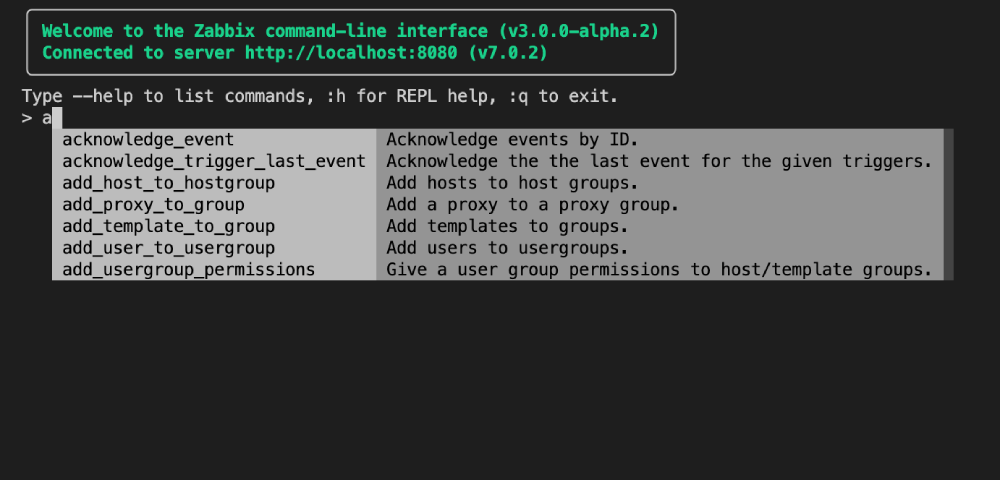
Running without arguments will start the REPL:
zabbix-cli
Usage
Zabbix-cli is a command line interface for Zabbix. It can be used in three ways:
- Interactive mode: Start the REPL by running
zabbix-cli. This will start a shell where you can run multiple commands in a persistent session. - Single command: Run a single command by running
zabbix-cli COMMAND. This will run the command and print the output. - Batch mode: Run multiple commands from a file by running
zabbix-cli -f FILE. The file should contain one command per line.
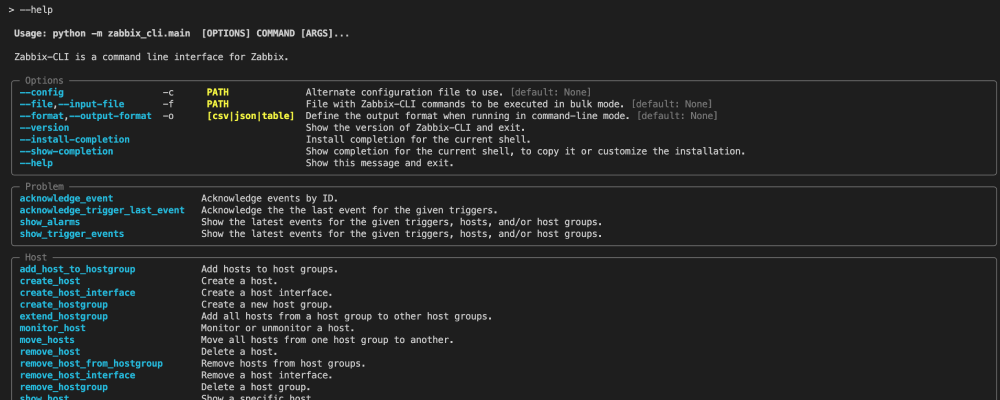
Command reference can be found in the online user guide or by running zabbix-cli --help.
Authentication
By default, the application will prompt for a username and password. Once authenticated, the application stores the session token in a file for future use.
For more information about the various authentication methods, see the authentication guide.
Configuration
Zabbix-cli needs a config file. It is created when the application is started for the first time. The config file can be created manually with the init command:
zabbix-cli init --zabbix-url https://zabbix.example.com/
For more detailed information about the configuration file, see the configuration guide.
Formats
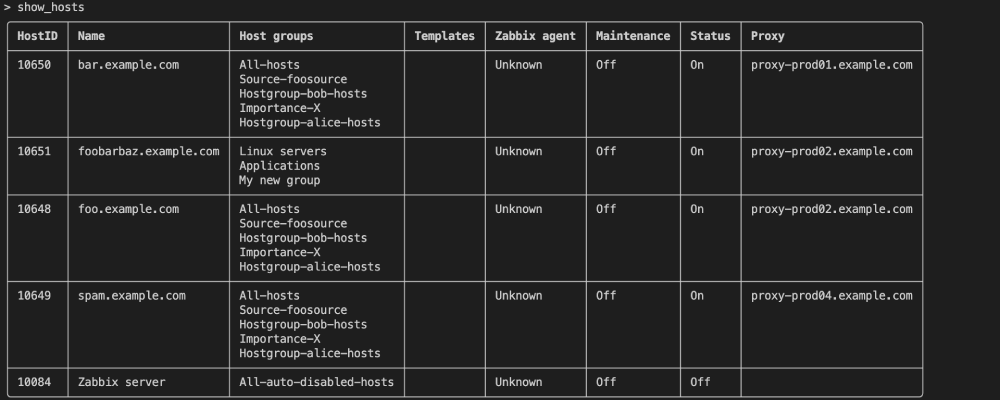
Zabbix-cli supports two output formats: table and JSON. The default format is table, but it can be changed with the --format parameter:
# Show hosts in table format (default)
zabbix-cli show_hosts

# Show hosts in JSON format
zabbix-cli --format json show_hosts

# Set format in REPL mode
> --format json show_hosts
The default format can be configured with the app.output.format config option:
[app.output]
format = "json"
Table

The default rendering mode is a Rich table that adapts to the width of the terminal.
JSON
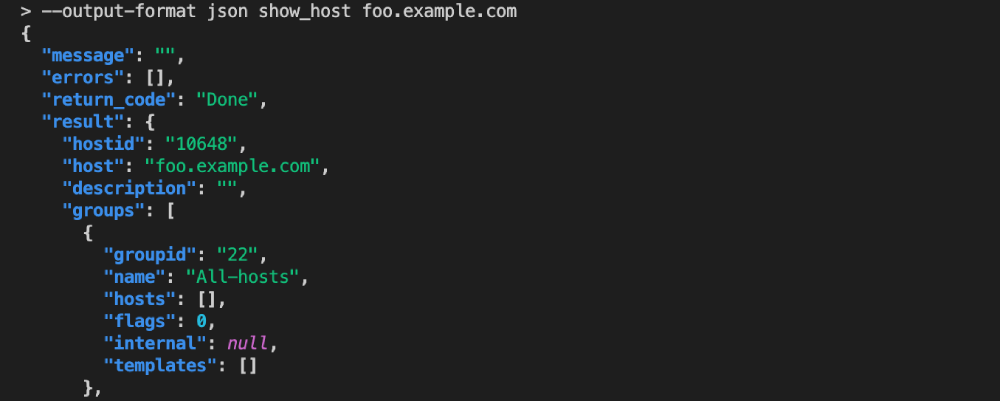
The JSON output format is always in this format, where ResultT is the expected result type:
{
  "message": "",
  "errors": [],
  "return_code": "Done",
  "result": ResultT
}
The type of the result field varies based on the command run. For show_host it is a single Host object, while for show_hosts it is an array of Host objects.
show_host foo.example.com*
{
  "message": "",
  "errors": [],
  "return_code": "Done",
  "result": {
    "hostid": "10648",
    "host": "foo.example.com",
    "description": "",
    "groups": [
      {
        "groupid": "22",
        "name": "All-hosts",
        "hosts": [],
        "flags": 0,
        "internal": null,
        "templates": []
      },
      {
        "groupid": "46",
        "name": "Source-foosource",
        "hosts": [],
        "flags": 0,
        "internal": null,
        "templates": []
      },
      {
        "groupid": "47",
        "name": "Hostgroup-bob-hosts",
        "hosts": [],
        "flags": 0,
        "internal": null,
        "templates": []
      },
      {
        "groupid": "48",
        "name": "Importance-X",
        "hosts": [],
        "flags": 0,
        "internal": null,
        "templates": []
      },
      {
        "groupid": "49",
        "name": "Hostgroup-alice-hosts",
        "hosts": [],
        "flags": 0,
        "internal": null,
        "templates": []
      }
    ],
    "templates": [],
    "inventory": {},
    "monitored_by": "proxy",
    "proxyid": "2",
    "proxy_groupid": "0",
    "maintenance_status": "0",
    "active_available": "0",
    "status": "0",
    "macros": [],
    "interfaces": [
      {
        "type": 1,
        "ip": "",
        "dns": "foo.example.com",
        "port": "10050",
        "useip": 0,
        "main": 1,
        "interfaceid": "49",
        "available": 0,
        "hostid": "10648",
        "bulk": null,
        "connection_mode": "Dns",
        "type_str": "Agent"
      }
    ],
    "proxy": {
      "proxyid": "2",
      "name": "proxy-prod02.example.com",
      "hosts": [],
      "status": null,
      "operating_mode": 0,
      "address": "127.0.0.1",
      "proxy_groupid": "1",
      "compatibility": 0,
      "version": 0,
      "local_address": "192.168.0.1",
      "local_port": "10051",
      "mode": "Active",
      "compatibility_str": "Undefined"
    },
    "zabbix_agent": "Unknown"
  }
}
show_hosts foo.*
{
  "message": "",
  "errors": [],
  "return_code": "Done",
  "result": [
    {
      "hostid": "10648",
      "host": "foo.example.com",
      "description": "",
      "groups": [
        {
          "groupid": "22",
          "name": "All-hosts",
          "hosts": [],
          "flags": 0,
          "internal": null,
          "templates": []
        },
        {
          "groupid": "46",
          "name": "Source-foosource",
          "hosts": [],
          "flags": 0,
          "internal": null,
          "templates": []
        },
        {
          "groupid": "47",
          "name": "Hostgroup-bob-hosts",
          "hosts": [],
          "flags": 0,
          "internal": null,
          "templates": []
        },
        {
          "groupid": "48",
          "name": "Importance-X",
          "hosts": [],
          "flags": 0,
          "internal": null,
          "templates": []
        },
        {
          "groupid": "49",
          "name": "Hostgroup-alice-hosts",
          "hosts": [],
          "flags": 0,
          "internal": null,
          "templates": []
        }
      ],
      "templates": [],
      "inventory": {},
      "monitored_by": "proxy",
      "proxyid": "2",
      "proxy_groupid": "0",
      "maintenance_status": "0",
      "active_available": "0",
      "status": "0",
      "macros": [],
      "interfaces": [],
      "proxy": {
        "proxyid": "2",
        "name": "proxy-prod02.example.com",
        "hosts": [],
        "status": null,
        "operating_mode": 0,
        "address": "127.0.0.1",
        "proxy_groupid": "1",
        "compatibility": 0,
        "version": 0,
        "local_address": "192.168.0.1",
        "local_port": "10051",
        "mode": "Active",
        "compatibility_str": "Undefined"
      },
      "zabbix_agent": "Unknown"
    }
  ]
}
Development
Zabbix-cli currently uses uv and Hatch for project management and packaging. To start off, clone the repository:
git clone https://github.com/unioslo/zabbix-cli.git
Then make a virtual environment using uv:
uv venv
This will create a new virtual environment, install the required dependencies and enter the environment.
Testing
Run unit tests (without coverage):
hatch run test
Generate coverage report:
hatch run cov
Documentation
To serve the documentation locally:
hatch run docs:serve
This will start a local web server on http://localhost:8001 that is automatically refreshed when you make changes to the documentation. However, some hooks are only run on startup, such as the creation of pages for each command. Changes to command examples or docstrings will require a restart.
Metadata
Release files for zabbix-cli-uio 3.7.0
For a detailed explanation of source distributions (sdists) and built distributions (wheels), please see the package formats documentation.
Source distribution (sdist)
| File | Size | Uploaded | |
|---|---|---|---|
| zabbix_cli_uio-3.7.0.tar.gz | 181.7 kB | Details |
Built distribution (wheel)
| File | Interpreter | ABI | Platform | Reset |
|---|---|---|---|---|
| zabbix_cli_uio-3.7.0-py3-none-any.whl | Python 3 | none | any | Details |
Total release size: 400.1 kB
Release files / zabbix_cli_uio-3.7.0.tar.gz
| Download URL | zabbix_cli_uio-3.7.0.tar.gz |
|---|---|
| Size | 181.7 kB |
| Tags | Source |
|
SHA-256 checksum How to use checksums |
0f3f923b75a8d4e3b4d57e3d8822177db1dae11ee100f6e4cf9af6cb28fb52bf
|
|
BLAKE2b-256 checksum How to use checksums |
1da68e6d8fbf6842f2a363807bce5f59ccc7cd97c64b79c282e38af7b5384958
|
| Upload date | |
|
Uploaded using Trusted Publishing? What is trusted publishing? |
Yes |
| Uploaded via |
twine/6.1.0 CPython/3.13.12
|
Provenance
Provenance describes where a file came from. On PyPI, provenance is shared via attestations, which provide a verifiable record of the build or publishing details. View details, limitations and caveats.


PyPI Publish Attestation
PyPI verified that this artifact, at this checksum, originated from the publisher listed below.
Signed by GitHub Actions, verified by PyPI on Jun 17, 2026.
Transparency logRelease files / zabbix_cli_uio-3.7.0-py3-none-any.whl
| Download URL | zabbix_cli_uio-3.7.0-py3-none-any.whl |
|---|---|
| Size | 218.4 kB |
| Tags | Python 3 |
|
SHA-256 checksum How to use checksums |
977de860e41ec5603f46ce592a8d7c8ab3c708d0152b3b0abf277292df0efb00
|
|
BLAKE2b-256 checksum How to use checksums |
da022781ae01c3fe36a515d107806a8ad7ff2319a6cc80d04a9e333ba180be3b
|
| Upload date | |
|
Uploaded using Trusted Publishing? What is trusted publishing? |
Yes |
| Uploaded via |
twine/6.1.0 CPython/3.13.12
|
Provenance
Provenance describes where a file came from. On PyPI, provenance is shared via attestations, which provide a verifiable record of the build or publishing details. View details, limitations and caveats.
PyPI Publish Attestation
PyPI verified that this artifact, at this checksum, originated from the publisher listed below.
Signed by GitHub Actions, verified by PyPI on Jun 17, 2026.
Transparency log













