
zalgo-cli
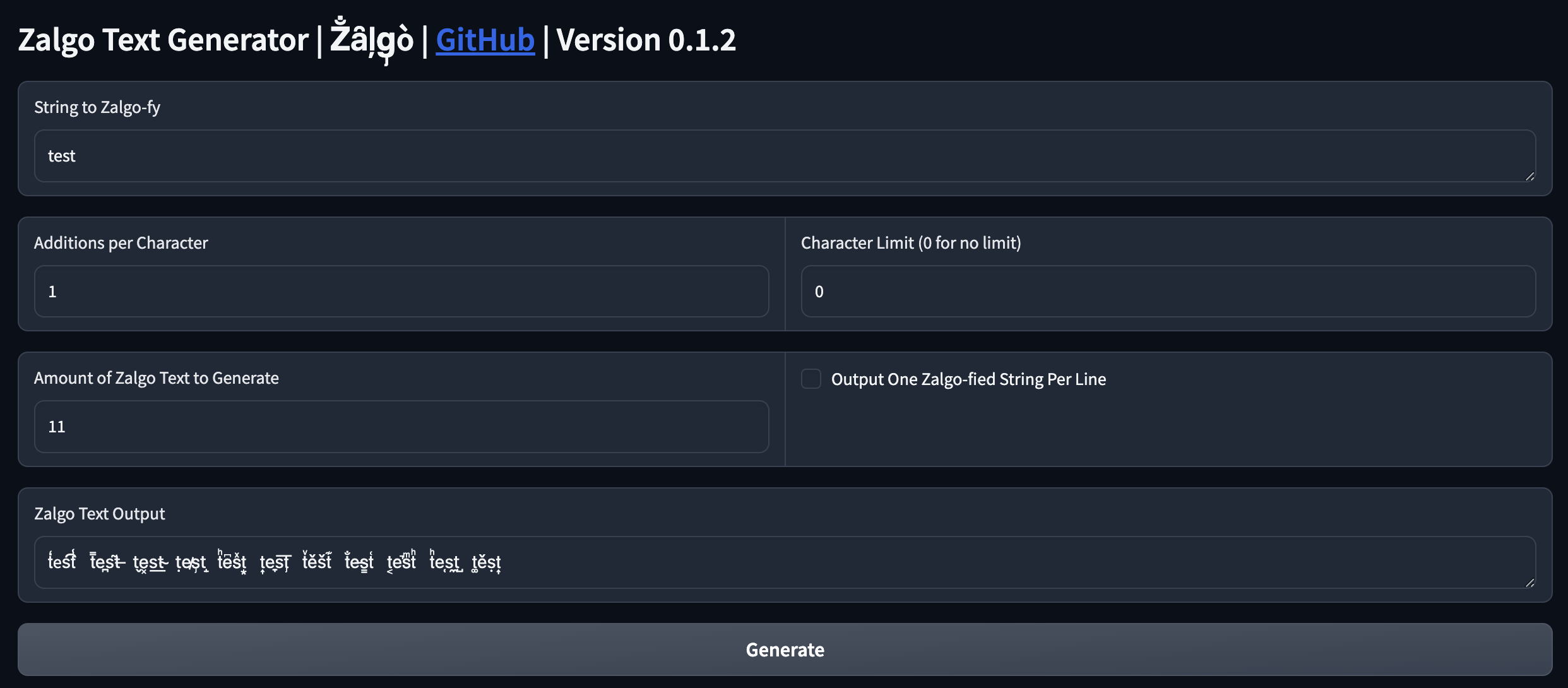
A simple command line tool and Gradio app to generate zalgo texts, or de-zalgo texts.
Demo
CLI
$ zalgo test -n 20

ṯe͕sͫť	t̿e̵s͍t̐	t̜e̼s̗tͨ	ẗe̮s̼tͥ
t͋e̞śt̪	t̊e̎s̮t͈	ṯe͊s̗t̍	t̄e̬śt͗
t͕e͓s͜t͕	tͯe̙s͙t͍	t̀e̊s̏t̲	t̰ẽs̕t̗
t̘e͐s̞t̿	ẗeͣs͆t̸	t͙e͉s̑t̤	t̀e͙s̐t̋
t͆e̟s̈́tͦ	t̛e͏s̛t͕	t̆eͮs̠tͮ	t͋e̱s͎tͦ
# accept input from stdin, adding tons of the zalgo-thingys
# output is too crazy to be put here
$ echo 'hello world' | zalgo -n 5 -o -a1000
Specifying a list of unicode codepoints to zalgo-fy the text
See https://www.compart.com/en/unicode/block/U+0300
# add `t' diacratic marks (U+036D) on t 100 times, then add `c' diacratic marks on c 100 times
$ zalgo 'tc' -a100 -c '0x036D 0x0368'
tͭͭͭcͨͨͨ
De-zalgo-fy the text
$ zalgo -z 'Z̐ȃļg̡ò'
Zalgo
Gradio
https://huggingface.co/spaces/tddschn/zalgo-gradio
$ zalgo-gradio
Installation
pipx
This is the recommended installation method.
$ pipx install zalgo-cli
pip
$ pip install zalgo-cli
zalgo-gradio
zalgo-gradio requires an extra dependency to run, you can install it with pipx install zalgo-cli[gradio] or pip install zalgo-cli[gradio].
Usage
CLI
You can use either zalgo or zalgo-cli to run the program.
$ zalgo --help

usage: zalgo [-h] [-a int] [-l int] [-n int] [-o] [-c str] [-d] [-z] [-V]
             [str]

Generate or De-Zalgo text

positional arguments:
  str                   Initial string to Zalgo-fy or De-Zalgo-fy. If not
                        provided, read from stdin (default: None)

options:
  -h, --help            show this help message and exit
  -a int, --adds-per-char int
                        Number of additions per character (default: 1)
  -l int, --char-limit int
                        Character limit [0 for no limit] (default: 0)
  -n int, --amount int  Amount of Zalgo text to generate (default: 1)
  -o, -1, --one-per-line
                        Output one Zalgo-fied string per line (default: False)
  -c str, --codepoints str
                        Codepoints to Add (space-separated hex values, e.g.,
                        '0x036D 0x0368') (default: )
  -d, --debug           Enable debug logging (default: False)
  -z, --dezalgo         De-Zalgo-fy the input string (default: False)
  -V, --version         show program's version number and exit
Gradio
$ zalgo-gradio
Or use the hosted version at https://huggingface.co/spaces/tddschn/zalgo-gradio .
Library
Codes are split into separate files so that you can use it as a library too without hassle.
There's only one core function that you might want to use:
from zalgo_cli import zalgo
Read the source code to see how to use it.
Develop
$ git clone https://github.com/tddschn/zalgo-cli.git
$ cd zalgo-cli
$ poetry install
Credits
Initial development of this project was inspired by https://github.com/n-1x/zalgo-cli .
1 maintainer

Metadata
1 maintainer
Release files for zalgo-cli 0.5.0
For a detailed explanation of source distributions (sdists) and built distributions (wheels), please see the package formats documentation.
Source distribution (sdist)
| File | Size | Uploaded | |
|---|---|---|---|
| zalgo_cli-0.5.0.tar.gz | 5.5 kB | Details |
Built distribution (wheel)
| File | Interpreter | ABI | Platform | Reset |
|---|---|---|---|---|
| zalgo_cli-0.5.0-py3-none-any.whl | Python 3 | none | any | Details |
Total release size: 12.6 kB
Release files / zalgo_cli-0.5.0.tar.gz
| Download URL | zalgo_cli-0.5.0.tar.gz |
|---|---|
| Size | 5.5 kB |
| Tags | Source |
|
SHA-256 checksum How to use checksums |
0914be2ec1b83378d373040f3d58c9dc038670d5b57274c379ae5efa012c886b
|
|
BLAKE2b-256 checksum How to use checksums |
f6e38c3c0e08ef1733cc64e3d21a0e487b3d81d43591d9d5b9020c25b9a9d3ce
|
| Upload date | |
|
Uploaded using Trusted Publishing? What is trusted publishing? |
No |
| Uploaded via |
poetry/1.7.1 CPython/3.12.3 Darwin/23.4.0
|
Release files / zalgo_cli-0.5.0-py3-none-any.whl
| Download URL | zalgo_cli-0.5.0-py3-none-any.whl |
|---|---|
| Size | 7.1 kB |
| Tags | Python 3 |
|
SHA-256 checksum How to use checksums |
cdae87f32b8cea7fa6180156a9608ce85812022c196191477bf971678a6132b9
|
|
BLAKE2b-256 checksum How to use checksums |
53aae8dee8f11fb33c68e5e5ad61e27f8ac58da7852cc4877238e83cb3affcb7
|
| Upload date | |
|
Uploaded using Trusted Publishing? What is trusted publishing? |
No |
| Uploaded via |
poetry/1.7.1 CPython/3.12.3 Darwin/23.4.0
|














