
Video annotation tool for marking timed events in eye tracking research

Project description
Zarafe 
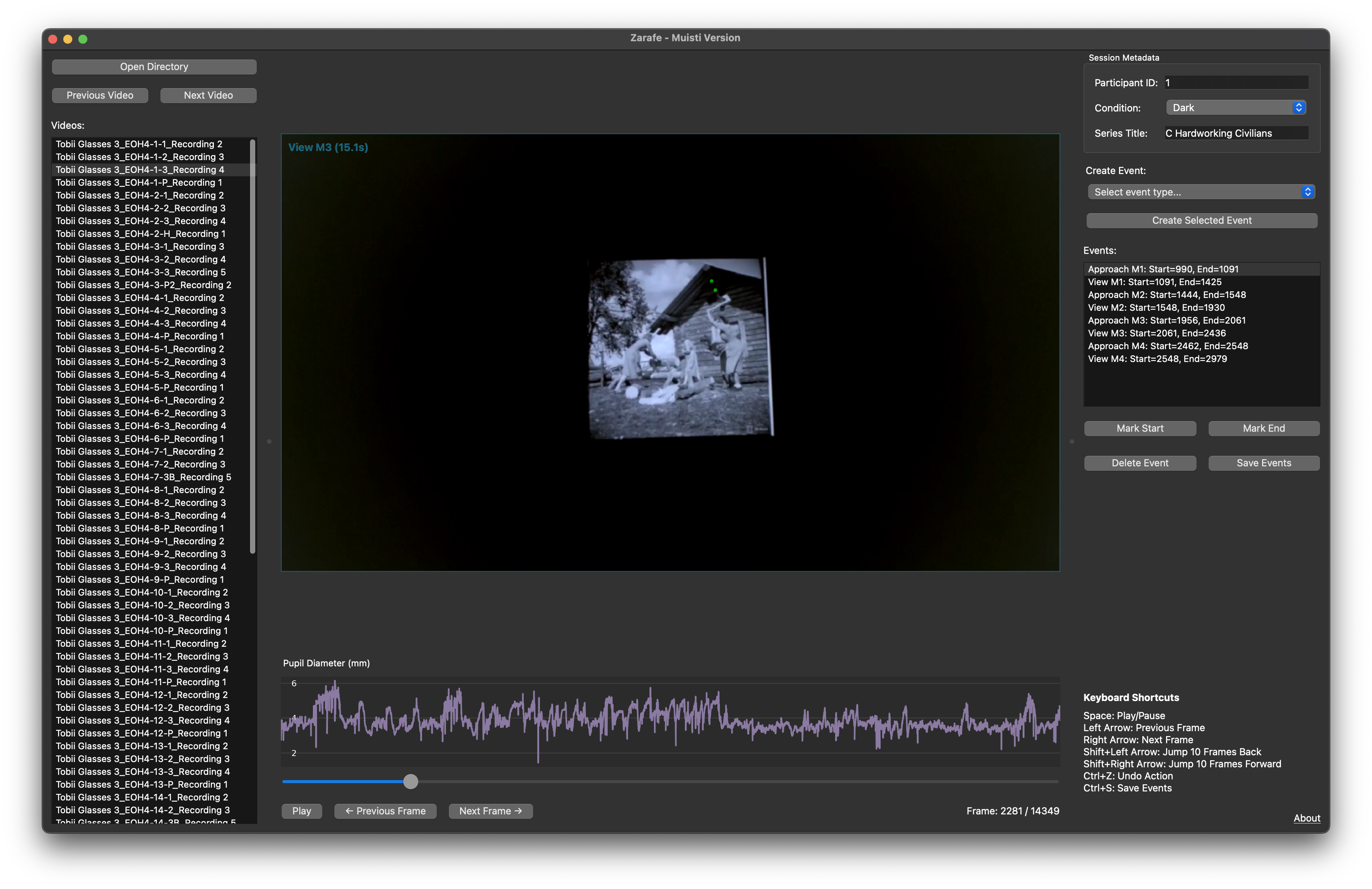
Zarafe is an open-source video annotation tool that unifies time-based event marking across different head-mounted eye trackers through a single, easy-to-use interface.
Why Zarafe?
Working with different head-mounted eye trackers means dealing with multiple proprietary software tools for annotation. This creates several challenges:
- Multiple software learning curves: Each eye tracker requires learning different annotation software
- Licensing barriers: Proprietary tools require licenses and may not be readily available
- Training overhead: Domain experts (like surgeons) need training on multiple platforms
- Fragmented workflows: Inconsistent annotation formats across different devices
Zarafe solves these problems by providing a unified annotation platform that works with different eye trackers.
Features
This tool allows users to:
- Load directories containing worldCamera.mp4 recordings and gazeData.tsv files
- View eye tracking videos with gaze position overlays
- Create, mark and manage time-based event annotations
- Save annotations to CSV files for further analysis
- Work with data from any supported eye tracker through a single interface
Data Preparation
Important: Before using Zarafe, you need to convert your eye tracking data:
Zarafe uses glassesValidator to import your eye tracking data. Some eye trackers require preprocessing before importing:
- Pupil Labs: Export from Pupil/Neon Player (disable World Video Exporter) or Pupil Cloud
- Meta Project Aria Gen 1: Process in Aria Studio with MPS eye gaze run, then use provided export script
- SMI ETG: Export raw data and scene video from BeGaze with specific settings
For detailed preprocessing instructions for your specific eye tracker, see the glassesValidator preprocessing guide.
The import process will generate the required worldCamera.mp4 and gazeData.tsv files.
Zarafe expects a specific directory structure with each recording in its own folder containing both files.
Installation
Requirements: Python ≥3.9 (tested on Python 3.9-3.12)
Option 1: Install from PyPI (Recommended)
pip install zarafe
zarafe
Option 2: Install from Source
-
Clone this repository:
git clone https://github.com/mh-salari/zarafe.git
cd zarafe
-
Install dependencies (choose one method):
Option A: Using uv (recommended)
# Install uv from https://docs.astral.sh/uv/getting-started/installation/

# Install dependencies
uv sync
Option B: Using pip
pip install -e .
-
Run the application:
# With uv
uv run python main.py

# With pip
python main.py
Notes
Zarafe is developed by Mohammadhossein Salari with assistance from Claude 3.7 Sonnet and Claude Sonnet 4, AI assistants developed by Anthropic.
Important Disclaimer: This software ships as-is and was developed as part of my PhD project to serve personal research needs. Please make a complete backup of your data before using this tool. Use at your own risk.
License
This project is licensed under the MIT License - see the LICENSE file for details.
Acknowledgments
Zarafe uses glassesValidator for data import. If you use this functionality, please cite:
Niehorster, D.C., Hessels, R.S., Benjamins, J.S., Nyström, M. and Hooge, I.T.C. (2023). GlassesValidator: A data quality tool for eye tracking glasses. Behavior Research Methods. doi: 10.3758/s13428-023-02105-5
This project has received funding from the European Union's Horizon Europe research and innovation funding program under grant agreement No 101072410, Eyes4ICU project.
Giraffe icon downloaded from Flaticon, created by smalllikeart


Download files
Download the file for your platform. If you're not sure which to choose, learn more about installing packages.
Source Distribution
Built Distribution
Filter files by name, interpreter, ABI, and platform.
If you're not sure about the file name format, learn more about wheel file names.
Copy a direct link to the current filters
File details
Details for the file zarafe-2.0.0.tar.gz.
File metadata
- Download URL: zarafe-2.0.0.tar.gz
- Upload date:
- Size: 4.0 MB
- Tags: Source
- Uploaded using Trusted Publishing? No
- Uploaded via: twine/6.2.0 CPython/3.11.13
File hashes
| Algorithm | Hash digest | |
|---|---|---|
| SHA256 |
581112d2ba420c4dfe10b5fe8cbb38d746b61da0b872c57af63baa7056986538
|
|
| MD5 |
cfe042a2e564a258d53787d3f7189da7
|
|
| BLAKE2b-256 |
44ba00d61074f879d665daac8fb47b4f64d868410266e4c1731e47ceda80b7ed
|
File details
Details for the file zarafe-2.0.0-py3-none-any.whl.
File metadata
- Download URL: zarafe-2.0.0-py3-none-any.whl
- Upload date:
- Size: 4.0 MB
- Tags: Python 3
- Uploaded using Trusted Publishing? No
- Uploaded via: twine/6.2.0 CPython/3.11.13
File hashes
| Algorithm | Hash digest | |
|---|---|---|
| SHA256 |
e91745474da2c803d54d9e14ee0a1f1a3b3e37c42bb10acdf530c09bc96168bb
|
|
| MD5 |
c83b470be47f8dc5af9085a61c273c78
|
|
| BLAKE2b-256 |
d48b9813703f20d18c155214be3c1b21c6a50d6c943949877556380dcc518202
|






