
AI Data Analysis MCP

Project description
 Zaturn: Your Co-Pilot For Data Analytics & Business Insights
Zaturn let's you analyze your data using AI chat; without needing you to write SQL/Python code or fiddling with aesthetically pleasing (but overwhelming) dashboards.
You can add Zaturn MCP to Claude Desktop (or any MCP client), connect your data sources, ask questions in natural language, and get instant insights with visualizations. With Zaturn, your AI can automatically understand the kind of data you have, query it, and give you useful pointers with a coherent narrative. You can ask specific questions like "Who is our most valuable customer?", or let AI explore your data with a question like "Here's all the data we have, give us some ideas for the next quarter."

But I can just upload my data to ChatGPT and ask it to analyze right?
Yes, but ChatGPT has an upload size limit of approximately 50MB for CSV files/spreadsheets, and uploading also takes time. Plus, it can't read data straight from your MySQL or PostgreSQL server. Zaturn can overcome all of these limitations, without moving your data anywhere. It simply equips your AI with SQL and visualization capabilities so AI can query your data directly, get the results, process them, and give you instant insights. With Zaturn, AI does not need to process your full dataset and keep it in its memory to answer your questions about the data.
Zaturn in Action
https://github.com/user-attachments/assets/d42dc433-e5ec-4b3e-bef0-5cfc097396ab
Features:
Multiple Data Sources
Zaturn can currently connect to the following data sources:
- SQL Databases: PostgreSQL, SQLite, DuckDB, MySQL, ClickHouse
- Files: CSV, Parquet
Connectors for more data sources are being added.
Visualizations
In addition to providing tabular and textual summaries, Zaturn can also generate the following image visualizations
- Scatter and Line Plots
- Histograms
- Strip and Box Plots
- Bar Plots
NOTE: The visuals will be shown only if your MCP client supports image rendering (e.g. Claude Desktop)
If you MCP client does not support images (e.g. Cursor) add the
--noimgargument in the MCP config. Then the plots will be stored as files and the file location will be returned. You can view the plots with your file browser.
More visualization capabilities are being added.
Installation & Setup
uv tool install zaturn
- Add to MCP config, with data sources:
"mcpServers": {
  "zaturn": {
    "command": "zaturn_mcp",
    "args": [
      "postgresql://username:password@host:port/dbname",
      "mysql+pymysql://username:password@host:3306/dbname",
      "sqlite:////full/path/to/sample_dbs/northwind.db",
      "/full/path/to/sample_dbs/titanic.parquet",
      "/full/path/to/sample_dbs/ny_aq.csv",
      "/full/path/to/sample_dbs/duckdb_sample.duckdb"
    ]
  },
}
OR add a sources.txt to the Zaturn config directory:
postgresql://username:password@host:port/dbname
mysql+pymysql://username:password@host:3306/dbname
clickhouse://username:password@host:port/dbname
sqlite:////full/path/to/sample_dbs/northwind.db
/full/path/to/sample_dbs/titanic.parquet
/full/path/to/sample_dbs/ny_aq.csv
/full/path/to/sample_dbs/duckdb_sample.duckdb
This file needs to be at ~/.config/zaturn/sources.txt on Linux/MacOS and at %APPDATA%\zaturn\sources.txt on Windows.
If your MCP client does not support image rendering, add the --noimg argument:
...
    "args": [
      "--noimg",
      "mysql+pymysql://username:password@host:3306/dbname",
...
- Set a system prompt if your LLM/IDE allows you to:
You are a helpful data analysis assistant. Use only the tool provided data sources to process user inputs. Do not use external sources or your own knowledge base.
- Ask a question and watch the magic:
User: List the top 5 customers by revenue for Northwind
AI:
The top 5 customers by revenue for Northwind are:

1. B's Beverages with a revenue of $6,154,115.34
2. Hungry Coyote Import Store** with a revenue of $5,698,023.67
3. Rancho grande with a revenue of $5,559,110.08
4. Gourmet Lanchonetes with a revenue of $5,552,597.90
5. Ana Trujillo Emparedados y helados with a revenue of $5,534,356.6
Roadmap
- Support for more data source types
- More data visualizations
- Predictive analysis and forecasting, e.g.:
Based on the revenue of the last 3 months, forecast next month's revenue.
- Generate Presentations & PDFs
Manager:
  I need a presentation to show the boss. Can you do it by EOD?
Analyst:
  EOD?! Are you still in the 2010s?
  I can get it done right now. Actually, you can do it right now.
  You know what? The boss can do it right now.
- A native notebook interface
Help And Feedback
Raise an issue or join the Discord.
Support The Project
If you find Zaturn useful, please support this project by:
- Starring the Project
- Spreading the word
- Pledging $9/month on Patreon
Your support will enable me to dedicate more of my time to Zaturn.
Example Dataset Credits
The pokemon dataset compiled by Sarah Taha and PokéAPI has been included under the CC BY-NC-SA 4.0 license for demonstration purposes.
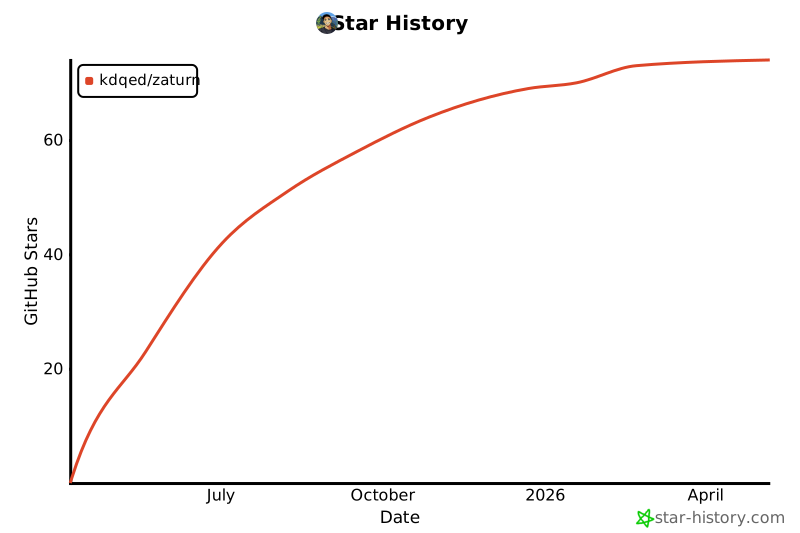
Star History
Release history Release notifications | RSS feed


Download files
Download the file for your platform. If you're not sure which to choose, learn more about installing packages.
Source Distribution
Built Distribution
Filter files by name, interpreter, ABI, and platform.
If you're not sure about the file name format, learn more about wheel file names.
Copy a direct link to the current filters
File details
Details for the file zaturn-0.1.6.tar.gz.
File metadata
- Download URL: zaturn-0.1.6.tar.gz
- Upload date:
- Size: 150.5 kB
- Tags: Source
- Uploaded using Trusted Publishing? No
- Uploaded via: uv/0.6.12
File hashes
| Algorithm | Hash digest | |
|---|---|---|
| SHA256 |
8107a0d638db743fb18494be037577b71abf673807b0e477f91afe592fd39111
|
|
| MD5 |
98762b4602714cf3bfbf3e1686785c80
|
|
| BLAKE2b-256 |
d06c634ae360a861a016bf97242e97a79424b51ad2f8910bd7595709be6160e3
|
File details
Details for the file zaturn-0.1.6-py3-none-any.whl.
File metadata
- Download URL: zaturn-0.1.6-py3-none-any.whl
- Upload date:
- Size: 45.1 kB
- Tags: Python 3
- Uploaded using Trusted Publishing? No
- Uploaded via: uv/0.6.12
File hashes
| Algorithm | Hash digest | |
|---|---|---|
| SHA256 |
20ddde2310ecd672d9310aecda33d839c2b4ab84f8b6e995945330ba65fcd5a6
|
|
| MD5 |
aecdd5e4a734918d338ae4f3c9f0af2b
|
|
| BLAKE2b-256 |
539c64832b654fbf168b8fe0bbdfbdb23f45121ab526b3805064f738c76fcb63
|






