
Zcrafter Bridge: MCP server for IBM z/OS mainframes



Give AI Agents real access to your mainframe and keep it from changing anything you haven't approved.
Zcrafter Bridge is an open-source Model Context Protocol (MCP) server for IBM z/OS. It lets AI agents such as Claude Code, Codex, Cursor, GitHub Copilot in VS Code and Gemini CLI work on a mainframe: datasets and PDS members, COBOL and JCL, batch jobs and spool, z/OS UNIX files, TSO commands and the operator console.
- 48 tools over z/OSMF and the Zowe SDK. Nothing is installed on the mainframe.
- A person approves every change. The agent cannot approve its own work, and an approval covers only the steps it lists.
- One line to install, on macOS, Linux and Windows.
What's an MCP server?
MCP is how AI Agents talks to outside systems. An MCP server hands AI a set of tools it can call. Bridge is an MCP server whose tools are your mainframe - datasets, members, z/OS UNIX files, jobs, spool, TSO and the operator console, with an approval gate in front of anything that changes the system.
Install it once, point your AI client at it, then just talk.
Install
One line, on macOS and Linux:
curl -fsSL https://raw.githubusercontent.com/ZcrafterAI/Bridge/main/install.sh | sh
Or directly with uv, on any system including Windows:
uv tool install zcrafter-bridge
Either way you get one command, zcrafter-bridge. Bridge is on PyPI and in the official MCP Registry as io.github.ZcrafterAI/bridge. To run it with no install step at all, use uvx zcrafter-bridge as the command in your client. It needs Python 3.11 or newer, which uv fetches for you. It no longer needs Node.
What the installer does: it finds uv (or installs it for your user), then runs uv tool install, which puts Bridge and its dependencies in a folder of their own under your home directory. It uses no sudo and changes nothing system-wide. You can read it first: install.sh. To remove Bridge: uv tool uninstall zcrafter-bridge.
Connect your AI client
| Client | How |
|---|---|
| Claude Code | claude mcp add zcrafter-bridge -- zcrafter-bridge |
| Codex | codex mcp add zcrafter-bridge -- zcrafter-bridge |
| Claude Desktop, Cursor, Gemini CLI | Add the JSON below to the client's MCP settings |
| VS Code | The same entry under "servers" in .vscode/mcp.json |
{
  "mcpServers": {
    "zcrafter-bridge": { "command": "zcrafter-bridge" }
  }
}
Claude Code users can also install the skill that teaches the agent the approval flow:
zcrafter-bridge install-skill
Connect your mainframe
Bridge signs in to z/OSMF as you. It looks for your sign-in in this order:
- Environment variables:
ZOWE_OPT_HOST,ZOWE_OPT_USER,ZOWE_OPT_PASSWORD(and optionallyZOWE_OPT_PORT,ZOWE_OPT_REJECT_UNAUTHORIZED,ZOWE_OPT_BASE_PATH). These are Zowe CLI's own names. - Your Zowe profile:
~/.zowe/zowe.config.json, with the password read from your operating system's keychain, wherezowe config secureput it. Test the profile withzowe zosmf check status.
No password is stored by Bridge, and none is ever sent to the AI model.
How the gate works
Reading is free. Listing datasets, reading members, checking jobs, searching spool — no approval needed.
Changing anything is gated. Before an agent can write a member, submit a job, run a command or delete a dataset, it must:
- Open a request
- Write a spec (what changes and why) and get your yes
- Write a plan that lists every change as a step, and get your yes
Only you can say yes. The agent can ask for an approval. It cannot give one. Bridge asks you directly, outside the agent's reach:
- in your AI client's own prompt, when the client has one, or
- on a page Bridge opens in your browser, on your machine only, or
- in a terminal, with
zcrafter-bridge approve, on a machine with no browser.
The page's address carries a one-time token the agent never sees, so an agent that can browse still cannot press Approve.
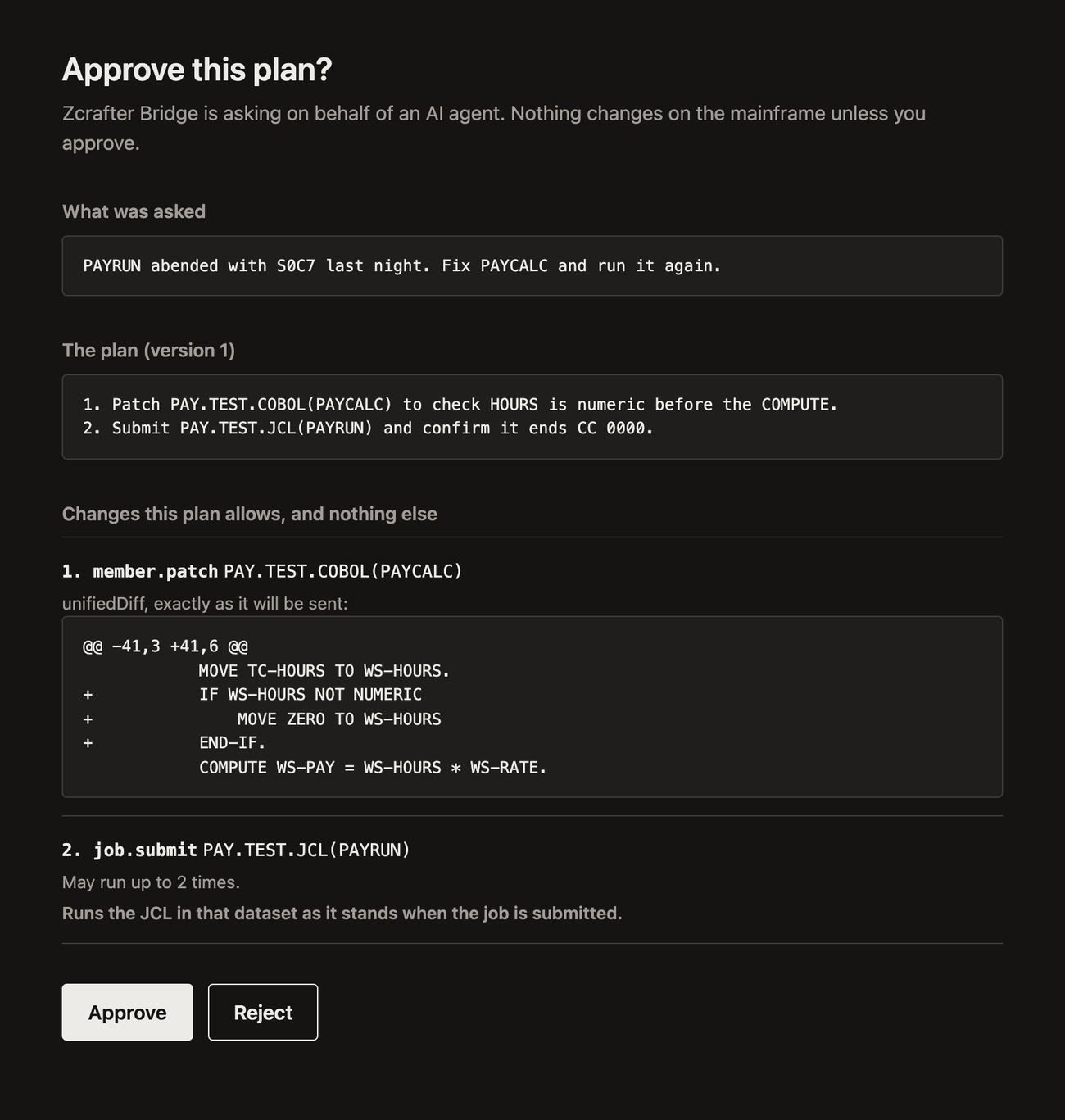
Your yes covers the listed steps and nothing else. Each step names one tool and its target, for example member.write on PAY.TEST.COBOL(PAYCALC). After approval a change runs only if it matches a step, and each step runs once unless the plan says more. A command step fixes the exact command. A step can also fix the exact content, diff or JCL, and then that is what must be sent.
| The agent tries | It gets |
|---|---|
| A change before you approved | PLAN_NOT_APPROVED |
| To approve its own plan | WAITING_FOR_PERSON, and you get asked |
| A change the plan did not list | STEP_NOT_IN_PLAN |
| A change to a protected dataset | PROTECTED_DATASET |
Editing the spec after approval un-approves the plan too. Every change is logged with its inputs; passwords are redacted, diffs are hashed.
Tools
48 tools. The ones in italics change the system, so they need an approved plan step.
| Datasets | list, info, read, write, create, create like, delete, rename, copy, recall, migrate |
| Members | list, read, search, write, patch, delete, rename |
| z/OS UNIX files | list, read, write, create, delete, rename, chmod |
| Jobs | list, status, steps, failed jobs, wait, JCL, spool, output, submit, cancel, purge, hold, release, change class |
| TSO | tso.query for read-only commands (LISTCAT, LISTDS, LISTUSER...), tso.command for anything else |
| Operator console | console.command |
| System | list systems, verify connection, list profiles, search the tool catalog |
job.steps shows which step of a job failed, and job.failed lists the jobs that ended badly, so an agent can start from the failure instead of reading every log.
Large reads (member.read, dataset.read, job.output, job.spool.read) accept searchText, maxLines and regex — so Claude finds one line in a 40,000-line job log instead of pulling the whole thing into context.
Configuration
Copy .env.example to .env to change defaults.
| Variable | Default | |
|---|---|---|
MAINFRAME_WORKFLOW_ZOWE_PROFILE |
default |
Which Zowe profile to use |
MAINFRAME_WORKFLOW_DB_PATH |
~/.zcrafter-bridge/state.db |
Where requests are stored |
MAINFRAME_WORKFLOW_IDLE_DAYS |
14 |
Abandon untouched requests after |
MAINFRAME_WORKFLOW_RETENTION_DAYS |
90 |
Archive finished requests after |
MAINFRAME_WORKFLOW_APIML_BASE_PATH |
— | Set if z/OSMF is behind API ML |
MAINFRAME_WORKFLOW_APPROVAL |
auto |
How you approve: auto (your AI client's prompt, else a browser page), prompt, browser, terminal |
MAINFRAME_WORKFLOW_APPROVAL_WAIT_SECONDS |
60 |
How long one approval call waits for you before telling the agent to ask again |
MAINFRAME_WORKFLOW_READ_ONLY |
false |
true offers no tool that changes anything |
MAINFRAME_WORKFLOW_PROTECTED_DATASETS |
— | Patterns the dataset and member tools may never write to, e.g. SYS1.**,*.PROD.** |
MAINFRAME_WORKFLOW_TSO_ACCOUNT |
ACCT |
TSO account number, used on z/OSMF without the one-request TSO interface |
MAINFRAME_WORKFLOW_APPROVAL=unsafe-agent turns the person off: the agent's own call counts as approval. It exists for automated runs against throwaway systems. Do not use it on a mainframe you care about.
Troubleshooting
Zowe config not found — Bridge reads ~/.zowe/zowe.config.json. Run zowe config list to confirm you have one, or set ZOWE_OPT_HOST, ZOWE_OPT_USER and ZOWE_OPT_PASSWORD.
z/OSMF profile "default" not found — your profile has another name. Run zowe config list profiles, then set MAINFRAME_WORKFLOW_ZOWE_PROFILE in .env.
...is missing host, user or password — credentials aren't in your OS keychain. Re-run zowe config secure.
could not read the OS keychain — the machine has no keychain Bridge can open (common on servers and in containers). Use the ZOWE_OPT_* variables there.
Claude says a tool isn't allowed — approve it when prompted, or check claude mcp list.
The agent says an approval is waiting but nothing opened — the address is printed in the server's log (stderr), or run zcrafter-bridge approve in a terminal.
STEP_NOT_IN_PLAN — the agent tried a change you did not approve. It has to write a new plan revision that lists it and ask you again.
tso.command or console.command answers 401 or 403 — your user ID needs TSO or EMCS console authority on the mainframe. Bridge cannot grant it.
Development
git clone https://github.com/ZcrafterAI/Bridge.git && cd Bridge
python -m venv .venv && source .venv/bin/activate    # Windows: .venv\Scripts\activate
pip install -e ".[dev]"
pytest                                               # 185 tests, no mainframe needed
python -m mainframe_workflow_mcp.cli                 # run from source
credential-resolver/ is the older Node helper for reading the Zowe keychain. Bridge reads the keychain itself now and only falls back to the helper if you have built it (cd credential-resolver && npm install && npm run build).
Architecture notes: docs/architecture.md. The tool catalog lives in mainframe_workflow_mcp/toolbox/ and the z/OSMF calls in mainframe_workflow_mcp/clients/.
Questions
What is Zcrafter Bridge? An MCP server that connects AI agents to an IBM z/OS mainframe through z/OSMF, with a person approving every change.
Which AI clients work with it? Any client that speaks MCP over stdio: Claude Code, Claude Desktop, OpenAI Codex, Cursor, VS Code with GitHub Copilot, Gemini CLI and others.
What does it need on the mainframe? z/OSMF switched on and a user ID. Nothing is installed on z/OS. It uses your existing Zowe profile, or three environment variables.
Can the AI change my mainframe without asking? No. Reading needs no approval. Any change needs a plan you approve, on a channel the agent cannot reach, and only the changes that plan lists can run.
Does it work with COBOL and JCL? Yes. It reads and edits members, applies diffs, submits JCL, waits for the job, reads the output, and can show which step failed and with what code.
How is it different from Zowe CLI? Zowe CLI is a command line for people. Bridge gives an AI agent the same z/OSMF operations as tools, built on the Zowe SDK, and puts an approval gate and an audit log in front of anything that changes the system.
Whose permissions does it use? Yours. Bridge signs in as your user ID, so your site's security rules (RACF, ACF2 or Top Secret) apply to everything the agent does.
Is it free? Yes, MIT licensed.
Who makes it? Zcrafter, which builds AI agents for the mainframe.
MIT licensed. Contributions welcome — see CONTRIBUTING.md.
1 maintainer

Metadata
1 maintainer
Release files for zcrafter-bridge 0.3.1
For a detailed explanation of source distributions (sdists) and built distributions (wheels), please see the package formats documentation.
Source distribution (sdist)
| File | Size | Uploaded | Provenance | Actions |
|---|---|---|---|---|
| zcrafter_bridge-0.3.1.tar.gz | 406.6 kB | With provenance | Details for zcrafter_bridge-0.3.1.tar.gz |
Built distribution (wheel)
| File | Interpreter | ABI | Platform | Actions Reset |
|---|---|---|---|---|
| zcrafter_bridge-0.3.1-py3-none-any.whl | Python 3 | none | any | Details for zcrafter_bridge-0.3.1-py3-none-any.whl |
Total release size: 473.8 kB
Release files / zcrafter_bridge-0.3.1.tar.gz
| Download URL | zcrafter_bridge-0.3.1.tar.gz |
|---|---|
| Size | 406.6 kB |
| Tags | Source |
|
SHA-256 checksum How to use checksums |
0d1d9caa923b1c7b60b62ccae2c5fc7d6a891598b233627304e2219ea745048b
|
|
BLAKE2b-256 checksum How to use checksums |
7835e4b22c18bb4851b3dd2b395dd7da0e2e50d5a281ed391939e5dd4ca5e94f
|
| Upload date | |
|
Uploaded using Trusted Publishing? What is trusted publishing? |
Yes |
| Uploaded via |
twine/7.0.0 CPython/3.13.16
|
Provenance
Provenance describes where a file came from. On PyPI, provenance is shared via attestations, which provide a verifiable record of the build or publishing details. View details, limitations and caveats.


PyPI Publish Attestation
PyPI verified that this artifact, at this checksum, originated from the publisher listed below.
Signed by GitHub Actions, verified by PyPI on Nov 16, 2026.
Transparency logRelease files / zcrafter_bridge-0.3.1-py3-none-any.whl
| Download URL | zcrafter_bridge-0.3.1-py3-none-any.whl |
|---|---|
| Size | 67.1 kB |
| Tags | Python 3 |
|
SHA-256 checksum How to use checksums |
e0f6378087a35dc4c8de1da599552aff42fda2b2e8a506f8522fbfa3def6b8fd
|
|
BLAKE2b-256 checksum How to use checksums |
2bb6fe5008be392979b4b07bad19f4c1e4a7b90e832d6d60bbd771b518b446e5
|
| Upload date | |
|
Uploaded using Trusted Publishing? What is trusted publishing? |
Yes |
| Uploaded via |
twine/7.0.0 CPython/3.13.16
|
Provenance
Provenance describes where a file came from. On PyPI, provenance is shared via attestations, which provide a verifiable record of the build or publishing details. View details, limitations and caveats.
PyPI Publish Attestation
PyPI verified that this artifact, at this checksum, originated from the publisher listed below.
Signed by GitHub Actions, verified by PyPI on Nov 16, 2026.
Transparency logSecurity for zcrafter-bridge 0.3.1
Provenance
Provenance describes where a file came from. On PyPI, provenance is shared via attestations, which provide a verifiable record of the build or publishing details. View details, limitations and caveats.
Full provenance
Both files in this release have been uploaded with provenance metadata.
Attestation for zcrafter_bridge-0.3.1.tar.gz
PyPI Publish Attestation
PyPI verified that this artifact, at this checksum, originated from the publisher listed below.
Signed by GitHub Actions, verified by PyPI on Nov 16, 2026.
Transparency logA note on package security
PyPI is a repository for distributing packages, not a service for auditing them. While third-party security researchers and our staff do their best to detect and remove malicious packages, PyPI cannot guarantee the quality, security or suitability of any given package.
To learn more about protecting yourself from malicious actors, visit our package security documentation.














