
zcsv
Blazing-fast drop-in replacement for Python's csv module, powered by Rust.
import zcsv as csv — same API, 4-6x faster.


Why zcsv?
Python's built-in csv module is implemented in C but still creates Python objects for every field of every row. For a 100K-row file with 50 columns, that's 5 million string allocations just to iterate.
zcsv eliminates this. The Rust core parses CSV via SIMD instructions into a single contiguous buffer. The Python-facing Row object is a zero-copy cursor — it holds a pointer and an index, nothing more. Python strings are created only when you access a field, and only for the fields you actually use.
Features you won't find elsewhere
- CSV Injection Protection —
safe=Trueescapes=,+,-,@,\t,\r(OWASP best practice) - RFC 4180 Strict Mode —
strict=Truevalidates field counts, quoting rules, with line numbers in errors - Delimiter Autodetection — frequency analysis in Rust (
,;\t|:) - Encoding Autodetection — UTF-8, UTF-16 (LE/BE), Latin-1, BOM handling
- Automatic Type Inference —
zcsv.read()returns typedlist[dict](int, float, bool, str)
Install
pip install zcsv
From source (requires Rust toolchain):
git clone https://github.com/Seinarukiro2/zcsv.git
cd zcsv
pip install maturin
maturin develop --release
Quick Start
Drop-in replacement
import zcsv as csv

# Exactly like stdlib — but 4x faster
with open("data.csv") as f:
    for row in csv.reader(f):
        print(row[0], row[1])

# DictReader — 6x faster
with open("data.csv") as f:
    for row in csv.DictReader(f):
        print(row["name"], row["age"])

# Writer — 1.4x faster
with open("out.csv", "w", newline="") as f:
    w = csv.writer(f)
    w.writerow(["name", "age"])
    w.writerows([["Alice", "30"], ["Bob", "25"]])
zcsv extensions
import zcsv

# Read with automatic type inference
data = zcsv.read("data.csv")
# [{"name": "Alice", "age": 30, "active": True}, ...]

# Batch reading for large files
for batch in zcsv.read_batches("huge.csv", batch_size=10_000):
    process(batch)

# Write with CSV injection protection (safe=True by default)
zcsv.write("out.csv", data)
API Reference
zcsv.reader(csvfile, **kwargs)
Returns a cursor iterator. Each iteration advances to the next row. Access fields with row[0] (by index) or row.to_list() for a full list.
with open("data.csv") as f:
    for row in zcsv.reader(f):
        name = row[0]          # lazy — creates Python string only now
        last = row[-1]         # negative indexing works
        print(len(row))        # field count
        print(repr(row))       # ['Alice', '30', 'NYC']
Storing rows: The cursor reuses the same object. To collect rows, use snapshot():
with open("data.csv") as f:
    rows = [row.snapshot() for row in zcsv.reader(f)]
    # or: [row.to_list() for row in zcsv.reader(f)]
Parameters: delimiter, quotechar, strict (RFC 4180 validation)
zcsv.DictReader(f, fieldnames=None, **kwargs)
Same cursor pattern with dict-like access:
with open("data.csv") as f:
    for row in zcsv.DictReader(f):
        row["name"]           # by key
        row[0]                # also by index
        row.keys()            # column names
        row.values()          # all values
        row.items()           # (key, value) pairs
        row.get("x", "N/A")  # with default
        "name" in row         # membership test
zcsv.read(path, **kwargs) -> list[dict]
Read entire file with automatic type inference.
zcsv.read("data.csv",
    delimiter=None,       # None = autodetect
    has_header=True,
    schema={"id": int, "price": float},  # override types
    skip_rows=0,
    max_rows=None,
    columns=["name", "age"],  # select columns
    null_values=["", "NA", "null", "None"],
    encoding=None,        # None = autodetect
    strict=False,         # RFC 4180 validation
    n_threads=None,       # parallel type conversion
)
zcsv.write(path, data, **kwargs)
zcsv.write("out.csv", data,
    delimiter=",",
    safe=True,    # CSV injection protection (default: True)
    strict=False,
)
zcsv.writer(csvfile, **kwargs) / zcsv.DictWriter(csvfile, fieldnames, **kwargs)
Stdlib-compatible streaming writer. safe=False by default (stdlib compat).
zcsv.read_batches(path, batch_size=10_000, **kwargs)
Memory-efficient iterator yielding list[dict] batches.
Architecture
Python API        ┌─ reader() ─── cursor Row (zero-copy, lazy strings)
                  ├─ DictReader() ─── cursor with field names
                  ├─ writer() / DictWriter() ─── raw FFI serialization
                  ├─ read() ─── type inference + parallel conversion
                  └─ write() ─── CSV injection protection

Rust Core         ┌─ simd-csv ─── SIMD-accelerated CSV parsing
(PyO3 + FFI)      ├─ SharedData ─── single Vec<u8> buffer for all rows
                  ├─ memmap2 ─── memory-mapped I/O for large files
                  ├─ rayon ─── parallel column type conversion
                  ├─ encoding_rs ─── charset detection + conversion
                  └─ fast_pyobjects ─── raw CPython FFI (PyUnicode_New, PyList_SET_ITEM)
Key design decisions
- Zero-copy Row: All CSV data lives in one contiguous
Vec<u8>.RowisArc<SharedData> + u32— 12 bytes, no per-row heap allocation. Python strings created only on field access via rawPyUnicode_New. - Cursor pattern:
reader.__next__()returnsselfwithPy_INCREF(~10ns) instead of allocating a new object (~900ns). - String dedup cache: Repeated values (countries, categories, booleans) are cached. Auto-disables after 200 samples if hit rate < 20%.
- GIL release: File I/O, SIMD parsing, type inference, CSV serialization all run with GIL released.
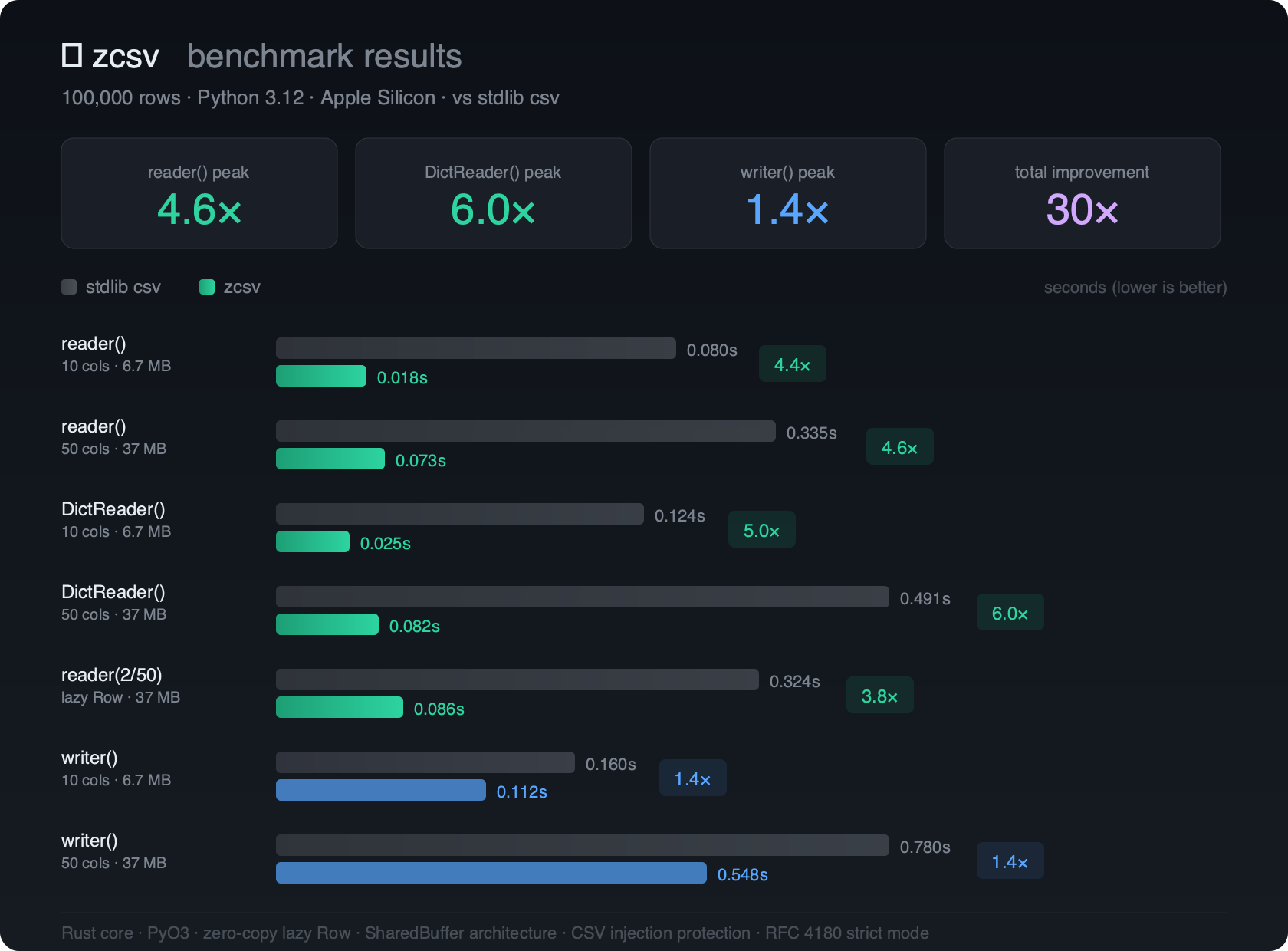
Benchmarks
100,000 rows, Python 3.13, Apple Silicon M4:
| Operation | stdlib csv |
zcsv |
Speedup |
|---|---|---|---|
reader() 10 cols |
0.080s | 0.018s | 4.4x |
reader() 50 cols |
0.335s | 0.073s | 4.6x |
DictReader() 10 cols |
0.124s | 0.025s | 5.0x |
DictReader() 50 cols |
0.491s | 0.082s | 6.0x |
writer() 10 cols |
0.160s | 0.112s | 1.4x |
writer() 50 cols |
0.780s | 0.548s | 1.4x |
License
MIT
1 maintainer

Metadata
1 maintainer
Release files for zcsv 0.2.1
For a detailed explanation of source distributions (sdists) and built distributions (wheels), please see the package formats documentation.
Source distribution (sdist)
| File | Size | Uploaded | |
|---|---|---|---|
| zcsv-0.2.1.tar.gz | 184.9 kB | Details |
Built distribution (wheel)
| File | Interpreter | ABI | Platform | Reset |
|---|---|---|---|---|
| zcsv-0.2.1-cp313-cp313-macosx_11_0_arm64.whl | CPython 3.13 | CPython 3.13 | macOS 11.0+ ARM64 | Details |
Total release size: 653.2 kB
Release files / zcsv-0.2.1.tar.gz
| Download URL | zcsv-0.2.1.tar.gz |
|---|---|
| Size | 184.9 kB |
| Tags | Source |
|
SHA-256 checksum How to use checksums |
ca3139f267a3db9b478f139fa12613dec1ead1de39ca57532c087fc744c41ee1
|
|
BLAKE2b-256 checksum How to use checksums |
42c87be11894c73a93b4d544a5bae9ec52ce2b950fe5077f93b07a26c6b0e038
|
| Upload date | |
|
Uploaded using Trusted Publishing? What is trusted publishing? |
No |
| Uploaded via |
maturin/1.12.6
|
Release files / zcsv-0.2.1-cp313-cp313-macosx_11_0_arm64.whl
| Download URL | zcsv-0.2.1-cp313-cp313-macosx_11_0_arm64.whl |
|---|---|
| Size | 468.3 kB |
| Tags | CPython 3.13 macOS 11.0+ ARM64 |
|
SHA-256 checksum How to use checksums |
5c7f60f26df8b9fffdc6e7353136f2f9173db0c38ada4447bbb313152613f2c4
|
|
BLAKE2b-256 checksum How to use checksums |
408372f490c33aca78ce918294c6671e0687f5c6ecca84b1230206651e573246
|
| Upload date | |
|
Uploaded using Trusted Publishing? What is trusted publishing? |
No |
| Uploaded via |
maturin/1.12.6
|














