
Zecret
A modern, encrypted terminal diary.
One entry a day, in your terminal, kept in a single encrypted file that only you can open.
zecret.krfu.dev · Install · How it works







Why
A diary should be private by construction, not by promise. Zecret has no server, no account, no sync and no telemetry — there is nowhere for your writing to go. It is one encrypted file on your own disk, opened by a password only you know, in a terminal you already have open.
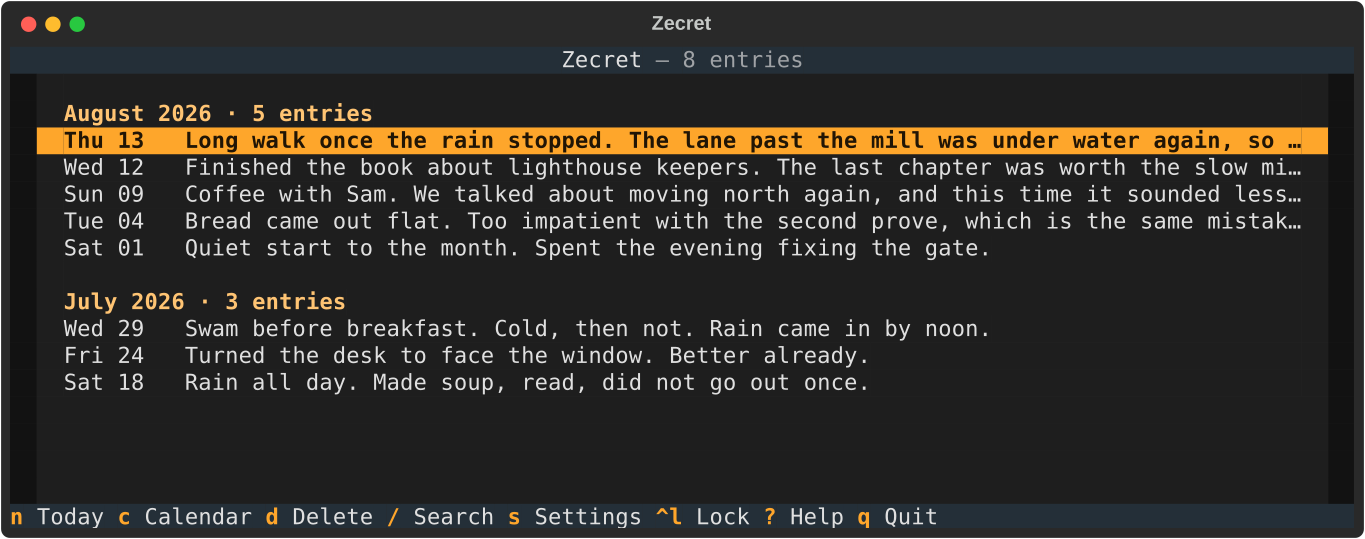
- 📅 One entry a day — each day is a page, named by its date; come back and it is the same page
- 🗓️ Grouped by month — the diary reads as months, each headed with how much of it you wrote
- 🔐 Encrypted at rest — Argon2id key derivation, AES-256-GCM per entry
- ✍️ Keyboard-driven — a fast Textual TUI, no mouse required
- 🔎 Instant search — live filtering across everything you have written
- 📄 One portable file — back it up by copying it; it is useless without your password
- 🌗 Light and dark — eight themes, picked in settings and remembered
- 🔒 Locks itself — walks away when you do, and asks for your password again
- 🚫 Offline by design — no networking of any kind
Install
uv tool install zecret
zecret
That is the whole of it: uv fetches a
suitable Python along with the program, so nothing depends on what your
system happens to ship. If you would rather use what you already have,
pipx install zecret and pip install zecret both work on Python 3.13 or
newer.
Your diary lives at ~/.zecret/diary.enc by default. Point somewhere else
with --path /some/where.enc or the ZECRET_DIARY_PATH environment
variable — handy for keeping separate diaries, or trying it out without
touching your real one.
On first launch there is no diary yet, so Zecret asks you to choose a master password and creates one. Every launch after that asks for that password to unlock it.
[!WARNING] There is no password recovery, by design. Nobody — including you — can open the file without the password. Choose something you will not lose.
Using it
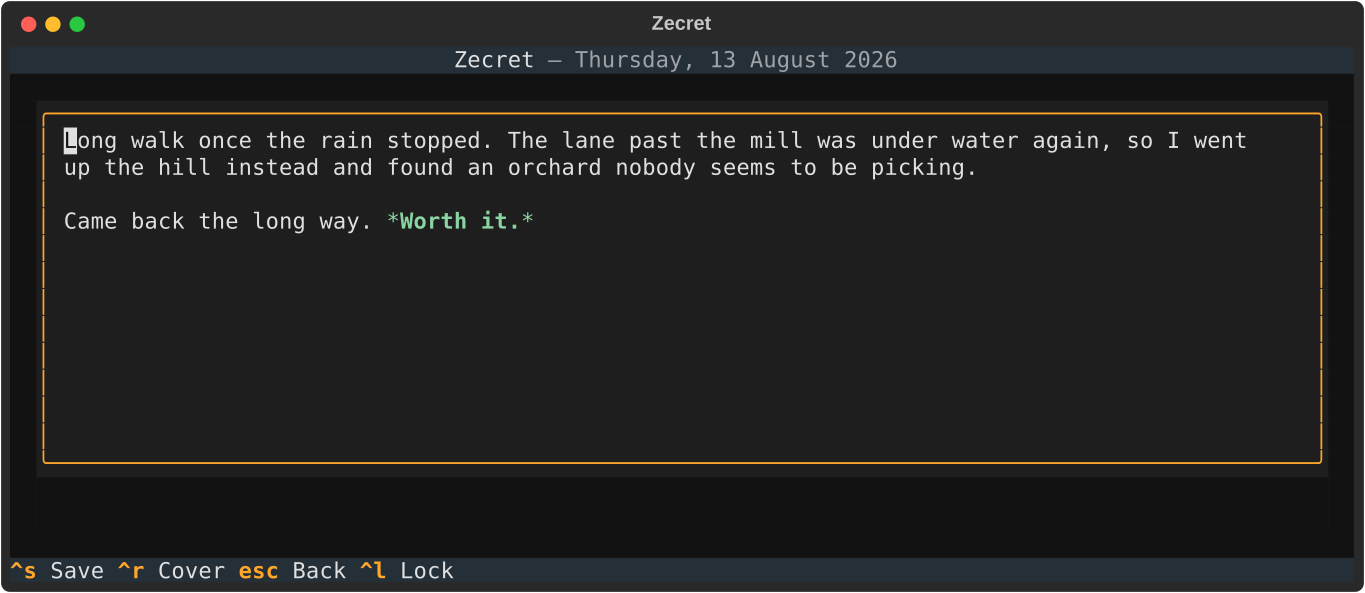
Press n to write about today, ctrl+s to save. A day holds one entry, so pressing n again later opens what you already wrote rather than starting a second page — the evening simply continues the morning. Every save re-writes the diary file atomically, so there is no draft state to lose track of.
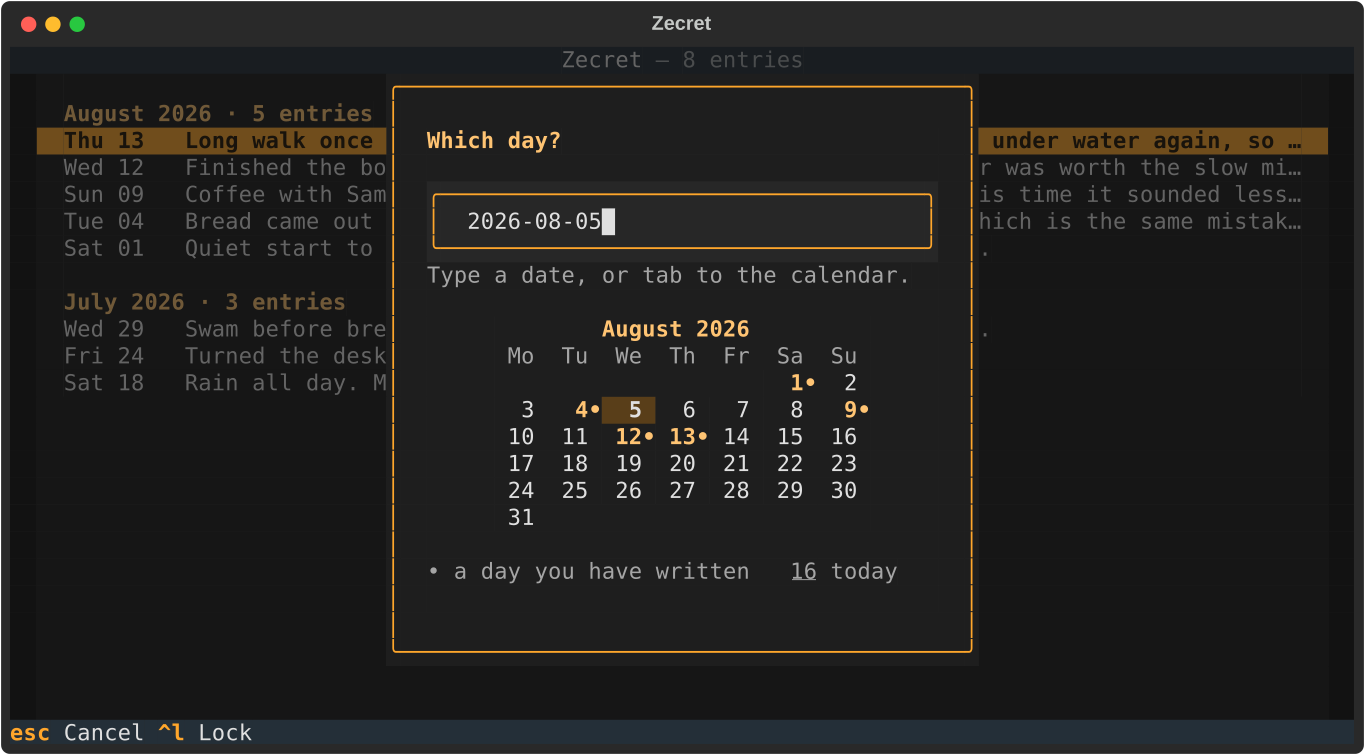
Missed a day? Press a and type the date. Anything up to today is fair game; days that have not happened yet are refused.
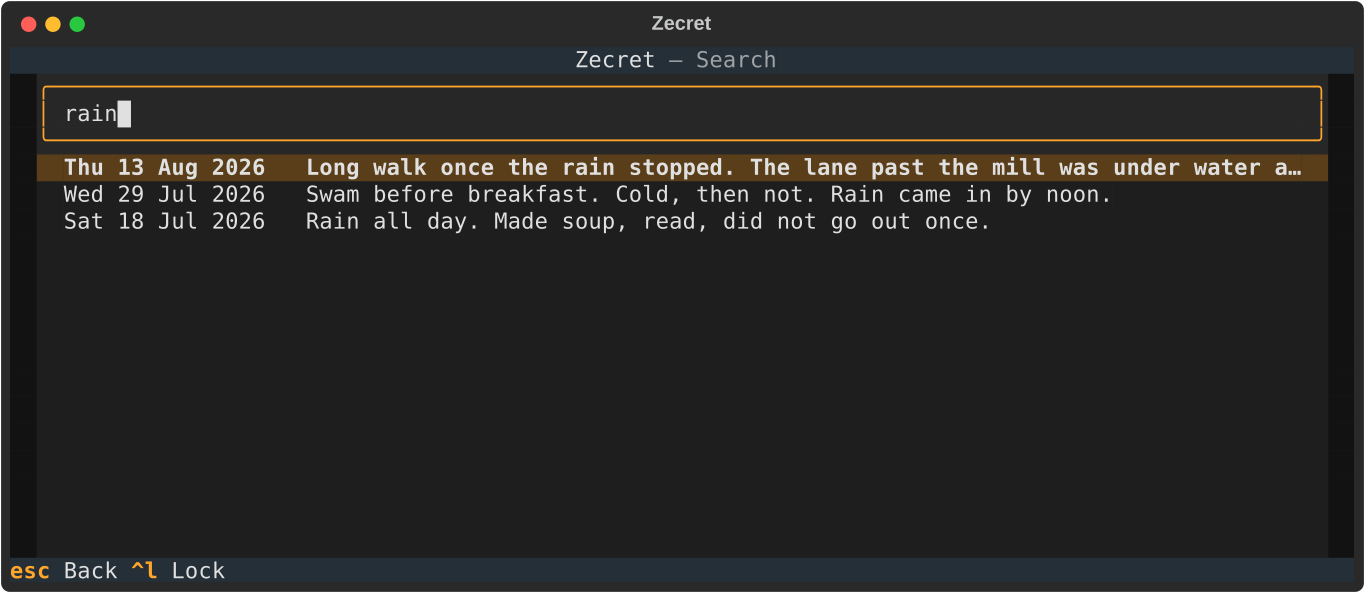
Press / to search. Your entries are already decrypted in memory for the session, so filtering is instant and nothing touches the disk.
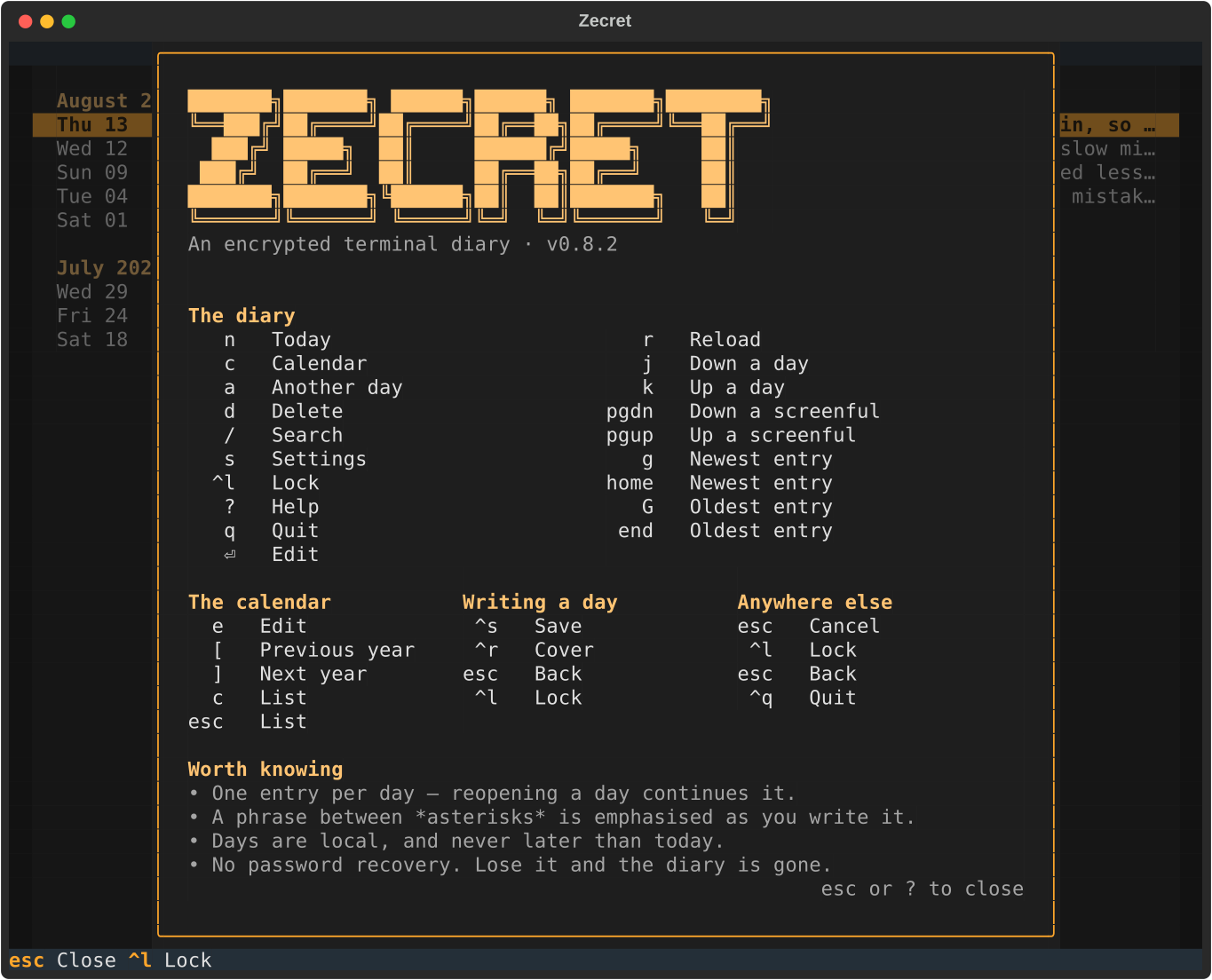
Press ? for every key in one popup, and s for settings
— where you pick a theme, choose how long the diary waits before locking
itself, and change your master password. Those preferences are kept in
~/.zecret/config.json, the one file Zecret writes unencrypted; it holds
your settings and nothing about what you wrote.
Zecret locks itself after fifteen minutes without a keystroke, and asks for your password again — press L to do it yourself on the way out of the room. A half-written entry holds the lock off rather than being thrown away by a timer. Change the wait, or turn it off, in settings.
Keys
| Key | Where | Does |
|---|---|---|
| n | entry list | Write about today |
| a | entry list | Write about another day (asks which) |
| enter | entry list | Open the selected day |
| d | entry list | Delete the selected day's entry (asks first) |
| r | entry list | Re-read the file, picking up another Zecret's writing |
| / | entry list | Search |
| s | entry list | Settings: theme, locking, master password |
| L | entry list | Lock the diary without quitting |
| ? | entry list | Help — every key, on one page |
| q | entry list | Quit |
| ctrl+s | editor | Save and return |
| esc | anywhere | Back (asks first if you have unsaved edits) |
Getting around a long diary: j/k or the arrow keys move a day at a time, g/G (or home/end) jump to the newest and oldest entries, and PgUp/PgDn move a screenful. These stay out of the bar at the bottom, which only has room for so much — ? lists everything.
How it works
- Key derivation — Argon2id (
time_cost=3,memory_cost=64 MiB,parallelism=4, roughly OWASP interactive settings), with a random 16-byte salt generated per diary and stored in the file header. Your password is never stored; the derived key never touches disk. - Encryption — AES-256-GCM with a fresh random nonce for every encryption. Each day's entry is encrypted independently, so editing one day never re-encrypts the others. Only the dates are visible in the file; every word you write is inside the ciphertext.
- Integrity — tampering with a stored entry, or a wrong password, fails the AEAD authentication check and is reported as an error, never as an empty or partial diary. The header carries an encrypted verifier, so this holds even for a diary with no entries yet.
- Durability — saves are atomic (temp file →
fsync→os.replace), so an interrupted save can never leave a half-written diary. Creating a diary instead claims the path withO_EXCL, so two first runs racing each other cannot end with one written over the other; a creation that fails removes what it started. The file is created0600.
Plaintext is never written to disk — not as temp files, not as logs, not for crash recovery.
Development
git clone https://github.com/kfurtak1024/zecret.git
cd zecret
uv sync          # dev tools included (PEP 735 dependency group)
uv run zecret    # run it from the checkout
uv run pytest
uv run ruff check . && uv run ruff format .
uv run mypy
The screenshots above are generated, not taken by hand — regenerate them after any change that alters what a screen looks like:
uv run python tools/screenshots.py # needs librsvg or inkscape
CI runs those same checks on every push and pull request. uv.lock is
committed and CI installs from it, so regenerate and commit it whenever
pyproject.toml changes.
Zecret needs Python 3.13 or newer. Development and CI both run on 3.13 —
the floor, pinned in .python-version — so that a mistake only a newer
interpreter would forgive shows up rather than reaching a user. Newer
versions are expected to work and 3.14 passes the suite, but 3.13 is what
every push is checked against. uv installs a suitable interpreter for you
regardless of what your system ships.
The layering is strict and worth preserving: crypto.py knows nothing
about entries or files, models.py knows nothing about encryption,
storage.py is the only module that touches the filesystem, and screens
reach the diary only through the app. See CLAUDE.md for the
full architecture and the security requirements the test suite enforces.
License
MIT.
1 maintainer

Metadata
1 maintainer
Release files for zecret 0.1.0
For a detailed explanation of source distributions (sdists) and built distributions (wheels), please see the package formats documentation.
Source distribution (sdist)
| File | Size | Uploaded | |
|---|---|---|---|
| zecret-0.1.0.tar.gz | 1.3 MB | Details |
Built distribution (wheel)
| File | Interpreter | ABI | Platform | Reset |
|---|---|---|---|---|
| zecret-0.1.0-py3-none-any.whl | Python 3 | none | any | Details |
Total release size: 1.4 MB
Release files / zecret-0.1.0.tar.gz
| Download URL | zecret-0.1.0.tar.gz |
|---|---|
| Size | 1.3 MB |
| Tags | Source |
|
SHA-256 checksum How to use checksums |
6f995f90172796248927df7e7fdf9dbe49fe248c187421ee8275b3947b7be909
|
|
BLAKE2b-256 checksum How to use checksums |
bc528c3dc76868309542570b20e5dae413f946ba89a8ab059d16d80b7696bb41
|
| Upload date | |
|
Uploaded using Trusted Publishing? What is trusted publishing? |
Yes |
| Uploaded via |
twine/7.0.0 CPython/3.13.14
|
Provenance
Provenance describes where a file came from. On PyPI, provenance is shared via attestations, which provide a verifiable record of the build or publishing details. View details, limitations and caveats.


PyPI Publish Attestation
PyPI verified that this artifact, at this checksum, originated from the publisher listed below.
Signed by GitHub Actions, verified by PyPI on Aug 17, 2026.
Transparency logRelease files / zecret-0.1.0-py3-none-any.whl
| Download URL | zecret-0.1.0-py3-none-any.whl |
|---|---|
| Size | 56.7 kB |
| Tags | Python 3 |
|
SHA-256 checksum How to use checksums |
6f5bbcc04f3efbd5974adb5fd1cfc68cd72303b337082d6aa0a945bd8b13a601
|
|
BLAKE2b-256 checksum How to use checksums |
d7cf497c1080dcceb5ed2b70d7d32a739da68ce20d80b403a2b886b1955e0cd1
|
| Upload date | |
|
Uploaded using Trusted Publishing? What is trusted publishing? |
Yes |
| Uploaded via |
twine/7.0.0 CPython/3.13.14
|
Provenance
Provenance describes where a file came from. On PyPI, provenance is shared via attestations, which provide a verifiable record of the build or publishing details. View details, limitations and caveats.
PyPI Publish Attestation
PyPI verified that this artifact, at this checksum, originated from the publisher listed below.
Signed by GitHub Actions, verified by PyPI on Aug 17, 2026.
Transparency log













