

Python Rules Engine
ZEN Engine is a cross-platform, Open-Source Business Rules Engine (BRE). It is written in Rust and provides native bindings for NodeJS, Python and Go. ZEN Engine allows to load and execute JSON Decision Model (JDM) from JSON files.
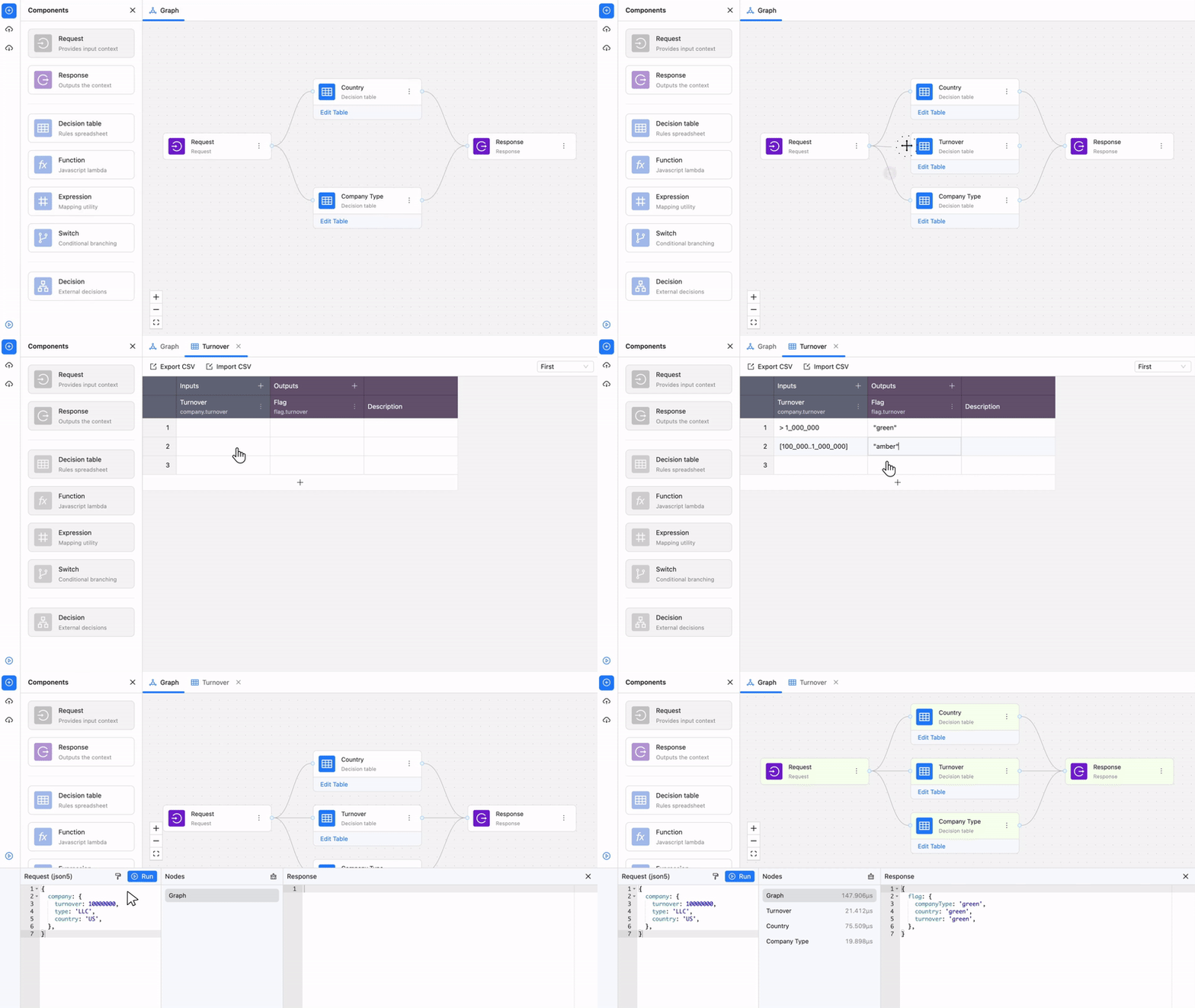
An open-source React editor is available on our JDM Editor repo.
Usage
ZEN Engine is built as embeddable BRE for your Rust, NodeJS, Python or Go applications. It parses JDM from JSON content. It is up to you to obtain the JSON content, e.g. from file system, database or service call.
Installation
pip install zen-engine
Usage
To execute a simple decision you can use the code below.
import zen

# Example filesystem content, it is up to you how you obtain content
with open("./jdm_graph.json", "r") as f:
  content = f.read()

engine = zen.ZenEngine()

decision = engine.create_decision(content)
result = decision.evaluate({"input": 15})
Loaders
For more advanced use cases where you want to load multiple decisions and utilise graphs you can build loaders.
import zen

def loader(key):
    with open("./jdm_directory/" + key, "r") as f:
        return f.read()

engine = zen.ZenEngine({"loader": loader})
result = engine.evaluate("jdm_graph1.json", {"input": 5})
When engine.evaluate is invoked it will call loader and pass a key expecting a content of the JDM decision graph.
In the case above we will assume file jdm_directory/jdm_graph1.json exists.
Similar to this example you can also utilise loader to load from different places, for example from REST API, from S3, Database, etc.
Supported Platforms
List of platforms where Zen Engine is natively available:
- NodeJS - GitHub | Documentation | npmjs
- Python - GitHub | Documentation | pypi
- Go - GitHub | Documentation
- Rust (Core) - GitHub | Documentation | crates.io
For a complete Business Rules Management Systems (BRMS) solution:
JSON Decision Model (JDM)
GoRules JDM (JSON Decision Model) is a modeling framework designed to streamline the representation and implementation of decision models.
Understanding GoRules JDM
At its core, GoRules JDM revolves around the concept of decision models as interconnected graphs stored in JSON format. These graphs capture the intricate relationships between various decision points, conditions, and outcomes in a GoRules Zen-Engine.
Graphs are made by linking nodes with edges, which act like pathways for moving information from one node to another, usually from the left to the right.
The Input node serves as an entry for all data relevant to the context, while the Output nodes produce the result of decision-making process. The progression of data follows a path from the Input Node to the Output Node, traversing all interconnected nodes in between. As the data flows through this network, it undergoes evaluation at each node, and connections determine where the data is passed along the graph.
To see JDM Graph in action you can use Free Online Editor with built in Simulator.
There are 5 main node types in addition to a graph Input Node (Request) and Output Node (Response):
- Decision Table Node
- Switch Node
- Function Node
- Expression Node
- Decision Node
Decision Table Node
Overview
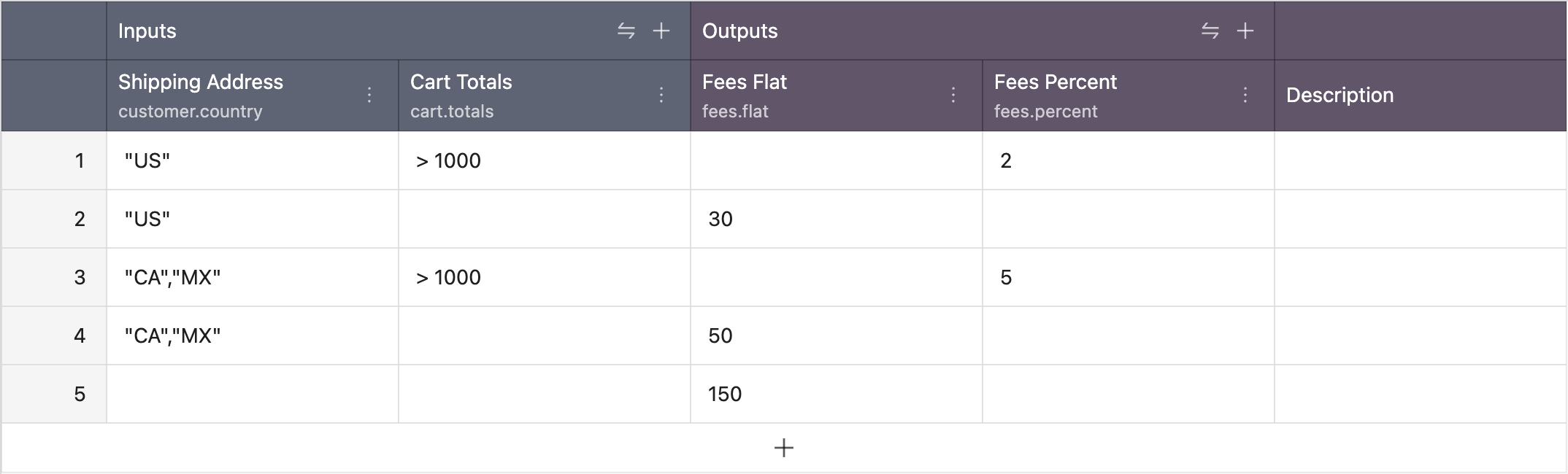
Tables provide a structured representation of decision-making processes, allowing developers and business users to express complex rules in a clear and concise manner.
Structure
At the core of the Decision Table is its schema, defining the structure with inputs and outputs. Inputs encompass business-friendly expressions using the ZEN Expression Language, accommodating a range of conditions such as equality, numeric comparisons, boolean values, date time functions, array functions and more. The schema's outputs dictate the form of results generated by the Decision Table. Inputs and outputs are expressed through a user-friendly interface, often resembling a spreadsheet. This facilitates easy modification and addition of rules, enabling business users to contribute to decision logic without delving into intricate code.
Evaluation Process
Decision Tables are evaluated row by row, from top to bottom, adhering to a specified hit policy.
Single row is evaluated via Inputs columns, from left to right. Each input column represents AND operator. If cell is empty that column is evaluated truthfully, independently of the value.
If a single cell within a row fails (due to error, or otherwise), the row is skipped.
HitPolicy
The hit policy determines the outcome calculation based on matching rules.
The result of the evaluation is:
- an object if the hit policy of the decision table is
firstand a rule matched. The structure is defined by the output fields. Qualified field names with a dot (.) inside lead to nested objects. null/undefinedif no rule matched infirsthit policy- an array of objects if the hit policy of the decision table is
collect(one array item for each matching rule) or empty array if no rules match
Inputs
In the assessment of rules or rows, input columns embody the AND operator. The values typically consist of (qualified) names, such as customer.country or customer.age.
There are two types of evaluation of inputs, Unary and Expression.
Unary Evaluation
Unary evaluation is usually used when we would like to compare single fields from incoming context separately, for example customer.country and cart.total . It is activated when a column has field defined in its schema.
Example
For the input:
{
  "customer": {
    "country": "US"
  },
  "cart": {
    "total": 1500
  }
}
This evaluation translates to
IF customer.country == 'US' AND cart.total > 1000 THEN {"fees": {"percent": 2}}
ELSE IF customer.country == 'US' THEN {"fees": {"flat": 30}}
ELSE IF customer.country == 'CA' OR customer.country == 'MX' THEN {"fees": {"flat": 50}}
ELSE {"fees": {"flat": 150}}
List shows basic example of the unary tests in the Input Fields:
| Input entry | Input Expression |
|---|---|
| "A" | the field equals "A" |
| "A", "B" | the field is either "A" or "B" |
| 36 | the numeric value equals 36 |
| < 36 | a value less than 36 |
| > 36 | a value greater than 36 |
| [20..39] | a value between 20 and 39 (inclusive) |
| 20,39 | a value either 20 or 39 |
| <20, >39 | a value either less than 20 or greater than 39 |
| true | the boolean value true |
| false | the boolean value false |
| any value, even null/undefined | |
| null | the value null or undefined |
Note: For the full list please visit ZEN Expression Language.
Expression Evaluation
Expression evaluation is used when we would like to create more complex evaluation logic inside single cell. It allows us to compare multiple fields from the incoming context inside same cell.
It can be used by providing an empty Selector (field) inside column configuration.
Example
For the input:
{
  "transaction": {
    "country": "US",
    "createdAt": "2023-11-20T19:00:25Z",
    "amount": 10000
  }
}
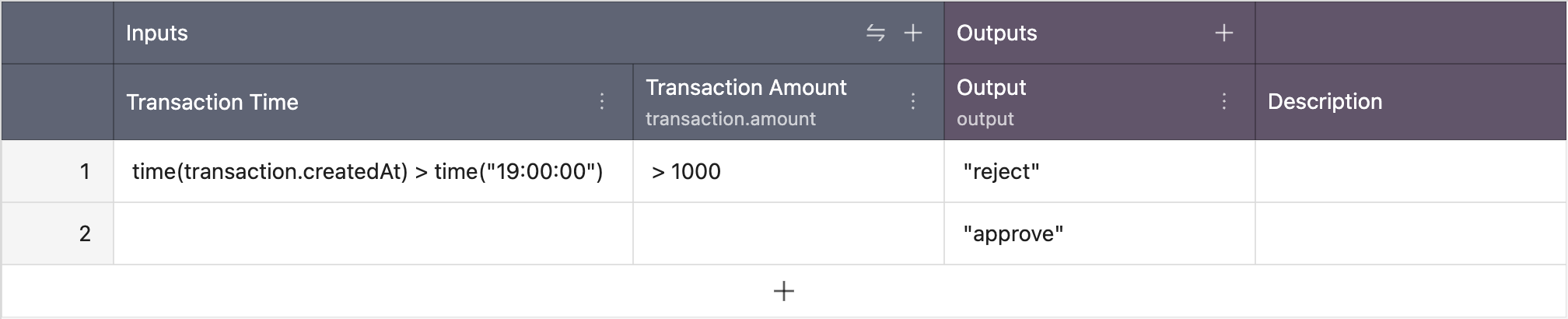
IF time(transaction.createdAt) > time("17:00:00") AND transaction.amount > 1000 THEN {"status": "reject"}
ELSE {"status": "approve"}
Note: For the full list please visit ZEN Expression Language.
Outputs
Output columns serve as the blueprint for the data that the decision table will generate when the conditions are met during evaluation.
When a row in the decision table satisfies its specified conditions, the output columns determine the nature and structure of the information that will be returned. Each output column represents a distinct field, and the collective set of these fields forms the output or result associated with the validated row. This mechanism allows decision tables to precisely define and control the data output.
Example

And the result would be:
{
  "flatProperty": "A",
  "output": {
    "nested": {
      "property": "B"
    },
    "property": 36
  }
}
Switch Node (NEW)
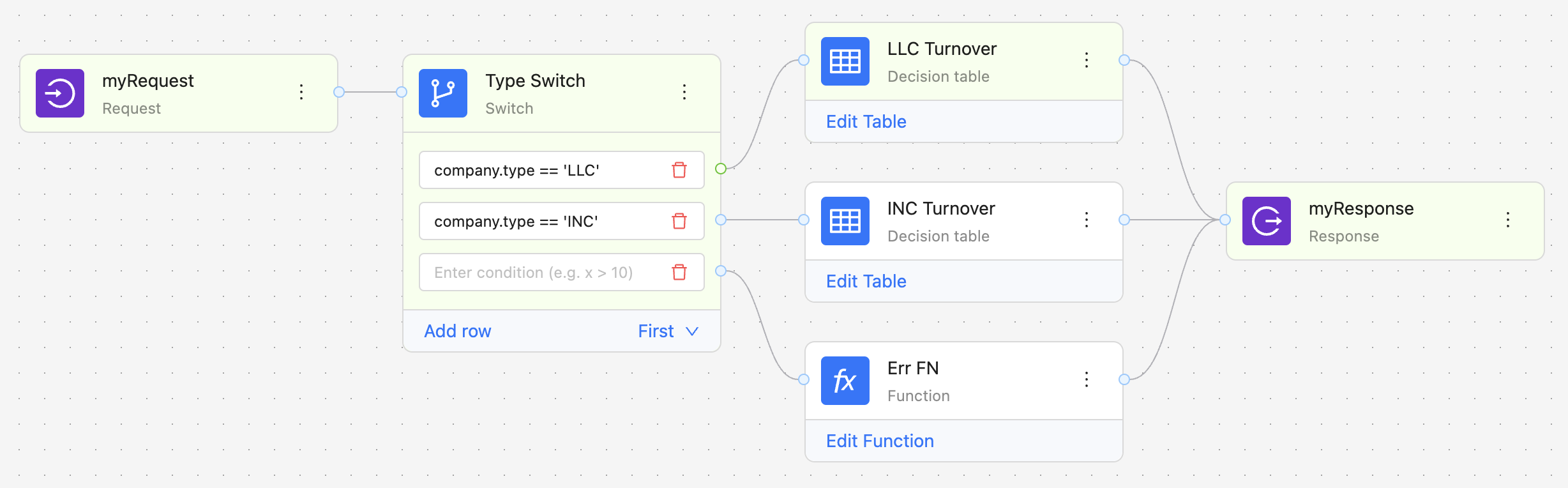
The Switch node in GoRules JDM introduces a dynamic branching mechanism to decision models, enabling the graph to diverge based on conditions.
Conditions are written in a Zen Expression Language.
By incorporating the Switch node, decision models become more flexible and context-aware. This capability is particularly valuable in scenarios where diverse decision logic is required based on varying inputs. The Switch node efficiently manages branching within the graph, enhancing the overall complexity and realism of decision models in GoRules JDM, making it a pivotal component for crafting intelligent and adaptive systems.
The Switch node preserves the incoming data without modification; it forwards the entire context to the output branch(es).
HitPolicy
There are two HitPolicy options for the switch node, first and collect.
In the context of a first hit policy, the graph branches to the initial matching condition, analogous to the behavior observed in a table. Conversely, under a collect hit policy, the graph extends to all branches where conditions hold true, allowing branching to multiple paths.
Note: If there are multiple edges from the same condition, there is no guaranteed order of execution.
Available from:
- Python 0.16.0
- NodeJS 0.13.0
- Rust 0.16.0
- Go 0.1.0
Functions Node
Function nodes are JavaScript snippets that allow for quick and easy parsing, re-mapping or otherwise modifying the data using JavaScript. Inputs of the node are provided as function's arguments. Functions are executed on top of QuickJS Engine that is bundled into the ZEN Engine.
Function timeout is set to a 50ms.
const handler = (input, {dayjs, Big}) => {
    return {
        ...input,
        someField: 'hello'
    };
};
There are two built in libraries:
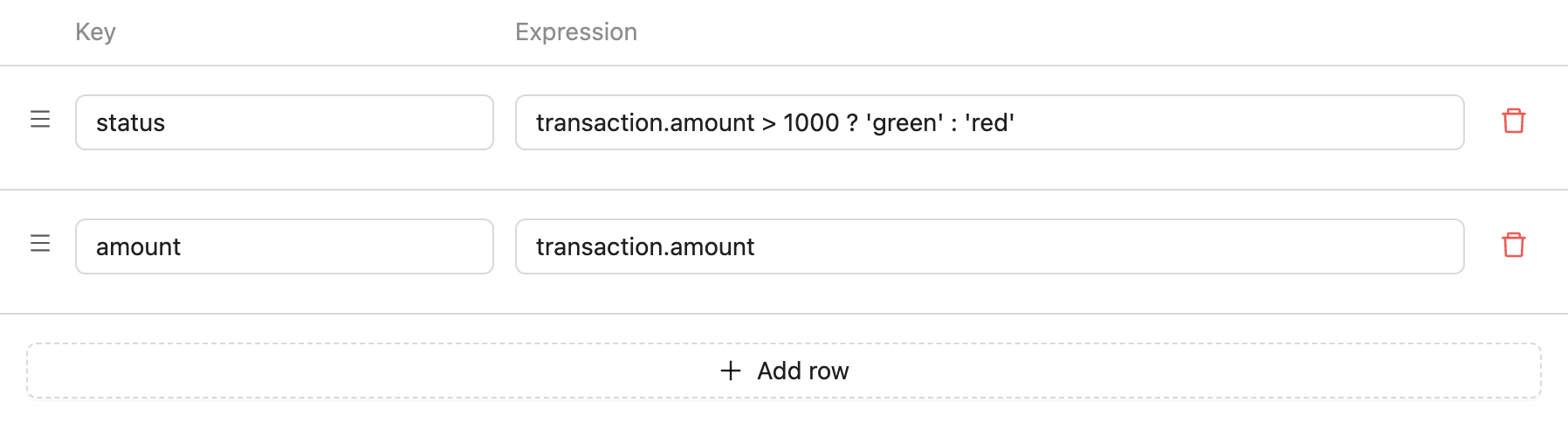
Expression Node
The Expression node serves as a tool for transforming input objects into alternative objects using the Zen Expression Language. When specifying the output properties, each property requires a separate row. These rows are defined by two fields:
- Key - qualified name of the output property
- Value - value expressed through the Zen Expression Language
Note: Any errors within the Expression node will bring the graph to a halt.
Decision Node
The "Decision" node is designed to extend the capabilities of decision models. Its function is to invoke and reuse other decision models during execution.
By incorporating the "Decision" node, developers can modularize decision logic, promoting reusability and maintainability in complex systems.
Support matrix
| Arch | Rust | NodeJS | Python | Go |
|---|---|---|---|---|
| linux-x64-gnu | :heavy_check_mark: | :heavy_check_mark: | :heavy_check_mark: | :heavy_check_mark: |
| linux-arm64-gnu | :heavy_check_mark: | :heavy_check_mark: | :heavy_check_mark: | :heavy_check_mark: |
| darwin-x64 | :heavy_check_mark: | :heavy_check_mark: | :heavy_check_mark: | :heavy_check_mark: |
| darwin-arm64 | :heavy_check_mark: | :heavy_check_mark: | :heavy_check_mark: | :heavy_check_mark: |
| win32-x64-msvc | :heavy_check_mark: | :heavy_check_mark: | :heavy_check_mark: | :heavy_check_mark: |
We do not support linux-musl currently.
Contribution
JDM standard is growing and we need to keep tight control over its development and roadmap as there are number of companies that are using GoRules Zen-Engine and GoRules BRMS. For this reason we can't accept any code contributions at this moment, apart from help with documentation and additional tests.
2 maintainers


Download files
Download the file for your platform. If you're not sure which to choose, learn more about installing packages.
Source Distribution
Built Distributions
Filter files by name, interpreter, ABI, and platform.
If you're not sure about the file name format, learn more about wheel file names.
Copy a direct link to the current filters
File details
Details for the file zen_engine-2.0.0.tar.gz.
File metadata
- Download URL: zen_engine-2.0.0.tar.gz
- Upload date:
- Size: 588.8 kB
- Tags: Source
- Uploaded using Trusted Publishing? No
- Uploaded via:
maturin/1.14.1
File hashes
| Algorithm | Hash digest | |
|---|---|---|
| SHA256 |
a70c9db9f60ff34cb6803f284598d24b26a66e22e3c8c320c6773c44fb5c1cb2
|
|
| MD5 |
18924e13a40912c4a524de69fdf412b7
|
|
| BLAKE2b-256 |
b3014d084d8d7d7c26c06835aed2744188fd1d53b6dae7918bb5deeabe57ea59
|
File details
Details for the file zen_engine-2.0.0-cp38-abi3-win_amd64.whl.
File metadata
- Download URL: zen_engine-2.0.0-cp38-abi3-win_amd64.whl
- Upload date:
- Size: 10.6 MB
- Tags: CPython 3.8+, Windows x86-64
- Uploaded using Trusted Publishing? No
- Uploaded via:
maturin/1.14.1
File hashes
| Algorithm | Hash digest | |
|---|---|---|
| SHA256 |
3b2e61edb6fba839cfaae43c9e4d88d6c9912282b1902ba60ba67a13c6ccccd7
|
|
| MD5 |
6c830bb2d7bb623588401d426f36afe7
|
|
| BLAKE2b-256 |
e0588b237c7fbd9ff4c5b73e0b12b58df06f2999ae15ebb23d31999572c62e29
|
File details
Details for the file zen_engine-2.0.0-cp38-abi3-manylinux_2_28_x86_64.whl.
File metadata
- Download URL: zen_engine-2.0.0-cp38-abi3-manylinux_2_28_x86_64.whl
- Upload date:
- Size: 10.3 MB
- Tags: CPython 3.8+, manylinux: glibc 2.28+ x86-64
- Uploaded using Trusted Publishing? No
- Uploaded via:
maturin/1.14.1
File hashes
| Algorithm | Hash digest | |
|---|---|---|
| SHA256 |
35ed024be55ab0b31fdb86e51a38598863e6106495adf46b5778d9badbdee74b
|
|
| MD5 |
39ed1da0ad5209353d952536b89ff074
|
|
| BLAKE2b-256 |
560861c2651f0896bf94223aad6cc7f8eba4d63d5f23fe9d44688be801862d8c
|
File details
Details for the file zen_engine-2.0.0-cp38-abi3-manylinux_2_28_aarch64.whl.
File metadata
- Download URL: zen_engine-2.0.0-cp38-abi3-manylinux_2_28_aarch64.whl
- Upload date:
- Size: 9.5 MB
- Tags: CPython 3.8+, manylinux: glibc 2.28+ ARM64
- Uploaded using Trusted Publishing? No
- Uploaded via:
maturin/1.14.1
File hashes
| Algorithm | Hash digest | |
|---|---|---|
| SHA256 |
c828aac9b6b49e1359874ec86dc5c66efa0480105b5fa9e8af54faca64389d34
|
|
| MD5 |
a06db444e547f16d706deee0b0bbe500
|
|
| BLAKE2b-256 |
ae6b4b3ac3a54b2a2b771925dabfd29444fbb5a9b7af545c87ba57c5762ca749
|
File details
Details for the file zen_engine-2.0.0-cp38-abi3-macosx_11_0_arm64.whl.
File metadata
- Download URL: zen_engine-2.0.0-cp38-abi3-macosx_11_0_arm64.whl
- Upload date:
- Size: 9.2 MB
- Tags: CPython 3.8+, macOS 11.0+ ARM64
- Uploaded using Trusted Publishing? No
- Uploaded via:
maturin/1.14.1
File hashes
| Algorithm | Hash digest | |
|---|---|---|
| SHA256 |
c5842638ec467d0dd4b451d82ba1a36eb9da45f9bd2162e6f201ffd24fe135a1
|
|
| MD5 |
3d08e0c1ea0e6fc13660a856671ff85d
|
|
| BLAKE2b-256 |
d9fb6ea54ffcc614161aaafcf5f71093d66d3fb2638867d5628928e4fe055950
|
File details
Details for the file zen_engine-2.0.0-cp38-abi3-macosx_10_12_x86_64.whl.
File metadata
- Download URL: zen_engine-2.0.0-cp38-abi3-macosx_10_12_x86_64.whl
- Upload date:
- Size: 10.0 MB
- Tags: CPython 3.8+, macOS 10.12+ x86-64
- Uploaded using Trusted Publishing? No
- Uploaded via:
maturin/1.14.1
File hashes
| Algorithm | Hash digest | |
|---|---|---|
| SHA256 |
e9bf6dce887e9807c0526efad54a8fd37d644c9d2534174cc67067327e7b6bc0
|
|
| MD5 |
9bc5ce2c5c20bbe2a605ac965e3e79ab
|
|
| BLAKE2b-256 |
9157cf59248c5c902ea80f44712568cca35e56868713aa25f6d49e65ccae2a9f
|














