
A 3D simplicial complex visualizer

Project description
Zen Sight
A (work in progress) simplicial complex visualization python package made with React and a Python backend.
Features
- Interactive Visualizations: 2D and 3D simplicial complex rendering using react-force-graph and Three.js
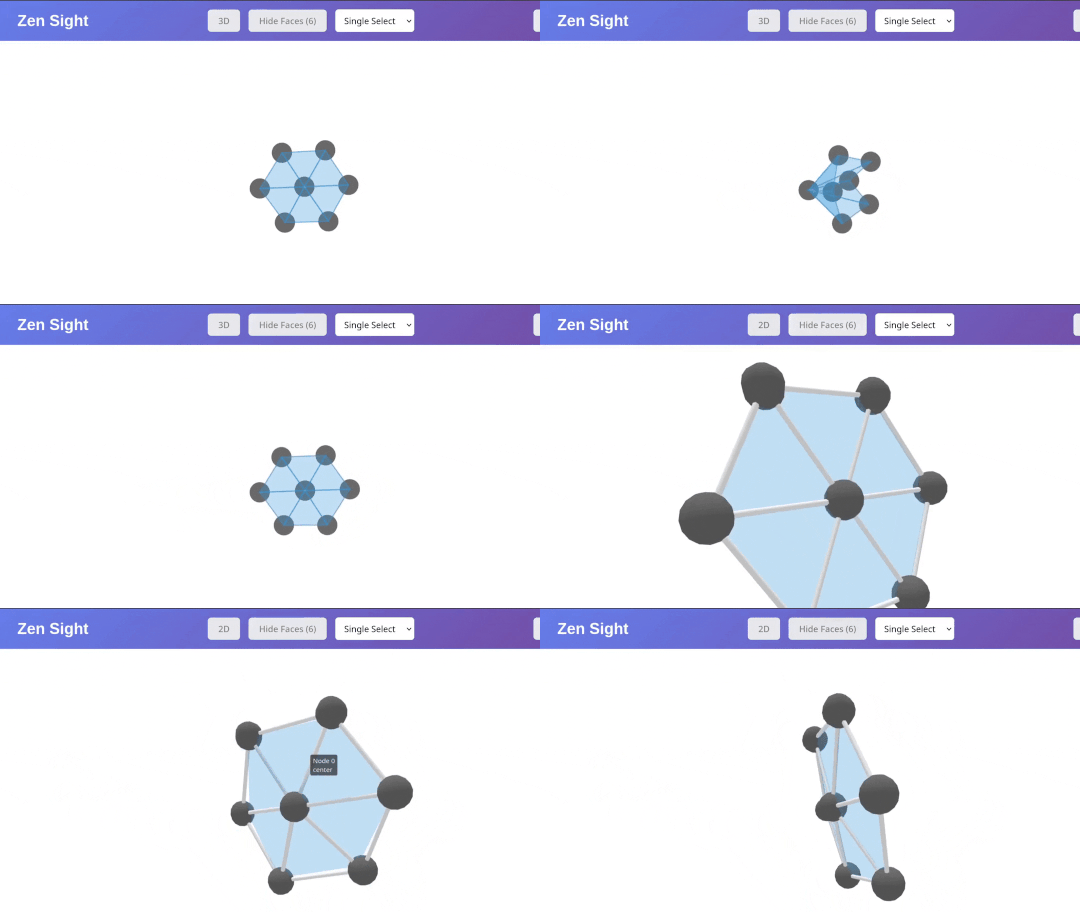
- Selection Functionality: Single, multi, and lasso selection tools for nodes
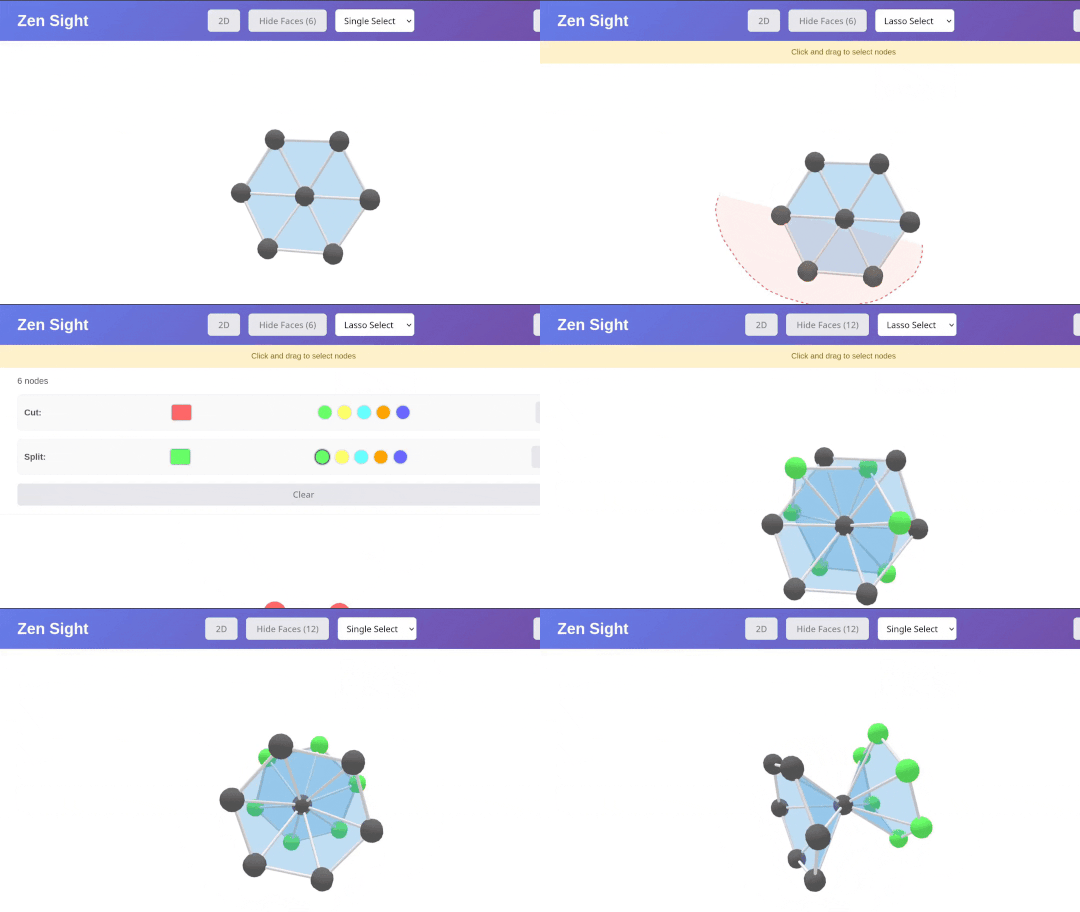
- Graph Operations: Node cutting and duplication.
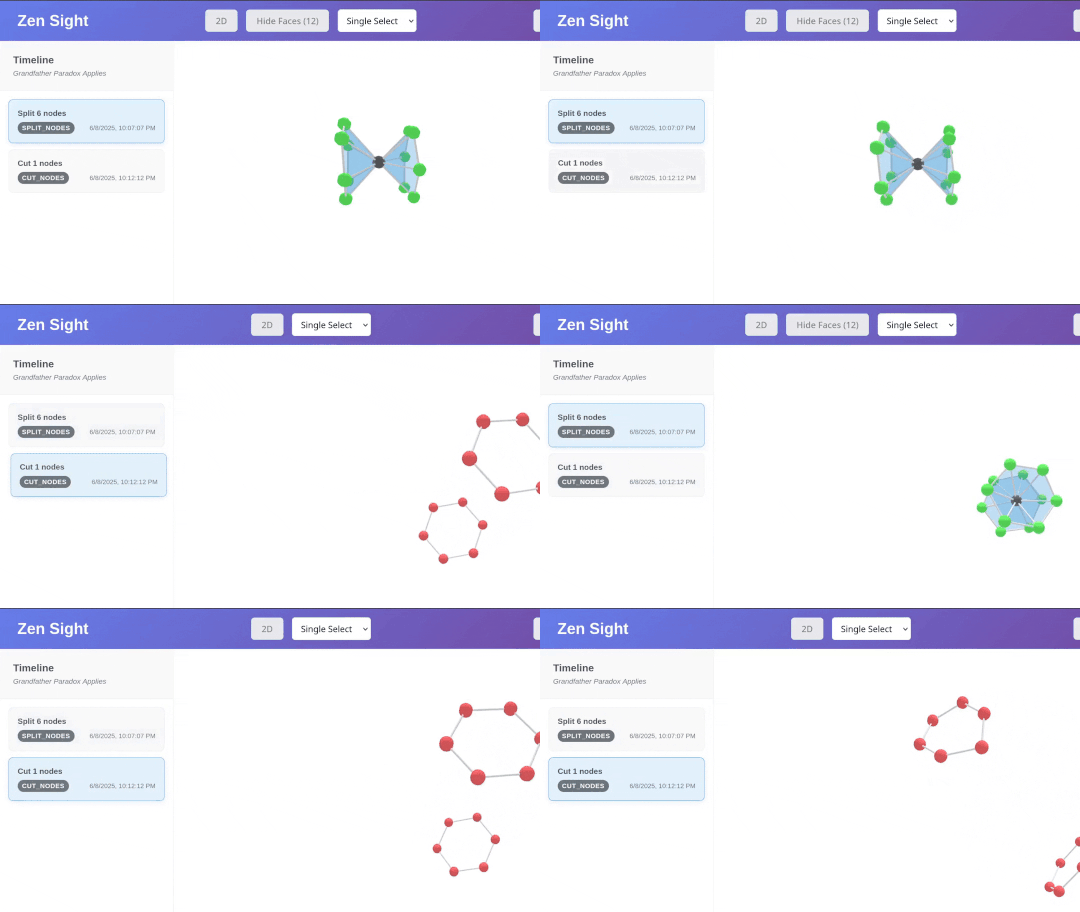
- Timeline Replay: Replay and review graph operations with the timeline
- Integration: Built-in adapters for NetworkX and Zen Mapper
Installation
pip install zen-sight
Quick(ish) Start
Creating Simplicial Complexes
from zen_sight import Sight


def create_simplicial_complex():
    """Create a graph with 2-simplices"""

    # nodes in a hexagonal pattern
    nodes = []
    positions = [
        (0, 0),
        (1, 0),
        (0.5, 0.87),
        (-0.5, 0.87),
        (-1, 0),
        (-0.5, -0.87),
        (0.5, -0.87),
    ]

    for i, (x, y) in enumerate(positions):
        nodes.append(
            {
                "id": i,
                "name": f"Node {i} <br> {'center' if i == 0 else 'outer'}",
                "x": x * 50,
                "y": y * 50,
                "z": 0,
                "group": "center" if i == 0 else "outer",
            }
        )

    links = []
    # connect center to all others
    for i in range(1, 7):
        links.append({"source": 0, "target": i})

    # connect outer nodes
    for i in range(1, 7):
        next_i = (i % 6) + 1
        links.append({"source": i, "target": next_i})

    faces = [
        (0, 1, 2),  # center with each adjacent pair in outer ring
        (0, 2, 3),
        (0, 3, 4),
        (0, 4, 5),
        (0, 5, 6),
        (0, 6, 1),
    ]

    return nodes, links, faces


def main():
    sight = Sight()

    nodes, links, faces = create_simplicial_complex()

    sight.set_nodes(nodes)
    sight.set_links(links)
    sight.set_faces(faces)

    sight.set_config(
        {
            "nodeAutoColorBy": "group",
            "nodeRelSize": 4,
            "nodeLabel": "name",
            "nodeOpacity": 1,
            "linkColor": "#000000",
            "linkWidth": 2,
            "linkOpacity": 1,
            # Simplex appearance: alpha is for 2D version and will be ignored
            # in favor of faceOpacity for 3D
            "faceFillColor": "rgba(52, 152, 219, 0.3)",
            "faceStrokeColor": "rgba(52, 152, 219, 0.5)",
            "faceStrokeWidth": 1,
            "faceOpacity": 0.3,
        }
    )
    sight.show()


if __name__ == "__main__":
    main()
Zen Mapper Integration
import zen_mapper as zm
from zen_sight.adapters import vis_zen_mapper
import numpy as np
from sklearn.decomposition import PCA
from sklearn.cluster import DBSCAN


def circle(n=100):
    theta = np.linspace(0, 2 * np.pi, n)
    x = np.cos(theta)
    y = np.sin(theta)
    return np.c_[x, y]

def main():
    data = circle()
    proj = PCA(n_components=1).fit_transform(data)
    result = zm.mapper(
        data=data,
        cover_scheme=zm.Width_Balanced_Cover(percent_overlap=0.2, n_elements=6),
        projection=proj,
        dim=1,
        clusterer=zm.sk_learn(DBSCAN(eps=0.2)),
    )

    vis_zen_mapper(result)

if __name__ == "__main__":
    main()
The Sight Class:
Currently, zen-sight comes with a Sight Class which acts as the main interface for creating customized visualizations. Sight() comes with a .show() method which will create the app routes and initialize the visualization on port 5050. This is hard-coded currently and needs to be updated...
Here is a breakdown of the datastructure for Sight()
graph TD
    A["<b>Sight</b><br/><i>class</i>"] --> C["<b>nodes</b><br/><i>List[Dict]</i>"]
    A --> D["<b>links</b><br/><i>List[Dict]</i>"]
    A --> E["<b>faces</b><br/><i>List[Dict]</i>"]
    A --> F["<b>config</b><br/><i>Dict</i>"]

    C --> C1["<b>List[Dict]:</b><br/>Node objects with 'id' field<br/>"]

    D --> D1["<b>List[Dict]:</b><br/>Link objects with 'source'<br/>and 'target' fields<br/>Represents graph edges"]

    E --> E1["<b>List[Dict]:</b><br/>Face objects with 'nodes'<br/>field containing 3 node IDs<br/>Represents triangular faces"]

    F --> F1["<b>Dict:</b><br/>react-force-graph config"]


    style A fill:#ffcd00,stroke:#e6b800,stroke-width:4px,color:#0f1419
    style C fill:#ff8cc8,stroke:#1a1f2e,stroke-width:3px,color:#0f1419
    style D fill:#51cf66,stroke:#1a1f2e,stroke-width:3px,color:#0f1419
    style E fill:#ffa94d,stroke:#1a1f2e,stroke-width:3px,color:#0f1419
    style F fill:#74c0fc,stroke:#1a1f2e,stroke-width:3px,color:#0f1419
    style C1 fill:#1a1f2e,stroke:#ff8cc8,stroke-width:2px,color:#f8f9fa
    style D1 fill:#1a1f2e,stroke:#51cf66,stroke-width:2px,color:#f8f9fa
    style E1 fill:#1a1f2e,stroke:#ffa94d,stroke-width:2px,color:#f8f9fa
    style F1 fill:#1a1f2e,stroke:#74c0fc,stroke-width:2px,color:#f8f9fa
- Note: Currently faces is a List[Tuple] made up of 3-tuples of nodes incident with the face
Customization
API Table:
Zen Sight partially acts as a wrapper for react-force-graph-3D. Here is an incomplete table of relevant variables/parameters:
| Property | Type | Default | Description | Category |
|---|---|---|---|---|
| graphData | object | { nodes: [], links: [] } |
Graph data structure | Data Input |
| backgroundColor | string | "#000011" | Background color | Container Layout |
| nodeId | string/func | id |
Node object accessor for unique ID | Node Data |
| nodeVal | number/string/func | val |
Node object accessor for numeric value | Node Data |
| nodeLabel | string/func | name |
Node object accessor for label | Node Styling |
| nodeDesc | string/func | desc |
Node object accessor for description | Node Styling |
| nodeColor | string/func | color |
Node color accessor | Node Styling |
| nodeAutoColorBy | string/func | - | Auto-color nodes by property | Node Styling |
| nodeOpacity | number | 0.75 | Node opacity value | Node Styling |
| nodeRelSize | number | 4 | Ratio of node sphere volume | Node Styling |
| linkSource | string/func | source |
Link object accessor for source | Link Data |
| linkTarget | string/func | target |
Link object accessor for target | Link Data |
| linkLabel | string/func | name |
Link object accessor for label | Link Styling |
| linkDesc | string/func | desc |
Link object accessor for description | Link Styling |
| linkColor | string/func | color |
Link color accessor | Link Styling |
| linkAutoColorBy | string/func | - | Auto-color links by property | Link Styling |
| linkOpacity | number | 0.2 | Link line opacity | Link Styling |
| linkWidth | number/func | 0 | Link line width | Link Styling |
| linkResolution | number | 6 | Link cylinder geometric resolution | Link Styling |
| linkCurvature | number/func | 0 | Link curvature (0=straight, 1=full) | Link Styling |
| linkCurveRotation | number/func | 0 | Link curve rotation in radians | Link Styling |
Future Work
- Patch Bugs, Finalize API, & Organize
- Apply It!
- Implement more adapters (e.g. GHUDI Simplex Trees)
- Include 3-Simplices and allow for simplex collapses
- Include more customization options for faces/tetrahedra
- Implement splitting functionality
- Create a Filtration Visualizer
- Backend can already do this with a bit of work
- Create a Figure-Generation Mode for export
- Could port Zen Sight to also work in VR


Download files
Download the file for your platform. If you're not sure which to choose, learn more about installing packages.
Source Distribution
Built Distribution
Filter files by name, interpreter, ABI, and platform.
If you're not sure about the file name format, learn more about wheel file names.
Copy a direct link to the current filters
File details
Details for the file zen_sight-0.2.0.tar.gz.
File metadata
- Download URL: zen_sight-0.2.0.tar.gz
- Upload date:
- Size: 457.3 kB
- Tags: Source
- Uploaded using Trusted Publishing? Yes
- Uploaded via: twine/6.1.0 CPython/3.12.9
File hashes
| Algorithm | Hash digest | |
|---|---|---|
| SHA256 |
5975aea8ac6f3f914c7b459d6b86c869a8214469969605ffec63f24d40e22788
|
|
| MD5 |
ddfa8378579c916de9f68ef32bf75485
|
|
| BLAKE2b-256 |
6fe21fb79c6ace610535f1daf9857318a6809d1aa69eab4062b7b001c79bd101
|
Provenance
The following attestation bundles were made for zen_sight-0.2.0.tar.gz:
Publisher:
python-publish.yml on Jamiller137/zen-sight
-
Statement:
-
Statement type:
https://in-toto.io/Statement/v1 -
Predicate type:
https://docs.pypi.org/attestations/publish/v1 -
Subject name:
zen_sight-0.2.0.tar.gz -
Subject digest:
5975aea8ac6f3f914c7b459d6b86c869a8214469969605ffec63f24d40e22788 - Sigstore transparency entry: 273181830
- Sigstore integration time:
-
Permalink:
Jamiller137/zen-sight@7deb9ebb9c3aed3d056d96d7a01e0b1323303c44 -
Branch / Tag:
refs/tags/v0.2.0 - Owner: https://github.com/Jamiller137
-
Access:
public
-
Token Issuer:
https://token.actions.githubusercontent.com -
Runner Environment:
github-hosted -
Publication workflow:
python-publish.yml@7deb9ebb9c3aed3d056d96d7a01e0b1323303c44 -
Trigger Event:
release
-
Statement type:
File details
Details for the file zen_sight-0.2.0-py3-none-any.whl.
File metadata
- Download URL: zen_sight-0.2.0-py3-none-any.whl
- Upload date:
- Size: 457.0 kB
- Tags: Python 3
- Uploaded using Trusted Publishing? Yes
- Uploaded via: twine/6.1.0 CPython/3.12.9
File hashes
| Algorithm | Hash digest | |
|---|---|---|
| SHA256 |
605a7cb31a3f7620028170bb10e849a93c59de7f8d3b426df0013a4debe063f5
|
|
| MD5 |
763a52978e3678509bb8ab18707a3939
|
|
| BLAKE2b-256 |
4c4bf1ace0f805f527da462d95832b0b16a4d70101104634c521d9286f9fbc0a
|
Provenance
The following attestation bundles were made for zen_sight-0.2.0-py3-none-any.whl:
Publisher:
python-publish.yml on Jamiller137/zen-sight
-
Statement:
-
Statement type:
https://in-toto.io/Statement/v1 -
Predicate type:
https://docs.pypi.org/attestations/publish/v1 -
Subject name:
zen_sight-0.2.0-py3-none-any.whl -
Subject digest:
605a7cb31a3f7620028170bb10e849a93c59de7f8d3b426df0013a4debe063f5 - Sigstore transparency entry: 273181834
- Sigstore integration time:
-
Permalink:
Jamiller137/zen-sight@7deb9ebb9c3aed3d056d96d7a01e0b1323303c44 -
Branch / Tag:
refs/tags/v0.2.0 - Owner: https://github.com/Jamiller137
-
Access:
public
-
Token Issuer:
https://token.actions.githubusercontent.com -
Runner Environment:
github-hosted -
Publication workflow:
python-publish.yml@7deb9ebb9c3aed3d056d96d7a01e0b1323303c44 -
Trigger Event:
release
-
Statement type:






