
ZenBot-Pi



A Python package for controlling Arduino-based motor robots over I2C communication from a Raspberry Pi or other Linux SBCs.
Start Generation Here
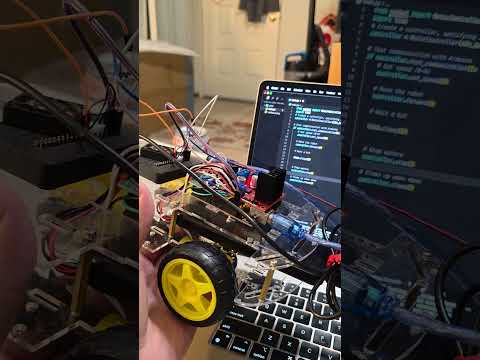
End Generation Here
Features
- Simple control of DC motors connected to an Arduino
- I2C communication protocol for reliability
- Command-line interface for manual control
- Library for integration into your Python projects
Installation
From PyPI```bash
pip install zenbot-pi
### From Source

```bash
git clone https://github.com/yourusername/zenbot-pi.git
cd zenbot-pi
pip install -e .
Hardware Setup
- Connect your Raspberry Pi/Orange Pi to Arduino via I2C:
- Pi SDA → Arduino A4 (SDA)
- Pi SCL → Arduino A5 (SCL)
- Pi GND → Arduino GND
Start Generation Here
Pinout Information
-
Motor Control Pins:
enA (Pin 6): Enables motor A.in1 (Pin 4): Controls the direction of motor A (input 1).in2 (Pin 5): Controls the direction of motor A (input 2).in3 (Pin 7): Controls the direction of motor B (input 1).in4 (Pin 8): Controls the direction of motor B (input 2).enB (Pin 9): Enables motor B.
-
Buzzer and Button Pins:
buzzer (Pin A0): Used to produce sound feedback.startButton (Pin 12): Button to stop the motors for safety.
-
I2C Communication:
- The Arduino uses the I2C address
0x08for communication with the Raspberry Pi or other devices.
- The Arduino uses the I2C address
End Generation Here
-
Make sure the Arduino is running the provided sketch (see
arduino_sketchesdirectory) with I2C slave address set to 0x08. -
Enable I2C on your Raspberry Pi:
sudo raspi-configNavigate to Interfacing Options → I2C → Enable
For Orange Pi, use
sudo orangepi-configor appropriate method.
Using the CLI
The package provides a command-line interface:
# Run interactive control mode
zenbot-pi interactive

# Run test sequence
zenbot-pi test

# Send direct commands
zenbot-pi direct forward
zenbot-pi direct stop
zenbot-pi direct 5  # Set speed to 5

# Use different I2C bus or address
zenbot-pi --i2c-bus 1 --address 0x09 interactive
Using the Library
Basic usage example:
from zenbot import MotorController

# Create a controller, specifying I2C bus (default: 3) and address (default: 0x08)
controller = MotorController(i2c_bus=3, address=0x08)

# Test communication with Arduino
if controller.test_communication():
    # Set speed (0-9)
    controller.set_speed(5)

    # Move the robot
    controller.forward()

    # Wait a bit
    import time
    time.sleep(2)

    # Stop motors
    controller.stop()

    # Clean up when done
    controller.close()
Available Commands
forward()- Move robot forwardbackward()- Move robot backwardleft()- Turn robot leftright()- Turn robot rightstop()- Stop all motorsset_speed(level)- Set speed level (0-9)get_status()- Get system statussend_command(cmd)- Send a raw command characterclose()- Close I2C connection
Arduino Setup
This library requires an Arduino running the provided sketch. The Arduino sketch:
- Listens for commands on I2C bus (address 0x08 by default)
- Controls motor driver shield/circuit based on received commands
- Provides status feedback
Troubleshooting
- Check I2C connection with
i2cdetect -y [bus_number] - Ensure Arduino has the correct I2C address (0x08 by default)
- Verify power supply is adequate for motors
- Check log file
zenbot.logfor debugging information
License
MIT License - see LICENSE file for details
Contributing
Contributions are welcome! Please feel free to submit a Pull Request.
1 maintainer

Metadata
1 maintainer
Release files for zenbot-pi 0.1.1
For a detailed explanation of source distributions (sdists) and built distributions (wheels), please see the package formats documentation.
Source distribution (sdist)
| File | Size | Uploaded | |
|---|---|---|---|
| zenbot_pi-0.1.1.tar.gz | 14.4 kB | Details |
Built distribution (wheel)
| File | Interpreter | ABI | Platform | Reset |
|---|---|---|---|---|
| zenbot_pi-0.1.1-py3-none-any.whl | Python 3 | none | any | Details |
Total release size: 27.3 kB
Release files / zenbot_pi-0.1.1.tar.gz
| Download URL | zenbot_pi-0.1.1.tar.gz |
|---|---|
| Size | 14.4 kB |
| Tags | Source |
|
SHA-256 checksum How to use checksums |
1fd8424fd113ab07ec9df2797d09b401694bcdd2e93d6b29900b8b5bd2c09d39
|
|
BLAKE2b-256 checksum How to use checksums |
752681dc6a9e0d14afef730aa1ce62ebdf352cc4c39309dcc7e5ef260f326a30
|
| Upload date | |
|
Uploaded using Trusted Publishing? What is trusted publishing? |
No |
| Uploaded via |
twine/6.1.0 CPython/3.10.16
|
Release files / zenbot_pi-0.1.1-py3-none-any.whl
| Download URL | zenbot_pi-0.1.1-py3-none-any.whl |
|---|---|
| Size | 12.8 kB |
| Tags | Python 3 |
|
SHA-256 checksum How to use checksums |
4f737aa225a9cbdee1552a64a47eb897ebc735a9204ba442d8c5cfebc3ca0bbb
|
|
BLAKE2b-256 checksum How to use checksums |
83965181efdbeeed9b930d71ba9c293016a7b6ab9ef3137e77fd879561250a1c
|
| Upload date | |
|
Uploaded using Trusted Publishing? What is trusted publishing? |
No |
| Uploaded via |
twine/6.1.0 CPython/3.10.16
|














