
Zendesk MCP Server


A Model Context Protocol server for Zendesk.
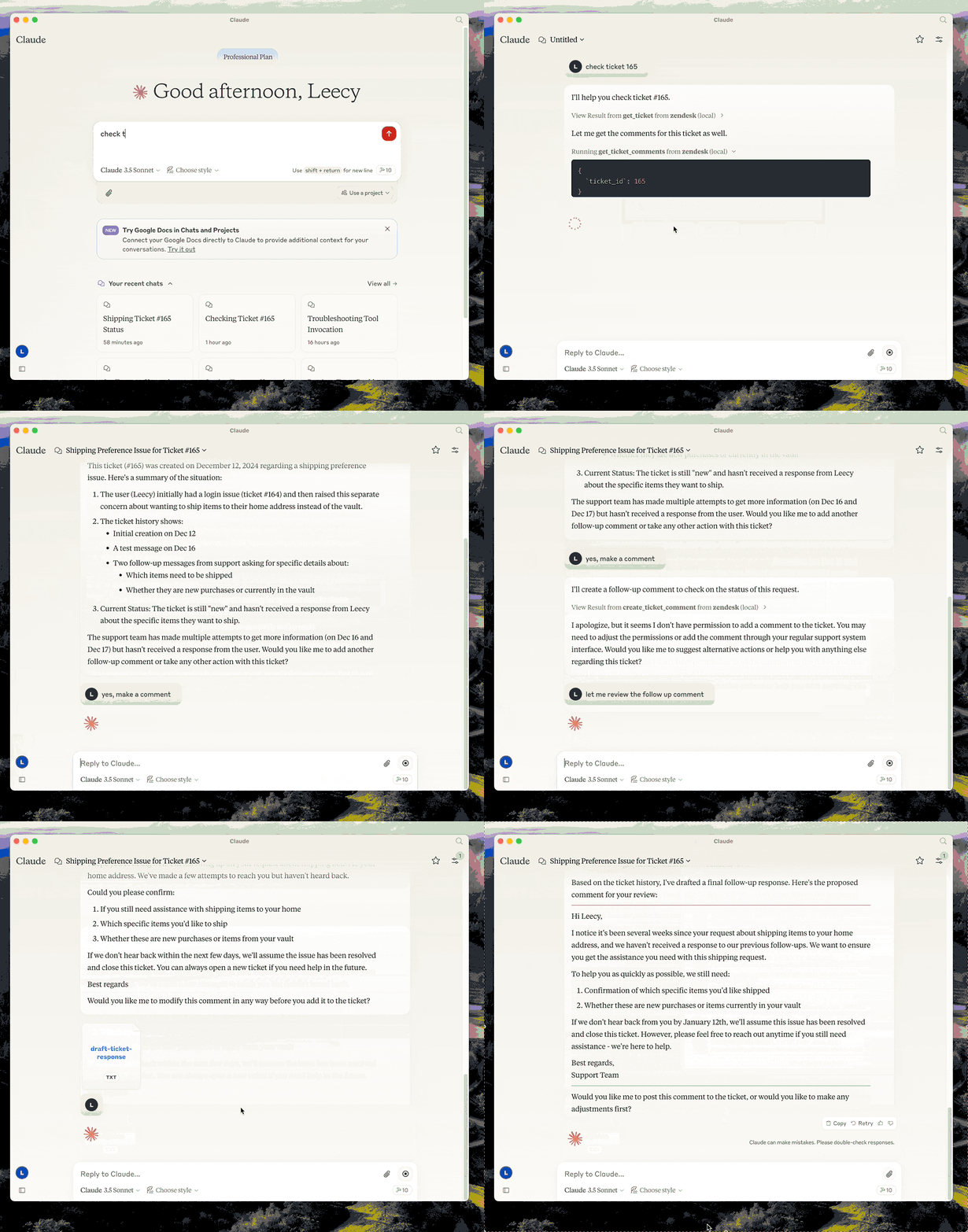
This server provides a comprehensive integration with Zendesk. It offers:
- Tools for retrieving and managing Zendesk tickets and comments
- Specialized prompts for ticket analysis and response drafting
- Full access to the Zendesk Help Center articles as knowledge base
Setup
- build:
uv venv && uv pip install -e .oruv buildin short. - setup zendesk credentials in
.envfile, refer to .env.example. - configure in Claude desktop:
{
  "mcpServers": {
      "zendesk": {
          "command": "uv",
          "args": [
              "--directory",
              "/path/to/zendesk-mcp-server",
              "run",
              "zendesk"
          ]
      }
  }
}
Docker
You can containerize the server if you prefer an isolated runtime:
-
Copy
.env.exampleto.envand fill in your Zendesk credentials. Keep this file outside version control. -
Build the image:
docker build -t zendesk-mcp-server .
-
Run the server, providing the environment file:
docker run --rm --env-file /path/to/.env zendesk-mcp-server
Add
-iwhen wiring the container to MCP clients over STDIN/STDOUT (Claude Code uses this mode). For daemonized runs, add-d --name zendesk-mcp.
The image installs dependencies from requirements.lock, drops privileges to a non-root user, and expects configuration exclusively via environment variables.
Claude MCP Integration
To use the Dockerized server from Claude Code/Desktop, add an entry to Claude Code's settings.json similar to:
{
  "mcpServers": {
    "zendesk": {
      "command": "/usr/local/bin/docker",
      "args": [
        "run",
        "--rm",
        "-i",
        "--env-file",
        "/path/to/zendesk-mcp-server/.env",
        "zendesk-mcp-server"
      ]
    }
  }
}
Adjust the paths to match your environment. After saving the file, restart Claude for the new MCP server to be detected.
Resources
- zendesk://knowledge-base, get access to the whole help center articles.
Prompts
analyze-ticket
Analyze a Zendesk ticket and provide a detailed analysis of the ticket.
draft-ticket-response
Draft a response to a Zendesk ticket.
Tools
get_tickets
Fetch the latest tickets with pagination support
-
Input:
page(integer, optional): Page number (defaults to 1)per_page(integer, optional): Number of tickets per page, max 100 (defaults to 25)sort_by(string, optional): Field to sort by - created_at, updated_at, priority, or status (defaults to created_at)sort_order(string, optional): Sort order - asc or desc (defaults to desc)
-
Output: Returns a list of tickets with essential fields including id, subject, status, priority, description, timestamps, and assignee information, along with pagination metadata
get_ticket
Retrieve a Zendesk ticket by its ID
- Input:
ticket_id(integer): The ID of the ticket to retrieve
get_ticket_comments
Retrieve all comments for a Zendesk ticket by its ID
- Input:
ticket_id(integer): The ID of the ticket to get comments for
create_ticket_comment
Create a new comment on an existing Zendesk ticket
- Input:
ticket_id(integer): The ID of the ticket to comment oncomment(string): The comment text/content to addpublic(boolean, optional): Whether the comment should be public (defaults to true)
create_ticket
Create a new Zendesk ticket
- Input:
subject(string): Ticket subjectdescription(string): Ticket descriptionrequester_id(integer, optional)assignee_id(integer, optional)priority(string, optional): one oflow,normal,high,urgenttype(string, optional): one ofproblem,incident,question,tasktags(array[string], optional)custom_fields(array[object], optional)
update_ticket
Update fields on an existing Zendesk ticket (e.g., status, priority, assignee)
- Input:
ticket_id(integer): The ID of the ticket to updatesubject(string, optional)status(string, optional): one ofnew,open,pending,on-hold,solved,closedpriority(string, optional): one oflow,normal,high,urgenttype(string, optional)assignee_id(integer, optional)requester_id(integer, optional)tags(array[string], optional)custom_fields(array[object], optional)due_at(string, optional): ISO8601 datetime
1 maintainer

Release files for zendesk-mcp-server 0.1.1
For a detailed explanation of source distributions (sdists) and built distributions (wheels), please see the package formats documentation.
Source distribution (sdist)
| File | Size | Uploaded | |
|---|---|---|---|
| zendesk_mcp_server-0.1.1.tar.gz | 27.2 kB | Details |
Built distribution (wheel)
| File | Interpreter | ABI | Platform | Reset |
|---|---|---|---|---|
| zendesk_mcp_server-0.1.1-py3-none-any.whl | Python 3 | none | any | Details |
Total release size: 41.2 kB
Release files / zendesk_mcp_server-0.1.1.tar.gz
| Download URL | zendesk_mcp_server-0.1.1.tar.gz |
|---|---|
| Size | 27.2 kB |
| Tags | Source |
|
SHA-256 checksum How to use checksums |
d72e4150fcee5d70290d5cdf177db7ab73abb69ad2eda2dc4660f4a52ae85e4b
|
|
BLAKE2b-256 checksum How to use checksums |
1c0cfc6e866a408a093f80f96aa8dd8adf227801179603e467daadfa7a38ad57
|
| Upload date | |
|
Uploaded using Trusted Publishing? What is trusted publishing? |
No |
| Uploaded via |
uv/0.8.9
|
Release files / zendesk_mcp_server-0.1.1-py3-none-any.whl
| Download URL | zendesk_mcp_server-0.1.1-py3-none-any.whl |
|---|---|
| Size | 14.0 kB |
| Tags | Python 3 |
|
SHA-256 checksum How to use checksums |
6c6515b1c46ad5d0222b7ae4879fad69af8cfabcbc147d179ae8127381ee05df
|
|
BLAKE2b-256 checksum How to use checksums |
82598cadc229d57d7d39cb2fb3a222e7200d6721369eebbb1b9bf7c40dce3f3f
|
| Upload date | |
|
Uploaded using Trusted Publishing? What is trusted publishing? |
No |
| Uploaded via |
uv/0.8.9
|














